

 pdfFiller
 Adobe Sign
 WPS Office
 Trade Ideas
 iTop PDF
 PDFelement
-
Latest Version
Foxit PDF Reader 2024.1.0.23997 LATEST
-
Review by
-
Operating System
Windows 7 / Windows 8 / Windows 10 / Windows 11
-
User Rating
Click to vote -
Author / Product
-
Filename
FoxitPDFReader20241_L10N_Setup_Prom.exe
-
MD5 Checksum
3357f73dde8a5344bf3a04bef6db11b0
Foxit PDF Reader is the free PDF Reader for Windows PC which enables you to become part of the connected world. Provide authors with comments on documents, be notified when new document versions become available, discuss interesting topics right in the document, or securely open protected documents.
Foxit PDF Reader is a powerful and versatile PDF reader and editor developed by Foxit Software. It stands out in the crowded market of PDF software by offering a range of features that cater to both casual users and professionals. With a focus on speed, efficiency, and user-friendly functionality, it aims to enhance your PDF viewing, editing, and collaboration processes.
Whether you're a consumer, business, government agency, or educational organization, you need to read, create, sign, and annotate (comment on) PDF documents and fill out PDF forms. Foxit PDF Reader is a small, lightning-fast, and feature-rich PDF viewer that allows you to create (free PDF creation app), open, view, sign, and print any PDF file.
The reader is built upon the industry’s fastest and most accurate (high fidelity) PDF rendering engine, providing users with the best PDF viewing and printing experience. You can download the Foxit Reader for PC offline installer from the site by clicking on the free download button.
Highlights
PDF Reader – Reading and printing PDF couldn’t be easier
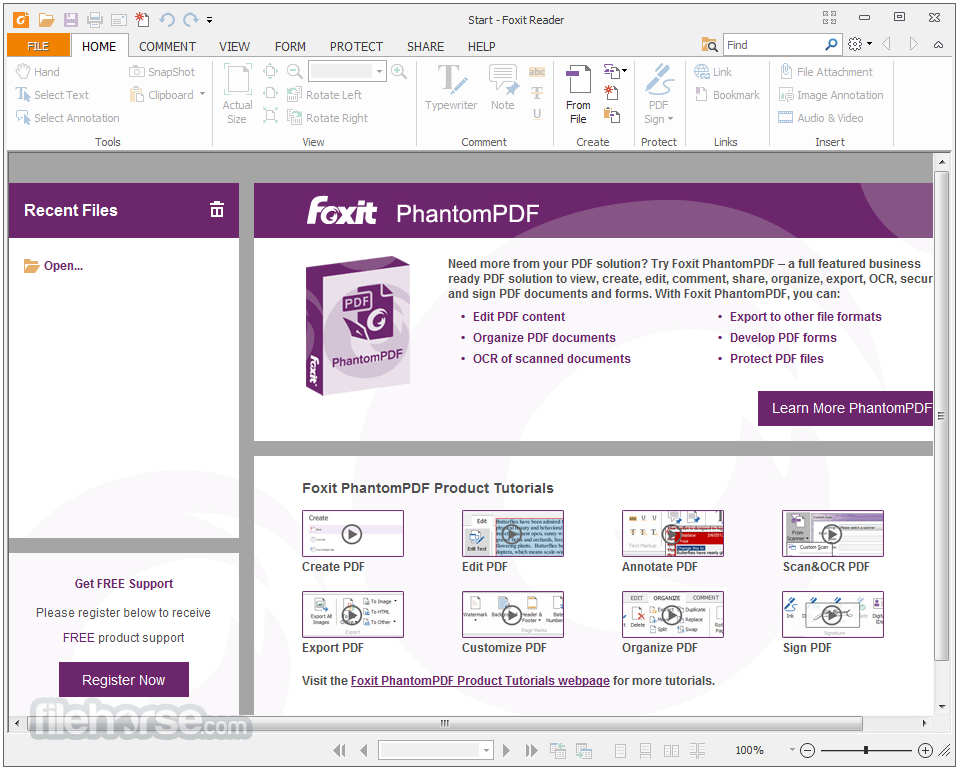
Many of the documents you interact with are PDF documents. Experience the power of PDF through a full-functioned PDF Reader. Quickly learn the product by utilizing the Microsoft Office style ribbon toolbar, which provides a familiar user interface. Leverage existing forms and workflow with standard PDF (Acroforms) and XFA (XML Form Architecture) form filling. JAWS (Job Access With Speech) compatibility allows blind and visually impaired users to read the screen either with a text-to-speech output or with a refreshable Braille.
ConnectedPDF – Next-generation PDF for the connected world!
FoxitReader goes beyond PDF viewing, it's ConnectedPDF Powered. ConnectedPDF is a leading-edge technology that powers cloud-based services for PDF files, services include: ConnectedPDF Security - grant and revoke document access. ConnectedPDF Document Management - Track to see who opens your document and what they do and notify readers of new updates. ConnectedPDF Collaboration - Elevate your teamwork with connected reviews or send requests to others to get a file.
PDF Creator – Create PDF documents
The connected world shares documents in PDF format. It allows you to create PDFs from common file formats. Create standard-compliant PDFs that are compatible with other PDF products. Create PDFs with integrated fully functional Word®, PowerPoint®, and Excel® add-ons. Streamline workflow by converting hardcopy into electronic PDF – scan and convert in one step.
Collaborate and Share – Annotate, share, and collaborate
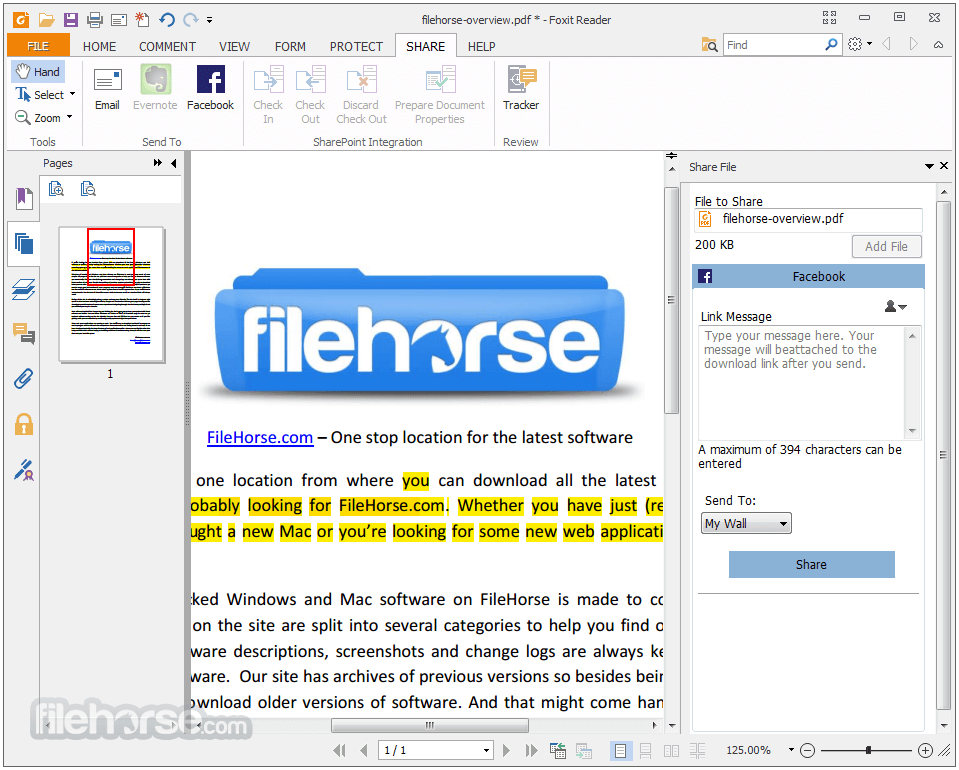
When teams collaborate and share information, they work at their best. The app links knowledge workers together to increase flexibility and results. Integrate with leading storage services – Google Drive, Dropbox, Box, Alfresco, and SharePoint. Participant in shared and connected reviews. Provide comments to documents with a large variety of annotation tools.
Protect and Sign – Encrypt and sign PDFs
Many documents contain confidential information. Don’t just protect your perimeter, protect information by protecting the documents themselves. The PDF Reader supports multiple security options. Sign documents in your own handwriting or utilize eSignature. ConnectedPDF Powered – enforces document protection. Extends usage control of Microsoft Rights Management Services to PDF documents.
Customize and Deploy – Take control in enterprise-wide deployments
Foxit makes it easy to deploy Foxit PDFReader to all the desktops in the organization, no matter how widespread your empire reaches. Supports Group Policy for the standardization of menu and configuration settings. Provides a SCUP catalog to import and deploy updates through Microsoft Windows Update Services (SCCM). Customize mass deployments through XML configuration support.
Key Features
Fast and Lightweight: It boasts remarkable speed and efficiency, making it a viable alternative to other resource-heavy PDF readers. It opens large files quickly without causing system slowdowns.
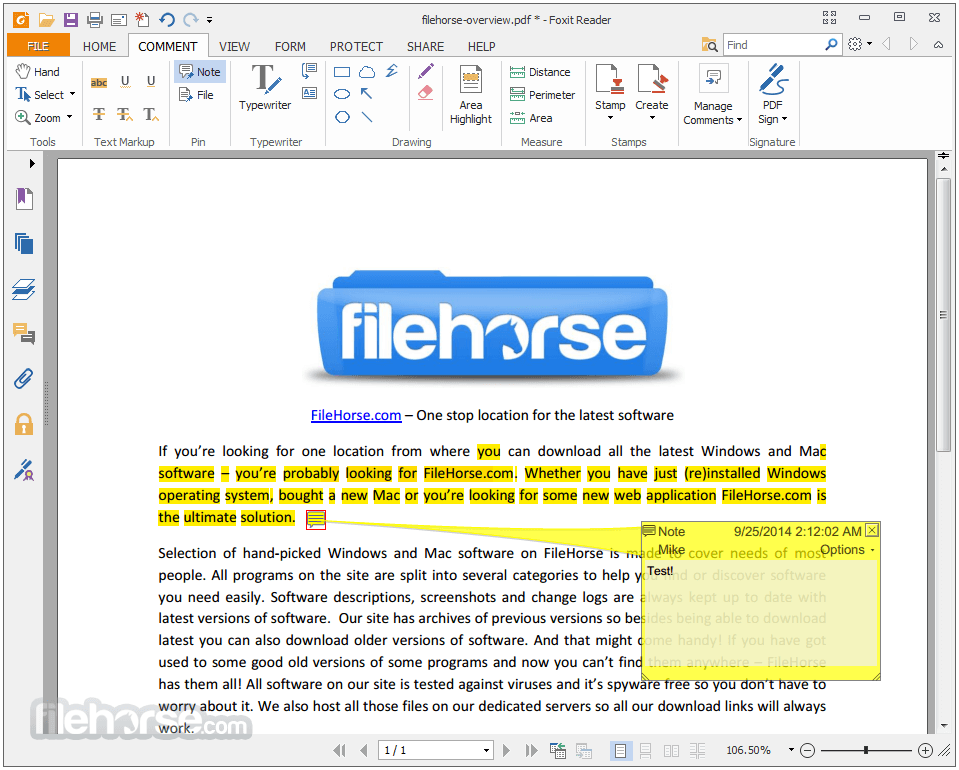
Annotation and Markup Tools: The software provides a comprehensive set of annotation tools, including highlighting, underlining, strikethrough, notes, and drawing tools. This makes it easy to collaborate on PDF documents.
Form-Filling: It allows you to fill out interactive PDF forms, making it convenient for completing application forms, contracts, and other documents.
Text Editing: Unlike many other PDF readers, the PDF reader enables you to edit text directly within PDF documents. You can add, modify, and delete text with ease.
ConnectedPDF: This feature facilitates seamless document collaboration. It allows you to track changes, manage versions, and receive real-time updates on document activities.
Security Features: The software provides advanced security options, including password protection, encryption, and digital signatures, ensuring the confidentiality and integrity of your documents.
Multi-Platform Support: Foxit PDF Reader is available for Windows, macOS, iOS, and Android, allowing you to access and work on your PDFs across different devices.
User Interface
It boasts an intuitive and user-friendly interface. The toolbar is well-organized, featuring easily recognizable icons for various functions. The layout is clean, allowing for efficient navigation and quick access to essential tools.
How to Use
Opening PDFs: Launch the application and click on "File" > "Open" to browse and open your desired PDF document.
Annotations: Use the annotation toolbar to highlight text, add comments, draw shapes, and more.
Text Editing: To edit text, click on the "Edit" tab and then select the text you want to modify. You can change font, size, color, and alignment.
Form-Filling: For interactive forms, simply click on the form fields to input your information.
Security: To secure a PDF, go to the "Protect" tab, where you can set passwords, apply encryption, and add digital signatures.
FAQ
Is Foxit PDF Reader available for FREE?
Yes, it offers a free version with basic features. There's also a premium version, Foxit PDF Editor and PDF Editor Suite Pro, with more advanced capabilities.
Can I collaborate on documents using Foxit PDF Reader?
Absolutely. The ConnectedPDF feature allows you to collaborate in real-time, track changes, and manage versions.
Does Foxit PDF Reader support mobile devices?
Yes, the application has mobile versions for both iOS and Android devices, enabling you to work on PDFs while on the go.
Can I convert PDFs to other formats?
Yes, it enables you to convert PDFs to various formats, including Word, Excel, and PowerPoint.
Is the text editing feature user-friendly?
The text editing feature is straightforward, allowing you to make quick edits without the need for complex tools.
Alternatives
Adobe Acrobat Reader: A longstanding competitor, Adobe Acrobat Reader is renowned for its reliability and extensive feature set.
PDFelement: Edit, combine, transform, and organize PDFs with ease for Windows!
SumatraPDF: Are you looking for a PDF Reader that follows the principle of less is more?
PDF-XChange Editor: This software offers a wide range of editing tools, making it a suitable choice for those requiring in-depth PDF manipulation.
Okular: Allows you to read PDF documents, comics, EPub books, and more!
Pricing
It comes in both free and premium versions. The FREE version includes essential features, while the premium version, Foxit PDF Editor (formerly Foxit PhantomPDF), offers advanced functionalities. Pricing for Foxit PDF Editor varies based on licensing options, including Standard, Business, and Education editions.
System Requirements
Foxit PDF Reader stands as a commendable PDF reader and editor, offering an impressive range of features designed to enhance your PDF workflow. Its lightweight nature, coupled with its annotation, text editing, and security tools, makes it a competitive choice in the realm of PDF software.
While the free version is suitable for basic needs, those seeking more advanced capabilities will find value in upgrading to Foxit PDF Editor (formerly Foxit PhantomPDF). Overall, Foxit PDF Reader earns its place as a reliable and efficient tool for handling PDF documents, whether you're a casual user or a professional requiring extensive PDF manipulation capabilities.
Also Available: Download Foxit PDF Reader Portable and Foxit PDF Reader for Mac
Foxit PDF Reader is a powerful and versatile PDF reader and editor developed by Foxit Software. It stands out in the crowded market of PDF software by offering a range of features that cater to both casual users and professionals. With a focus on speed, efficiency, and user-friendly functionality, it aims to enhance your PDF viewing, editing, and collaboration processes.
Whether you're a consumer, business, government agency, or educational organization, you need to read, create, sign, and annotate (comment on) PDF documents and fill out PDF forms. Foxit PDF Reader is a small, lightning-fast, and feature-rich PDF viewer that allows you to create (free PDF creation app), open, view, sign, and print any PDF file.
The reader is built upon the industry’s fastest and most accurate (high fidelity) PDF rendering engine, providing users with the best PDF viewing and printing experience. You can download the Foxit Reader for PC offline installer from the site by clicking on the free download button.
Highlights
PDF Reader – Reading and printing PDF couldn’t be easier
Many of the documents you interact with are PDF documents. Experience the power of PDF through a full-functioned PDF Reader. Quickly learn the product by utilizing the Microsoft Office style ribbon toolbar, which provides a familiar user interface. Leverage existing forms and workflow with standard PDF (Acroforms) and XFA (XML Form Architecture) form filling. JAWS (Job Access With Speech) compatibility allows blind and visually impaired users to read the screen either with a text-to-speech output or with a refreshable Braille.
ConnectedPDF – Next-generation PDF for the connected world!
FoxitReader goes beyond PDF viewing, it's ConnectedPDF Powered. ConnectedPDF is a leading-edge technology that powers cloud-based services for PDF files, services include: ConnectedPDF Security - grant and revoke document access. ConnectedPDF Document Management - Track to see who opens your document and what they do and notify readers of new updates. ConnectedPDF Collaboration - Elevate your teamwork with connected reviews or send requests to others to get a file.
PDF Creator – Create PDF documents
The connected world shares documents in PDF format. It allows you to create PDFs from common file formats. Create standard-compliant PDFs that are compatible with other PDF products. Create PDFs with integrated fully functional Word®, PowerPoint®, and Excel® add-ons. Streamline workflow by converting hardcopy into electronic PDF – scan and convert in one step.
Collaborate and Share – Annotate, share, and collaborate
When teams collaborate and share information, they work at their best. The app links knowledge workers together to increase flexibility and results. Integrate with leading storage services – Google Drive, Dropbox, Box, Alfresco, and SharePoint. Participant in shared and connected reviews. Provide comments to documents with a large variety of annotation tools.
Protect and Sign – Encrypt and sign PDFs
Many documents contain confidential information. Don’t just protect your perimeter, protect information by protecting the documents themselves. The PDF Reader supports multiple security options. Sign documents in your own handwriting or utilize eSignature. ConnectedPDF Powered – enforces document protection. Extends usage control of Microsoft Rights Management Services to PDF documents.
Customize and Deploy – Take control in enterprise-wide deployments
Foxit makes it easy to deploy Foxit PDFReader to all the desktops in the organization, no matter how widespread your empire reaches. Supports Group Policy for the standardization of menu and configuration settings. Provides a SCUP catalog to import and deploy updates through Microsoft Windows Update Services (SCCM). Customize mass deployments through XML configuration support.
Key Features
Fast and Lightweight: It boasts remarkable speed and efficiency, making it a viable alternative to other resource-heavy PDF readers. It opens large files quickly without causing system slowdowns.
Annotation and Markup Tools: The software provides a comprehensive set of annotation tools, including highlighting, underlining, strikethrough, notes, and drawing tools. This makes it easy to collaborate on PDF documents.
Form-Filling: It allows you to fill out interactive PDF forms, making it convenient for completing application forms, contracts, and other documents.
Text Editing: Unlike many other PDF readers, the PDF reader enables you to edit text directly within PDF documents. You can add, modify, and delete text with ease.
ConnectedPDF: This feature facilitates seamless document collaboration. It allows you to track changes, manage versions, and receive real-time updates on document activities.
Security Features: The software provides advanced security options, including password protection, encryption, and digital signatures, ensuring the confidentiality and integrity of your documents.
Multi-Platform Support: Foxit PDF Reader is available for Windows, macOS, iOS, and Android, allowing you to access and work on your PDFs across different devices.
User Interface
It boasts an intuitive and user-friendly interface. The toolbar is well-organized, featuring easily recognizable icons for various functions. The layout is clean, allowing for efficient navigation and quick access to essential tools.
How to Use
Opening PDFs: Launch the application and click on "File" > "Open" to browse and open your desired PDF document.
Annotations: Use the annotation toolbar to highlight text, add comments, draw shapes, and more.
Text Editing: To edit text, click on the "Edit" tab and then select the text you want to modify. You can change font, size, color, and alignment.
Form-Filling: For interactive forms, simply click on the form fields to input your information.
Security: To secure a PDF, go to the "Protect" tab, where you can set passwords, apply encryption, and add digital signatures.
FAQ
Is Foxit PDF Reader available for FREE?
Yes, it offers a free version with basic features. There's also a premium version, Foxit PDF Editor and PDF Editor Suite Pro, with more advanced capabilities.
Can I collaborate on documents using Foxit PDF Reader?
Absolutely. The ConnectedPDF feature allows you to collaborate in real-time, track changes, and manage versions.
Does Foxit PDF Reader support mobile devices?
Yes, the application has mobile versions for both iOS and Android devices, enabling you to work on PDFs while on the go.
Can I convert PDFs to other formats?
Yes, it enables you to convert PDFs to various formats, including Word, Excel, and PowerPoint.
Is the text editing feature user-friendly?
The text editing feature is straightforward, allowing you to make quick edits without the need for complex tools.
Alternatives
Adobe Acrobat Reader: A longstanding competitor, Adobe Acrobat Reader is renowned for its reliability and extensive feature set.
PDFelement: Edit, combine, transform, and organize PDFs with ease for Windows!
SumatraPDF: Are you looking for a PDF Reader that follows the principle of less is more?
PDF-XChange Editor: This software offers a wide range of editing tools, making it a suitable choice for those requiring in-depth PDF manipulation.
Okular: Allows you to read PDF documents, comics, EPub books, and more!
Pricing
It comes in both free and premium versions. The FREE version includes essential features, while the premium version, Foxit PDF Editor (formerly Foxit PhantomPDF), offers advanced functionalities. Pricing for Foxit PDF Editor varies based on licensing options, including Standard, Business, and Education editions.
System Requirements
- Windows: Windows 7, 8, 10, 11 (32-bit and 64-bit)
- 1.3 GHz or faster processor (x86 compatible) or ARM processor, Microsoft SQ1 or better
- 512 MB RAM (Recommended: 1 GB RAM or greater)
- 1 GB of available hard drive space
- 1024*768 screen resolution
- Supports 4K and other high-resolution displays
- Lightweight and fast performance
- Comprehensive annotation and markup tools
- Seamless collaboration with ConnectedPDF
- Support for text editing within PDFs
- Cross-platform availability
- Some advanced features are only available in the premium version
- Free version might lack certain functionalities required by power users
Foxit PDF Reader stands as a commendable PDF reader and editor, offering an impressive range of features designed to enhance your PDF workflow. Its lightweight nature, coupled with its annotation, text editing, and security tools, makes it a competitive choice in the realm of PDF software.
While the free version is suitable for basic needs, those seeking more advanced capabilities will find value in upgrading to Foxit PDF Editor (formerly Foxit PhantomPDF). Overall, Foxit PDF Reader earns its place as a reliable and efficient tool for handling PDF documents, whether you're a casual user or a professional requiring extensive PDF manipulation capabilities.
Also Available: Download Foxit PDF Reader Portable and Foxit PDF Reader for Mac
-
Foxit PDF Reader 2024.1.0.23997 Screenshots
The images below have been resized. Click on them to view the screenshots in full size.
-

-
-
-
What's new in this version:
Enhanced integration with ChatGPT to make end users more productive:
- Document Translation – Automatically translate entire documents into the desired target language, offering you seamless and efficient translation of your documents with just a few clicks
 OperaOpera 109.0 Build 5097.59 (64-bit)
 iTop VPNiTop VPN 5.4.0 - Fast, Safe & Secure
 PhotoshopAdobe Photoshop CC 2024 25.7 (64-bit)
 iAnyGoTenorshare iAnyGo 4.0.15
 Opera GXOpera GX 109.0.5097.62 (64-bit)
 Adobe AcrobatAdobe Acrobat Pro 2024.002.20687
 BlueStacksBlueStacks - Play on PC 5.21.150
 Hero WarsHero Wars - Online Action Game
 Data Recovery4DDiG Windows Data Recovery 9.8.6
 TradingViewTradingView - Trusted by 60 Million Traders
Comments and User Reviews