




 Drive Monitor
 Windhawk
 SANDISK
 PC Internals
 UniGetUI
 CCleaner
 GearUP Booster
-
Latest Version
Unlocker 1.9.2 LATEST
-
Review by
-
Operating System
Windows XP / Vista / Windows 7 / Windows 8
-
User Rating
Click to vote -
Author / Product
-
Filename
Unlocker 1.9.2.msi
-
MD5 Checksum
16be23c2ebbc5d09f9b6195442e2b8b0
Unlocker is an Explorer extension that allows you, with a simple right-click of the mouse on a file or folder, to get rid of error messages such as error deleting file or folder cannot delete folder: it is used by another person or program.
Empty Loop Unlocker is a lightweight utility software designed to help users manage files that are locked by the system or other applications. Developed by Cedrick Collomb, it allows users to delete, rename, or move files that are otherwise inaccessible due to restrictions imposed by the operating system.
This tool is particularly useful for dealing with stubborn files that refuse to be deleted through conventional means, such as those locked by background processes or malware.
Have you ever seen these Windows error messages?
Features
File Unlocking: The tool excels at unlocking files and folders that are being used by other processes. This feature is essential for users who frequently encounter the "Cannot delete file: Access is denied" error.
Process Termination: The software can terminate processes that are preventing the modification of certain files. This ensures that users can perform necessary actions on their files without interference.
User-Friendly Interface: It boasts a simple and intuitive interface that makes it easy for users to select and unlock files.
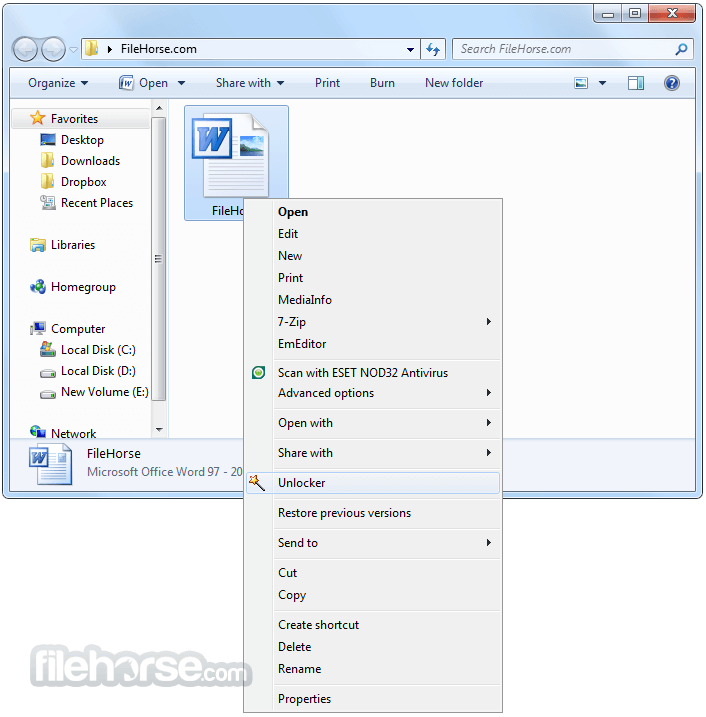
Shell Integration: It integrates seamlessly with the Windows shell, allowing users to unlock files directly from the right-click context menu.
Minimal Resource Usage: The software is designed to be lightweight and does not consume significant system resources, making it suitable for use on older or less powerful computers.
Multilingual Support: It supports multiple languages, catering to a global user base.
User Interface
Unlocker's user interface is clean and straightforward. Upon launching the application, users are presented with a simple window where they can select the file or folder they wish to unlock.

The main window features a navigation pane for browsing files and folders, and a status bar that displays the status of the selected item. The context menu integration allows users to unlock files directly from Windows Explorer, providing a seamless experience.
Installation and Setup
Downloading the Installer: It can be downloaded from the official Empty Loop website, FileHorse.com, or other trusted software repositories.
Running the Installer: Once the installer is downloaded, run it to begin the installation process. The installer is straightforward and guides users through each step.
Accepting the License Agreement: Users must accept the End User License Agreement (EULA) to proceed with the installation.
Choosing Installation Options: During installation, users can choose whether to integrate the app with the Windows shell. This option is recommended for easier access.
Completing the Installation: After configuring the installation options, click "Install" to complete the process. It will be ready to use once the installation is finished.
How to Use
Launching: Open this software from the Start menu or desktop shortcut.
Selecting a File or Folder: Use the navigation pane to locate the file or folder you want to unlock.
Unlocking the File: Once the file or folder is selected, it will display a list of processes that are locking it. Choose the desired action (e.g., unlock, delete, rename, move) and click "OK."
Using Context Menu Integration: Right-click on the file or folder in Windows Explorer and select "Unlocker" from the context menu. Follow the same steps to unlock the item.
FAQ
What is Unlocker used for?
The program is used to unlock files and folders that are locked by the system or other applications, allowing users to delete, rename, or move them.
Is Unlocker safe to use?
Yes, this tool is safe to use. However, users should exercise caution when terminating processes, as this can affect system stability.
Does Unlocker work on all versions of Windows?
Unlocker is compatible with most versions of Windows, including Windows XP, Vista, 7, 8, 10, or 11.
Can Unlocker unlock multiple files at once?
Yes, it can unlock multiple files or folders simultaneously.
Is Unlocker free to use?
Yes, this tool is free to use. It is available as freeware on the official Empty Loop website.
Alternatives
Wise Force Deleter: A simple tool that helps users delete files that are locked by other applications or processes.
System Requirements
Empty Loop Unlocker is a lightweight utility software designed to help users manage files that are locked by the system or other applications. Developed by Cedrick Collomb, it allows users to delete, rename, or move files that are otherwise inaccessible due to restrictions imposed by the operating system.
This tool is particularly useful for dealing with stubborn files that refuse to be deleted through conventional means, such as those locked by background processes or malware.
Have you ever seen these Windows error messages?
- Cannot delete folder: It is being used by another person or program.
- Cannot delete file: Access is denied.
- There has been a sharing violation.
- The source or destination file may be in use.
- The file is in use by another program or user.
- Make sure the disk is not full or write-protected and that the file is not currently in use.
Features
File Unlocking: The tool excels at unlocking files and folders that are being used by other processes. This feature is essential for users who frequently encounter the "Cannot delete file: Access is denied" error.
Process Termination: The software can terminate processes that are preventing the modification of certain files. This ensures that users can perform necessary actions on their files without interference.
User-Friendly Interface: It boasts a simple and intuitive interface that makes it easy for users to select and unlock files.
Shell Integration: It integrates seamlessly with the Windows shell, allowing users to unlock files directly from the right-click context menu.
Minimal Resource Usage: The software is designed to be lightweight and does not consume significant system resources, making it suitable for use on older or less powerful computers.
Multilingual Support: It supports multiple languages, catering to a global user base.
User Interface
Unlocker's user interface is clean and straightforward. Upon launching the application, users are presented with a simple window where they can select the file or folder they wish to unlock.
The main window features a navigation pane for browsing files and folders, and a status bar that displays the status of the selected item. The context menu integration allows users to unlock files directly from Windows Explorer, providing a seamless experience.
Installation and Setup
Downloading the Installer: It can be downloaded from the official Empty Loop website, FileHorse.com, or other trusted software repositories.
Running the Installer: Once the installer is downloaded, run it to begin the installation process. The installer is straightforward and guides users through each step.
Accepting the License Agreement: Users must accept the End User License Agreement (EULA) to proceed with the installation.
Choosing Installation Options: During installation, users can choose whether to integrate the app with the Windows shell. This option is recommended for easier access.
Completing the Installation: After configuring the installation options, click "Install" to complete the process. It will be ready to use once the installation is finished.
How to Use
Launching: Open this software from the Start menu or desktop shortcut.
Selecting a File or Folder: Use the navigation pane to locate the file or folder you want to unlock.
Unlocking the File: Once the file or folder is selected, it will display a list of processes that are locking it. Choose the desired action (e.g., unlock, delete, rename, move) and click "OK."
Using Context Menu Integration: Right-click on the file or folder in Windows Explorer and select "Unlocker" from the context menu. Follow the same steps to unlock the item.
FAQ
What is Unlocker used for?
The program is used to unlock files and folders that are locked by the system or other applications, allowing users to delete, rename, or move them.
Is Unlocker safe to use?
Yes, this tool is safe to use. However, users should exercise caution when terminating processes, as this can affect system stability.
Does Unlocker work on all versions of Windows?
Unlocker is compatible with most versions of Windows, including Windows XP, Vista, 7, 8, 10, or 11.
Can Unlocker unlock multiple files at once?
Yes, it can unlock multiple files or folders simultaneously.
Is Unlocker free to use?
Yes, this tool is free to use. It is available as freeware on the official Empty Loop website.
Alternatives
Wise Force Deleter: A simple tool that helps users delete files that are locked by other applications or processes.
System Requirements
- Operating System: Windows XP, Vista, 7, 8, 10, 11 (32-bit and 64-bit)
- Processor: 1 GHz or faster
- Memory: 512 MB RAM
- Storage: 10 MB of free disk space
- Free to use
- Simple and intuitive interface
- Effective at unlocking stubborn files
- Lightweight and minimal resource usage
- Seamless shell integration
- This application has been discontinued
- Limited functionality beyond file unlocking
- Potential risks when terminating system processes
- Not actively updated with new features
Why is this app published on FileHorse? (More info)
-
Unlocker 1.9.2 Screenshots
The images below have been resized. Click on them to view the screenshots in full size.
-
What's new in this version:
- Improved Installer: Universal installer for both 32 and 64 bit machines
- Fixed Bug: Fixed small memory and behavior bugs
- Promotional feature: Fully optional Delta toolbar.
 OperaOpera 132.0 Build 5905.22 (64-bit)
 AdsPowerAdsPower - Antidetect Browser
 PhotoshopAdobe Photoshop CC 2026 27.7 (64-bit)
 BlueStacks AIBlueStacks AI
 OKXOKX - Buy Bitcoin or Ethereum
 CapCutCapCut Desktop 8.7.0
 PC RepairPC Repair Tool 2026
 Hero WarsHero Wars - Online Action Game
 TradingViewTradingView - Trusted by 100 Million Traders
 Forza HorizonForza Horizon 6
Comments and User Reviews