




 Antigravity
 Windsurf
 OnSpace AI
 SQL Server
 10Web
10Web Replit
 Lovable
 Cursor
-
Latest Version
Postman 12.21.9 LATEST
-
Review by
-
Operating System
Windows 7 64 / Windows 8 64 / Windows 10 64 / Windows 11
-
User Rating
Click to vote -
Author / Product
-
Filename
Postman (x64).exe
-
MD5 Checksum
0ff3807ea86cec3a62714ce458644dd4
Postman is a powerful API development and testing tool for Windows designed to simplify the process of building, debugging, and managing APIs.
Initially a Chrome extension, Postman has evolved into a full-fledged standalone application available for Windows, macOS, and Linux.
It is widely used by developers, QA teams, and DevOps professionals to streamline API testing, automate workflows, and improve collaboration within teams.
Key Features
API Testing – Create and execute API requests, inspect responses, and debug errors efficiently.
Collections & Environments – Organize API requests into collections and manage different environments seamlessly.
Automated Testing & Monitoring – Run scheduled API tests and monitor API performance over time.
Mock Servers – Simulate API endpoints for testing purposes without relying on a live backend.
Collaboration Tools – Share API requests, environments, and collections with team members.
API Documentation – Generate interactive API documentation to improve usability.
Postman CLI – Run API tests from the command line and integrate with CI/CD pipelines.
GraphQL & WebSockets Support – Work with GraphQL APIs and WebSockets alongside RESTful APIs.
Security Features – Manage API keys, OAuth tokens, and other authentication mechanisms securely.
Integration with Third-party Tools – Connect with GitHub, Jenkins, Slack, and more for streamlined workflows.
User Interface
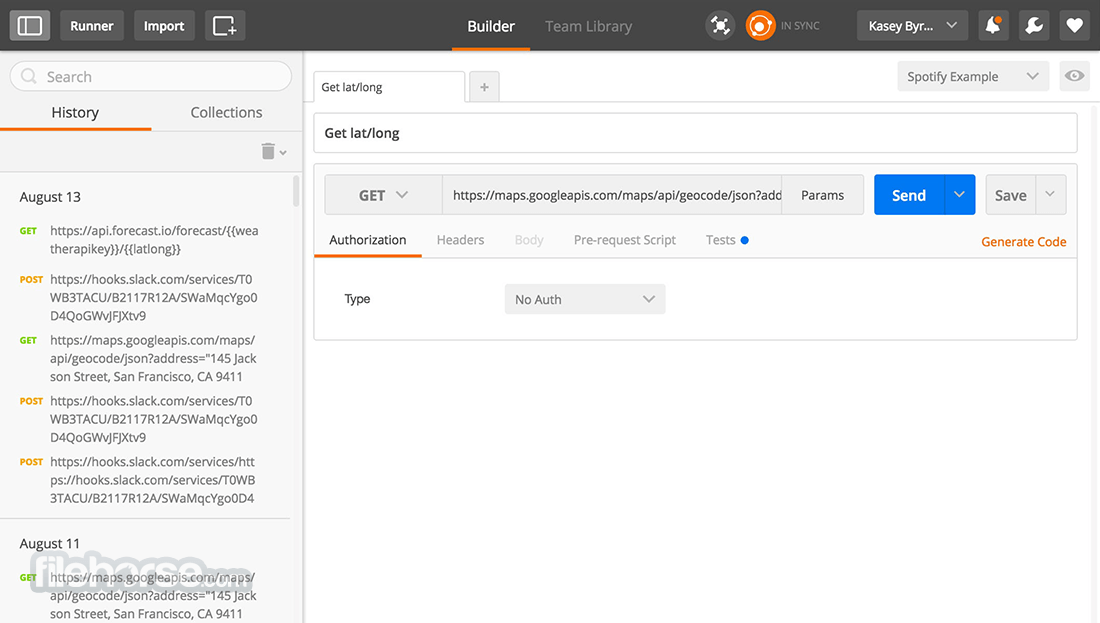
It features a sleek and modern user interface with a tabbed layout, making it easy to navigate between different API requests.
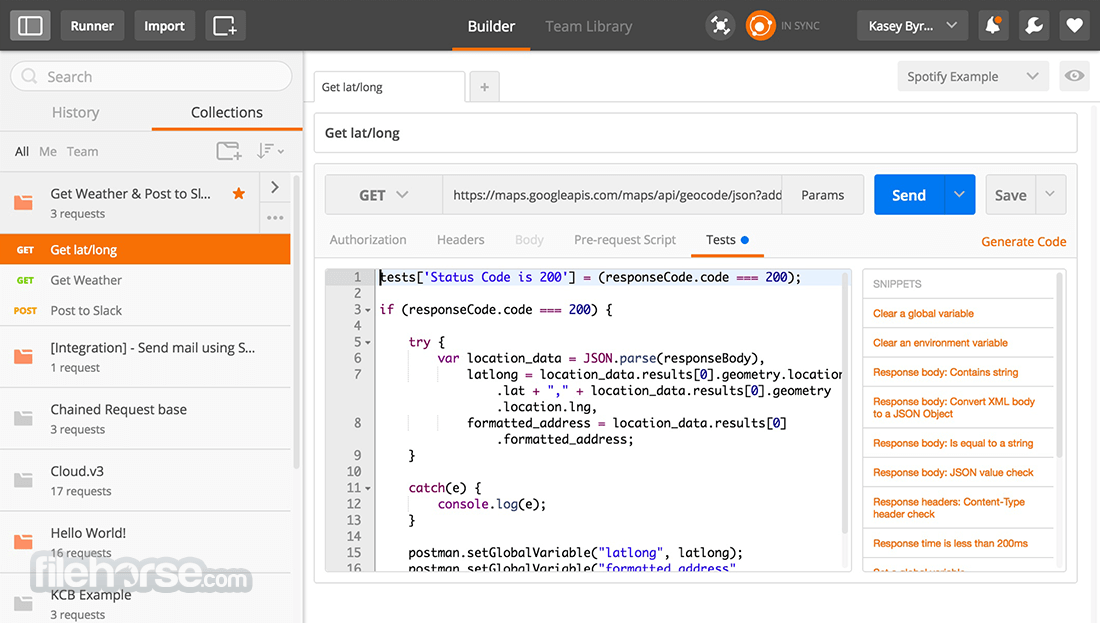
The main dashboard allows users to create, send, and inspect API requests effortlessly. The side panel organizes collections, environments, and history logs, ensuring quick access to previous API calls.
The intuitive UI reduces the learning curve for new users while providing advanced options for experienced developers.
What`s New
Is Postman free to use?
Yes, it offers a free version with core features. Paid plans provide additional collaboration and enterprise-level functionalities.
Can I use Postman without an internet connection?
Yes, it can run locally without an internet connection, except for cloud-based features like collaboration and monitoring.
Does Postman support GraphQL APIs?
Yes, this platform and program fully supports GraphQL, allowing users to test GraphQL queries and mutations.
How do I automate API testing in Postman?
You can use the Tests tab to write JavaScript-based test scripts and run automated tests using Postman Collections and the Postman CLI.
Is Postman secure for handling sensitive API data?
Yes, it provides secure environment variables and encryption mechanisms to protect sensitive API credentials and data.
Alternatives
Insomnia – A minimalistic API testing tool with a focus on usability and simplicity.
cURL – A command-line tool for API requests, best for developers comfortable with CLI interfaces.
Pricing
FREE ($0)
Postman is a must-have tool for developers and API testers, offering a rich set of features to simplify API development, testing, and collaboration.
While it has minor drawbacks like memory usage and premium features behind paywalls, its overall usability and efficiency make it one of the best API testing platforms available.
Also Available: Download Postman for Mac
Initially a Chrome extension, Postman has evolved into a full-fledged standalone application available for Windows, macOS, and Linux.
It is widely used by developers, QA teams, and DevOps professionals to streamline API testing, automate workflows, and improve collaboration within teams.
Key Features
API Testing – Create and execute API requests, inspect responses, and debug errors efficiently.
Collections & Environments – Organize API requests into collections and manage different environments seamlessly.
Automated Testing & Monitoring – Run scheduled API tests and monitor API performance over time.
Mock Servers – Simulate API endpoints for testing purposes without relying on a live backend.
Collaboration Tools – Share API requests, environments, and collections with team members.
API Documentation – Generate interactive API documentation to improve usability.
Postman CLI – Run API tests from the command line and integrate with CI/CD pipelines.
GraphQL & WebSockets Support – Work with GraphQL APIs and WebSockets alongside RESTful APIs.
Security Features – Manage API keys, OAuth tokens, and other authentication mechanisms securely.
Integration with Third-party Tools – Connect with GitHub, Jenkins, Slack, and more for streamlined workflows.
User Interface
It features a sleek and modern user interface with a tabbed layout, making it easy to navigate between different API requests.
The main dashboard allows users to create, send, and inspect API requests effortlessly. The side panel organizes collections, environments, and history logs, ensuring quick access to previous API calls.
The intuitive UI reduces the learning curve for new users while providing advanced options for experienced developers.
What`s New
- Postman AI Agent Builder: Easily discover, test, and integrate APIs and LLMs to speed up agent development.
- Smarter AI Agents: A comprehensive toolkit for effortless discovery, testing, and deployment.
- LLM Testing & Evaluation: Test prompts, responses, and performance of multiple LLMs simultaneously.
- Instant Tool Readiness: Convert APIs into agent-ready tools instantly, no coding required.
- Verified API Accuracy: Ensure reliability with APIs from trusted partners.
- Centralized Discovery: Access 100k+ public APIs and LLMs in one place.
- No-Code Workflow Builder: Easily create multi-step agent workflows with a visual canvas.
- Simplified Agent Testing: Test workflows locally for accuracy and reliability.
- Stay Updated: Get the latest AI agent-building insights and best practices.
- Compare LLM Performance: Evaluate response quality, cost, and efficiency to choose the best model.
- Visual Agent Design: Use a no-code canvas for seamless agent and workflow configuration.
- Scalable Tool Generation: Instantly create and deploy tools via APIs on Postman or your own environment.
- Download the latest version from the official website or FileHorse.
- Run the installer and follow the on-screen instructions.
- Launch the application and sign in with a Postman account (optional but recommended for cloud features).
- Start creating API requests and testing endpoints immediately.
- Open Postman and create a new request by selecting GET, POST, PUT, DELETE, or other HTTP methods.
- Enter the API endpoint URL in the request bar.
- Add headers, authentication, or request parameters as needed.
- Click Send to execute the request and inspect the response.
- Save requests to a collection for future use.
- Use test scripts to automate response validation and integrate with CI/CD pipelines.
Is Postman free to use?
Yes, it offers a free version with core features. Paid plans provide additional collaboration and enterprise-level functionalities.
Can I use Postman without an internet connection?
Yes, it can run locally without an internet connection, except for cloud-based features like collaboration and monitoring.
Does Postman support GraphQL APIs?
Yes, this platform and program fully supports GraphQL, allowing users to test GraphQL queries and mutations.
How do I automate API testing in Postman?
You can use the Tests tab to write JavaScript-based test scripts and run automated tests using Postman Collections and the Postman CLI.
Is Postman secure for handling sensitive API data?
Yes, it provides secure environment variables and encryption mechanisms to protect sensitive API credentials and data.
Alternatives
Insomnia – A minimalistic API testing tool with a focus on usability and simplicity.
cURL – A command-line tool for API requests, best for developers comfortable with CLI interfaces.
Pricing
FREE ($0)
- For up to 3 collaborators.
- Includes API Client access, cloud-based integrations, 3 packages, 1-day collection recovery, 25 collection runs, access to Flows, and 50 free Postbot activities.
- Add-ons: Postbot, Collection Runner, Flows.
- All Free features + unlimited collaborators, 30-day collection recovery, 10,000 mock server & monitor requests, and pay-as-you-go capabilities.
- Add-ons: Postbot, Collection Runner, Flows.
- All Basic features + private workspaces, single/multi-partner workspaces, basic role-based access, 25 packages, and 90-day collection recovery.
- Add-ons: Postbot, Collection Runner, Partner Editor, Flows.
- All Professional features + private API network, SSO/SCIM/SAML, reporting & analytics, audit logs, user groups, advanced role-based access, 100 packages, 100,000 mock server requests, 10,000 monitor requests, and customer success.
- Add-ons: Postbot, Collection Runner, Partner Editor, API Builder, Advanced Security Administration.
- OS: Windows 11 or Windows 10 (64-bit)
- RAM: Minimum 4GB (Recommended 8GB or more)
- Processor: Intel Core i3 or higher
- Storage: At least 500MB free space
- Intuitive and user-friendly interface.
- Comprehensive API testing and automation features.
- Supports REST, GraphQL, and WebSockets.
- Strong collaboration tools for teams.
- Free plan available with essential features.
- High memory usage, especially with large collections.
- Some advanced features locked behind paid plans.
- Requires an account for cloud features.
- Occasional performance lags with large-scale testing.
- Learning curve for beginners unfamiliar with API testing.
Postman is a must-have tool for developers and API testers, offering a rich set of features to simplify API development, testing, and collaboration.
While it has minor drawbacks like memory usage and premium features behind paywalls, its overall usability and efficiency make it one of the best API testing platforms available.
Also Available: Download Postman for Mac
Why is this app published on FileHorse? (More info)
-
Postman 12.21.9 Screenshots
The images below have been resized. Click on them to view the screenshots in full size.
-
-

 OperaOpera 134.0 Build 5954.26 (64-bit)
 BlueStacksBlueStacks 10.42.251.1002
 PhotoshopAdobe Photoshop CC 2026 27.7 (64-bit)
 WPS OfficeWPS Office Free 12.2.0.23196
 GTA 6GTA 6 for PS5
 CapCutCapCut Desktop 9.1.0
 PC RepairPC Repair Tool 2026
 Hero WarsHero Wars - Online Action Game
 TradingViewTradingView - Trusted by 100 Million Traders
 Halo: CampaignHalo: Campaign Evolved
Comments and User Reviews