




 Camo Studio
 OpusClip
 Artlist
 Premiere Pro
 Restream
 LitMedia AI
 Kling AI
-
Latest Version
Shotcut 26.8.1 LATEST
-
Review by
-
Operating System
Windows 7 64 / Windows 8 64 / Windows 10 64 / Windows 11
-
User Rating
Click to vote -
Author / Product
-
Filename
shotcut-win64-26.8.1.exe
Developed by Meltytech, Shotcut is particularly popular among independent creators, YouTubers, and hobbyists seeking robust video editing tools without the cost or bloat of commercial software.

Unlike many beginner-oriented editors, it offers a non-linear editing experience with a wide range of video effects, filters, and advanced editing capabilities that rival paid alternatives.
Features
Wide Format Support: Supports hundreds of audio and video formats via FFmpeg.
Native Timeline Editing: No need to import clips into the project before editing.
4K Resolution Support: Handles HD and 4K projects with ease.
Audio Filters and Mixing: Includes audio scopes, peak meters, and various filters like compressor, EQ, and reverb.
Video Effects and Filters: Over 40 video filters including color grading, chroma key (green screen), blur, and more.
Keyframe Support: Enables animation and parameter control over time.
Hardware Encoding/Decoding: Utilizes GPU acceleration for rendering (on supported systems).
User Interface
It features a customizable, modular interface where users can undock, rearrange, or hide panels to suit their workflow.

It has a steep learning curve for absolute beginners but rewards persistence with powerful control over editing tasks.
The interface may feel minimalistic at first, but every essential tool is neatly packed and logically arranged.
Installation and Setup
It can be downloaded directly from the official website. It offers a portable version and a traditional installer. Installation is straightforward: just run the installer and follow the prompts.
No bloatware, no hidden bundles. On first launch, users can select the video mode (resolution and frame rate) or let it auto-detect based on the first clip imported.
How to Use
Launch Shotcut software and open a new project.
Import media using the “Open File” button.
Drag clips to the timeline and start editing—cut, trim, add transitions, or filters.
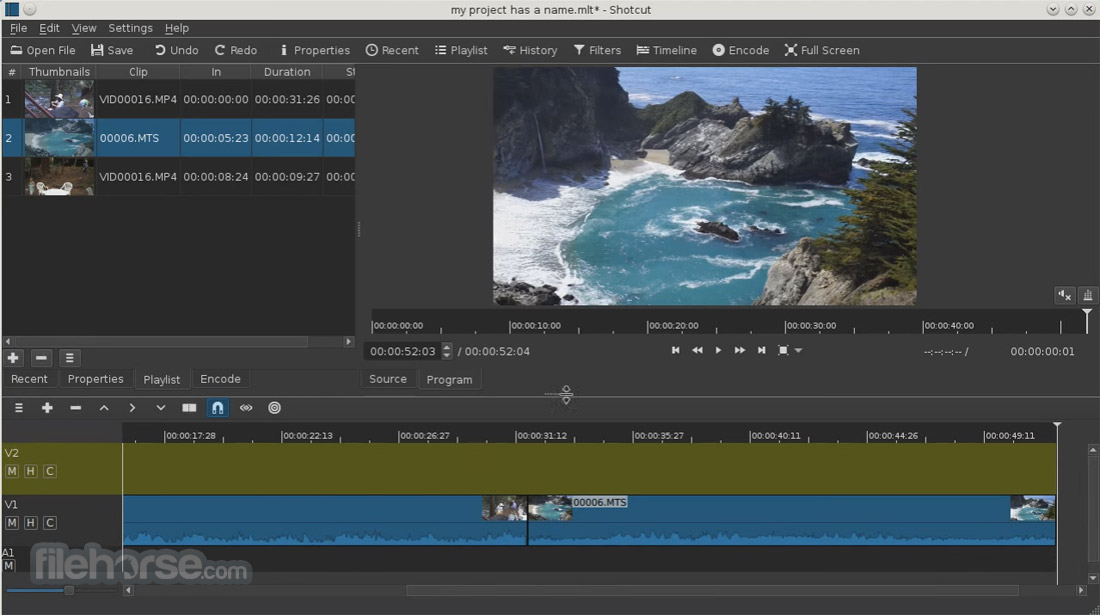
Add audio tracks, overlay text, or insert effects.
Use the Export panel to select output settings and render the final video.
FAQs
Is Shotcut really free?
Yes, Shotcut tool is completely free/open-source. There are no paid tiers or feature restrictions.
Can I use Shotcut for commercial projects?
Absolutely. It’s licensed under the GPL, which allows for both personal and commercial use.
Does Shotcut support 4K editing?
Yes, it supports resolutions up to 4K and beyond.
Is there GPU acceleration?
Yes, it offers GPU processing for certain filters and hardware encoding/decoding.
Are there built-in templates or effects packs?
No pre-made templates are included, but users can create and save their own presets.
Alternatives
DaVinci Resolve: Professional-grade with advanced color grading and VFX tools.
Filmora: Add unique VFX and filters to your video.
OpenShot: Easier for beginners but with fewer features.
Lightworks: Professional editor with a free tier.
Adobe Premiere Pro: Industry-standard, subscription-based.
System Requirements
- OS: Windows 7/8/10/11 (64-bit only)
- CPU: x86-64 Intel or AMD processor
- RAM: Minimum 4 GB (8+ GB recommended)
- GPU: Optional, for hardware acceleration
- Storage: ~500 MB for installation, additional for project files
- Completely free and open-source
- Extensive format and codec support
- High-end features like keyframing and 4K support
- Modular, customizable interface
- No import requirement before editing
- Lacks real-time collaboration features
- No built-in media or templates
- Occasional performance hiccups on low-end PCs
It stands out as a powerful, no-cost video editing tool that holds its own against high-end paid software. While not the most beginner-friendly at first glance, it offers unmatched flexibility and professional features without locking anything behind a paywall. Whether you're a content creator, educator, or video hobbyist, Shotcut is a worthy addition to your creative toolkit.
Also Available: Download Shotcut for Mac
-
Shotcut 26.8.1 Screenshots
The images below have been resized. Click on them to view the screenshots in full size.
-
-
-

-

What's new in this version:
Elements:
Added Elements panel to the File > New and View menus and the Generate buttons.
This is a very slim (22MB) stock asset library: emoji stickers, sounds, overlay transitions, animated text, graphics.
The content licenses are royalty free, including commercial, and do not require attribution:
- Emojis: Open Font License 1.1
- Sounds: The Sonniss #GameAudioGDC Bundle Licensing Agreement
- Text, Transitions, Graphics: Lottie Simple License
Changed:
- Added Settings > Graphics Adapter for Windows and Linux (only if multiple GPUs)
- Added Shake video filter
- First generated UI to be shared and officially adopted
- The --experimental UI generator now also generates a meta.qml
- (See View > Application Log to get the temp file names to copy and share these files.)
- Improved appearance of tabs and Subtitles in Fusion Dark and Fusion Light themes
Fixed:
- Fixed opening a .mlt project file from a file manager on macOS (broke in v26.6)
- Fixed corrupt color in dissolve transitions with Settings > Processing Mode > Linear 10-bit CPU
- Fixed the new Reduce Noise: Audio (RNNoise) when the export audio sample rate is not 48000 Hz
- Fixed off-by-one frame errors in subtitle bar in Timeline and Subtitle Burn In video filter
- Fixed all builds missing support for VST2 and LV2 audio plugins
- Now install and try the Valhalla Supermassive VST plugin
- Fixed a libGLESv2.dll warning on startup on some Windows systems
- Fixed Motion Tracker keyframes not applying after save/reload
- Fixed manual override QSG_RHI_BACKEND environment variable on Windows
- Fixed Properties > Convert & View > Resources > Convert to keep 10-bit video as 10-bit when using 10-bit processing modes
- Fixed the Crop: Source filter with Preview Scaling and hardware decoder
- Fixed proxy video generated for rotated video (Properties > Rotation) not preserving rotation
 OperaOpera 135.0 Build 5973.76 (64-bit)
 MalwarebytesMalwarebytes Premium 5.6.5
 PhotoshopAdobe Photoshop CC 2026 27.9.1 (64-bit)
 LDPlayerLDPlayer - Android Emulator
 GTA 6GTA 6 for PS5
 CapCutCapCut Desktop 9.3.0
 PC RepairPC Repair Tool 2026
 Hero WarsHero Wars - Online Action Game
 TradingViewTradingView - Trusted by 100 Million Traders
 How to FishHow to Fish
Comments and User Reviews