




 Smart Booster
 Windhawk
 CCleaner
 UniGetUI
 PC Internals
 SANDISK
 GearUP Booster
-
Latest Version
BleachBit 6.0.2 LATEST
-
Review by
-
Operating System
Windows 7 / Windows 8 / Windows 10 / Windows 11
-
User Rating
Click to vote -
Author / Product
-
Filename
BleachBit-6.0.2-setup.exe
-
MD5 Checksum
ec0ea65eab140933c486bd578c2856a2
Designed for Linux and Windows systems, it wipes clean a thousand applications including Firefox, Edge, Adobe Flash, Google Chrome, Opera, Safari, and more.
Beyond simply deleting files, BleachBit includes advanced features such as shredding files to prevent recovery, wiping free disk space to hide traces of files deleted by other applications, and vacuuming Firefox to make it faster. Better than free, BleachBit is open-source.
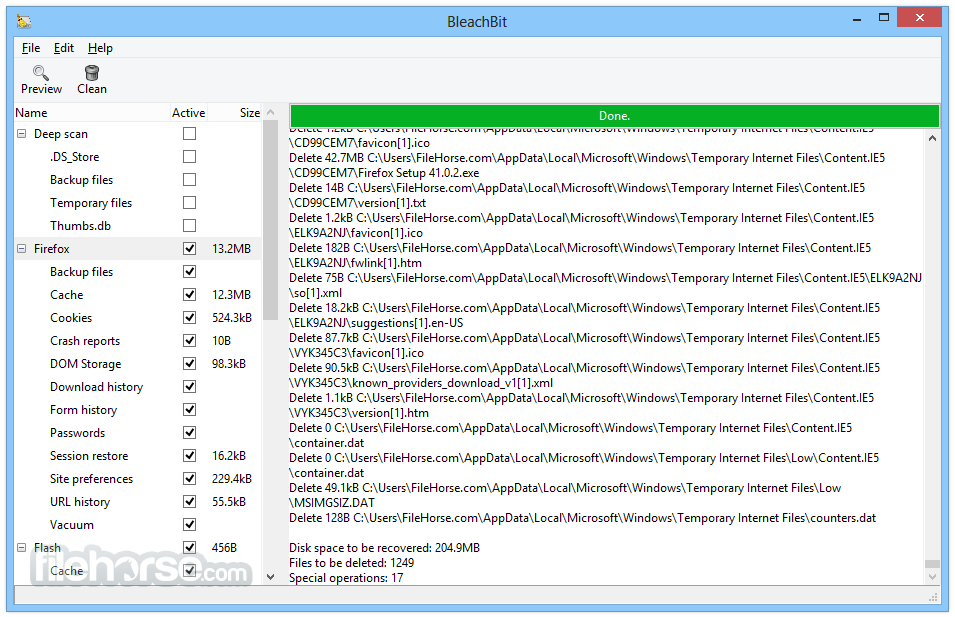
It includes a growing list of cleaners. Typically each cleaner represents an application such as Firefox or Internet Explorer. Within each cleaner, the app gives options covering components that can be cleaned such as cache, cookies, and log files. Each option is given a description to help you make good decisions.
Bleach Bit has many useful features designed to help you easily clean your computer to free space and maintain privacy.
- Simple operation: read the descriptions, check the boxes you want, click preview, and click delete.
- Multi-platform: Linux and Windows
- Free of charge and no money trail
- Free to share, learn, and modify (open source)
- No adware, spyware, malware, browser toolbars, or "value-added software"
- Translated to 64 languages besides American English
- Shred files to hide their contents and prevent data recovery
- Shred any file (such as a spreadsheet on your desktop)
- Overwrite free disk space to hide previously deleted files
- Portable app for Windows: run without installation
- Command-line interface for scripting and automation
- CleanerML allows anyone to write a new cleaner using XML
- Automatically import and update winapp2.ini cleaner files (a separate download) giving Windows users access to 2500+ additional cleaners
- Frequent software updates with new features
- Install the software by following setup instructions
- Launch BleachBit as Administrator for full access
- Select system areas or apps to clean from the list
- Click "Preview" to see what will be deleted
- Review the results and uncheck items if needed
- Click "Clean" to delete selected files and data
- Use "Shred Files" to securely erase sensitive files
- Use "Wipe Free Space" to remove leftover data traces
- Check for updates regularly to stay current
Operating System: Windows 7, 8, 10, 11
Processor: 1 GHz or faster
RAM: 512 MB minimum (1 GB recommended)
Storage: 100 MB of free disk space
Permissions: Admin rights for full functionality
PROS
- Cleans junk files and frees up space
- Simple and user-friendly interface
- Supports many popular apps
- Open-source and free to use
- Shreds files for secure deletion
- No built-in backup or restore feature
- Not beginner-friendly for advanced tools
- Limited visual feedback after cleaning
- Can remove needed files if careless
- No automatic or scheduled cleaning
-
BleachBit 6.0.2 Screenshots
The images below have been resized. Click on them to view the screenshots in full size.

-
-

-

What's new in this version:
New Features:
- Add cleaning support for Visual Studio Code, Codium, Antigravity, Cursor, Windsurf, and Devin
- Add support for multiple browser profiles on Chrome and Edge
- Add cleaner for Claude Code
- Add DNS cache cleaner
- Clean AI models from Google Chrome
- When shredding a filename, reduce data remnants and speed up shredding files
- Convert Apache OpenOffice (formerly called OpenOffice.org) cleaner from Python to CleanerML
- Add options to deep scan for developers: venv, __pycache__, node_modules, and .angular
- Clear clipboard after shredding files from paste operation
User interface and performance:
- Limit the line width of long warning text
- Improve the logic that triggers the notice during startup about Expert Mode
- During deep scan, skip directories listed in the keep list to improve the speed of scanning
- Stop trying to rename files when an error is not retryable
- Respond to keyboard interrupt (Ctrl+C) when shredding filenames
- Warn when the configuration file is not writable
- Disable the chaff controls while generating chaff
Fixed:
- If there are errors reading the cookie keep list, then it will abort the cookie cleaning process to avoid removing important cookies
- Fix: crash in recognition of local cleaners
- Fix: GUI stops loading if recognition fails
- Fix: cleaner loading with invalid data types
- Fix crash with certain Unicode on the CLI
- Fix: escape invalid Unicode in system information output
- Fix: allow Unicode in keep/custom lists
- Fix: avoid losing custom theme icons in Vivaldi by not deleting files in the VivaldiThumbnails folder
- Fix DuplicateOptionError when restoring warning preferences
- Improve handling of symlinks in keep list (whitelist)
- Improve reliability when running external processes without waiting
 OperaOpera 133.0 Build 5932.24 (64-bit)
 LDPlayerLDPlayer - Android Emulator
 PhotoshopAdobe Photoshop CC 2026 27.7 (64-bit)
 BlueStacks AIBlueStacks AI
 GTA 6GTA 6 for PS5
 CapCutCapCut Desktop 8.7.0
 PC RepairPC Repair Tool 2026
 Hero WarsHero Wars - Online Action Game
 TradingViewTradingView - Trusted by 100 Million Traders
 Forza HorizonForza Horizon 6
Comments and User Reviews