




 Firefox
 Comet
Comet Samsung
 Chrome
 Opera GX
 iTop Browser
 AdsPower
-
Latest Version
Java JRE 8 Update 501 (32-bit) LATEST
-
Review by
-
Operating System
Windows 7 / Windows 8 / Windows 10
-
User Rating
Click to vote -
Author / Product
-
Filename
jre-8u501-windows-i586.exe
-
MD5 Checksum
1e520ae20ab4cc997e4cfbfd5af804d6
Java Runtime Environment (JRE) allows you to play online games, chat with people around the world, calculate your mortgage interest, and view images in 3D, just to name a few.
It's also integral to the intranet applications and other e-business solutions that are the foundation of corporate computing.
It provides the libraries, the Java Virtual Machine, and other components to run applets and applications written in the Java programming language.
In addition, two key deployment technologies are part of the JRE: Java Plug-in, which Enables Applets to Run in Popular Browsers; and Web Start, which deploys standalone applications over a network. Many cross-platform applications also require Java to operate properly.
It is a programming language and computing platform first released by Sun Microsystems in 1995. There are lots of applications and websites that will not work unless you have Java installed, and more are created every day.
The program is fast, secure, and reliable. From laptops to data centers, game consoles to scientific supercomputers, and cell phones to the Internet, Java is everywhere! It is at the heart of the digital lifestyle.
It's the platform for launching careers, exploring human-to-digital interfaces, architecting the world's best applications, and unlocking innovation everywhere—from garages to global organizations.
Why should I upgrade to the latest version?
The latest version contains important enhancements to improve the performance, stability, and security of the applications that run on your machine. Installing this free update will ensure that your applications continue to run safely and efficiently.
What will I get when I download software?
The Java Runtime Environment (JRE) 32bit is what you get when you download software. The JRE consists of the Java Virtual Machine (JVM), Java platform core classes, and supporting Java platform libraries. The JRE is the runtime portion of the software, which is all you need to run it in your Web browser.
What is Java Plug-in software?
The program is a component of the (JRE). It allows applets written in the programming language to run inside various web browsers. The Plug-in software is not a standalone program and cannot be installed separately.
I have heard the terms Virtual Machine and JVM. Is this software?
The Virtual Machine is only one aspect of software that is involved in web interaction. The Virtual Machine is built right into your software download and helps run Java apps.
Here's an overview of the key components and features of the Java Runtime Environment:
Java Virtual Machine (JVM): The JVM is the cornerstone of the app. It is responsible for executing Java bytecode, which is the compiled form of Java source code. The JVM provides a runtime environment for Java applications, handling tasks such as memory management, garbage collection, and dynamic bytecode interpretation.
Core Libraries: It includes a set of core libraries that provide fundamental functionality to Java programs. These libraries offer a wide range of APIs (Application Programming Interfaces) for tasks such as input/output operations, networking, file handling, database connectivity, and graphical user interfaces (GUI).
Class Loader: The class loader is a component of the JVM that loads Java classes into memory as they are referenced by the running program. It is responsible for locating and loading class files from the file system, network, or other sources. The class loader also performs bytecode verification to ensure the integrity and security of the loaded classes.
Just-In-Time (JIT) Compiler: It includes a JIT compiler that dynamically compiles parts of the Java bytecode into native machine code for improved performance. The JIT compiler identifies frequently executed code segments and optimizes them for faster execution. By combining interpretation and compilation, the JIT compiler aims to achieve a balance between execution speed and startup time.
Security: The JRE incorporates various security features to protect against malicious or unauthorized actions. It includes a security manager that enforces a security policy, restricting the actions that a Java application can perform. Additionally, the implements a sandbox environment for untrusted applets and provides mechanisms for digital signatures, encryption, and authentication.
Deployment Tools: It provides tools for deploying and managing Java applications. For example, the Java Web Start technology allows users to launch Java applications directly from a web browser without manual installation. It also includes utilities for packaging Java applications as executable JAR (Java Archive) files.
Platform Independence: One of the key advantages of Java is its platform independence. It allows Java programs to run on different operating systems without requiring modification. The JVM, along with the abstraction provided by the core libraries, abstracts away the underlying hardware and operating system details, enabling "write once, run anywhere" portability.
It's important to note that the JRE is primarily intended for running Java applications and does not include development tools such as compilers and debuggers. For Java development, you would typically use the Java Development Kit (JDK), which includes the JRE along with additional tools for compiling, debugging, and packaging Java applications.
Overview
It consists of a collection of functions and services designed for Java applications. It acts as a meta-operating system that runs on top of the computer's operating system, providing additional services specifically for Java applications.
The main purpose of the JRE, also known as the Java Virtual Machine (JVM), is to enable Java applications to run on different operating systems without any need for modification.
In addition to its core functionality, it includes various components and libraries that are essential for the proper functioning of Java applications. These components include memory allocation and management, Java Web Start and Plug-in, Java Naming and Directory Interface (JNDI), Java Archive (JAR), and Java for XML Processing (JAX-WS), among others.
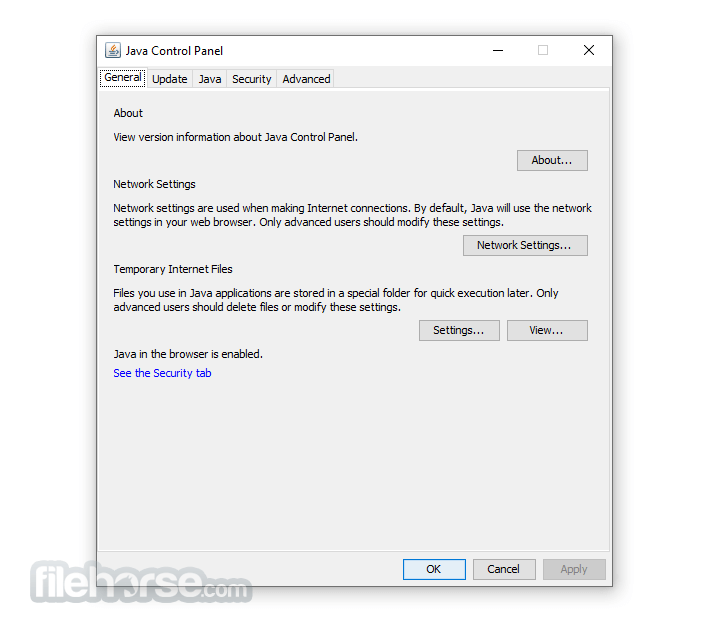
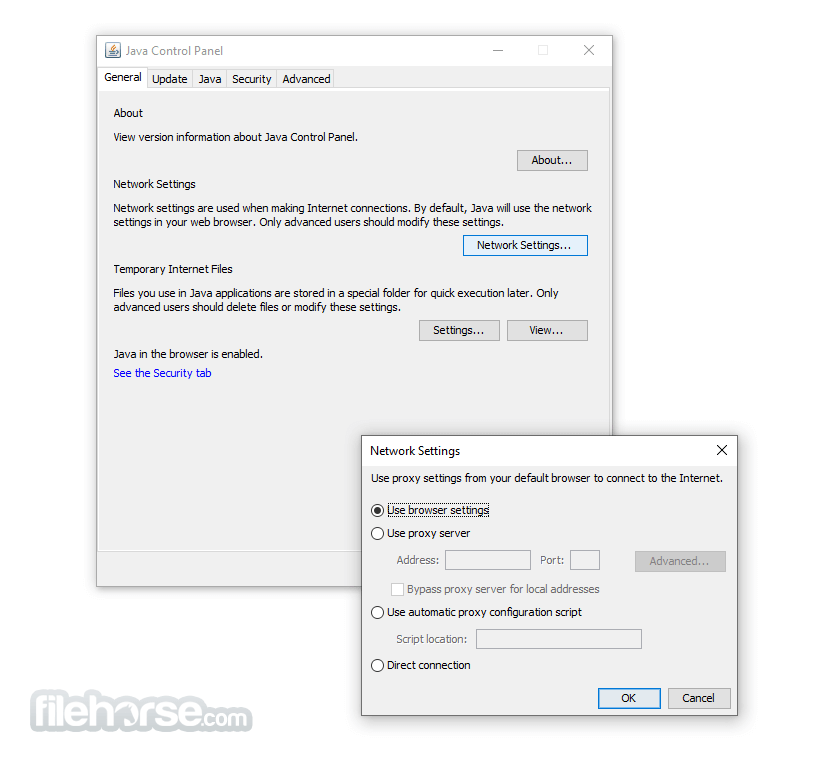
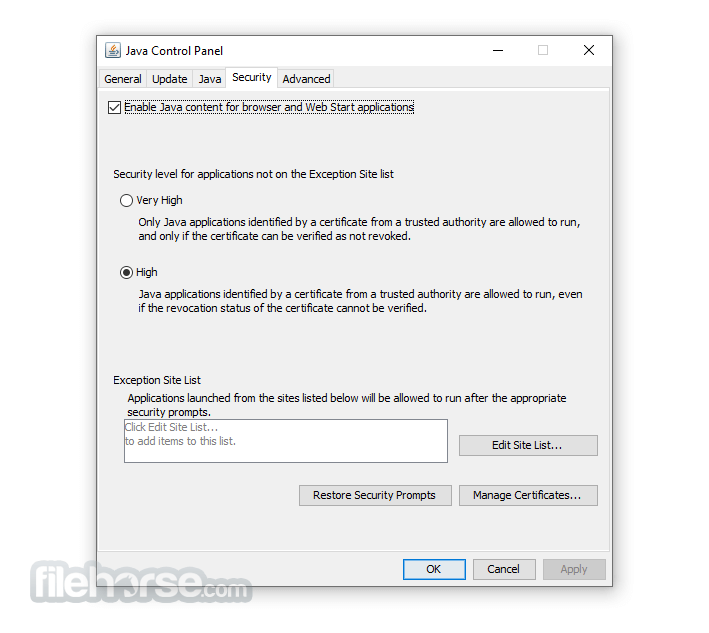
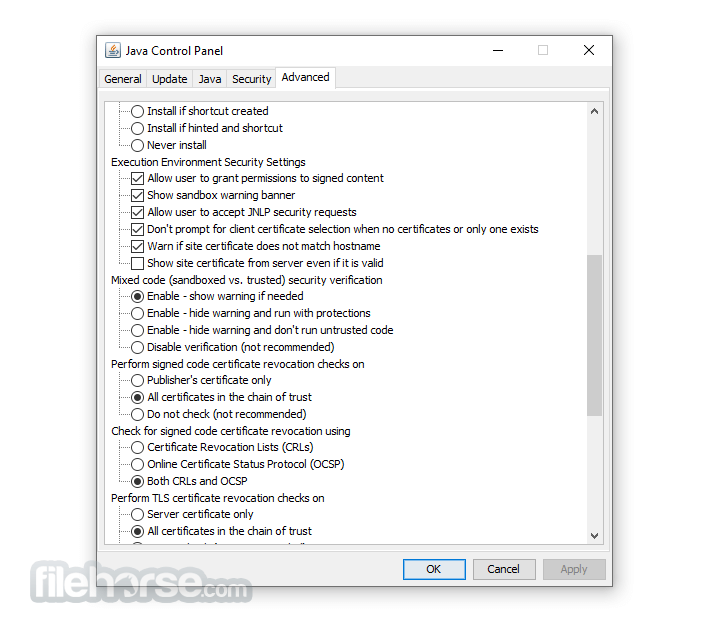
It offers customizable settings through its Control Panel, which is part of Oracle Technologies. This Control Panel allows users to configure security certificates and network settings according to their specific requirements. Users can access and modify various functions of the program, including advanced features like the Java console, debugging tools, JavaFX runtime, and default Java settings for web browsers.
A JRE file is a system file that contains all the necessary libraries and class files needed to execute Java code. Without the JRE, it is not possible to run software programs written in Java. The latest version of the app includes performance improvements, stability fixes, enhanced features, and better security measures. Once installed, the tool ensures efficient and secure execution of Java applications on your device.
Install
Installing the Java Runtime Environment is a straightforward process. After downloading the app, you simply need to follow the on-screen instructions, and the program will install itself.
However, you may need to enable the latest version for it to function properly. This can be done by accessing the Java tab in the Control Panel, verifying the enabled version of the app, and saving the updated settings.
To check if the Java Runtime Environment is installed on your computer, you can navigate to the Control Panel and click on the Programs button. This will display a list of all the installed software programs on your device. Look for Java Runtime Environment or Java Development Kit (JDK) in the list, as JRE is a component of JDK. Most computers will only show JDK installed, which includes the JRE.
Java programs rely on the presence of the app to run. When you launch a Java application, it requires the JRE to execute properly. If the JRE is not installed or outdated, the application will not run. Occasionally, the app may not automatically update to the latest version, so it is advisable to check the installed version on your computer. If you are seeking an alternative, you can consider JavaExe. Additionally, if you wish to develop Java applications, you can download the Java Development Kit (JDK).
Note: When your installation completes, you may need to restart your browser (close all browser windows and re-open) to enable the installation.
System Requirements
It's also integral to the intranet applications and other e-business solutions that are the foundation of corporate computing.
It provides the libraries, the Java Virtual Machine, and other components to run applets and applications written in the Java programming language.
In addition, two key deployment technologies are part of the JRE: Java Plug-in, which Enables Applets to Run in Popular Browsers; and Web Start, which deploys standalone applications over a network. Many cross-platform applications also require Java to operate properly.
It is a programming language and computing platform first released by Sun Microsystems in 1995. There are lots of applications and websites that will not work unless you have Java installed, and more are created every day.
The program is fast, secure, and reliable. From laptops to data centers, game consoles to scientific supercomputers, and cell phones to the Internet, Java is everywhere! It is at the heart of the digital lifestyle.
It's the platform for launching careers, exploring human-to-digital interfaces, architecting the world's best applications, and unlocking innovation everywhere—from garages to global organizations.
Why should I upgrade to the latest version?
The latest version contains important enhancements to improve the performance, stability, and security of the applications that run on your machine. Installing this free update will ensure that your applications continue to run safely and efficiently.
What will I get when I download software?
The Java Runtime Environment (JRE) 32bit is what you get when you download software. The JRE consists of the Java Virtual Machine (JVM), Java platform core classes, and supporting Java platform libraries. The JRE is the runtime portion of the software, which is all you need to run it in your Web browser.
What is Java Plug-in software?
The program is a component of the (JRE). It allows applets written in the programming language to run inside various web browsers. The Plug-in software is not a standalone program and cannot be installed separately.
I have heard the terms Virtual Machine and JVM. Is this software?
The Virtual Machine is only one aspect of software that is involved in web interaction. The Virtual Machine is built right into your software download and helps run Java apps.
Here's an overview of the key components and features of the Java Runtime Environment:
Java Virtual Machine (JVM): The JVM is the cornerstone of the app. It is responsible for executing Java bytecode, which is the compiled form of Java source code. The JVM provides a runtime environment for Java applications, handling tasks such as memory management, garbage collection, and dynamic bytecode interpretation.
Core Libraries: It includes a set of core libraries that provide fundamental functionality to Java programs. These libraries offer a wide range of APIs (Application Programming Interfaces) for tasks such as input/output operations, networking, file handling, database connectivity, and graphical user interfaces (GUI).
Class Loader: The class loader is a component of the JVM that loads Java classes into memory as they are referenced by the running program. It is responsible for locating and loading class files from the file system, network, or other sources. The class loader also performs bytecode verification to ensure the integrity and security of the loaded classes.
Just-In-Time (JIT) Compiler: It includes a JIT compiler that dynamically compiles parts of the Java bytecode into native machine code for improved performance. The JIT compiler identifies frequently executed code segments and optimizes them for faster execution. By combining interpretation and compilation, the JIT compiler aims to achieve a balance between execution speed and startup time.
Security: The JRE incorporates various security features to protect against malicious or unauthorized actions. It includes a security manager that enforces a security policy, restricting the actions that a Java application can perform. Additionally, the implements a sandbox environment for untrusted applets and provides mechanisms for digital signatures, encryption, and authentication.
Deployment Tools: It provides tools for deploying and managing Java applications. For example, the Java Web Start technology allows users to launch Java applications directly from a web browser without manual installation. It also includes utilities for packaging Java applications as executable JAR (Java Archive) files.
Platform Independence: One of the key advantages of Java is its platform independence. It allows Java programs to run on different operating systems without requiring modification. The JVM, along with the abstraction provided by the core libraries, abstracts away the underlying hardware and operating system details, enabling "write once, run anywhere" portability.
It's important to note that the JRE is primarily intended for running Java applications and does not include development tools such as compilers and debuggers. For Java development, you would typically use the Java Development Kit (JDK), which includes the JRE along with additional tools for compiling, debugging, and packaging Java applications.
Overview
It consists of a collection of functions and services designed for Java applications. It acts as a meta-operating system that runs on top of the computer's operating system, providing additional services specifically for Java applications.
The main purpose of the JRE, also known as the Java Virtual Machine (JVM), is to enable Java applications to run on different operating systems without any need for modification.
In addition to its core functionality, it includes various components and libraries that are essential for the proper functioning of Java applications. These components include memory allocation and management, Java Web Start and Plug-in, Java Naming and Directory Interface (JNDI), Java Archive (JAR), and Java for XML Processing (JAX-WS), among others.
It offers customizable settings through its Control Panel, which is part of Oracle Technologies. This Control Panel allows users to configure security certificates and network settings according to their specific requirements. Users can access and modify various functions of the program, including advanced features like the Java console, debugging tools, JavaFX runtime, and default Java settings for web browsers.
A JRE file is a system file that contains all the necessary libraries and class files needed to execute Java code. Without the JRE, it is not possible to run software programs written in Java. The latest version of the app includes performance improvements, stability fixes, enhanced features, and better security measures. Once installed, the tool ensures efficient and secure execution of Java applications on your device.
Install
Installing the Java Runtime Environment is a straightforward process. After downloading the app, you simply need to follow the on-screen instructions, and the program will install itself.
However, you may need to enable the latest version for it to function properly. This can be done by accessing the Java tab in the Control Panel, verifying the enabled version of the app, and saving the updated settings.
To check if the Java Runtime Environment is installed on your computer, you can navigate to the Control Panel and click on the Programs button. This will display a list of all the installed software programs on your device. Look for Java Runtime Environment or Java Development Kit (JDK) in the list, as JRE is a component of JDK. Most computers will only show JDK installed, which includes the JRE.
Java programs rely on the presence of the app to run. When you launch a Java application, it requires the JRE to execute properly. If the JRE is not installed or outdated, the application will not run. Occasionally, the app may not automatically update to the latest version, so it is advisable to check the installed version on your computer. If you are seeking an alternative, you can consider JavaExe. Additionally, if you wish to develop Java applications, you can download the Java Development Kit (JDK).
Note: When your installation completes, you may need to restart your browser (close all browser windows and re-open) to enable the installation.
System Requirements
- OS: Windows 7, 8, 8.1, 10, 11, Windows Server 2012, Windows Server 2016, and Windows Server 2019
- Processor: It requires a minimum of a Pentium 2 266 MHz processor, although a faster processor is recommended for optimal performance.
- Memory: It requires a minimum of 128 MB of RAM, although a larger amount of RAM is recommended for running complex Java programs.
- Disk space: It requires a minimum of 124 MB of disk space for installation, although a larger amount of disk space is recommended for running Java programs.
- Display: It requires a minimum display resolution of 800 x 600 pixels, although a higher resolution is recommended for better display quality.
- Widely Supported Language
- Platform Independence
- Robust Standard Library
- Automatic Memory Management
- Strong Community Support
- Slower Execution Speed
- Steeper Learning Curve
- Verbosity of Code
Why is this app published on FileHorse? (More info)
-
Java JRE 8 Update 501 (32-bit) Screenshots
The images below have been resized. Click on them to view the screenshots in full size.
-

-
-
-
 OperaOpera 134.0 Build 5954.56 (64-bit)
 BlueStacksBlueStacks 10.42.255.1002
 PhotoshopAdobe Photoshop CC 2026 27.9.1 (64-bit)
 LDPlayerLDPlayer - Android Emulator
 GTA 6GTA 6 for PS5
 CapCutCapCut Desktop 9.1.0
 PC RepairPC Repair Tool 2026
 Hero WarsHero Wars - Online Action Game
 TradingViewTradingView - Trusted by 100 Million Traders
 Halo: CampaignHalo: Campaign Evolved
Comments and User Reviews