




 OnSpace AI
 SQL Server
 Antigravity
 Windsurf
 Cursor
 10Web
10Web Replit
 Lovable
-
Latest Version
App Builder 2026.23 LATEST
-
Review by
-
Operating System
Windows 7 64 / Windows 8 64 / Windows 10 64 / Windows 11
-
User Rating
Click to vote -
Author / Product
-
Filename
appbuilder64.zip
-
MD5 Checksum
064115352809735eb6a6011535bdce6a
If you want to create modern desktop and mobile applications then you're in the right place!
One amazing feature of DecSoft's App Builder apps is that it can run, with one code base, in almost all the platforms. DecSoft's App Builder creates HTML5 apps, Progressive Web Apps, and WebExtensions, ready to be deployed, without any other dependency, in all the modern mobile and desktop browsers.
Additionally, thanks to the app integration with Apache Cordova, apps can be also deployed in platforms like Android, iOS, Windows 11/Windows 10, and others. All with one code base!
Features and Highlights
Visual actions
You don't need to know Javascript to create applications with the Builder. The app's script language is based on hundreds of visual actions that you can simply put in the place that you need to be executed.
Visual designer
It provides us dozens of visual and non-visual controls ready to be placed in the application's designer. Simply drag and drop the control that you need into the designer and then place it where you wanted.
Contextual help
The tool is intended to be easy to use, however, they include a complete help file that describes all the available control and actions, as well as some specific tutorials.
More than apps
It prepares for you the required stuff to deploy your applications as WebApps and Progressive WebApps. The tool also allows you to develop WebExtensions for modern browsers.
Many themes
It includes by default 22 different themes that it can use from apps. It can choose one or more of the themes to be included, and, change it in design time and also in runtime just using one action.
Many samples
The program includes 165+ apps samples that touch almost all the visual actions and a lot of other fields. Play with the samples, learn how to use visual actions, and many other things like controls, plugins, and more.
Extensible
The AppBuilder's applications can be extended using Javascript in addition to the visual actions provided by the program. Also, it's possible to use the tool's Javascript plugins and Apache Cordova plugins.
Apache Cordova
The software is integrated with Apache Cordova and their plugins and prepare for you the appropriate icons and splash screens, configuration files, signing files and batch and shell scripts in order to run, debug and release apps quickly.
CLI support
It includes a command-line compiler in addition to the visual environment. In this way, it can compile applications from the command line, simply and fast.
Customizable
The AppBuilder IDE is fully customizable. You can set every toolbar and every dock panel in every place in the IDE, prepare different layouts to be reused when you wanted, change the IDE theme, and many more.
Translated
The app IDE is currently available in English, French, and Spanish, and, is ready to be translated to any other (LTR) language, in fact, the tool includes a complete program that allows translating the IDE into other languages.
Without limits
Forget "warez" and pirate releases. The software does not have any limitation in time nor characteristics in their demo version. You can always try the very latest release of the app, and, if they are useful for you, then purchase it.
How to Use
- Download and install App Builder on your PC.
- Launch the software and start a new project.
- Use the visual editor to design the app layout.
- Add functionality using JavaScript or built-in actions.
- Configure app settings and preferences.
- Test the app using the integrated emulator.
- Export the project to generate an app package.
- Deploy the app to the desired platform.
- OS: Windows 7/8/10/11 (32-bit or 64-bit)
- Processor: Intel or AMD 1.8 GHz or faster
- RAM: 2 GB minimum (4 GB recommended)
- Storage: At least 500 MB of free disk space
- Display: 1024x768 resolution or higher
- Additional: .NET Framework 4.5 or higher
- No coding required for basic app development
- Supports HTML, CSS, and JavaScript integration
- Built-in components for faster development
- Cross-platform app deployment support
- Regular updates and active development
- Limited advanced customization options
- Performance may vary on large projects
- Requires some JavaScript knowledge for features
- No direct support for native app development
- License cost may be high for some users
-
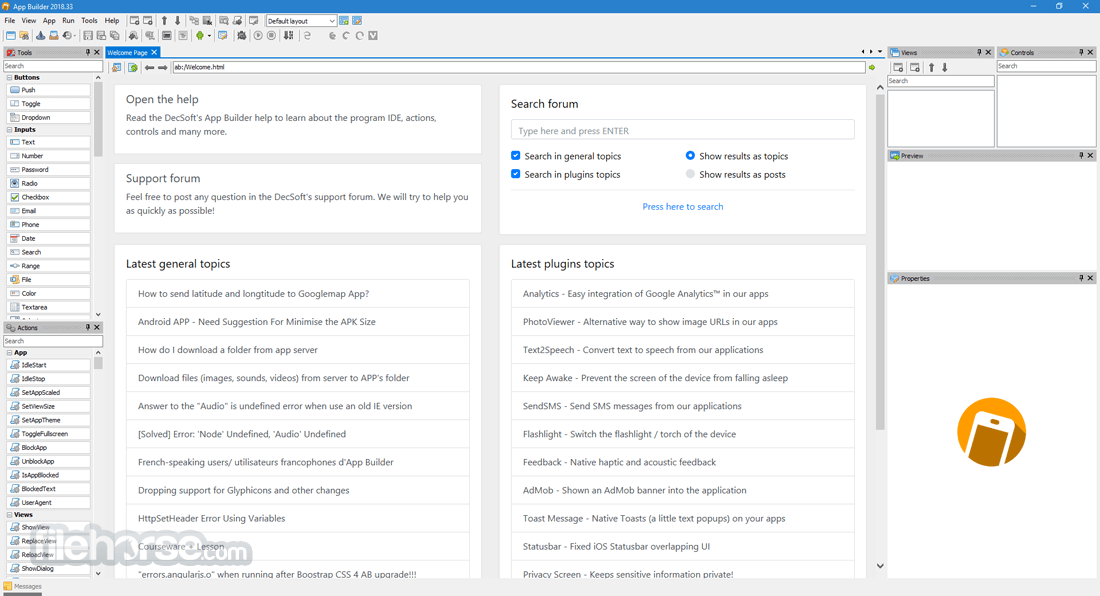
App Builder 2026.23 Screenshots
The images below have been resized. Click on them to view the screenshots in full size.
-

-

-

-

What's new in this version:
- Now our Apache Cordova compiled apps will run in "edge to edge" mode (for devices who support it, there are no changes for devices who do not support it). The right enhancements to the app's CSS and some JS functions have been made in order to get this working as expected.
- Update the VueJS JavaScript library Core to the latest 3.5.41 version (debug and production) for the apps' template. This release of VueJS Core has a lot of changes, fixes and enhancements, so our apps' template.
- Updated the VueJS JavaScript library Pinia to the latest 4.0.3 version (debug and production) for the app's template. This version of the VueJS JavaScript library Pinia includes a lot of changes, fixes and enhancements
 OperaOpera 134.0 Build 5954.66 (64-bit)
 BlueStacksBlueStacks 10.42.255.1002
 PhotoshopAdobe Photoshop CC 2026 27.9.1 (64-bit)
 LDPlayerLDPlayer - Android Emulator
 GTA 6GTA 6 for PS5
 CapCutCapCut Desktop 9.1.0
 PC RepairPC Repair Tool 2026
 Hero WarsHero Wars - Online Action Game
 TradingViewTradingView - Trusted by 100 Million Traders
 Halo: CampaignHalo: Campaign Evolved
Comments and User Reviews