




 Artlist
 Kling AI
 Premiere Pro
 OpusClip
 Camo Studio
 Restream
 LitMedia AI
-
Latest Version
Fast Screen Recorder 2.1.0 LATEST
-
Review by
-
Operating System
Windows 7 / Windows 8 / Windows 10 / Windows 11
-
User Rating
Click to vote -
Author / Product
-
Filename
FastScreenRecorder_fpt.exe

With the Fast Screen Recorder, you can record everything that's happening on your computer screen. So many times you need to record your screen.
You can make videos for YouTube, like record software tutorials to help others, also make a software review, and make a video of your presentation.
FastPCTools Screen Recording tool helps you with so many features to capture your screen video with a speaker and microphone.
Features
Select the Area of the screen
This screen recording tool also has custom area selection on your computer screen. Also, have some default sizes. Full-screen area selection has two options: one is with the Taskbar and the second is without the Taskbar.
Record Speakers
This option can be turned on/off. On this option, you can find a small down arrow near the icon. So you can choose your speaker which installed on your system.
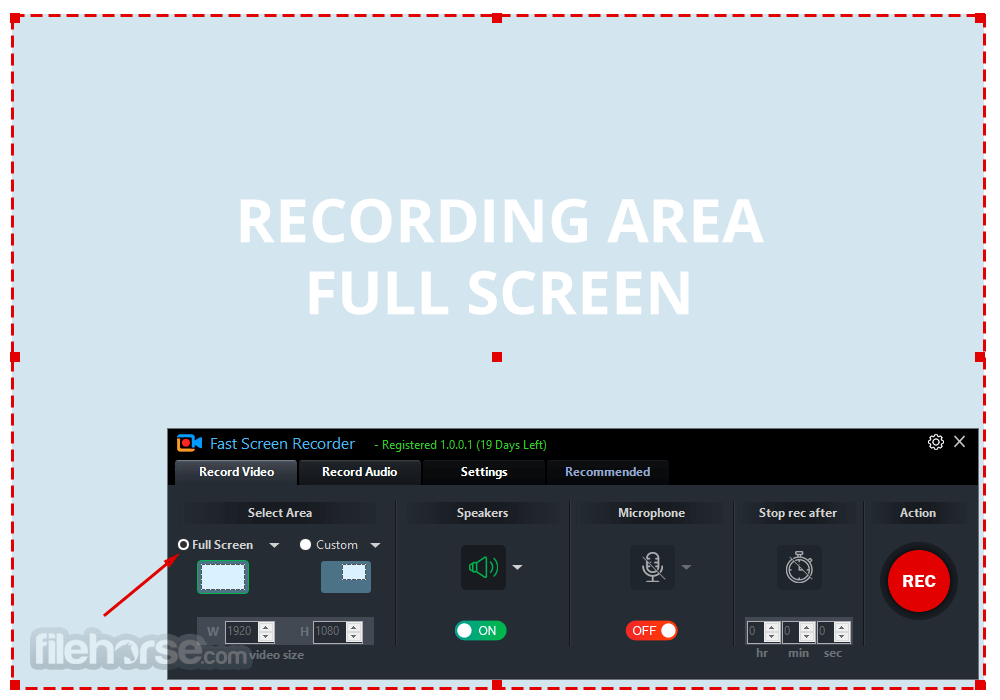
Record Microphone
With this option, you can select your microphone with the click on the down arrow near the microphone icon. You can also turn on/off the microphone recording.
Stop recording after some time
This is also a good feature of this screen recorder. With this option, you can auto-stop your recording after the fixed time that you define here.
Recording Action
After setting all things you click on the Record button, the Big Red Color round button to start your recording.
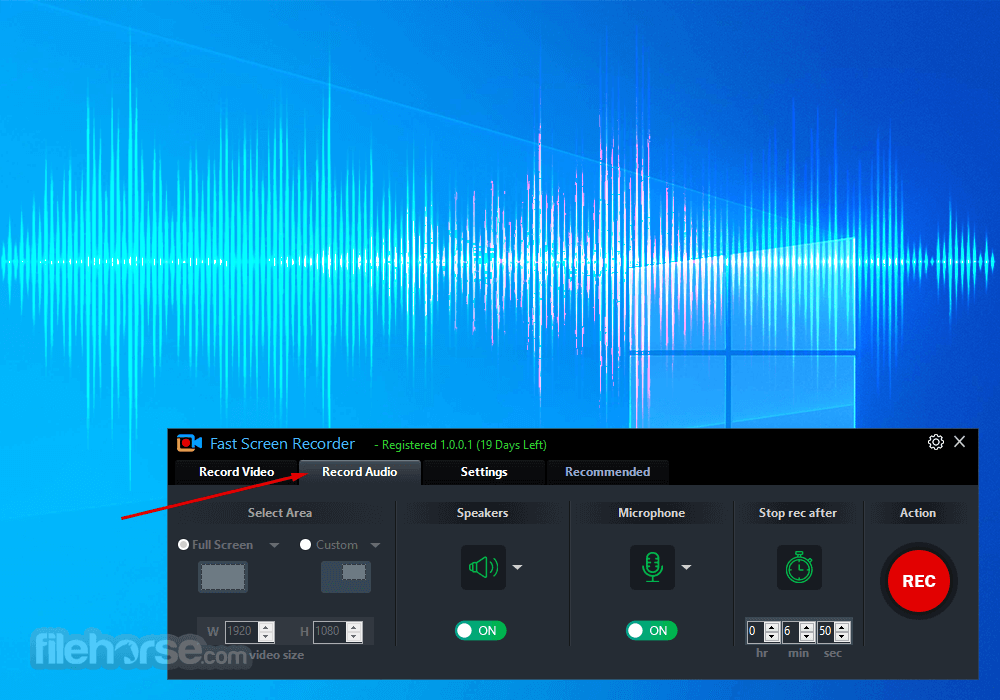
With this FastPCTools Screen Recording software, you can also record only the audio that is playing on your PC with your microphone or without a microphone, as you want to record.
Fast Screen Recorder for PC by FastPCTools is the best lightweight software for Windows computers. It has all the major features that users require. Also, the user interface is very interactive and user-friendly.
FAQs
What is screen recording?
Screen recording is a technique used to capture everything displayed on your computer screen and save it as a video file. This allows you to view the recorded content later. Screen recording is commonly used for various purposes, including teaching, demonstrations, software reviews, website reviews, coaching, and creating video lessons.
How do you record your screen?
To record your screen, you need a screen recording application. Fast Screen Recorder by FastPCTools is a user-friendly and efficient software that enables you to record your screen easily.
How can I record a Zoom call on my PC?
You can record a Zoom video call on your PC using Fast Screen Recorder by following these steps:
- Set the Zoom window to your desired size and position on your screen.
- Open Fast Screen Recorder before starting your Zoom video call.
- Use the red dotted rectangular box in Fast Screen Recorder to select the Zoom window area for recording.
- Start your Zoom video call.
- Click the red circle "REC" button in Fast Screen Recorder to begin recording.
- After the call ends, click "Stop Recording."
- Once the recording is processed, you can view the saved Zoom call video.

Pricing
License for 1 year /1 PC - $11.97
- Record Video with Webcam, Microphone, Speaker
- Record Full Screen or Selected Screen Area
- Set Time to Automatically Stop Recording
- Convert Recorded Video Format
- Record Multiple Screens
- Unlimited Screen Recording
- Record only Audio
- Record Mouse Activity
- Capture Screenshot
- Free Updates
Compatible with Windows 11, 10, 8.1, and 8
PROS
- Easy-to-Use Interface
- High-Quality Video Recording
- Audio Recording Included
- No Time Limit on Recording
- Lightweight and Fast
- Limited Editing Features
- Watermark on Free Version
- Limited Output Formats
- No Advanced Effects
-
Fast Screen Recorder 2.1.0 Screenshots
The images below have been resized. Click on them to view the screenshots in full size.
-
-
-
-
What's new in this version:
Fast Screen Recorder 2.1.0
- Change log not available for this version
Fast Screen Recorder 1.0.0.51
- Recorded Video can be converted into MP4.
- Set Frame rate as required for record gameplay.
- Multi-screen Recording and screenshot capture feature.
Fast Screen Recorder 1.0.0.48
- Fix Some User Reported Issues.
Fast Screen Recorder 1.0.0.33
- Fix Some Issues.
- Improve save video speed.
Fast Screen Recorder 1.0.0.30
- Fix Some Issues.
- Improve save video speed.
Fast Screen Recorder 1.0.0.24
- Fix Some Issues.
Fast Screen Recorder 1.0.0.20
- Fix Some Issues
Fast Screen Recorder 1.0.0.15
- Add a new feature to capture screenshots & fix some minor issues.
Fast Screen Recorder 1.0.0.11
- Fix Some Issues
 OperaOpera 134.0 Build 5954.66 (64-bit)
 BlueStacksBlueStacks 10.42.255.1002
 PhotoshopAdobe Photoshop CC 2026 27.9.1 (64-bit)
 LDPlayerLDPlayer - Android Emulator
 GTA 6GTA 6 for PS5
 CapCutCapCut Desktop 9.1.0
 PC RepairPC Repair Tool 2026
 Hero WarsHero Wars - Online Action Game
 TradingViewTradingView - Trusted by 100 Million Traders
 Halo: CampaignHalo: Campaign Evolved
Comments and User Reviews