




 Flow Launcher
 Fluent Search
 Wallpaper
 Folder Color
 WindowBlinds
 Logi Options+
 DeskScapes
 Raycast
-
Latest Version
Macro Recorder Premium 4.0.49 LATEST
-
Review by
-
Operating System
Windows 7 / Windows 8 / Windows 10 / Windows 11
-
User Rating
Click to vote -
Author / Product
-
Filename
MacroRecorderSetup.exe
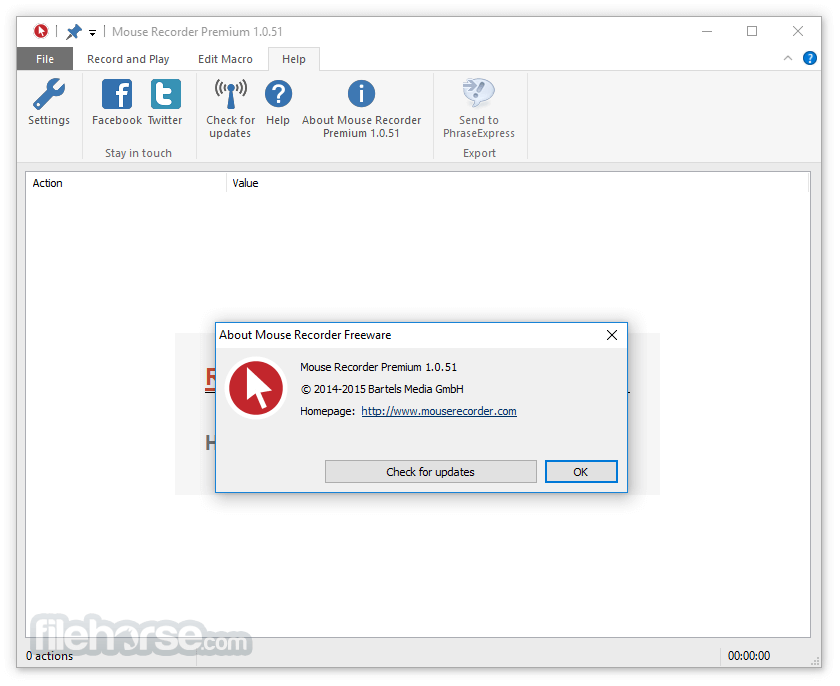
Mouse Recorder Premium (now Macro Recorder) is a freeware macro recorder to automate repetitive tasks for software test automation, web automation, or to free you from any repetitive task.
The app is as easy as using a tape recorder - Record your mouse clicks and keystrokes.
Press Play for instant macro playback at a customizable speed. The macro editor allows you to adjust timing, tweak mouse actions, or add extra clicks or key presses.
Macro Recorder is the successor to Mouse Recorder with many new features:
Individual mouse movements are shown as overlays on your screen, helping you to quickly identify specific actions. No more performing the same task twice!
Mouse Recorder Premium can automate web browsing and pauses the macro until a webpage is fully loaded or until an app has finished any operation. Smart fallback and timeout options assure reliable macro playback on different computers with different CPU power.
The app can not only record mouse clicks and keystrokes but also restore the window positions of the recorded applications if those might have changed.
Macro recordings can be transferred to the popular Text Expander "PhraseExpress" to get powerful extra features: Organize macros in a folder structure for an easy overview; Share macros in a company network with professional client-/server architecture and SQL server support; Synchronize macros with Dropbox or any other cloud storage solutions; Execute macros by hotkey or text abbreviations; For example, entering "setdate" could run a macro which opens the Windows date setting dialog.
Mouse Recorder Premium is freeware for personal and commercial use. This macro program for Windows is not just a mouse recorder or keyboard recorder but a powerful automation tool for Windows PC that can play back tasks infinitely.
Press Record - Perform the actions
The macro recorder accurately records your mouse movements, clicks, and keyboard input.
Press Stop - Edit the macro
The built-in macro editor allows you to review your recording, edit actions, customize delays or keyboard input, and add additional actions.
Press Play - Repeat the macro
MouseRecorder repeats your macro recording, saving you from repetitive tasks. You can adjust playback speed and smooth out edgy mouse movements on demand (which is great for creating awesome screencasts).
Macro Recorder operates akin to a tape recorder, capturing mouse events and keystrokes for automating repetitive tasks on your computer, offering a streamlined solution without the need for programming. Unlike traditional methods relying on fixed coordinates, it intelligently identifies visual areas surrounding click positions during playback, ensuring accurate execution even if targets have shifted, such as due to webpage ads.
Moreover, it maintains consistency by recording and restoring window sizes and positions, while also smoothing out mouse movements for seamless execution, with adjustable playback speeds and the option to exclude movements for enhanced precision.
Dispensing with cumbersome lists of coordinates, it simplifies editing by consolidating mouse actions between clicks, facilitating easy rearrangement and modification. Its user-friendly interface obviates the need for learning complex scripting languages, catering to a broad audience.
Additionally, it offers visual overlays for easy macro analysis and integrates seamlessly with "PhraseExpress," facilitating macro organization, sharing, and triggering, thereby constituting a comprehensive automation suite suitable for individual users and collaborative teams alike.
What's New
What is Macro Recorder Premium and what can it do?
Macro Recorder is a Windows and Mac automation tool that records mouse and keyboard actions and replays them automatically. The paid editions add advanced features such as SmartClick, image and OCR recognition, macro scheduling, variables, command-line parameters, and more powerful automation controls.
Can Macro Recorder Premium automate tasks beyond simple mouse and keyboard recording?
Yes. Its advanced automation features can recognize images and text on the screen, wait for specific visual conditions, execute programs, extract information with OCR, use variables and conditional logic, and automate web or desktop applications. This makes it suitable for more complex workflows than basic macro recording.
Is Macro Recorder still actively developed in 2026?
Yes. Macro Recorder is still actively developed, with new automation and AI capabilities being added, including AI-powered screen analysis, object recognition, OCR, and integrations with multiple AI models. The developer is also testing a new version with additional automation features.
PROS
The app is as easy as using a tape recorder - Record your mouse clicks and keystrokes.
Press Play for instant macro playback at a customizable speed. The macro editor allows you to adjust timing, tweak mouse actions, or add extra clicks or key presses.
Macro Recorder is the successor to Mouse Recorder with many new features:
- Goto/Loop/Repeat actions to cycle or branch portions of a macro sequence.
- Mouse position can be captured without affecting the controlled application.
- Up to 999,999 repetitions.
- Labels to add comments to actions.
- Pixel detection with color tolerance option.
- Compatible with HiRes ("retina") displays.
- Many bug fixes and improvements.
- Compatibility with PhraseExpress.
Individual mouse movements are shown as overlays on your screen, helping you to quickly identify specific actions. No more performing the same task twice!
Mouse Recorder Premium can automate web browsing and pauses the macro until a webpage is fully loaded or until an app has finished any operation. Smart fallback and timeout options assure reliable macro playback on different computers with different CPU power.
The app can not only record mouse clicks and keystrokes but also restore the window positions of the recorded applications if those might have changed.
Macro recordings can be transferred to the popular Text Expander "PhraseExpress" to get powerful extra features: Organize macros in a folder structure for an easy overview; Share macros in a company network with professional client-/server architecture and SQL server support; Synchronize macros with Dropbox or any other cloud storage solutions; Execute macros by hotkey or text abbreviations; For example, entering "setdate" could run a macro which opens the Windows date setting dialog.
Mouse Recorder Premium is freeware for personal and commercial use. This macro program for Windows is not just a mouse recorder or keyboard recorder but a powerful automation tool for Windows PC that can play back tasks infinitely.
Press Record - Perform the actions
The macro recorder accurately records your mouse movements, clicks, and keyboard input.
Press Stop - Edit the macro
The built-in macro editor allows you to review your recording, edit actions, customize delays or keyboard input, and add additional actions.
Press Play - Repeat the macro
MouseRecorder repeats your macro recording, saving you from repetitive tasks. You can adjust playback speed and smooth out edgy mouse movements on demand (which is great for creating awesome screencasts).
Macro Recorder operates akin to a tape recorder, capturing mouse events and keystrokes for automating repetitive tasks on your computer, offering a streamlined solution without the need for programming. Unlike traditional methods relying on fixed coordinates, it intelligently identifies visual areas surrounding click positions during playback, ensuring accurate execution even if targets have shifted, such as due to webpage ads.
Moreover, it maintains consistency by recording and restoring window sizes and positions, while also smoothing out mouse movements for seamless execution, with adjustable playback speeds and the option to exclude movements for enhanced precision.
Dispensing with cumbersome lists of coordinates, it simplifies editing by consolidating mouse actions between clicks, facilitating easy rearrangement and modification. Its user-friendly interface obviates the need for learning complex scripting languages, catering to a broad audience.
Additionally, it offers visual overlays for easy macro analysis and integrates seamlessly with "PhraseExpress," facilitating macro organization, sharing, and triggering, thereby constituting a comprehensive automation suite suitable for individual users and collaborative teams alike.
What's New
- ChatGPT 5 Support — Added support for OpenAI ChatGPT 5.
- Dynamic Loop Values — Added support for dynamic values within loops.
- Double-Click Simulation — Macros can now simulate double-click actions.
- PhraseExpress Launch Improvements — Macro Recorder now launches minimized when triggered by PhraseExpress.
- Improved Focus Action — Disabled focus actions no longer change the mouse position.
- Startup Crash Fix — Fixed a rare crash that could occur when starting the application.
What is Macro Recorder Premium and what can it do?
Macro Recorder is a Windows and Mac automation tool that records mouse and keyboard actions and replays them automatically. The paid editions add advanced features such as SmartClick, image and OCR recognition, macro scheduling, variables, command-line parameters, and more powerful automation controls.
Can Macro Recorder Premium automate tasks beyond simple mouse and keyboard recording?
Yes. Its advanced automation features can recognize images and text on the screen, wait for specific visual conditions, execute programs, extract information with OCR, use variables and conditional logic, and automate web or desktop applications. This makes it suitable for more complex workflows than basic macro recording.
Is Macro Recorder still actively developed in 2026?
Yes. Macro Recorder is still actively developed, with new automation and AI capabilities being added, including AI-powered screen analysis, object recognition, OCR, and integrations with multiple AI models. The developer is also testing a new version with additional automation features.
PROS
- Easy recording and playback
- Customizable actions and timing
- Supports visual overlays for analysis
- Integrates with PhraseExpress
- No programming skills required
- Limited to Windows platform
- Some features might be complex
- Requires manual adjustment for precision
- Dependency on visual cues for accuracy
- Lack of advanced scripting options
Why is this app published on FileHorse? (More info)
-
Macro Recorder Premium 4.0.49 Screenshots
The images below have been resized. Click on them to view the screenshots in full size.

-

-
-

-

 OperaOpera 135.0 Build 5973.92 (64-bit)
 LDPlayerLDPlayer - Android Emulator
 PhotoshopAdobe Photoshop CC 2026 27.9.1 (64-bit)
 MalwarebytesMalwarebytes Premium 5.7.0
 GTA 6GTA 6 for PS5
 CapCutCapCut Desktop 9.3.0
 PC RepairPC Repair Tool 2026
 Hero WarsHero Wars - Online Action Game
 TradingViewTradingView - Trusted by 100 Million Traders
 How to FishHow to Fish
Comments and User Reviews