




 FotorPea
 Lightroom
 Picsart
 Luminar Neo
 Envato
 Kittl
Kittl CorelDRAW Go
-
Latest Version
Portraiture 5 LATEST
-
Review by
-
Operating System
Windows 10 / Windows 11
-
User Rating
Click to vote -
Author / Product
-
Filename
PortraiturePS4102.exe
Portraiture is a professional plugin for Photoshop that strives to provide users with access to the most advanced tools for skin retouching.
It allows both novices and professionals to say goodbye to time-consuming and labor-intensive manual pixel-by-pixel treatments of the skin and instead employs the latest algorithms to quickly provide excellent portrait retouching and open-access to numerous settings to make each procedure customizable and personalized.
Imagenomic Portraiture app offers three different areas of customization for all image formats that are currently supported in Photoshop (and only JPEG and TIFF for Lightroom).
Those areas are Smoothing (for the elimination of Fine, Medium, and Large skin blemishes), Skin Mask (for equalizing the skin tone of your loaded portrait), and Enhancements (for various other effects, including Sharpness, Warmth, Contrast, and others). To make sure you can easily reapply the perfectly tuned skin treatment retouching configuration, the plugin also has built-in support for presets, both pre-made and user-defined.
Portraiture plugin is optimized for all the modern versions of Windows OS (7, 8, 10, or 11) and can be infused into the latest image editing apps made by Adobe.
The plugin is, as of now, offered only under a premium perpetual license for each supported app, with a notable discount for purchasing bundled access to both Photoshop and Lightroom. The latest version of Portraiture is not available under a free trial license.
What`s New - Portraiture 5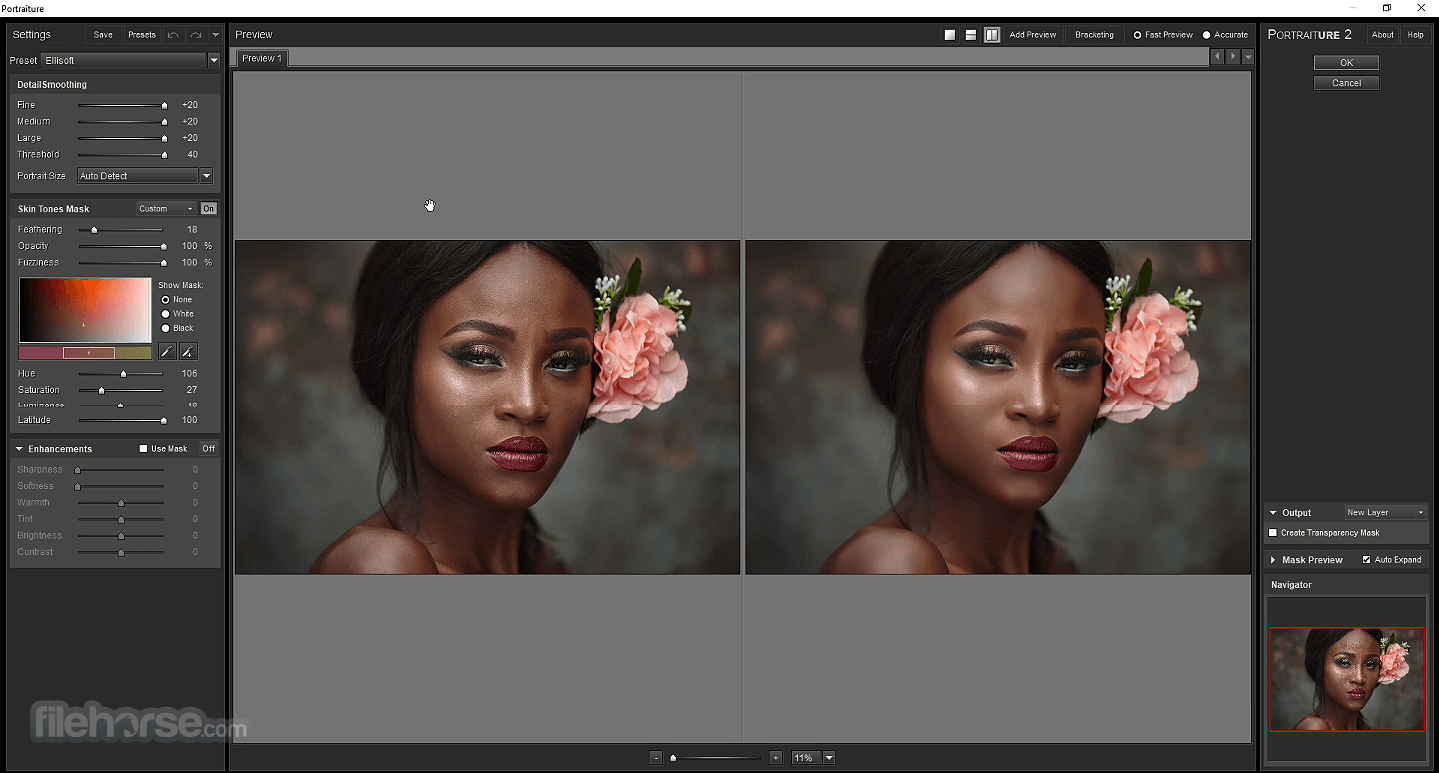
Features
The app features a user-friendly interface with intuitive controls and sliders for adjusting various parameters. The layout is clean and organized, making it easy for users to navigate and apply enhancements.
Installation and Setup
Installing this app is a straightforward process. Users can download the software from the official website or FileHorse and follow the on-screen instructions for installation. Once installed, the software can be activated using a license key provided upon purchase.

How to Use
What is Portraiture used for?
Portraiture is a professional portrait retouching plugin developed by Imagenomic. It is designed to automatically smooth skin and remove imperfections while preserving important details like skin texture, hair, and facial features.
Which programs does Portraiture work with?
Portraiture works as a plugin for Adobe Photoshop and Adobe Lightroom (depending on version compatibility). It integrates directly into the editing workflow, allowing photographers to apply skin retouching without leaving their main editing environment.
Is Portraiture better than manual skin retouching?
Portraiture significantly speeds up the retouching process, especially for high-volume portrait work such as weddings, fashion, or studio photography. While manual retouching offers maximum control, Portraiture provides a balance between efficiency and quality, making it useful for professionals who need consistent results.
Is Portraiture still relevant in 2026?
Yes. In 2026, Portraiture remains relevant for photographers who prefer a dedicated skin-retouching plugin rather than relying solely on AI-based or built-in tools. It continues to be used in professional workflows where controlled, natural-looking skin smoothing is required.
Is Portraiture suitable for beginners?
Portraiture is relatively easy to use thanks to preset-based adjustments and intuitive sliders. However, achieving natural results still requires understanding skin tones and retouching principles to avoid over-smoothing.
Can Portraiture for PC be used as a standalone application?
No, it cannot be used as a standalone application. It works only as a plugin within supported applications such as Adobe Photoshop and Lightroom.

Alternatives
Adobe Photoshop's Portrait Retouching Tools - Photoshop offers various tools and techniques for portrait retouching, including the Healing Brush, Clone Stamp, and Dodge/Burn tools.
Luminar NEO - Luminar is a versatile photo editing software with AI-powered portrait enhancement features, including skin smoothing and portrait-specific filters.
Capture One - A professional-grade photo editing software that includes advanced retouching tools and presets for portrait enhancement.
DxO PhotoLab - DxO PhotoLab offers advanced image processing capabilities, including tools for enhancing portraits and correcting imperfections.
ON1 Photo RAW - ON1 Photo RAW is a comprehensive photo editing software with dedicated portrait retouching tools and customizable presets.
Pricing
Photo Suite - $99.95 /per year or $319.96 one-time purchase
Includes all photo plugins:
Imagenomic LLC's Portraiture stands as a comprehensive solution for portrait retouching, offering advanced algorithms, customizable controls, and seamless integration with popular photo editing software.
With its intuitive user interface and range of features, it empowers photographers and digital artists to achieve professional-level results efficiently. While it may have a learning curve for beginners, its robust capabilities make it a valuable tool for anyone looking to enhance their portrait photography.
Note: 15-day trial version.
Also Available: Download Portraiture for Mac
It allows both novices and professionals to say goodbye to time-consuming and labor-intensive manual pixel-by-pixel treatments of the skin and instead employs the latest algorithms to quickly provide excellent portrait retouching and open-access to numerous settings to make each procedure customizable and personalized.
Imagenomic Portraiture app offers three different areas of customization for all image formats that are currently supported in Photoshop (and only JPEG and TIFF for Lightroom).
Those areas are Smoothing (for the elimination of Fine, Medium, and Large skin blemishes), Skin Mask (for equalizing the skin tone of your loaded portrait), and Enhancements (for various other effects, including Sharpness, Warmth, Contrast, and others). To make sure you can easily reapply the perfectly tuned skin treatment retouching configuration, the plugin also has built-in support for presets, both pre-made and user-defined.
Portraiture plugin is optimized for all the modern versions of Windows OS (7, 8, 10, or 11) and can be infused into the latest image editing apps made by Adobe.
The plugin is, as of now, offered only under a premium perpetual license for each supported app, with a notable discount for purchasing bundled access to both Photoshop and Lightroom. The latest version of Portraiture is not available under a free trial license.
What`s New - Portraiture 5
- AI-Powered Masking: Intelligent automatic masks for skin, hair, and eyes with precise, natural-looking selections.
- Enhanced Skin Smoothing Engine: Improved algorithm delivers smoother results while preserving fine details and texture.
- Consistency Across Images: Tools designed to maintain a uniform look when editing multiple portraits.
- Fill Light Tool: New option to brighten shadow areas and recover detail without affecting overall exposure balance.
- Improved Workflow Integration: Seamless support for Adobe Photoshop and Lightroom Classic with optimized performance.
Features
- Automatic Skin Smoothing: It utilizes advanced algorithms to automatically identify and smooth skin tones while preserving important details.
- Customizable Controls: Users can adjust the level of smoothing, as well as other parameters such as brightness, contrast, and color saturation.
- Plugin Integration: It can be seamlessly integrated into popular photo editing software like Adobe Photoshop and Lightroom, making it easy to incorporate into existing workflows.
- Preset Effects: The software includes a range of preset effects and settings for quick and easy enhancement of portraits.
The app features a user-friendly interface with intuitive controls and sliders for adjusting various parameters. The layout is clean and organized, making it easy for users to navigate and apply enhancements.
Installation and Setup
Installing this app is a straightforward process. Users can download the software from the official website or FileHorse and follow the on-screen instructions for installation. Once installed, the software can be activated using a license key provided upon purchase.
How to Use
- Open the app within your preferred photo editing software or as a standalone application.
- Load the portrait image you wish to enhance.
- Use the sliders and controls to adjust settings such as skin smoothing, brightness, and contrast.
- Fine-tune the enhancements to achieve the desired result.
- Apply the changes and save the edited image.
What is Portraiture used for?
Portraiture is a professional portrait retouching plugin developed by Imagenomic. It is designed to automatically smooth skin and remove imperfections while preserving important details like skin texture, hair, and facial features.
Which programs does Portraiture work with?
Portraiture works as a plugin for Adobe Photoshop and Adobe Lightroom (depending on version compatibility). It integrates directly into the editing workflow, allowing photographers to apply skin retouching without leaving their main editing environment.
Is Portraiture better than manual skin retouching?
Portraiture significantly speeds up the retouching process, especially for high-volume portrait work such as weddings, fashion, or studio photography. While manual retouching offers maximum control, Portraiture provides a balance between efficiency and quality, making it useful for professionals who need consistent results.
Is Portraiture still relevant in 2026?
Yes. In 2026, Portraiture remains relevant for photographers who prefer a dedicated skin-retouching plugin rather than relying solely on AI-based or built-in tools. It continues to be used in professional workflows where controlled, natural-looking skin smoothing is required.
Is Portraiture suitable for beginners?
Portraiture is relatively easy to use thanks to preset-based adjustments and intuitive sliders. However, achieving natural results still requires understanding skin tones and retouching principles to avoid over-smoothing.
Can Portraiture for PC be used as a standalone application?
No, it cannot be used as a standalone application. It works only as a plugin within supported applications such as Adobe Photoshop and Lightroom.
Alternatives
Adobe Photoshop's Portrait Retouching Tools - Photoshop offers various tools and techniques for portrait retouching, including the Healing Brush, Clone Stamp, and Dodge/Burn tools.
Luminar NEO - Luminar is a versatile photo editing software with AI-powered portrait enhancement features, including skin smoothing and portrait-specific filters.
Capture One - A professional-grade photo editing software that includes advanced retouching tools and presets for portrait enhancement.
DxO PhotoLab - DxO PhotoLab offers advanced image processing capabilities, including tools for enhancing portraits and correcting imperfections.
ON1 Photo RAW - ON1 Photo RAW is a comprehensive photo editing software with dedicated portrait retouching tools and customizable presets.
Pricing
Photo Suite - $99.95 /per year or $319.96 one-time purchase
Includes all photo plugins:
- Portraiture Photo
- Noiseware Photo
- Realgrain Photo
- Adobe Photoshop
- Adobe Lightroom Classic
- Affinity Photo 2
- Portraiture For Photoshop – $249.95
- Portraiture For Lightroom Classic – $249.95
- Noiseware For Photoshop – $99.95
- Realgrain For Photoshop – $99.95
- Advanced skin smoothing algorithms
- Intuitive user interface
- Seamless integration with popular photo editing software
- Range of preset effects for quick enhancement
- May require some learning curve for beginners
Imagenomic LLC's Portraiture stands as a comprehensive solution for portrait retouching, offering advanced algorithms, customizable controls, and seamless integration with popular photo editing software.
With its intuitive user interface and range of features, it empowers photographers and digital artists to achieve professional-level results efficiently. While it may have a learning curve for beginners, its robust capabilities make it a valuable tool for anyone looking to enhance their portrait photography.
Note: 15-day trial version.
Also Available: Download Portraiture for Mac
Why is this app published on FileHorse? (More info)
-
Portraiture 5 Screenshots
The images below have been resized. Click on them to view the screenshots in full size.
-
-
 OperaOpera 128.0 Build 5807.77 (64-bit)
 Kling AIKling AI - Text or Image to Video
 PhotoshopAdobe Photoshop CC 2026 27.4 (64-bit)
 BlueStacksBlueStacks 10.42.167.1001
 OKXOKX - Buy Bitcoin or Ethereum
 CapCutCapCut 7.9.0
 PC RepairPC Repair Tool 2026
 Hero WarsHero Wars - Online Action Game
 TradingViewTradingView - Trusted by 100 Million Traders
 AdGuard VPNAdGuard VPN 2.9.0
Comments and User Reviews