




 Cursor
 OnSpace AI
 Lovable
 Antigravity
 SQL Server
 Replit
 Windsurf
 10Web
10Web
-
Latest Version
Python 3.14.7 (32-bit) LATEST
-
Review by
-
Operating System
Windows 7 / Windows 8 / Windows 10
-
User Rating
Click to vote -
Author / Product
-
Filename
python-3.14.7.exe
Key Features
Readability: Python's syntax emphasizes code readability with its clean and straightforward structure. The use of indentation instead of braces makes the code visually appealing and easy to understand.
Easy to Learn: It has a gentle learning curve, making it an excellent choice for beginners. The simplicity of its syntax allows new programmers to grasp fundamental concepts quickly and start writing functional code.
Large Standard Library: It provides a vast standard library that offers ready-to-use modules for various purposes. It includes modules for string manipulation, file handling, networking, web development, data processing, and much more. Leveraging the standard library saves development time and effort.
Dynamically Typed: It is dynamically typed, meaning that variable types are inferred at runtime. This flexibility allows developers to write code more quickly without explicitly declaring variable types.
Versatility: It can be used for a wide range of applications, including web development, data analysis, scientific computing, artificial intelligence, machine learning, automation, and scripting. Its versatility stems from its extensive library ecosystem, which provides specialized tools and frameworks for different domains.
Cross-platform Compatibility: Python 32bit is available on major operating systems like Windows, macOS, and Linux, ensuring portability across different environments. The app code written on one platform can typically run on another platform without modification.
Strong Community Support: It has a vibrant and active community of developers worldwide. This community contributes to the language's growth and provides extensive documentation, tutorials, forums, and open-source libraries. The community-driven nature of Python fosters collaboration and continuous improvement.
Python is commonly used in various fields:
Web Development: The web frameworks like Django, Flask, and Pyramid are widely adopted for building scalable and secure web applications.
Data Analysis and Scientific Computing: Python's libraries, such as NumPy, Pandas, and Matplotlib, enable data manipulation, analysis, and visualization. It is often used in scientific research, data science, and machine learning.
Automation and Scripting: Python's simplicity and ease of use make it a popular choice for automating repetitive tasks, writing scripts, and system administration.
Artificial Intelligence and Machine Learning: It offers powerful libraries like TensorFlow, PyTorch, and sci-kit-learn, which are extensively used in developing AI and machine learning models.
Desktop Application Development: It can be used to create cross-platform desktop applications using frameworks like PyQt and Tkinter.
How to Use
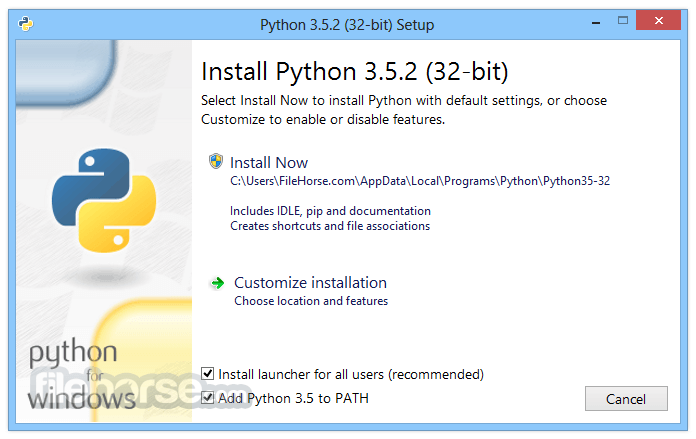
Install Python: Download the installer for your operating system from the official website (python.org) and run it. Follow the installation instructions provided.
Choose a Code Editor or IDE: Select a code editor or Integrated Development Environment (IDE) for writing your Python code. Some popular options include Visual Studio Code, PyCharm, Atom, and Sublime Text. Install your preferred editor/IDE.
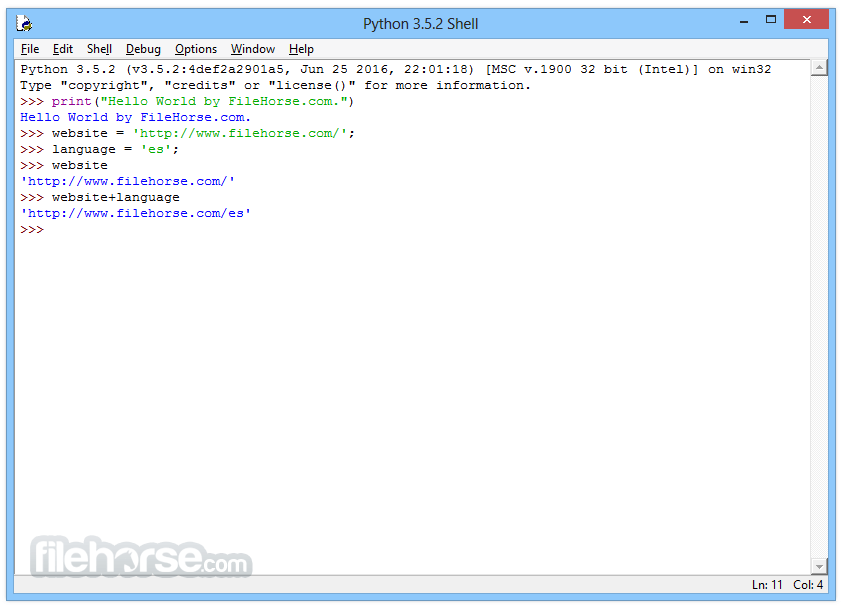
Write Your First Python Program: Open your code editor/IDE and create a new file with a .py extension. This is where you'll write your code. Start by writing a simple program, such as the classic "Hello, World!" program:
print("Hello, World!")
Save and Run Your Program: Save the file with a meaningful name and the .py extension. Open the command prompt or terminal, navigate to the directory where the file is saved, and execute the program using the command:
python filename.py
Learn Python Syntax: Familiarize yourself with Python's syntax and basic concepts. Learn about variables, data types, control flow statements (if-else, loops), functions, and more. Online tutorials, courses, and documentation are excellent resources for learning Python syntax.
Utilize Python Libraries: Python's strength lies in its extensive libraries. Explore libraries relevant to your projects, such as NumPy for numerical computations, Pandas for data manipulation, Matplotlib for data visualization, and TensorFlow or PyTorch for machine learning. Install libraries using the pip package manager:
pip install library_name
Practice and Explore: It offers a wide range of possibilities, so practice coding regularly. Experiment with different functionalities and libraries to expand your knowledge and discover Python's capabilities. Online coding challenges and projects can help you strengthen your skills.
Refer to Documentation and Online Resources: It has comprehensive documentation available on the official website (docs.python.org). It covers the language's syntax, standard libraries, and various topics. Additionally, online communities, forums, and tutorial websites offer valuable resources for learning and problem-solving.
Collaborate and Contribute: Engage with the community by participating in forums, joining local user groups, and contributing to open-source projects. Collaborating with others can enhance your learning experience and allow you to contribute to the growth of the ecosystem.
FAQ
Q: How do I install Python on my PC?
A: To install Python on your PC, visit the official website (python.org) and download the installer for your operating system. Run the installer and follow the instructions provided.
Q: Can I use Python on Windows, macOS, and Linux?
A: Yes, Python is compatible with all major operating systems, including Windows, macOS, and Linux. You can write and run Python code on any of these platforms.
Q: What code editor or IDE should I use for Python programming on PC?
A: There are several popular code editors and IDEs available for Python, such as Visual Studio Code, PyCharm, Atom, and Sublime Text. Choose the one that suits your preferences and workflow.
Q: How do I run a Python program on my PC?
A: Save your code with a .py extension. Open the command prompt or terminal, navigate to the directory where the Python file is saved, and run the command "python filename.py" to execute the program.
Q: What are Python packages and how do I install them?
A: Python packages are additional libraries or modules that extend Python's functionality. You can install packages using the pip package manager. For example, to install the NumPy package, run the command "pip install numpy" in the command prompt or terminal.
Q: Can I use Python to create graphical user interfaces (GUIs) for PC applications?
A: Yes, it provides various GUI frameworks like Tkinter, PyQt, and wxPython that allow you to create desktop applications with graphical interfaces.
Q: Is Python suitable for game development on PC?
A: Yes, it can be used for game development. Libraries like Pygame provide tools and functionality for creating 2D games, while engines like Panda3D and Pyglet offer more advanced capabilities.
Q: Can I use Python for web development on my PC?
A: Absolutely! It has powerful web frameworks like Django and Flask that enable you to build web applications, APIs, and websites using Python on your PC.
Q: Are there resources available for learning Python on PC?
A: Yes, there are numerous resources available for learning Python. You can find online tutorials, documentation, interactive courses, video tutorials, and books that cater to different learning styles and levels of expertise.
Q: Can I contribute to the Python community as a PC user?
A: Definitely! Python is an open-source language with an active community. You can contribute by reporting bugs, suggesting improvements, or even contributing code to the Python core or open-source projects.
Alternatives
JavaScript: Primarily used for web development, JavaScript is a versatile language with an extensive ecosystem of libraries and frameworks. It is particularly suitable for client-side scripting and interactive web applications.
R: A programming language specifically designed for statistical analysis and data visualization. It excels in the field of data science and is preferred by statisticians and researchers.
Java: A general-purpose language known for its robustness, scalability, and cross-platform compatibility. It is widely used for building enterprise-level applications, Android development, and large-scale systems.
Ruby: A dynamic, object-oriented language known for its simplicity and elegant syntax. It is often used in web development frameworks like Ruby on Rails.
System Requirements
- Operating System: Windows, macOS, Linux
- Processor: 1 GHz or faster
- RAM: 1 GB (minimum), 4 GB or more (recommended)
- Disk Space: 200 MB for Python installation
- Simplicity and readability
- Vast library ecosystem
- Cross-platform compatibility
- Extensive community support
- Integration capabilities
- Global Interpreter Lock (GIL) can limit multi-threading performance
- Relatively slower execution speed compared to low-level languages
- Lack of a dedicated GUI (Graphical User Interface)
Overall, Python's versatility, simplicity, extensive library support, and thriving community make it a language that continues to thrive and evolve. Whether you are a beginner exploring programming or an experienced developer seeking a powerful toolset, Python is a language worth considering for its wide range of applications and its ability to facilitate efficient and effective development.
Also Available: Python (64-bit) and Python for Mac
-
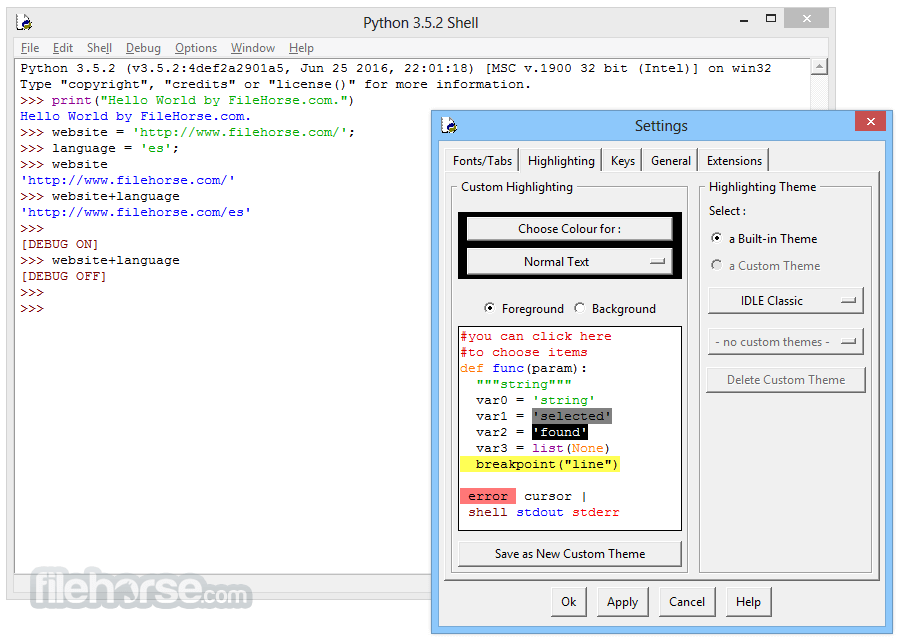
Python 3.14.7 (32-bit) Screenshots
The images below have been resized. Click on them to view the screenshots in full size.
-
-
-
-
What's new in this version:
Security:
- gh-153030: Fixed quadratic complexity in incremental parsing of long unterminated constructs (such as tags or comments) in html.parser.HTMLParser, which could be exploited for a denial of service
- gh-152674: The xml.etree.ElementTree.Element methods findall(), iterfind() and find() avoid quadratic behavior when using XPath index predicates ([1], [last()], [last()-N]) on XML documents with many same-tag siblings
- gh-152216: Update bundled libexpat to version 2.8.2
- gh-151987: The tarfile.TarFile.extract() method now applies the given filter when it extracts a link target from the archive as a fallback
- gh-151981: In tarfile, seeking a stream now stops when end of the stream is reached
- gh-151544: Modules/Setup.local is no longer used as a landmark to discover whether Python is running in a source tree, as it could potentially affect actual installs. The pybuilddir.txt file is now the sole indicator of running in a source tree
- gh-151558: Fixed an vulnerability in the tarfile data and tar extraction filters where crafted archives could create a symlink pointing outside the destination directory. This was a bypass of CVE 2025-4330
- gh-150743: http.client now limits the number of chunked-response trailer lines it will read to 100, and the number of interim (1xx) responses it will skip to 100. A malicious or broken server could previously stream trailer lines or 100 Continue responses forever, hanging the client even when a socket timeout was in use. Reported by @YLChen-007 via GHSA-w4q2-g22w-6fr4
- gh-143927: Normalize all line endings (CR, CRLF, and LF) to LF+TAB when writing multi-line configparser values
- gh-143921: Reject NUL, CR and LF characters in IMAP commands. Other control characters are allowed and sent quoted
Core and Builtins:
- gh-133931: Fix data races when setting attributes of function objects on the free threaded build
- gh-154709: Fix an out-of-bounds access in reverse dictionary iterators when the underlying dictionary is cleared and modified after the iterator is created
- gh-154695: Fix asyncio.Task raising AttributeError when created with eager_start=True and no explicit loop argument
- gh-153809: Fix interpreter crash while deallocating objects of asyncio.Task on free-threaded builds. Contributed by Sergey Miryanov
- gh-154275: Fix a crash when getting deeply nested __parameters__ from a types.GenericAlias objects
- gh-153932: Fix thread safety issue in the __reduce__ method of enumerate
- gh-153298: Fixes a data race in types.GenericAlias __parameters__ initialization on free-threading builds
- gh-153205: Fix a potential SystemError during vector calls when memory allocation fails. A MemoryError is now raised instead
- gh-152682: Fix NULL pointer dereference in compile() when a reserved name (e.g. __classdict__) is used as a type parameter name and memory allocation fails while formatting the error message
- gh-152635: Fix a crash caused when running out of memory creating a _interpchannels channel. Now a MemoryError is correctly raised
- gh-152375: Fix undefined behaviour when a sys.monitoring callback raised an exception while the program was following a branch or loop
- gh-152235: Defer GC tracking of set.intersection(), set.difference(), set.symmetric_difference(), set.union() and set.__sub__. Patch by Donghee Na
- gh-152235: Defer GC tracking of a set or frozenset to the end of its construction from iterable. Patch by Donghee Na
- gh-152228: Fix an assertion failure when python is built in a debug mode that happened in str.replace() under a limited memory situation
- gh-151763: Fixes possible crash on types.CodeType deallocation
- gh-152020: On the free-threaded build, asyncio.all_tasks() no longer loses eager-started tasks when called from a thread other than the one running the event loop
- gh-151763: Fix a potential crash in compile(), exec(), eval() and ast.parse() when an allocation fails: the parser or compiler could return without setting an exception
- gh-151912: Fixed a crash in type() when selecting a metaclass whose tp_new slot is NULL. Such metaclasses are now rejected with TypeError instead of causing a NULL pointer dereference
- gh-151905: Fix OOM error handling in PyFrame_GetBack() to propagate exceptions instead of masking them as None
- gh-151773: Fix a crash in contextvars.ContextVar.set() when memory allocation fails
- gh-151126: Fix a crash when sharing memoryview objects between interpreters fails due to running out of memory. It now raises a proper MemoryError
- gh-151644: Fix a data race in sys.setdlopenflags() and sys.getdlopenflags() when called concurrently in the free-threaded build. The underlying _PyImport_GetDLOpenFlags and _PyImport_SetDLOpenFlags functions now use atomic load/store operations
- gh-151126: Avoid possible crash in _winapi.c where a device has no memory left. Now it properly raises a MemoryError. Patch by Ivy Xu
- gh-151546: Fix the stack limit check if Python is linked to musl (ex: Alpine Linux). Use the stack size set by the linker to compute the stack limits. Patch by Victor Stinner
- gh-151461: Fix direct execution of files with invalid source encodings to report the underlying codec lookup or decoding error instead of the generic SyntaxError: encoding problem message. Patch by Bartosz Sławecki
- gh-151218: PyConfig_Set() and sys.set_int_max_str_digits() now replace sys.flags (create a new object), instead of modifying sys.flags in-place. Patch by Victor Stinner
- gh-151253: If import encodings (first import) fails at Python startup, dump the Python path configuration to help users debugging their configuration. Patch by Victor Stinner
- gh-151238: Fix a crash when compiling a concatenated f-string or t-string if an error occurs when processing one of it’s parts
- gh-151126: Fix a crash, when there’s no memory left on a device, which happened in _interpchannels module
- Now it raises proper MemoryError errors
- gh-150902: Apply an existing optimization of PyCriticalSection (single mutex) to PyCriticalSection2: avoid acquiring the same locks that the current CS has already acquired
- gh-151065: Fix memory leak when using the mimalloc memory allocator
- gh-151029: On Linux, fix sys.remote_exec() unable to find remote writable memory when libpython replaced on disk
- gh-150988: Fix a reference leak in OSError when attributes are set before super().__init__()
- gh-144774: Fix data race in BaseException when an exception is copied while being mutated
- gh-150411: Fix a data race in the free-threaded build when gc.get_count() reads the young generation allocation count while another thread updates it
- gh-149689: Fix missing error propagation in parser action helpers when memory allocation fails. Patch by Thomas Kowalski
- gh-149162: Fix a potential deadlock in PyUnicode_InternFromString() and other interning functions in the free-threaded build when called from C++ static local initializers
Library:
- gh-155009: Fix argparse.ArgumentParser to preserve the program name from sys.argv[0] when a named module is executed as the main program without replacing sys.argv[0]
- gh-155063: Bump the version of pip bundled in ensurepip to version 26.2.
- gh-155063: Bump the version of pip bundled in ensurepip to version 26.
- gh-154936: Fix the pure Python json decoder to report the correct position for invalid literal control characters in JSON strings
- gh-154892: Fix a bug in the C accelerator for zoneinfo where datetime.datetime subclasses returning -1 for hour, minute, or second could incorrectly raise a SystemError
- gh-154848: The pickle C accelerator now enforces frame boundaries when unpickling, as the pure Python implementation already did. An argument that straddles a frame boundary, or a frame that begins before the previous one has ended, now raises pickle.UnpicklingError instead of being silently read across the boundary. This prevents the loaded data from diverging from the pickletools disassembly of the same pickle
- gh-109638: Fix exponential time in csv.Sniffer.sniff() for a sample which contains many quote characters. A doubled quote character is now also detected in a field which contains the delimiter or a line break
- gh-98820: Fix quadratic time in csv.Sniffer.sniff() for a sample which contains quoted fields, in particular for a single column of quoted fields
- gh-154738: Fix ExternalEntityParserCreate() not propagating the reparse-deferral setting to the subparser, which left GetReparseDeferralEnabled() returning an uninitialized value. Patch by tonghuaroot
- gh-93251: Fix UnicodeDecodeError in socket functions (such as getaddrinfo() and gethostbyaddr()) when the localized error message of the C library is not UTF-8: decode it from the locale encoding
- gh-154551: Fix ctypes.util.find_library() returning None in non-UTF-8 locales
- gh-79366: Fixed a race condition in logging: if a handler was removed while a record was being emitted, the following handlers of the same logger could be skipped
gh-73458: Fix logging.config.listen(): it left the caller waiting for the ready event forever if the server could not be started, for example if the port was invalid or already in use. It now also binds to an IPv6 address if the host has no IPv4 address, for example if localhost is only aliased to :1
- gh-154460: Fix time.strftime() and datetime.datetime.strftime() returning a wrong ISO 8601 week number (%V) on OpenBSD
- gh-154435: Fix os.posix_fadvise() and os.posix_fallocate() on DragonFly BSD: they raised OSError with a meaningless error code, because these functions return -1 and set errno there
- gh-154399: Fix venv activation in a non-interactive csh: activate.csh no longer fails when the prompt variable is not set
- gh-154389: Fix uuid.uuid1() on OpenBSD: it returned a version 4 UUID, because uuid_create() generates random UUIDs on this platform
- gh-154324: Fix os.sendfile() on illumos: it no longer reports a successful transfer when the underlying system call failed without writing any data
- gh-154307: Fix tempfile.TemporaryDirectory.cleanup() on DragonFly BSD, where removing a file with the UF_NOUNLINK flag failed with EISDIR instead of EPERM
- gh-154291: Fix socket.has_dualstack_ipv6() to return False on platforms such as DragonFly BSD where setting IPV6_V6ONLY to 0 silently has no effect
- gh-154283: On DragonFly BSD, threading.get_native_id() now returns a value that is unique across processes, matching the other platforms
- gh-154258: Fix a crash in mmap.mmap.resize() on NetBSD when growing a shared anonymous mapping. resize() now raises ValueError in this case, as it already did on Linux
- gh-131565: ctypes.util.dllist() now works on NetBSD. It is implemented in the _ctypes extension module so that dl_iterate_phdr() reports all loaded shared libraries: on NetBSD it only reports the link-map group of the calling object, which excluded them when called through ctypes
- gh-154225: Fix os.openpty() on Solaris and illumos: it no longer leaves the pseudo-terminal as the controlling terminal of the calling process
- gh-154227: Fix os.posix_openpt() on OpenBSD, where it rejected the O_CLOEXEC flag
- gh-145030: Fix asyncio write pipe transports for named FIFOs on macOS and Solaris. Unread data sitting in the FIFO made the transport misinterpret a poll event as the reader disconnecting, wrongly closing the transport
- gh-154001: Fix random.binomialvariate() raising ZeroDivisionError when random.random() returns zero
- gh-153908: Fix data race when calling repr() on itertools.count under the free-threaded build
- gh-153896: Deduplicate unhashable args in typing.Literal
- gh-153864: On a wide curses build, curses.window.insch() now inserts a non-ASCII byte as the character it encodes in the window’s encoding, consistently with addch(), instead of its code point
- gh-153862: On a wide curses build, curses.window.inch() now returns the locale-encoded byte of a non-ASCII character, matching instr(), instead of the low byte of its code point
- gh-146011: Fix a heap-use-after-free in the C implementation of decimal when calling repr() after deleting the Context
- gh-153761: Fix cancelling asyncio.loop.sock_accept() dropping a pending connection
- gh-153695: Hashing a sqlite3.Row that contains an unhashable value now raises TypeError instead of SystemError. Patch by tonghuaroot
- gh-127049: Fix a race condition in asyncio on Unix where asyncio.subprocess.Process.send_signal(), terminate() or kill() could signal an unrelated process that was recycled onto the PID of the already-reaped child when ThreadedChildWatcher is used. Patch by Kumar Aditya
- gh-153658: Fix sqlite3.Connection.iterdump() raising sqlite3.OperationalError when a table name contains a single quote. Patch by tonghuaroot
- gh-85943: Fix struct functions raising BytesWarning under the -bb command line option when a str format is used after an equal bytes format (or vice versa). The internal format cache no longer mixes str and bytes keys
- gh-153404: urllib.robotparser.RobotFileParser now silently ignores a Crawl-delay or Request-rate value written with non-decimal digits (such as U+00B2 SUPERSCRIPT TWO) instead of raising ValueError and aborting the parse of the whole robots.txt file
- gh-153417: Error messages from imaplib.IMAP4.select() and imaplib.IMAP4.uid() no longer raise BytesWarning under -bb when the mailbox or command argument is bytes
- gh-153406: email.utils.parsedate_to_datetime() now raises ValueError instead of OverflowError when the parsed year or timezone offset is out of range, matching its documented behavior
- gh-153083: Defer GC tracking of an array.array to the end of its construction. Patch by Donghee Na
- gh-153292: Fix data race in repr of threading.RLock in free-threading build
- gh-143990: A tkinter.font.Font created from a named font, including by copy(), now copies its configured options rather than the options resolved by Tcl’s font actual, preserving a size specified in pixels (a negative size)
- gh-148286: Fix undefined behavior in compression.zstd.ZstdDecompressor.unused_data when a complete frame was decompressed in a single call
- gh-153210: Fix crash on array import under a memory pressure
- gh-153200: Fix math.isqrt() returning an incorrect result for arguments not less than 2**64 that are instances of an int subclass with an overridden comparison operator
- gh-153068: Fix cProfile.Profile.enable() to no longer overwrite errors from sys.monitoring
- gh-153062: Fix a crash when concurrently iterating an itertools.tee() iterator on the free-threaded build
- gh-153056: Fix string.Template raising a spurious ValueError when the pattern attribute is a compiled regular expression object, which the documentation allows. On the free-threaded build this also occurred as a data race on the first concurrent use
- gh-153037: Fix ZstdFile raising AttributeError instead of io.UnsupportedOperation when iterating over a file that is not open for reading
- gh-135661: Fix html.parser.HTMLParser: an abruptly closed empty comment (<!--> or <!--->) no longer extends up to a later --> in the same feed() call
- gh-152851: Prevent a crash when allocation fails while copying a BLAKE-2s/2b object. Patch by Bénédikt Tran
- gh-54930: Error responses of http.server.BaseHTTPRequestHandler to malformed request lines now include a status line and headers instead of being sent in the bare HTTP/0.9 style. Only a valid HTTP/0.9 request (a two-word GET request line) now receives an HTTP/0.9 style response
- gh-119592: Fix concurrent.futures.ProcessPoolExecutor stranding submitted work forever when a worker process exited upon reaching its max_tasks_per_child limit after shutdown() was called with wait=False: a replacement worker is now spawned and the remaining work executed as documented. If the executor has instead been garbage collected without shutdown() (gh-152967), or a replacement worker cannot be started, the remaining futures now fail with BrokenProcessPool instead of never resolving. A worker exit racing shutdown(wait=False) can also no longer crash the executor management thread
- gh-152951: collections.deque prevent rare crash when calling extend under high memory pressure conditions
- gh-150880: Normalize non-extended Windows paths before appending the wildcard used by os.listdir() and os.scandir(), making paths with trailing spaces behave consistently with other filesystem APIs
- gh-152849: Out-of-range float and integer timestamps now raise OverflowError with the same message. Patch by tonghuaroot
- gh-152847: Reject a POSIX TZ transition rule with non-digit characters in the day-of-year field in the pure-Python zoneinfo parser. Patch by tonghuaroot
- gh-108280: Connecting imaplib to a server that does not send a valid IMAP4 greeting (for example a POP3 server answering on the IMAP port) now raises an error reporting the server’s response instead of imaplib.IMAP4.error: None
- gh-63121: imaplib now refreshes the cached capability list after a successful login() or authenticate(), using the CAPABILITY response sent by the server or, if none was sent, by querying it, so that capabilities that become available only after authentication (such as ENABLE on Gmail) are recognized. Capabilities advertised in the server greeting are now also used, avoiding a redundant CAPABILITY command
- gh-88574: imaplib no longer fails when a server sends a spurious blank line after the counted data of a literal, including after a literal that terminates a response (such as a mailbox name returned by LIST). Such blank lines are now skipped without swallowing the following line
- gh-152502: Detect the curses mouse interface (getmouse(), the BUTTON* constants, and others) with a configure capability probe or library macros instead of gating it on ncurses-specific macros. It is now also available with other curses implementations that provide it, such as NetBSD curses and PDCurses (the latter underpins windows-curses)
- gh-151842: Fix a crash in _interpreters.capture_exception() when MemoryError happens. Patch by Amrutha Modela
- gh-40038: imaplib now again quotes command arguments when necessary, for example mailbox names containing a space. Such quoting was inadvertently disabled when the module was ported to Python 3, and the arguments are now quoted according to the RFC 3501 grammar. For backward compatibility, an argument already enclosed in double quotes is left unchanged, so code that quotes arguments itself keeps working
- gh-50966: Fix unbounded recursion in turtle when a mouse event handler that moves the turtle is reentered while the screen is being redrawn, for example with screen.ondrag(turtle.goto). This could previously crash the interpreter
- gh-152569: Fix asyncio.wait() leaking waiting tasks via the await-graph when racing a future that never resolves. The waiting task is now discarded from every future’s awaited_by set once wait() returns, even for pending futures
- gh-78335: Update the docstrings of tkinter and tkinter.ttk widget classes to list all supported widget options, including options added in Tk 9.0 and 9.1. tkinter.Menubutton and tkinter.Message previously had no option list at all
- gh-152431: Fix asyncio.StreamWriter.start_tls() to keep the linked StreamReader transport in sync with the upgraded transport
- gh-151126: Fix two crashes in tkinter and socket modules initialization under a memory pressure. Sets missing MemoryError
- gh-133031: curses.textpad.Textbox now enters and reads back the non-ASCII characters of an 8-bit locale encoding, instead of mangling them with a 7-bit mask
- gh-71880: curses.textpad.Textbox now lets the lower-right cell of the window be edited. Writing it with addch() would move the cursor past the end of the window, raising an error and scrolling a scrollable window, so it is now written with insch(), which keeps the cursor in place
- gh-83274: Deallocating a tkinter application from a thread other than the one it was created in no longer crashes the interpreter. The underlying Tcl interpreter is leaked instead, and a RuntimeWarning is reported
- gh-152305: Fix the pure-Python datetime.time.strftime() implementation raising AttributeError for the year directives. Patch by tonghuaroot
- gh-88758: tkinter.Misc.focus_get(), focus_displayof(), focus_lastfor() and winfo_containing() now return None instead of raising KeyError when the widget was not created by tkinter (for example a torn-off menu)
- gh-38464: tkinter.Misc.nametowidget() now resolves the auto-generated names of cloned menus (a menu used as a menubar or a cascade) back to the original widget
- gh-152248: Make the C and pure-Python zoneinfo parsers validate POSIX TZ abbreviations consistently, rejecting unquoted abbreviations with non-letter characters and empty quoted abbreviations. Patch by tonghuaroot
- gh-80937: Fix a memory leak in tkinter when a Tcl command created with createcommand was not explicitly removed before the interpreter was deleted. The command no longer keeps the interpreter alive through a reference cycle
- gh-152246: Fix the pure-Python zoneinfo parser accepting an invalid POSIX TZ transition rule with a non-period separator. Patch by tonghuaroot
- gh-139816: Fix a hang in tkinter on interactive Python built without readline. An exception raised in a callback no longer causes the event loop to stop and wait for the user to press Enter; pending callbacks now keep running until input is actually available on stdin
- gh-139145: Fix a busy loop in tkinter on interactive Python. When a Tcl command running its own event loop (such as vwait or wait_variable()) was active and input arrived on stdin, the event loop kept spinning at 100% CPU. The stdin file handler is now removed as soon as input is available. Based on a patch by Michiel de Hoon
- gh-152212: Fix the pure-Python zoneinfo parser accepting a POSIX TZ string with a std abbreviation but no offset. This is invalid per POSIX and now raises ValueError, matching the C accelerator. Patch by tonghuaroot
- gh-152156: Fix a possible crash in concurrent.interpreters.create() under limited memory conditions
- gh-152157: The C implementations of fromisoformat() and fromisoformat() now reject a decimal separator that is not followed by any fractional digit before a timezone designator
- gh-151763: Fix crash in _interpqueues.create() whe MemoryError happens on queue creation
- gh-105895: Add match and case to the list of supported topics by help()
- gh-152079: Fix datetime.datetime.fromisoformat() in the C implementation dropping the sub-second part of a UTC offset whose whole-second part is zero, matching the pure-Python implementation
- gh-152052: The json C accelerator now correctly reports an unterminated string for a \uXXXX escape at the end of the input
- gh-152060: Fix datetime.datetime.fromisoformat() raising AssertionError instead of ValueError for some malformed strings in the pure-Python implementation, matching the C implementation
- gh-126219: Fixed a crash in tkinter.Tk when className contains a non-BMP character and tkinter is built against Tcl/Tk 8.x. Such a name is now rejected with a ValueError
- gh-86165: Fix imaplib.Time2Internaldate() to use the local timezone offset for time.struct_time values with tm_gmtoff set to None, as returned by datetime.datetime.timetuple(). Contributed by Xiao Yuan
- gh-151814: Fix unbounded memory growth in io.TextIOWrapper when repeatedly writing an empty string
- gh-151770: Fix datetime.datetime.fromisoformat() raising AssertionError instead of ValueError for an out-of-range month combined with a 24:00 time
- gh-151665: inspect.signature() now works on the lazy evaluators of type aliases and type parameters instead of raising ValueError
- gh-151695: Fix a use-after-free in the curses module. The encoding of the initial screen, used by curses.unctrl() and curses.ungetch() to encode non-ASCII characters, is now kept as a private copy instead of a borrowed pointer to a window object that may be deallocated
- gh-151596: Add missing size positional argument to the pure-Python implementation of io.TextIOBase.readline()
- gh-151640: Fix a data race in io.BytesIO in free-threaded builds when whole-buffer reads or peeks, or getvalue(), share the internal buffer with concurrent writes
- gh-148660: Fix a crash in collections.OrderedDict.copy() when a key’s __eq__ or a subclass method mutates the dict during the copy. Now raises RuntimeError instead, as iteration does
- gh-151497: Opening a tarfile archive no longer attempts to pre-allocate a huge buffer when a crafted or truncated member claims an oversized extended header (a GNU long name/link or a pax header). The extended header is now read in bounded chunks, so its size field can no longer trigger memory exhaustion
- gh-151403: Fixed a crash in subprocess.Popen (and _posixsubprocess.fork_exec) when an argv item’s __fspath__() concurrently mutates the args sequence being converted
- gh-151390: Colorize match in the REPL when followed by a unary + or - operator. Patch by Bartosz Sławecki
- gh-151126: Fix crash on unset MemoryError on allocation failure in ctypes.get_errno()
- gh-151416: Fix a crash in os.spawnv() and os.spawnve() when an argv item’s __fspath__() method mutates the argv list during argument conversion. os.spawnv() argument conversion errors other than TypeError, such as the ValueError for an embedded null, are no longer replaced with a generic TypeError
- gh-151337: Avoid possible memory leak in tkinter.c on Windows
- gh-151126: Fix a crash when MemoryError in os._path_splitroot() was not set properly
- gh-151126: Fix a crash, when there’s no memory left on a device, which happened in _interpchannels module
- Now it raises proper MemoryError errors
- gh-119710: Fix asyncio subprocess wait() hanging when the process has exited but one of its pipes is kept open by an inherited child process (so the pipe never reaches EOF). wait() now returns as soon as the process exits, regardless of the pipes’ state
- gh-151295: Fixed a crash (use-after-free) in bytes.join() and bytearray.join() that could occur if an item’s __buffer__() concurrently mutates the sequence being joined. The mutation is now reported as a RuntimeError instead
- gh-109940: Fix Windows venv activation in cmd.exe to respect VIRTUAL_ENV_DISABLE_PROMPT
- gh-117807: Fix mimetypes initialization from MIME map files containing invalid UTF-8 bytes
- gh-150583: Correctly set the default compression level in compression.zstd when passing a digested dictionary during compression
- gh-150641: Fix bug where typing.evaluate_forward_ref() with the STRING format could leak internal names used by the annotation machinery
- gh-150484: Fix unittest.mock.mock_open() __exit__ raising TypeError when used with contextlib.ExitStack
- gh-149816: Fix a potential use after free condition in pickle.dumps() in free-threaded mode when serializing lists
- gh-149319: The asyncio REPL now ignores PYTHONSTARTUP and PYTHON_BASIC_REPL when -E or -I is used. Patch by Jonathan Dung
- gh-47005: Fix urllib.request.AbstractHTTPHandler.do_open() to give regular headers set via add_header() priority over unredirected headers, consistent with get_header() and header_items()
- gh-123471: Make concurrent iteration over itertools.zip_longest safe under free-threading
- gh-123720: asyncio: Fix asyncio.Server.serve_forever() shutdown regression. Since 3.12, cancelling serve_forever() could hang waiting for a handler blocked on a read from a client that never closed (effectively requiring two interrupts to stop); the shutdown sequence now ensures client streams are closed so serve_forever() exits promptly and handlers observe EOF
- gh-123471: Make concurrent iteration over itertools.accumulate safe under free-threading
- gh-123471: Make concurrent iteration over itertools.combinations_with_replacement and itertools.permutations safe under free-threading
- gh-143988: Fixed crashes in socket.socket.sendmsg() and socket.socket.recvmsg_into() that could occur if buffer sequences are concurrently mutated
- gh-130796: Undeprecate the locale.getdefaultlocale() function. Patch by Victor Stinner
- gh-115634: Fix a deadlock in concurrent.futures.ProcessPoolExecutor when using max_tasks_per_child, present since the feature was introduced in Python 3.11. The executor stopped scheduling queued tasks after a worker process exited upon reaching its task limit. Based on a fix proposed by Tabrez Mohammed
- gh-140326: Fix the asyncio REPL namespace so that relative imports no longer resolve against the asyncio package and __file__ is no longer set
- gh-79638: Disallow all access in urllib.robotparser if the robots.txt file is unreachable due to server or network errors
- gh-123471: Make concurrent iterations over itertools.chain safe under free threading
- gh-123471: Make concurrent iterations over itertools.combinations and itertools.product safe under free-threading
- gh-123471: Make concurrent iterations over itertools.cycle safe under free-threading
- gh-120665: Fixed an issue where unittest loaders would load and instantiate unittest.TestCase-derived subclasses that are also abstract base classes, which can’t be instantiated
- gh-105708: Accept an uppercase V prefix in IPvFuture addresses in urllib.parse.urlsplit()
- gh-103925: Fix csv.Sniffer.sniff() for a sample with \r\n line endings in which a quoted field ends a line: a letter could be detected as the delimiter
- gh-101267: When a worker process terminates unexpectedly, concurrent.futures.ProcessPoolExecutor now sets a separate BrokenProcessPool exception on each pending future instead of sharing a single instance among them all. Sharing one exception produced malformed tracebacks: each Future.result() call re-raised the same object, appending another copy of the traceback to it
Documentation:
- gh-118150: Clarify in the difflib documentation what junk actually does, its drawbacks, and how to control it
- gh-86726: Greatly expand the tkinter documentation to cover the full public API of the package and its submodules. The descriptions are oriented towards Python rather than Tcl/Tk, with corrected return types and versionadded/versionchanged information
Tests:
- gh-155109: Add test.support.run_with_limited_c_stack() and use it in tests that exhaust the C stack with a fixed number of recursive calls, so that their outcome no longer depends on the C stack size
- gh-76595: Add C API tests for PyCapsule_Import()
- gh-154211: Add test.support.skip_if_huge_c_stack() and use it to skip tests that exhaust the C stack if the stack limit is very large (e.g. on DragonFly BSD or with ulimit -s unlimited)
- gh-154167: The test runner (regrtest) now restores the default SIGINT handler if it was inherited as ignored, so the test suite no longer hangs when run as a shell background job
- gh-154144: Fix building the _testcapi module on NetBSD
- gh-152548: Add the test.support.isolation.runInSubprocess() decorator to run a test method or TestCase subclass in a fresh interpreter subprocess, isolated from the rest of the test run
- gh-151626: Fix several tests in test.test_inspect, test.test_import, test.test_importlib, test.test_py_compile and test.test_compileall that failed when the test suite was run with PYTHONPYCACHEPREFIX set. These tests now neutralize the pycache prefix where they assume the default __pycache__ bytecode layout
- gh-151096: Fix test_embed failing when CPython is configured with a split exec prefix (--exec-prefix differing from --prefix)
- gh-148853: Fix tests failing on FreeBSD in test.support’s in_systemd_nspawn_sync_suppressed() due to unreadable /run directory
Build:
- gh-154070: Build the curses module against a wide-character capable ncurses even when it is not named ncursesw – for example the pkgsrc ncurses on NetBSD and illumos, or the system ncurses on macOS. Such a library previously produced a narrow build
- gh-126877: Fix the configure check for Tcl/Tk which could wrongly succeed with optimizing compilers when the libraries are missing
- gh-153438: Update Windows build and installer tooling and documentation to use the current download URL for nuget.exe
- gh-152502: The curses module now detects set_escdelay(), set_tabsize() and the ESCDELAY and TABSIZE variables with configure capability probes instead of the ncurses-specific NCURSES_EXT_FUNCS macro, so they are exposed when building against other curses implementations such as NetBSD curses that provide them
- gh-148260: On Linux when Python is linked to the musl C library, use a thread stack size of at least 1 MiB instead of musl default which is 128 kiB. Patch by Victor Stinner
- gh-138800: Fix library name in python3.pc on Android
Windows:
- gh-124111: Updated Windows builds to use Tcl/Tk 9.0.4
- gh-150836: Make installed tkinter work with Tcl/Tk 9 builds that embed the Tk script library in the Tk DLL on Windows
- gh-140146: Prevent tkinter from hanging on Windows if stdin is redirected to a pipe in an interactive session. This is helpful for testing interactive usage of tkinter from a script, for example as part of the cpython test suite
macOS:
- gh-153711: On macOS, do not attempt to use the dup3(2) and pipe2(2) system calls introduced in macOS 27 to prevent problems when running on older systems
- gh-124111: Update macOS installer to use Tcl/Tk 9.0.4
IDLE:
- gh-82183: When the shell is busy running code, using “Run… Customized” with “Restart shell” unchecked now reports that the shell is executing instead of restarting it anyway
- gh-83653: Blanking an integer entry in IDLE’s Settings dialog, such as “Auto squeeze min lines”, no longer saves an empty string as an invalid configuration value
- gh-65339: Saving the IDLE Shell or an Output window now defaults to a .txt extension and lists text files before Python files, since their content is not Python source
- gh-80504: The “In files:” field of IDLE’s Find in Files dialog now always contains a full directory path, even for an unsaved editor or the Shell. This shows in the grep output which directory was searched
- gh-134300: Do not add the idlelib directory to the path of the IDLE user process. User code run in IDLE can no longer import idlelib submodules as top-level modules, such as import help
- gh-89360: Fix a rare crash in the IDLE editor when the completion window is closed: deleting a key binding for a sequence that is not bound to the virtual event is now ignored instead of raising a ValueError
- gh-71956: Fix Replace All in the IDLE editor’s Replace dialog when the search direction is “Up” and “Wrap around” is off: it now replaces all matches above the current position instead of only the first one
- gh-152728: Move functions run.fix_scaling, editor.fixwordbreaks (as fix_word_breaks) and pyshell.fix_x11_paste to idlelib.util
- gh-66331: Set the WM_CLASS window property of IDLE’s windows to Idle on X11, so that window managers group and label them correctly instead of using the default Toplevel
- gh-85320: IDLE now reads and writes its configuration files and the breakpoints file using UTF-8 instead of the locale encoding. This keeps non-ASCII data (such as non-ASCII paths) from being corrupted and makes the files portable between environments
- gh-94523: Detect file if modified at local disk and prompt to ask refresh. Patch by Shixian Li
- gh-139551: Support rendering BaseExceptionGroup in IDLE
- gh-89520: Make IDLE extension configuration look at user config files, allowing user-installed extensions to have settings and key bindings defined in ~/.idlerc
Tools/Demos:
- gh-155218: Fix Argument Clinic generating the flags of the optional groups in different order on 32-bit and 64-bit platforms
- gh-155207: Argument Clinic now supports the --dry-run and --diff options. They list the files which would be changed, or write a unified diff of the changes to the standard output, without modifying any file
- gh-154580: Fix python-gdb.py raising UnicodeEncodeError when pretty-printing a non-ASCII str in a locale whose host charset cannot encode it, such as any non-ASCII string in the C locale
C API:
- gh-152132: Fix Py_RunMain() to return an exit code, rather than calling Py_Exit(), when running a script, a command, or the REPL. Patch by Victor Stinner
- gh-153300: PyConfig_Set() now also set global configuration variables. For example, PyConfig_Set("inspect", value) now also sets Py_InspectFlag. Patch by Victor Stinner
- gh-123619: PyUnstable_Object_EnableDeferredRefcount() now returns 0 if the object is not tracked by the garbage collector: if gc.is_tracked() is false. Patch by Victor Stinner
 OperaOpera 134.0 Build 5954.56 (64-bit)
 BlueStacksBlueStacks 10.42.255.1002
 PhotoshopAdobe Photoshop CC 2026 27.9.1 (64-bit)
 LDPlayerLDPlayer - Android Emulator
 GTA 6GTA 6 for PS5
 CapCutCapCut Desktop 9.1.0
 PC RepairPC Repair Tool 2026
 Hero WarsHero Wars - Online Action Game
 TradingViewTradingView - Trusted by 100 Million Traders
 Halo: CampaignHalo: Campaign Evolved
Comments and User Reviews