




 Antigravity
 Lovable
 OnSpace AI
 Cursor
 Replit
 10Web
10Web Windsurf
 SQL Server
-
Latest Version
Sandboxie Classic 5.73.0 (64-bit) LATEST
-
Review by
-
Operating System
Windows 7 64 / Windows 8 64 / Windows 10 64 / Windows 11
-
User Rating
Click to vote -
Author / Product
-
Filename
Sandboxie-Classic-x64-v5.73.0.exe
This isolated setting allows users to test untrusted programs and browse the web safely, ensuring that any changes made during these activities do not affect the actual operating system.
Features
Secure Web Browsing: Running web browsers under Sandboxie's protection ensures that any malicious software downloaded is confined within the sandbox and can be easily discarded.
Enhanced Privacy: Browsing history, cookies, and cached temporary files remain within the sandbox, preventing them from leaking into Windows.
Secure Email: Malicious software hiding in emails cannot break out of the sandbox, protecting the real system from potential threats.
System Integrity: Installing software into an isolated sandbox prevents wear-and-tear on Windows, maintaining system performance over time.
User Interface
It offers two versions: the Classic build with an MFC-based UI and the Plus build featuring a new Qt-based UI.
The Plus build introduces additional functionalities and a modern interface, providing users with a more intuitive experience.
Installation and Setup
Installing Sandboxie is straightforward. Users can download the installer from the official website and follow the on-screen prompts.
After installation, Sandboxie integrates into the system, allowing applications to be run within a sandboxed environment. It's advisable to consult the official documentation for detailed setup instructions.
How to Use
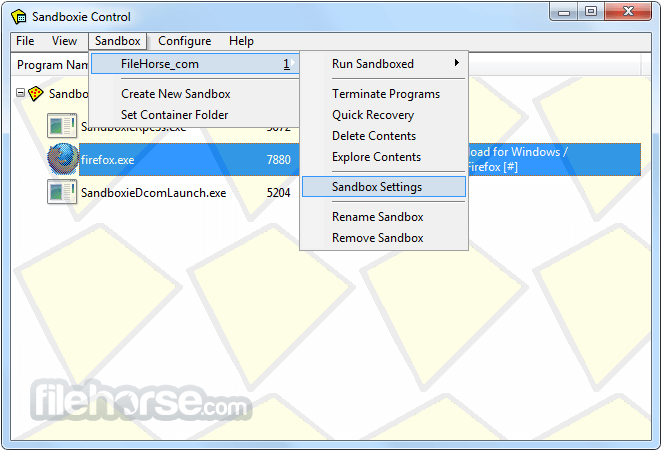
Running Applications in a Sandbox: Right-click on the desired application and select "Run Sandboxed" to execute it within an isolated environment.
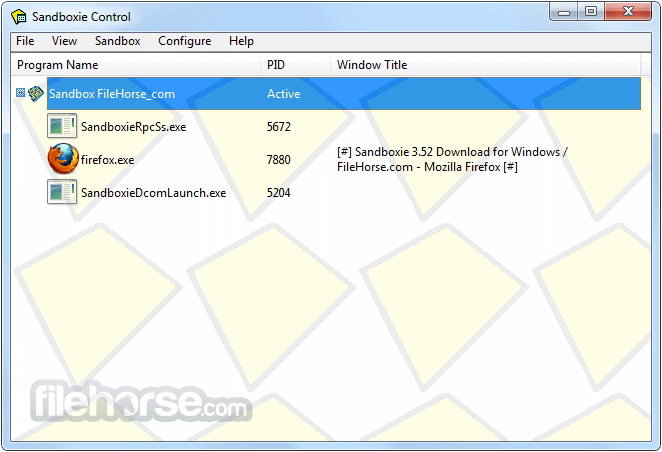
Managing Sandboxes: Use the Sandboxie Control panel to create, configure, and delete sandboxes as needed.
Recovering Files: Access and recover files downloaded or created within the sandbox through the "Quick Recovery" feature in the Sandboxie Control panel.
FAQs
Is Sandboxie safe and legitimate?
Yes, this tool is a legitimate program that has been used for years to run applications in isolated environments, enhancing system security.
Can Sandboxie protect my OS from web-based viruses?
Yes, by running your web browser through Sandboxie, any malicious software downloaded is confined within the sandbox, preventing it from affecting your actual system.
Is Sandboxie compatible with 64-bit applications?
Yes, it fully supports 64-bit applications, offering better security and performance.
Does Sandboxie require a license?
This program is now open-source and free to use. While there may have been licensing requirements in the past, the current version does not require a paid license.
Can Sandboxie be used on Windows 10 and 11?
Yes, Sandboxie is compatible with Windows 10 and 11, providing isolation capabilities on these operating systems.
System Requirements
- Operating System: Windows 11, 10, 8 or 7 (32-bit and 64-bit).
- RAM: 1 GB for 32-bit or 2 GB for 64-bit.
- Hard Disk Space: At least 10 MB of free space.
- Enhances system security by isolating applications.
- Protects privacy by containing browsing data.
- Prevents permanent changes to the system.
- Compatible with both 32-bit and 64-bit applications.
- Free and open-source.
- May require a learning curve for new users.
- Some applications may not function correctly within a sandbox.
Sandboxie (64-bit) is a valuable tool for users seeking to enhance their system's security and maintain privacy. By creating isolated environments for applications, it prevents unwanted changes and potential threats from affecting the main operating system.
While there may be a learning curve for some users, the benefits of using Sandboxie make it a worthwhile addition to any security-conscious individual's toolkit.
Note: Sandboxie is now open source. Sophos has released the Sandboxie source code to the GitHub community.
Also Available: Sandboxie (32-bit)
-
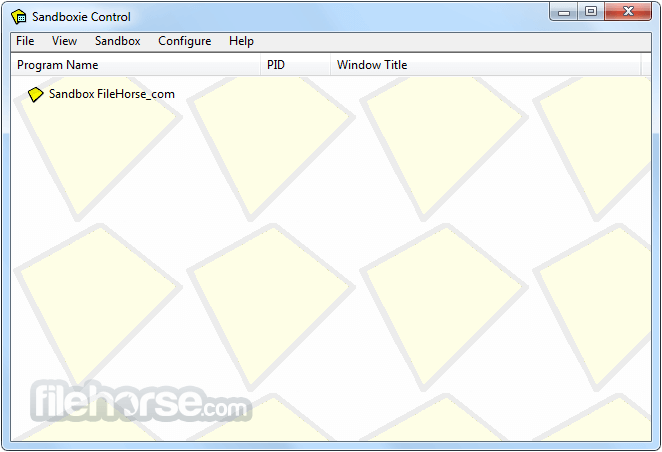
Sandboxie Classic 5.73.0 (64-bit) Screenshots
The images below have been resized. Click on them to view the screenshots in full size.
-
-
-

What's new in this version:
- Sandboxie-Plus 1.18.0 / Sandboxie 5.73.0 focuses on improving everyday usability, responsiveness, and Chromium browser compatibility, with particular attention given to one of the most frequently requested scenarios: sharing an existing browser profile between the host and a sandbox.
- The most significant work in this release addresses long-standing issues affecting Chromium-based browsers such as Chrome, Edge, Brave, and other derivatives when using the host profile from within a sandbox. Previous versions could trigger browser setting resets due to Chromium's Secure Preferences protection, making profile sharing unreliable. This release introduces a compatibility workaround that preserves browser settings and extensions when a host profile is accessed from inside a sandbox, eliminating one of the biggest obstacles to this workflow. In addition, Sandboxie now properly supports Chromium's elevation service and the required DPAPI handling, allowing sandboxed browsers to access host credentials, cookies, passwords, and other protected data when the appropriate compatibility template is enabled. Together, these improvements make running a sandboxed browser against an existing host profile far more practical and transparent than before.
- Recovery functionality has also received several improvements. RecoverFolder and AutoRecoverIgnore patterns now support wildcards, including recursive matching, providing much more flexible recovery configuration. AutoRecoverIgnore rules can now also be applied to the Quick Recovery dialog, while recovery handling itself has been refined to avoid unnecessary dialog closures and to provide a more consistent deletion workflow. Several issues affecting Immediate Recovery have been resolved as well, including problems caused by path casing differences and situations where recovery could become permanently suspended.
- The SandMan user interface has been improved with pending-change highlighting in the Options and Settings dialogs. Responsiveness has also been significantly improved during periods of heavy Sandboxie logging by batching UI updates and reducing rendering overhead.
- The crash dump mechanism has also been completely reworked. The new crash reporter provides a more streamlined experience and, if the user chooses, can automatically submit crash reports together with an optional comment, making it much easier to provide useful feedback and helping identify and resolve issues more quickly.
- This release further resolves several smaller but noticeable issues throughout the project, including cleaner handling of expected system account lookups, correct display of network paths in notifications, and numerous fixes that improve overall stability and polish.
- Overall, version 1.18.0 delivers a substantial quality-of-life update, with the new Chromium profile compatibility work standing out as a major improvement for users who rely on sharing their existing browser environment between the host system and Sandboxie.
 OperaOpera 133.0 Build 5932.60 (64-bit)
 LDPlayerLDPlayer - Android Emulator
 PhotoshopAdobe Photoshop CC 2026 27.7 (64-bit)
 BlueStacks AIBlueStacks AI
 GTA 6GTA 6 for PS5
 CapCutCapCut Desktop 8.9.1
 PC RepairPC Repair Tool 2026
 Hero WarsHero Wars - Online Action Game
 TradingViewTradingView - Trusted by 100 Million Traders
 Forza HorizonForza Horizon 6
Comments and User Reviews