




 Google Meet
 ChatSonic
 PagerGPT AI
 Teams
Teams LiveChat
 Fireflies
 GoToConnect
 BoldDesk
-
Latest Version
TeamSpeak Server 3.13.7 (32-bit) LATEST
-
Review by
-
Operating System
Windows 7 / Windows 8 / Windows 10 / Windows 11
-
User Rating
Click to vote -
Author / Product
-
Filename
teamspeak3-server_win32-3.13.7.zip
-
MD5 Checksum
70dce1c23c6868ae88d4eee71805e10b
TeamSpeak Server is an extremely popular free communication software that provides high-quality voice chat over the Internet to users interested not only in 1-on-1 chat but also in group chat with dozens and sometimes hundreds of participants.
The base functionality of TeamSpeak is in its connection between PC clients and internet dedicated servers, which serve as transfer points for all your audio streams. This centralized structure provides higher-quality sound than other solutions that rely on peer-to-peer connections.
The interface of the TeamSpeak client is well-organized, enabling users easy access to the server load area and listings of all the available rooms that are present on the server.
From there, users can simply enter any room with the double-click of their mouse and easily access customization options (keyboard bindings for mute/unmute, set their microphone and speaker levels, and more). During gaming sessions, the app Client can also be accessed via a very useful in-game overlay.
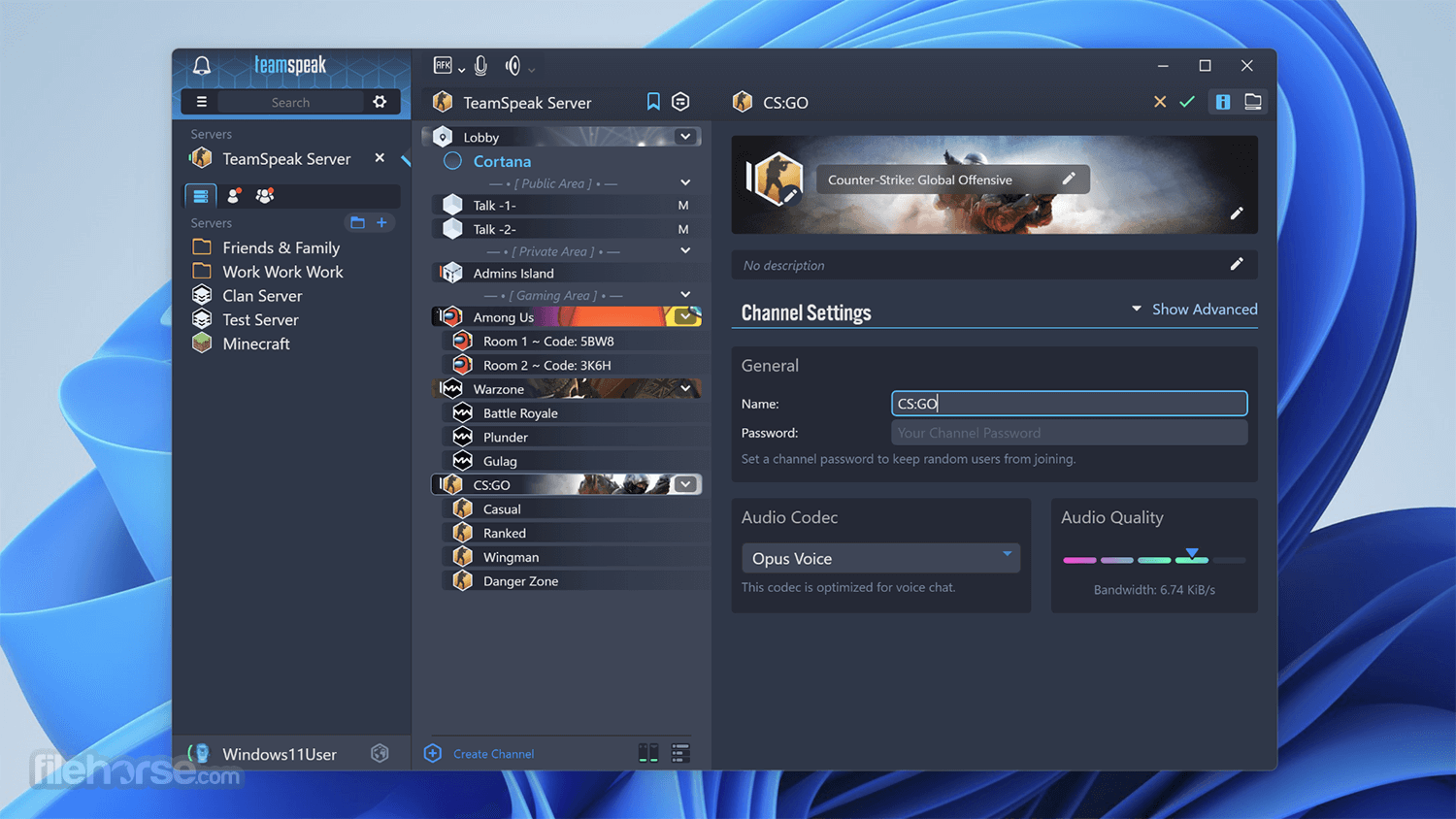
With the TeamSpeak Server 32bit, you can easily talk with hundreds and thousands of users simultaneously, enabling you to use it for large-scale teleconferencing in both professional and home situations (such as video gaming or gathering with friends and family). The app is absolutely free and gives you incredible freedom and power in the world of online voice chat.
Main Features

FAQs
What is TeamSpeak Server used for?
TeamSpeak Server is a voice communication server that allows users to host their own voice chat system. It is commonly used by gaming communities, teams, and organizations for real-time voice communication with full control over channels and permissions.
Do you need to host a TeamSpeak Server yourself?
Yes. TeamSpeak Server can be self-hosted on your own computer or a dedicated server, but it can also be rented from hosting providers. Self-hosting gives full control, while hosted solutions are easier to set up.
Is TeamSpeak Server still relevant in 2026?
Yes. In 2026, TeamSpeak Server remains relevant for users who prefer privacy, low latency, and full control over their voice communication, even though apps like Discord are more popular for casual use.
Alternatives
Discord - A popular communication platform for gamers, businesses, and communities, offering voice, video, and text communication features.
Mumble - An open-source, low-latency voice chat software designed for gamers and online communities.
Slack - A collaboration hub for teams, providing messaging, file sharing, and integration with third-party apps.
Pricing
The program is FREE to download and use for non-commercial purposes. Commercial users may need to purchase a license based on their usage requirements, with pricing starting at $25 per virtual server.
System Requirements
The system requirements for running TeamSpeak Server depend on the number of simultaneous users and the desired voice quality. Generally, a dedicated server with at least 512MB of RAM and a modern CPU is recommended for small to medium-sized deployments.
PROS
Also Available: TeamSpeak Server (64-bit) and TeamSpeak Server for Mac
The base functionality of TeamSpeak is in its connection between PC clients and internet dedicated servers, which serve as transfer points for all your audio streams. This centralized structure provides higher-quality sound than other solutions that rely on peer-to-peer connections.
The interface of the TeamSpeak client is well-organized, enabling users easy access to the server load area and listings of all the available rooms that are present on the server.
From there, users can simply enter any room with the double-click of their mouse and easily access customization options (keyboard bindings for mute/unmute, set their microphone and speaker levels, and more). During gaming sessions, the app Client can also be accessed via a very useful in-game overlay.
With the TeamSpeak Server 32bit, you can easily talk with hundreds and thousands of users simultaneously, enabling you to use it for large-scale teleconferencing in both professional and home situations (such as video gaming or gathering with friends and family). The app is absolutely free and gives you incredible freedom and power in the world of online voice chat.
Main Features
- Low-latency voice communication: The program is known for its exceptional voice quality and low-latency communication, making it ideal for gaming and professional use where timing is critical.
- Customizable server settings: Users can customize various server settings to suit their specific needs, including channel permissions, user groups, and audio codecs.
- Secure communication: It employs advanced encryption protocols to ensure secure communication, protecting sensitive information from unauthorized access.
- Cross-platform compatibility: TeamSpeak Server is available for a wide range of platforms, including Windows, Linux, and macOS, ensuring compatibility with most devices.
- Scalability: It supports thousands of simultaneous users on a single server, making it suitable for large-scale deployments such as gaming tournaments or corporate events.
FAQs
What is TeamSpeak Server used for?
TeamSpeak Server is a voice communication server that allows users to host their own voice chat system. It is commonly used by gaming communities, teams, and organizations for real-time voice communication with full control over channels and permissions.
Do you need to host a TeamSpeak Server yourself?
Yes. TeamSpeak Server can be self-hosted on your own computer or a dedicated server, but it can also be rented from hosting providers. Self-hosting gives full control, while hosted solutions are easier to set up.
Is TeamSpeak Server still relevant in 2026?
Yes. In 2026, TeamSpeak Server remains relevant for users who prefer privacy, low latency, and full control over their voice communication, even though apps like Discord are more popular for casual use.
Alternatives
Discord - A popular communication platform for gamers, businesses, and communities, offering voice, video, and text communication features.
Mumble - An open-source, low-latency voice chat software designed for gamers and online communities.
Slack - A collaboration hub for teams, providing messaging, file sharing, and integration with third-party apps.
Pricing
The program is FREE to download and use for non-commercial purposes. Commercial users may need to purchase a license based on their usage requirements, with pricing starting at $25 per virtual server.
System Requirements
The system requirements for running TeamSpeak Server depend on the number of simultaneous users and the desired voice quality. Generally, a dedicated server with at least 512MB of RAM and a modern CPU is recommended for small to medium-sized deployments.
PROS
- Exceptional voice quality and low-latency communication
- Customizable server settings for fine-tuning user permissions and channel configurations
- Secure communication with advanced encryption protocols
- Cross-platform compatibility with support for Windows, Linux, and macOS
- Scalability to support thousands of simultaneous users on a single server
- A minimalistic user interface may lack some advanced features found in other communication platforms
- Licensing fees for commercial use may deter some users
- A steeper learning curve for administrators configuring server settings compared to more user-friendly alternatives
Also Available: TeamSpeak Server (64-bit) and TeamSpeak Server for Mac
Why is this app published on FileHorse? (More info)
-
TeamSpeak Server 3.13.7 (32-bit) Screenshots
The images below have been resized. Click on them to view the screenshots in full size.
-
-

-

What's new in this version:
- New embedded default license is valid until the 1st of July 2027
 OperaOpera 129.0 Build 5823.44 (64-bit)
 Kling AIKling AI - Text or Image to Video
 PhotoshopAdobe Photoshop CC 2026 27.5 (64-bit)
 BlueStacksBlueStacks 10.42.167.1001
 OKXOKX - Buy Bitcoin or Ethereum
 CapCutCapCut 7.9.0
 PC RepairPC Repair Tool 2026
 Hero WarsHero Wars - Online Action Game
 TradingViewTradingView - Trusted by 100 Million Traders
 AdGuard VPNAdGuard VPN 2.9.0
Comments and User Reviews