




 FocuSee
 RecCloud
 Filmora
 LitMedia AI
 Premiere Pro
 Restream
 Kling AI
-
Latest Version
TunesKit AceMovi 5.5.0 LATEST
-
Review by
-
Operating System
Windows 7 / Windows 8 / Windows 10 / Windows 11
-
User Rating
Click to vote -
Author / Product
-
Filename
AceMovi.exe
TunesKit AceMovi Video Editor is a perfect video editing utility to help users create and edit videos. Well-designed with a simple and easy-to-navigate interface, TunesKit AceMovi for PC is dedicated to making editing easier than ever.

If you want to edit memorable moments you captured in life or make a video tutorial, it will be a great choice.
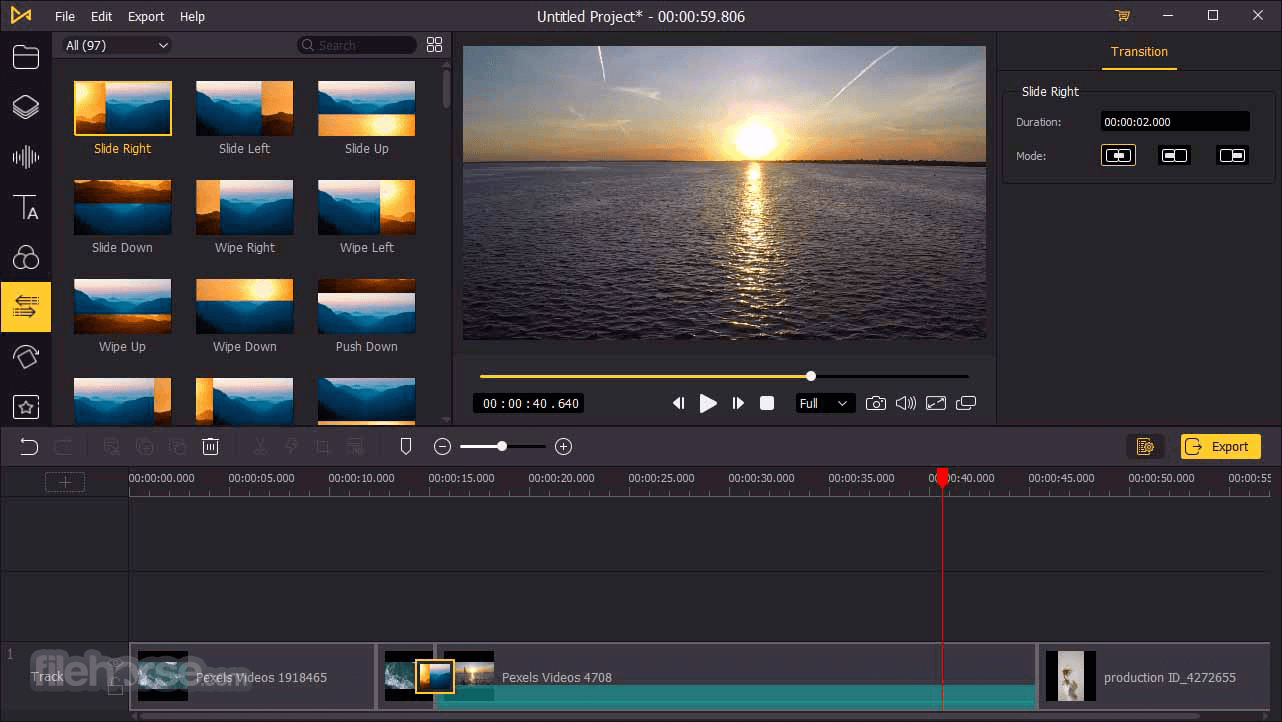
It offers numerous video templates and effects, including filters, transitions, animations, behaviors, picture-in-picture, split-screen, green screen, etc.
You can simply add your target source into the TunesKit AceMovi and arrange them to become visible in the timeline. While editing, you can clearly see any changes you made in the Preview window.
Moreover, it also provides flexible export options. Users can easily save them in different formats like MP4, MOV, MKV, etc., or devices such as iPhone, iPad, Galaxy, Smart TV, etc., or even online social platforms like YouTube, Facebook, Vimeo, etc.
Key Features
Screen Recorder
Record your computer screen and produce great product demos, how-to tutorials, etc.
Webcam Recorder
Record and capture real-time camera footage with high-quality preservation.
Slideshow Maker
Create a photo or video slideshow with music in AceMovi fast and easily.

Supported Input Formats
Video
M4V, AVI, MP4, MPG, MPEG, 3GP, 3G2, WMV, ASF, RM, RMVB, DAT, MOV, FLV, MKV, DV, NUT, H.264, NSV, VOB, DVR-MS, MXF, VRO, WTV, OGV, HD AVI (VC-1, MPEG-4), MTS/M2TS/TS/TRP (AVHD H.264, VC-1, MPEG-2 HD), HD WMV (VC-1, WMV HD), HD MKV (H.264), HD MOV (H.264), HD MPG (MPEG-2 HD), HD MP4 (H.264, Xvid), etc.
Audio
M4A, M4B, M4P, M4R, MP3, MP2, MPA, WMA, AAC, AC3, MKA, OGG, AIFF, RA, RAM, WAV, APE, FLAC, AA, AAX, etc.
How to use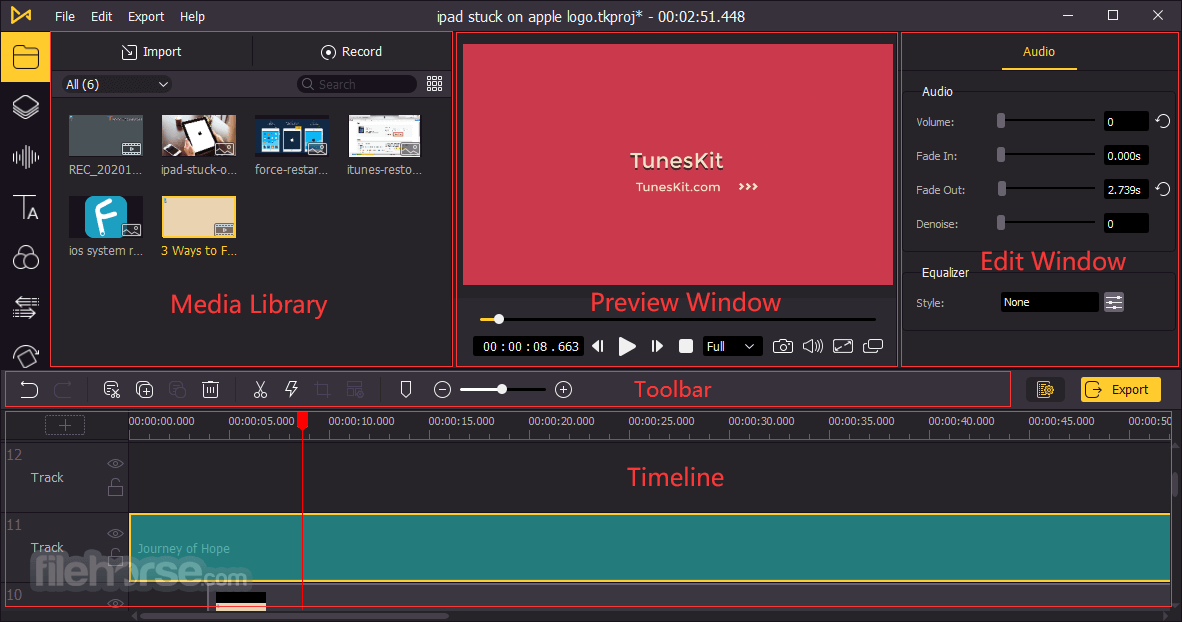
Pricing
Free Trial
What's the difference between the trial version and the full version?
The free trial version has all the same features as the full version. The only difference is that the exported videos in the free trial version will be watermarked.
When you try to export a video while using the trial version, a window will pop up and ask you to buy a license to remove the watermark. If you don't mind, you can click the Continue button to continue using it for free.
Alternatives
Filmora - A widely used video editing tool for both novices and seasoned professionals.
DaVinci Resolve - A professional video editing software that offers advanced features and AI capabilities.
Adobe Premiere Pro - A fully featured video editing software from the famous Adobe Creative Cloud suite.
UniFab - AI-powered 8-in-1 comprehensive video processing PC tool.
Topaz Video AI - Stunning video enlargements with groundbreaking AI technology!
System Requirements
Also Available: Download TunesKit AceMovi for Mac
If you want to edit memorable moments you captured in life or make a video tutorial, it will be a great choice.
It offers numerous video templates and effects, including filters, transitions, animations, behaviors, picture-in-picture, split-screen, green screen, etc.
You can simply add your target source into the TunesKit AceMovi and arrange them to become visible in the timeline. While editing, you can clearly see any changes you made in the Preview window.
Moreover, it also provides flexible export options. Users can easily save them in different formats like MP4, MOV, MKV, etc., or devices such as iPhone, iPad, Galaxy, Smart TV, etc., or even online social platforms like YouTube, Facebook, Vimeo, etc.
Key Features
- Offer a wide range of basic or advanced video editing tools like filters, transitions, etc.
- Flexible media import and various export customizations
- A growing number of free media templates and resources
- Clear interface and easy-to-understand buttons, very quick to learn
Screen Recorder
Record your computer screen and produce great product demos, how-to tutorials, etc.
Webcam Recorder
Record and capture real-time camera footage with high-quality preservation.
Slideshow Maker
Create a photo or video slideshow with music in AceMovi fast and easily.
Supported Input Formats
Video
M4V, AVI, MP4, MPG, MPEG, 3GP, 3G2, WMV, ASF, RM, RMVB, DAT, MOV, FLV, MKV, DV, NUT, H.264, NSV, VOB, DVR-MS, MXF, VRO, WTV, OGV, HD AVI (VC-1, MPEG-4), MTS/M2TS/TS/TRP (AVHD H.264, VC-1, MPEG-2 HD), HD WMV (VC-1, WMV HD), HD MKV (H.264), HD MOV (H.264), HD MPG (MPEG-2 HD), HD MP4 (H.264, Xvid), etc.
Audio
M4A, M4B, M4P, M4R, MP3, MP2, MPA, WMA, AAC, AC3, MKA, OGG, AIFF, RA, RAM, WAV, APE, FLAC, AA, AAX, etc.
How to use
- Download and install AceMovi, then launch the program.
- Import your media (video, audio, or images) into the project - drag or use “Import Media”.
- Drag media files onto the timeline in the order you want them to appear.
- To cut or split a video clip: move the playhead where you want the cut, then click the “Split” (scissors) icon — you can also right-click and choose Split.
- To trim the start or end of a clip: hover over the clip edge in the timeline until the trim cursor appears, then drag.
- To remove a middle part: split twice (before + after undesired segment), select the middle part, and press Delete.
- To crop or zoom a video: select the clip, click the Crop icon (or right-click → Crop), adjust the crop area or aspect ratio as needed.
- To rotate or flip video: select clip → open Properties → Video → use Rotate slider or Flip Horizontal/Vertical options.
- To change video speed (slow motion or fast): click the Speed icon (or right-click and select Speed/Duration), then adjust speed (from 0.01× up to 100×).
- After editing, preview your video; when satisfied, click Export and choose format and destination to save your final video.
Pricing
Free Trial
- Full editing features
- All video formats are supported
- Full editing features
- All video formats are supported
- No watermark
- Free technical customer support
- 30-day money-back guarantee
- 1-Month Plan - $14.95
- 1-Year Plan - $49.95
- Lifetime Plan - $79.95
What's the difference between the trial version and the full version?
The free trial version has all the same features as the full version. The only difference is that the exported videos in the free trial version will be watermarked.
When you try to export a video while using the trial version, a window will pop up and ask you to buy a license to remove the watermark. If you don't mind, you can click the Continue button to continue using it for free.
Alternatives
Filmora - A widely used video editing tool for both novices and seasoned professionals.
DaVinci Resolve - A professional video editing software that offers advanced features and AI capabilities.
Adobe Premiere Pro - A fully featured video editing software from the famous Adobe Creative Cloud suite.
UniFab - AI-powered 8-in-1 comprehensive video processing PC tool.
Topaz Video AI - Stunning video enlargements with groundbreaking AI technology!
System Requirements
- Operating System: Windows 7, 8, 8.1, 10, 11 (32-bit & 64-bit)
- Processor: 1G Hz processor, or above
- RAM: 512MB or higher of RAM
- Display: Monitor with 1024x768 pixels or higher resolution
- User-friendly interface
- Supports multiple video formats
- Extensive stock library
- Real-time preview feature
- Affordable pricing options
- Limited advanced features
- Occasional performance issues
- Watermark in the free version
- Limited audio editing options
Also Available: Download TunesKit AceMovi for Mac
Why is this app published on FileHorse? (More info)
-
TunesKit AceMovi 5.5.0 Screenshots
The images below have been resized. Click on them to view the screenshots in full size.
-
-
-

-
 OperaOpera 131.0 Build 5877.97 (64-bit)
 AdsPowerAdsPower - Antidetect Browser
 PhotoshopAdobe Photoshop CC 2026 27.7 (64-bit)
 BlueStacks AIBlueStacks AI
 OKXOKX - Buy Bitcoin or Ethereum
 CapCutCapCut Desktop 8.5.0
 PC RepairPC Repair Tool 2026
 Hero WarsHero Wars - Online Action Game
 TradingViewTradingView - Trusted by 100 Million Traders
 AdGuard VPNAdGuard VPN 2.9.0
Comments and User Reviews