




 Instapage
 10Web
10Web Replit
 Antigravity
 SQL Server
 OnSpace AI
 Windsurf
 Lovable
-
Latest Version
Java JDK 26.0.2 (64-bit) LATEST
-
Review by
-
Operating System
Windows 7 / Windows 8 / Windows 10 / Windows 11
-
User Rating
Click to vote -
Author / Product
-
Filename
jdk-26_windows-x64_bin.exe
-
MD5 Checksum
abab407d869ba4e30567896c60539332
With its robust features and extensive support, the JDK 2026 has become an indispensable resource in the world of Java development.
Java Development Kit (JDK) 64bit is a software package developed by Oracle Corporation that serves as a complete development environment for Java applications.
It includes a collection of programming tools, such as compilers, debuggers, and other utilities, along with a rich set of libraries and documentation. It ensures that developers have all the necessary components to create, test, and deploy Java programs efficiently.
Features
Compiler and Runtime Environment
It comes with the Java Compiler, which translates Java source code into bytecode that can run on any Java Virtual Machine (JVM). It also includes the Java Runtime Environment (JRE) that allows you to execute Java applications on your machine.
Libraries and APIs
It provides a vast set of libraries and APIs that simplify the development process. These libraries cover a wide range of functionalities, including database access, networking, graphical user interface (GUI) development, and much more.
Integrated Development Environment (IDE) Support
Although the app itself does not include an IDE, it seamlessly integrates with popular Java IDEs like Eclipse, IntelliJ IDEA, and NetBeans. This allows developers to leverage the JDK's capabilities within their preferred development environment.
Documentation
It offers extensive documentation, including the Java API documentation, which serves as a valuable resource for understanding the available classes, methods, and their usage. It also includes guides, tutorials, and sample code to assist developers in mastering Java development.
Debugging and Profiling Tools
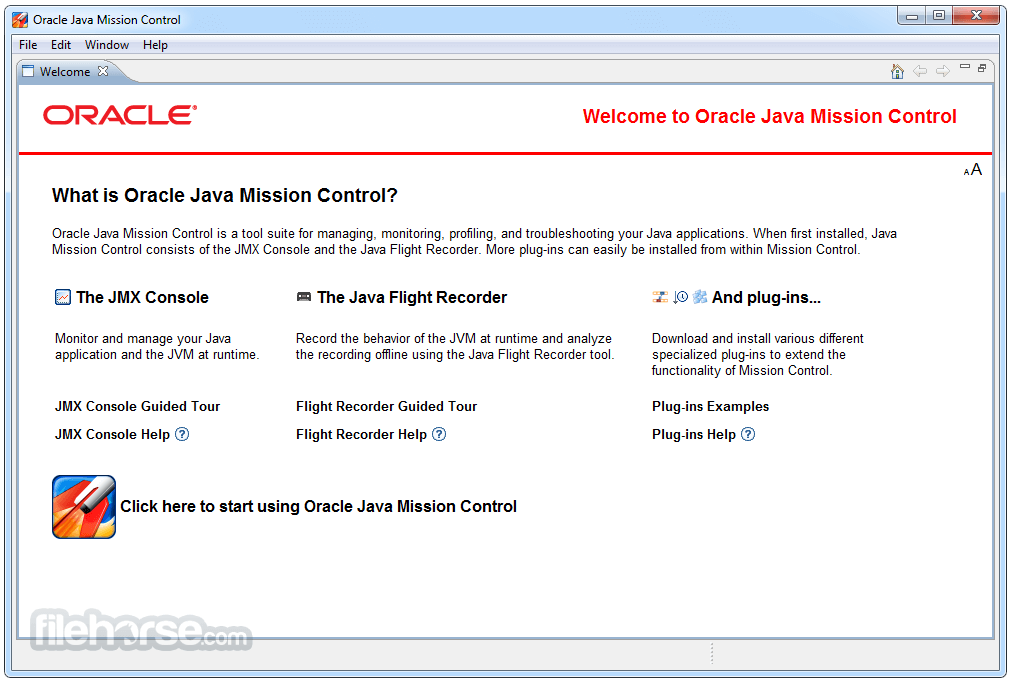
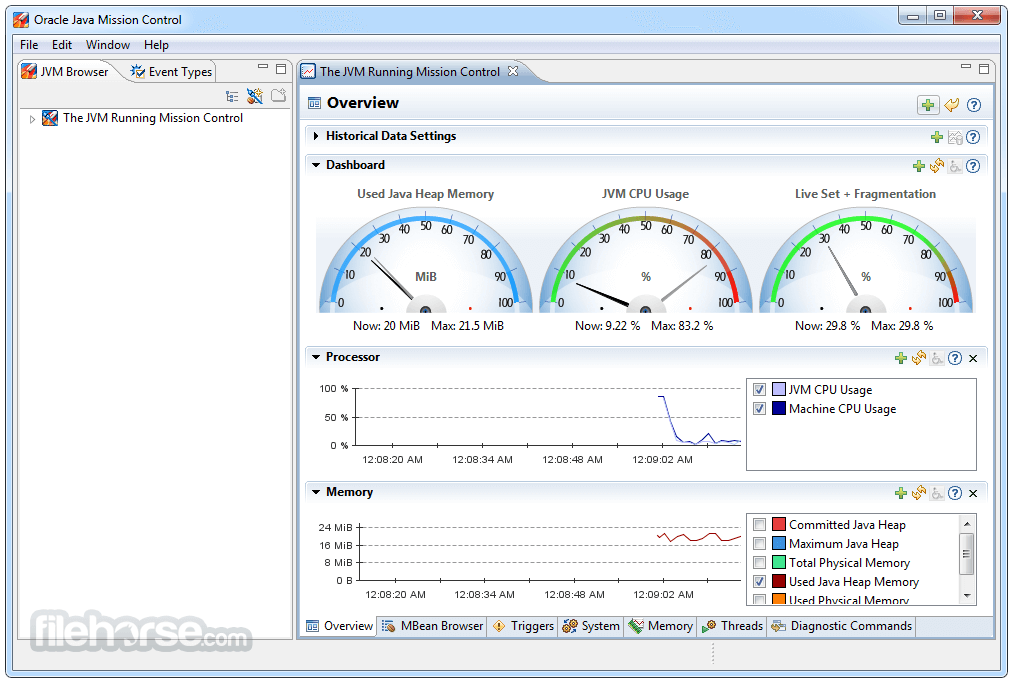
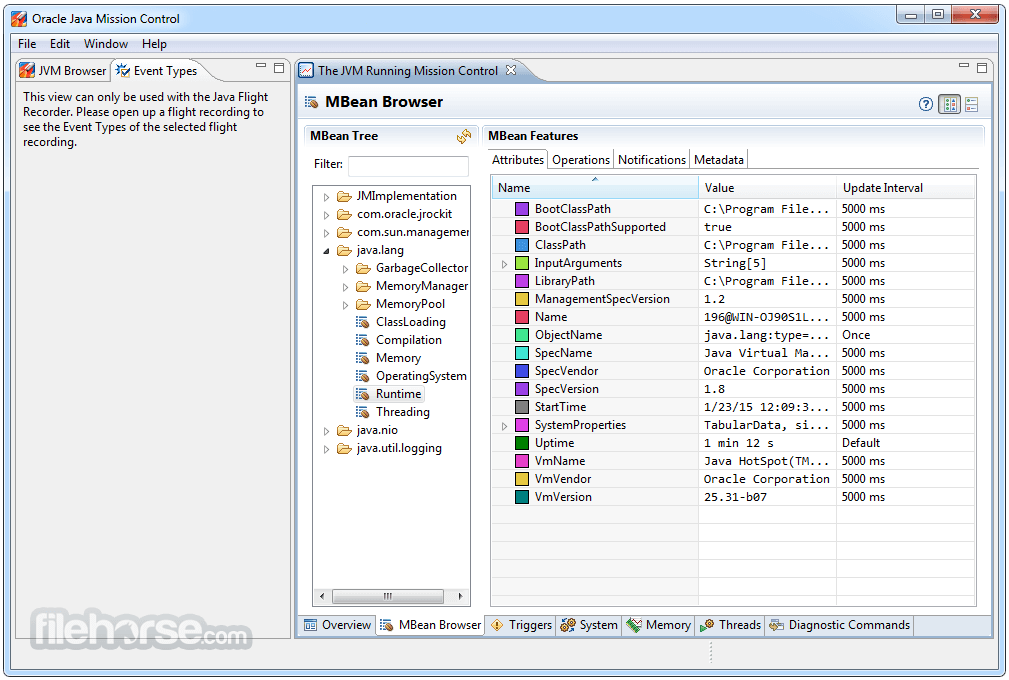
The JDK incorporates powerful debugging tools like jdb and jstack, which aid developers in identifying and resolving issues in their code. Additionally, it provides profiling tools like JConsole and VisualVM for performance analysis and optimization.
JDK 20 is available now!
Java Development Kit (JDK) 20 is the most recent release of the Java SE Platform, while JDK 17 LTS (Long-Term Support) is the latest long-term support release.
The JDK 20 binaries can be used freely in production and redistributed without any cost, as per the Oracle No-Fee Terms and Conditions.
Under these terms, JDK 20 will continue to receive updates until September 2023. After that, it will be succeeded by JDK 21.
How to Use
Download and Installation: To use the app, visit the official Oracle website or FileHorse and download the appropriate JDK version for your operating system.
Setup and Configuration: Follow the installation instructions provided by Oracle to set up the JDK 2026 on your machine. Ensure that you configure the environment variables correctly to enable command-line access to the tools.
Writing and Compiling Java Code: Use a text editor or an IDE to write your Java code. Save the code with the .java extension. Open a command prompt or terminal, navigate to the directory where the code is saved, and use the Javac command to compile the Java source code into bytecode.
Running Java Applications: After compiling the code, use the Java command followed by the name of the class containing the main method to execute the Java application.
FAQ
Q1. What is the difference between the JDK and the JRE?
A1. The JDK (Java Development Kit) is a complete development environment that includes the Java Compiler, libraries, and tools required for developing Java applications. The JRE (Java Runtime Environment), on the other hand, is a subset of the app and only provides the necessary components to run Java applications.
Q2. Can I use the JDK for commercial purposes?
A2. Yes, it can be used for both commercial and non-commercial purposes. However, it's essential to review and comply with Oracle's licensing terms and conditions.
Q3. Is the JDK compatible with multiple operating systems?
A3. Yes, the app is available for various operating systems, including Windows, macOS, and Linux distributions. Ensure that you download the appropriate version for your specific operating system.
Q4. Are there any alternatives to the JDK for Java development?
A4. Yes, some alternatives to the app include OpenJDK, Amazon Corretto, and IBM SDK for Java. These alternatives offer similar features and functionalities, and you can choose the one that best suits your needs.
Q5. Does the JDK support the latest version of the Java programming language?
A5. Yes, the JDK is regularly updated to support the latest version of the Java programming language. It is recommended to keep your app version up to date to leverage the newest language features and enhancements.
Pricing
The JDK is FREE to download and use. However, for commercial use, it is important to review and comply with Oracle's licensing terms and conditions.
PROS
- Comprehensive development environment with all the necessary tools and libraries.
- Extensive documentation and resources for Java developers.
- Regular updates and compatibility with the latest Java programming language versions.
- Seamless integration with popular Java IDEs.
- Robust debugging and profiling tools.
- The licensing terms for commercial use can be complex and may require careful review.
- Setting up and configuring the environment variables can be challenging for beginners.
- The installation package can be relatively large, requiring significant disk space.
The Java Development Kit (JDK) is an indispensable software package for Java developers, providing a complete development environment with powerful tools, libraries, and documentation. With its extensive features, seamless integration with popular IDEs, and support for the latest Java language versions, it empowers developers to build robust and scalable Java applications.
While the licensing terms for commercial use can be complex, the tool remains the go-to choice for professional Java development. Whether you are a beginner or an experienced developer, the JDK is a must-have toolset for unleashing the full potential of Java programming.
Also Available: Java Development Kit (32-bit) and Java Development Kit for Mac
-
Java JDK 26.0.2 (64-bit) Screenshots
The images below have been resized. Click on them to view the screenshots in full size.
-
-
-
-
What's new in this version:
JDK 26.0.2 contains IANA time zone data 2026b which contains the following changes:
- British Columbia last daylight saving time change was 2026-03-08 spring forward
New Features:
- security-libs/java.security
- ➜ Add Support for the Latest ML-KEM and ML-DSA Private Key Encodings (JDK-8347938)
- The JDK now encodes ML-KEM and ML-DSA private keys in PKCS #8 format using the DER-encoded ASN.1 CHOICE formats defined in Section 6, "Private Key Format" of RFC 9935 and Section 6, "Private Key Format" of RFC 9881. Two new security properties, jdk.mlkem.pkcs8.encoding and jdk.mldsa.pkcs8.encoding, control the encoding used when generating new keys with a KeyPairGenerator or when translating keys with a KeyFactory. Valid values are seed, expandedKey, and both (case-insensitive). If a system property of the same name is also specified, it supersedes the security property value. All three formats are supported when decoding previously encoded private keys with a KeyFactory.
- When these algorithms were introduced in JDK 24, the encoding format was equivalent to the expandedKey value. This release changes the default value to seed. As a result, ML-KEM and ML-DSA private keys generated by this JDK release will not be accepted by older releases by default, although keys generated by older releases are still readable by this release. To enable older JDK releases to accept ML-KEM and ML-DSA private keys generated by this JDK release, set the jdk.mlkem.pkcs8.encoding or jdk.mldsa.pkcs8.encoding property (whichever property is relevant to your use case) to expandedKey, and use KeyFactory.translateKey to convert the key to the older format.
Other Notes:
security-libs/java.security➜ Added WISeKey Global GB and GC Root CA Certificates (JDK-8372351):
- The following root certificates have been added to the cacerts truststore:
- + WISeKey
- + wisekeyglobalrootgbca
- DN: CN=OISTE WISeKey Global Root GB CA, OU=OISTE Foundation Endorsed, O=WISeKey, C=CH
- + WISeKey
- + wisekeyglobalrootgcca
- DN: CN=OISTE WISeKey Global Root GC CA, OU=OISTE Foundation Endorsed, O=WISeKey, C=CH
security-libs/javax.net.ssl➜ Include Client's Host and Port in DTLS Cookie (JDK-8373275 (not public)):
- The DTLS implementation in the SunJSSE security provider has been enhanced to generate HelloVerifyRequest cookies as recommended by RFC 6347. To use this feature, applications must create the SSLEngine with the SSLContext.createSSLEngine(String peerHost, int peerPort) API.
- hotspot/jfr ➜ JFR Event jdk.OldObjectSample Disabled for Generational ZGC (JDK-8382740):
- The JFR event jdk.OldObjectSample is disabled when using generational ZGC.
- The combination results in unacceptable performance overhead because the implementation relies on weak handles that, in generational ZGC, are processed only in the old generation.
security-libs/java.security ➜ Limiting the Size of Certificate Revocation List (CRL) Downloads (JDK-8381796 (not public)):
- A new system and security property, com.sun.security.crl.maxSize, has been added to limit the maximum length of a CRL that is downloaded through URIs in the CRL Distribution Points certificate extension during path validation. The value of these properties is the size in bytes of the DER-encoded CRL. For protocols that can return multivalue responses, such as LDAP, the size threshold is the sum of all CRLs downloaded from a single search query. CRLs that exceed this length will not be processed during certificate path validation. This size limit does not apply to CRLs that are imported through non-network-based means. A negative value disables this size limitation. A non-numeric value will be ignored, and the default size will be used instead. The default size limit is 20 MiB. For cases where both the security and system properties are set, the system property takes precedence. Enabling certificate path logging by setting java.security.debug=certpath will output the current size limit and note any discarded CRLs.
Fixed:
- sun/java2d/OpenGL/DrawBitmaskImage.java#id0: Incorrect color for first pixel (actual=ff000000)
- [OGL] glXMakeContextCurrent() drops the buffers of the unbound drawable
- Printing All pages results in NPE for 1.1 PrintJob
- Update HarfBuzz to 12.3.2
- [macos] Printing a page range with starting page > 1 results in missing pages
- Clean up code in Desktop native peer
- [macOS] Missing dispatch_release for semaphores in CDesktopPeer
- Update GIFlib to 6.1.1
- Update Libpng to 1.6.56
- Update GIFlib to 6.1.2
- Update Libpng to 1.6.57
- Update Libpng to 1.6.55
- [Accessibility,macOS,VoiceOver] VoiceOver reads the spinner value wrong and sometime partially
- Audio configuration Platform class - use nio for getting endianness of the underlying platform
- Revert JDK-8365711: Restore protected visibility of menuBarHeight and hotTrackingOn
- Incorrect positioning of arrow icon in parent JMenu in Windows L&F
- The final modifier on Windows L&F internal UI classes prevents extending them in apps
- Ghost caret and focus appear in non‑editable text fields
- File.getCanonicalPath drops backslash from UNC path with directory junctions
- (process) Improve ProcessBuilder error reporting
- Address possible oversized errors in Math.pow
- Improve "SocketException: Protocol family unavailable" message
- TLS connection to IPv6 address fails with BCJSSE due to IllegalArgumentException
- HttpsURLConnection.getServerCertificates() throws "java.lang.IllegalStateException: connection not yet open" for the HEAD method
- (fs) Files.copy can fail with EOPNOTSUPP when copy_file_range not supported
- Update Zlib Data Compression Library to Version 1.3.2
- Revert the changes to GZIPInputStream related to InputStream.available() usage
- Time Zone Abbreviation Not Localized for Non-English Locales
- LowMemoryTest2.java#id1 intermittent fails OOME: Metaspace
- aarch64: MacroAssembler::arrays_equals reads out of bounds
- C2 VectorAPI: assert(vbox->as_Phi()->region() == vect->as_Phi()->region()) failed
- C2 VectorAPI: assert(vbox->is_CheckCastPP()) failed: should be expanded
- Parse::jump_switch_ranges() could cause stack overflow when compiling huge switch statement
- C2: performance regression due to missing constant folding for Math.pow()
- Adjust checks which use supports_ht() on x86 for hybrid CPUs
- C2: segfault while adding node to IGVN worklist
- Enable dumping of APX EGPRs (R16–R31) in JVM fatal error logs
- C2 crashes in PhiNode::Ideal(PhaseGVN*, bool) accessing NULL pointer
- VM crashes with "assert((labs(val) & 0xFFFFFFFF00000000) == 0 || dest == (address)-1) failed: must be 32bit offset or -1" when using too high value for NonNMethodCodeHeapSize
- Provide clear naming for AVX10 identifiers
- TestZRelocationSetEvent.java intermittent fails OOME
- Path-to-gcroots search should not trigger stack overflows
- Enhance JfrRecorder::on_create_vm_3() assert output
- JFR: Metadata reconstruction invalidates ConstantMap for java.lang.String
- Add JVMTI phase entering/setting to hserr event log
- NoSuchFieldError thrown after a record with type annotation retransformed
- Some builds are missing debug helpers
- Crash SEGV in ThreadIdTable::lazy_initialize after JDK-8323792
- Dependencies::print_statistics() and AbstractClassHierarchyWalker::print_statistics() are not called from PRODUCT code
- AOT cache is not rejected when JAR file has changed
- Fix SIGSEGV when lib/modules is unreadable
- Failing os::write - remove bad file
- AOT cache creation fails with invalid native pointer
- JVM crashes when -XX:AOTMode=create uses app.aotconf generated with JVMTI agent
- Improve logging when rejecting assets from the AOT archive
- ThreadSnapshot::initialize can cause assert in Thread::check_for_dangling_thread_pointer (possibility of dangling Thread pointer)
- fileStream::fileSize() fails for >2GB files on Windows
- Adjust JVM debug helper exports
- Update the release version and date for OpenJDK 26u
- Unexpected Keystore message using jdk.crypto.disabledAlgorithms
- Make exceptions in Java_sun_security_mscapi_CKeyPairGenerator generateCKeyPair more specific
- 4 Dangling pointer defect groups in java.c
 OperaOpera 134.0 Build 5954.56 (64-bit)
 BlueStacksBlueStacks 10.42.255.1002
 PhotoshopAdobe Photoshop CC 2026 27.9.1 (64-bit)
 LDPlayerLDPlayer - Android Emulator
 GTA 6GTA 6 for PS5
 CapCutCapCut Desktop 9.1.0
 PC RepairPC Repair Tool 2026
 Hero WarsHero Wars - Online Action Game
 TradingViewTradingView - Trusted by 100 Million Traders
 Halo: CampaignHalo: Campaign Evolved
Comments and User Reviews