




 PC Internals
 GearUP Booster
 CCleaner
 SystemCare
 Drive Monitor
 4WinKey
 Windhawk
-
Latest Version
DiskGenius 6.20 LATEST
-
Review by
-
Operating System
Windows 7 / Windows 8 / Windows 10 / Windows 11
-
User Rating
Click to vote -
Author / Product
-
Filename
DGEngSetup6201821.exe
-
MD5 Checksum
b2fd06b3a4f89fad9c70be9933a36192
It allows you to resize, extend, split, create, delete, format, hides, copy, and erase partition to maximize disk space use. Create a system image backup for current Windows with simple clicks to keep the operating system under protection!
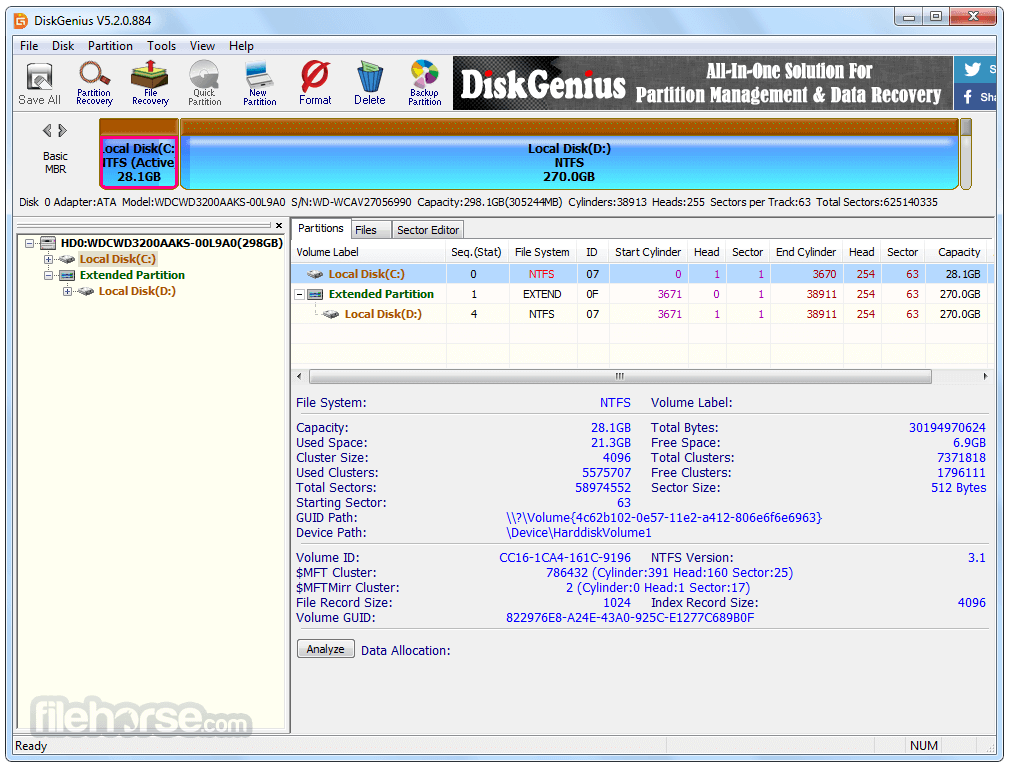
Safely and easily change the existing partition size or divide a partition into two smaller ones without losing any data. One-click partition a hard drive. It's very convenient to partition a new hard drive or repartition disk that contains partitions already.
Permanently erase existing and deleted data in a partition so that files cannot be recovered by any method well protecting sensitive data. Disk Genius can help you create and format a partition with the desired filesystem format.
It supports NTFS, exFAT, FAT32, FAT16, FAT12, EXT2, EXT3, and EXT4 file systems. Create a WinPE bootable disk and you can manage disk partition when a system crashes or there is no operating system on your computer.

DiskGenius provides an all-in-one partition backup solution to fully protect your data against any potential risks.
Image Partition
Efficiently back up everything on partition into one compressed file via several clicks, so that you can restore data from the image file when data loss or disaster occurs.
Clone Partition
Copy all data from one partition to another without interrupting any running programs, assuring you a copy 100% identical to the original drive.
Browse image files
Browse and retrieve files in the image file without restoring partition, and copy desired files/folders to a target location.
Supported file systems
Support backing up partitions formatted as NTFS, exFAT, FAT32, FAT16, FAT12, Ext2, Ext3 and Ext4.
Features and Highlights
- Provide basic partition operation include create a new partition, delete partition, hide partition. You can specify the detail parameters of partitions.
- Support many types of fixed disks such as IDE, SCSI, and SATA, etc. It also supports USB flash Disk, USB hard disk, memory card.
- Support the FAT12/FAT16/FAT32/NTFS file system.
- Can read files on the EXT2/EXT3 file system. Support Linux Logical Volume Management (LVM2).
- Support the GUID partition table style. Support GPT disks.
- Can quickly format FAT12/FAT16/FAT32/NTFS partitions. You can specify cluster size or select the option to compress the NTFS partition while formatting.
- Can browse any files in any supported partitions including hidden partitions, and also including the files that can not be accessed in the normal way. Even you can forcibly delete the files in supported partitions.
- Support assign or remove drive letters.
- Support deleted files recovery and recover files from formatted or inaccessible FAT12/FAT16/FAT32/NTFS partitions.
- Support lost partitions recovery (rebuild partition table). During the recovery operation, you can immediately see the files in the lost partitions. This is the best way to determine whether the partition found by Disk Genius is just you are looking for. Even you can recover lost files from the partition while the partition table is not saved to disk.
- Can backup partition table to a file or restore it from the file.
- Can backup whole partition to image file and restore partition from image file.
- Support copying partitions. Provide three copying modes include "Copy all sectors", "Copy all valid sectors" and "Copy all files".
- Support copying disks. Also, provide three copying modes like partitions copying.
- Support VMWare virtual disk file (".vmdk" file). Operate it like ordinary disks.
- Can copy files (from or to the virtual disk), recover lost files from the virtual disk file while the VMWare virtual machine is not running.
- Support ".img", ".ima" image file format.
- Support make USB-FDD and USB-ZIP mode bootable disk.

What`s New
Permanent File Deletion: If a partition cannot be locked after choosing "Delete Directory Entry," the software restarts into WinPE to complete the operation.
BitLocker Encryption: For operations like formatting, partition cloning, or disk cloning involving BitLocker-encrypted partitions:
- Encryption is temporarily disabled and restored afterward.
- Encryption is removed if necessary to ensure smooth execution.
Limitations: Resizing partitions within dynamic volumes is not supported.
USB disks now refresh correctly upon insertion.
Resolved display issues for exFAT and FAT32 partitions marked as damaged.
Fixed incorrect capacity display for USB drives with ISO partitions.
Alternatives
EaseUS Partition Master: A comprehensive partition management tool that allows users to effortlessly resize, merge, split, and format partitions. It also provides features like disk cloning and data recovery.
MiniTool Partition Wizard: A versatile partition management software offering a wide range of features, including partition resizing, conversion, and cloning. It supports various file systems and provides advanced options for disk optimization.
AOMEI Partition Assistant: A reliable partition manager with a user-friendly interface. It enables users to resize, merge, and split partitions easily. It also offers features like disk cloning, data migration, and OS migration.
Paragon Partition Manager: A powerful partition management solution with advanced features such as partition alignment, file system optimization, and secure disk wiping. It supports both basic and dynamic disks and provides comprehensive disk partitioning options.
Pricing
Standard
Personal License for 1 PC - $69.90
Includes essential features for everyday use, enabling users to recover lost data, manage disk partitions, and perform backups for partitions and hard drives.
Professional
Personal license for 1 PC - $ 99.90
Featuring a full suite of capabilities, including Load Current Partition Intelligently, access to Ext4/3/2 drives, BitLocker data recovery, RAID data recovery, and more.
System Requirements
DiskGenius is fully compatible with the latest Windows 11 and Windows Server 2022, designed to meet the needs of individuals, businesses, and enterprises alike.
PROS
- Comprehensive Disk Management Tools
- Data Recovery Capabilities
- Partition Backup and Restore
- User-Friendly Interface
- Supports Multiple File Systems
- Limited Features in Free Version
- Relatively High Pricing
- No MacOS Compatibility
- Occasional System Resource Usage
-
DiskGenius 6.20 Screenshots
The images below have been resized. Click on them to view the screenshots in full size.
-
-
-

-

What's new in this version:
New:
- Add the "Disk Speed Test" feature
- Add the "Windows Boot Repair and Conversion" feature
- Add the BMB21-2019 erase standard to the "Erase Sectors" feature
- Add support for restoring an individual partition from a PMFX disk image file
Enhanced:
- The "Verify Or Repair Bad Sectors/Blocks" feature displays disk read speed in the detection window during scanning
- The "Quick Partition" dialog box allows users to quickly select the number of partitions by pressing the numeric keys 1, 2, 7, 8, or 9
- The "Set Volume Name" dialog box supports selecting preset volume labels provided by the software
- The "Copy Sectors" feature supports resuming copy tasks after modifying the number of skipped bad sectors
- Add the "TRIM Optimization" option to the format dialog box
- The "Clone Partition" and "Clone Disk" features perform TRIM optimization on target partitions or disks before cloning
- Add support for Not Equal To search conditions (prefixed with "!") when searching hexadecimal data in the sector editor
- Optimize the display of capacity values in the program interface to show two decimal places
- Add a minimize button to dialogs that may require long processing time
- Enhance support for the ReFS file system
- Enhance support for newer HIF and MP4 formats when recovering files by type
- Enhance support for the EXT4 file system
- Enhance compatibility of the "File Recovery" feature with special data structures
Fixed:
- Fixed the issue that the selected file system type automatically reverted to NTFS after changing it to exFAT or EXT4 in the "Quick Partition" dialog box
- Fixed inaccurate Unicode string search results in the "Sector Editor" feature
- Fixed the issue that exceptions might occur when adding multiple disks in the "Erase Sectors" feature
- Fixed the issue that insufficient target disk space was incorrectly reported in some cases when cloning, backing up, or restoring disks
- Fixed the issue that folder modification timestamps were not preserved when copying files from ReFS partitions
- Fixed the issue that Excel-format reports generated by features such as file copying or bad sector checking could not be opened when the report contained more than one million rows
- Fixed the issue that folders were not displayed in the exclude-folder dialog box when backing up partitions to image files
- Fixed the issue that the "Erase Sectors" feature could not be executed in some cases
 OperaOpera 132.0 Build 5905.11 (64-bit)
 AdsPowerAdsPower - Antidetect Browser
 PhotoshopAdobe Photoshop CC 2026 27.7 (64-bit)
 BlueStacks AIBlueStacks AI
 OKXOKX - Buy Bitcoin or Ethereum
 CapCutCapCut Desktop 8.5.0
 PC RepairPC Repair Tool 2026
 Hero WarsHero Wars - Online Action Game
 TradingViewTradingView - Trusted by 100 Million Traders
 Forza HorizonForza Horizon 6
Comments and User Reviews