




 Raycast
 Logi Options+
 Flow Launcher
 Folder Color
 DeskScapes
 Fluent Search
 WindowBlinds
 Wallpaper
-
Latest Version
Stellarium 26.2 (64-bit) LATEST
-
Review by
-
Operating System
Windows 10 (64-bit) / Windows 11
-
User Rating
Click to vote -
Author / Product
-
Filename
stellarium-26.2-qt6-win64.exe
-
MD5 Checksum
bc47a35acb2d8bfbb240e720b19e348f

It provides a highly detailed and realistic simulation of stars, planets, nebulae, and other celestial objects, allowing users to view the sky as it would appear from any location on Earth.
With a vast catalog of over 600,000 stars and deep-space objects, Stellarium for PC is widely used in educational settings and by amateur astronomers for planning observations.
Key Features
Realistic Night Sky Simulation – Displays stars, planets, moons, constellations, and deep-sky objects with high accuracy.
Extensive Object Database – Over 600,000 cataloged stars and nebulae, with additional databases for more celestial objects.
Telescope Control – Connects to telescopes via third-party plugins for automated tracking.
Time Travel Feature – Simulates sky conditions at any past or future date.
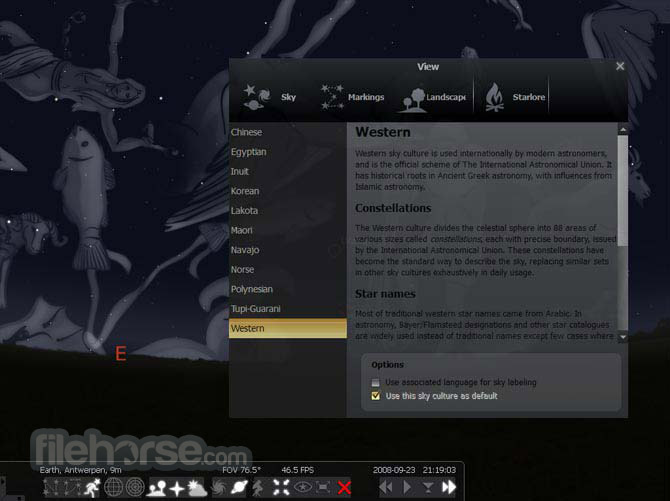
Constellations and Mythology – Displays constellation lines, names, and mythological figures from different cultures.
Customizable Views – Allows users to adjust sky elements, landscapes, and atmospheric conditions.
Educational Tools – Includes labels, grids, and overlays for learning and teaching astronomy.
Scripting Support – Enables automation and custom simulations using scripts.

Installation and Setup
- Download this program from the official website or FileHorse.
- Run the installer and follow the on-screen instructions.
- Choose installation options, including the default directory and additional plugins if needed.
- Launch the application and configure your viewing location using GPS coordinates or selecting a city.
- Adjust settings such as sky brightness, labels, and object visibility according to preference.
Set Location – Use the location window to specify your observing position.
Explore the Sky – Click and drag to move around the sky, zoom in with the mouse wheel.
Search for Objects – Use the search tool to find stars, planets, or constellations.

Time Control – Adjust the date and time slider to simulate past or future celestial events.
Enable Telescope Mode – If using a telescope, configure and connect it for guided tracking.
Use Shortcuts – Learn keyboard shortcuts to toggle grids, labels, and other features quickly.
FAQs
Is Stellarium free to use?
Yes, this program is completely FREE and open-source. However, premium versions with additional features are available for mobile devices.
Can Stellarium control my telescope?
Yes, with the appropriate plugin, it can connect to and control various telescope models.
Does Stellarium work offline?
Yes, it works entirely offline once installed, but online features like database updates require an internet connection.
Can I use Stellarium for astrophotography planning?
Yes, this app is widely used for planning astrophotography sessions by simulating star positions and visibility.
Is Stellarium available for macOS and Linux?
Yes, the software is cross-platform and available for Windows, macOS, and Linux.
System Requirements
- OS: Windows 7, 8, 10, 11 (64-bit)
- Processor: 2 GHz dual-core or higher
- RAM: 2 GB (4 GB recommended)
- Graphics: OpenGL 3.3 compatible GPU
- Storage: 1 GB of available space
- Free and open-source
- Realistic sky simulation with a vast celestial database
- Telescope control capability
- Educational and customizable
- Works offline after installation
- Requires a decent GPU for smooth rendering
- Some advanced features need plugins
Stellarium is an outstanding planetarium software for anyone interested in astronomy, from casual stargazers to serious amateur astronomers. Its detailed sky simulation, telescope control support, and educational features make it a valuable tool for planning observations and learning about celestial objects.
Also Available: Stellarium for Mac
-
Stellarium 26.2 (64-bit) Screenshots
The images below have been resized. Click on them to view the screenshots in full size.
-
-
-
What's new in this version:
Added:
- new IAU names since Nov 2025
- IAU star names with only Gaia numbers
- scripting command for Equation of Time
- territory.geojson data for sky cultures
- Chinese Yuan Dynasty sky culture
- storage permission request for Android
- a workaround for Intel’s garbage GLSL sin & asin
- a new lightweight atmosphere model
- mutiple search path for plugins and data
- ability translation of designations for axes of celestial coordinate systems
- util to fetch new orbit data elemets from JPL for ssystem_major and updated orbital elements of the moons
- visualization of star trails
- “Common names” tab into SkyCultureMaker plugin
- missing part of scripting docs
- a filter to list only enabled surveys
- new plugin: Planes
- support for zooming the map in Location dialog
- Byzantine calendar into Calendars plugin
- AndroidManifest.xml and an icon
- support building main executable for Android
- support for high graphics mode on GLES3
- hook for AstroCalc/Almanac tool to updating values when the date is changed
- context for 3 constellation names to avoid conflicts with minor planets names
- automatic update data after toggling the decimal degrees flag in AstroCalc/Positions tool
- support for CelesTrak CSV instead of TLE in Satellites plugin
- byname to constellation information and adjust format to SC editor in Sky Culture Maker plugin
- new time steps for AstroCalc/Ephemeris tool
- ability to use inex and tritos as periodic cycles
- Gamepad Controller support for Remote Control plugin
- ability to let SSO’s have multiple epochs
- missing package for qt6-based AppImage
- improvements for ephemeris visualization
- waitForKeypress() to support Bluetooth remote presentations
Fixed:
- InfoString issue
- blending issue in Satellites plugin
- Exoplanets plugin: Ignore atmospheric extinction when distribution mode is enabled
- coordinates of Boyden Observatory
- nebula names in search results
- grammar in typo reporting sentence in CONTRIBUTING.md
- DSO names
- showing the distance data in Pulsars plugin
- error in LocationService in RemoteControl Plugin
- Solar Corona refraction
- outline data for M20
- drawing the protractors in Oculars plugin
- drawing reticle in Oculars plugin
- old-fashioned config store of dynamic moon scaling
- asterism reference exclusion
- build without media
- Windows build with INDI
- precision of GLSL ES StelProjector project and unproject
- GLSL ES refraction precision
- logic of survey/model choice
- saving preferences for TextToSpeech feature
- compiling with INDI 2.2.2 on NetBSD
- single-constellation issue in AstroCalc tools
- null pointer dereference
- typos
- rounding issue in Equation of Time plugin
- scripting docs
- missing translatable type of object
- observing list designation column sorting
- type of comment in the UI file
- compilation on Android when missing fseeko()
- compatibility of viewDialog with Qt5
- missing excludes
- broken outline shape on the top-left side of the map
- the obtaining of distance in Pulsars plugin according to changes in ATNF Pulsars Catalogues v2.8.0
- coordinates and altitude of North Georgia Astronomical Observatory
- compilation of PFNGLMINSAMPLESHADINGPROC on Android
- the WaitForKey script command
- FOV of Trees landscape
- Calendars plugin: allow playing in dialog while main display is off
- Calendars plugin: improve dialog visibility on Linux
- tracked object jumps while zooming with viewport offset
- visibility of progress bar for HiPS after surveys are disabled
- internal format of dithering texture in GLES
- shortening names of asteroids
- build on GLES2-based Qt 6.9.3
Changed:
- Changed core: Don’t create dithering texture in low graphics mode
- Changed core: Protect the whole jpl_pleph with the mutex
- Changed core: Make planet hint circle better visible again on scaled hiDPI screens
- Changed core: Prevent occasional race condition in SolarSystem::computePositions()
- Changed core: Don’t show lunar ‘halo’ during solar eclipse
- Changed core: Only suppress earth shadow when moon is actually scaled up
- Changed core: Make RTS independent from scaling
- Changed core: A few clarifications in skyculture names
- Changed core: Pass log messages to the default handler on Android
- Changed core: Use a gamma to reduce LW atmo banding on GLESv2 even more
- Changed core: Use default atmosphere as the fallback
- Changed core: Don’t use GL_RGBA8 internal format in TextureAverageComputer
- Changed core: Add a fallback for systems without VAO support in TextureAverageComputer
- Changed core: Don’t use GL_DRAW_FRAMEBUFFER{,_BINDING} in LW atmo and TextureAverageComputer
- Changed core: Reduce banding of LW atmosphere in GLESv2
- Changed core: Don’t try to use RGBA16F FBO in GLESv2
- Changed core: Don’t require HighGraphicsFunctions in TextureAverageComputer
- Changed core: Don’t use RGBA16F for texture averaging in LW atmosphere
- Changed core: Enable INDI client support on Windows
- Changed core: Move sinh/asinh functions to the global shader prefix
- Changed core: Use highp in all projections’ shaders
- Changed core: Project vertices of the Moon on the GPU instead of the CPU
- Changed core: Render the Moon using a proper 3D model
- Changed core: Compute Moon texture coordinates inside fragment shader
- Changed core: Make TextureAverageComputer fully usable in GLESv3
- Changed core: Make TextureAverageComputer check GLES-compatible
- Changed core: Make atmosphere model selectable in GLES mode
- Changed core: TextureAverageComputer: Wrap OpenGL calls in GL() macro
- Changed core: Restore compilation without GUI
- Changed core: Colored trails
- Changed core: Make sure splash screen preserves OpenGL context
- Changed Location dialog: Add a threshold for map clicks
- Changed Location dialog: Use bilinear interpolation for upscaling the map
- Changed Location dialog: Allow panning the map beyond ±180° longitude
- Changed Location dialog: Move map point <-> lon/lat conversion to separate methods
- Changed Location dialog: Don’t resize Location dialog map on every paint
- Changed Location dialog: show location filter circle
- Changed Satellites plugin: draw satellites in point mode also in penumbra
- Changed Satellites plugin: Switch to using CSV instead of TLE in default sources
- Changed Satellites plugin: Move unzipping to a separate function
- Changed Satellites plugin: Avoid nested resets of SatellitesListModel
- Changed Satellites plugin: Print out the failing TLE line
- Changed Satellites plugin: Print download error in addition to error string
- Changed Telescope Control plugin: simplify initialization
- Changed Japanese Yasui Map sky culture
- Changed Korean Sky Culture
- Updated Bali skyculture: Apply image compression
- Updated the default list of satellites
- Updated default catalog of pulsars
- Updated the default catalog of exoplanets
- Updated the orbital elements for minor bodies of Solar system
- Updated the list of contributoirs
- Updated the names of DSO
- Updated the discovery circumstances data for comets and minor planets
- Updated the territory data for 2 Arabic SC
- Updated the default eyepieces reticles in Oculars plugin
- Updated the translations
- Updated the default bookmarks for Solar System Editor plugin
- Updated the planetary features data
- Updated the photometry data for satellites
- Updated the list of groups of satellites
- Updated the ephemeris for Himalia
- Updated rules for dependencies
- Removed deleted constellations from Chinese SC
- Removed deprecated TimeSpec use for UTC cases in Satellites plugin
- Removed assertions for quite possible situations
 OperaOpera 132.0 Build 5905.102 (64-bit)
 LDPlayerLDPlayer - Android Emulator
 PhotoshopAdobe Photoshop CC 2026 27.7 (64-bit)
 BlueStacks AIBlueStacks AI
 GTA 6GTA 6 for PS5
 CapCutCapCut Desktop 8.7.0
 PC RepairPC Repair Tool 2026
 Hero WarsHero Wars - Online Action Game
 TradingViewTradingView - Trusted by 100 Million Traders
 Forza HorizonForza Horizon 6
Comments and User Reviews