




 Restream
 Filmora
 Camo Studio
 Premiere Pro
 LitMedia AI
 OpusClip
 Kling AI
-
Latest Version
Aicoosoft Video Converter 7.0.1 LATEST
-
Review by
-
Operating System
Windows 7 / Windows 8 / Windows 10 / Windows 11
-
User Rating
Click to vote -
Author / Product
-
Filename
aicoosoft-video-conveter.exe
Aicoosoft Video Converter makes full use of AI technology, and when compared with traditional video converters, this video converter has a better balance between the conversion speed and output video quality.
Aicoosoft Video Converter for PC has unique advantages in video conversion and video compression, and it has a powerful video downloading feature.
It makes specific improvements in technology for the following users:
Video Editing Users
Better support for HD video conversion, compression, and popular video editing software.
Home Video Users
Supports more formats, the operation is very simple, and the conversion speed is very fast, making the conversion of various home video is very cost-effective.
DVD Users
For users who retain many DVDs and want to watch videos anywhere, the speed of converting DVDs to digital files is very fast.
Entertainment Users
For users who want to obtain videos and audio online, this video converter has powerful and convenient video downloading features.
Aicoosoft HD Video Converter app can convert 4K & HD videos like H264(AVC) and H265(HEVC), 1080P, 720P videos to any format for playback. Or you can convert videos to any device or share with others. 1:1 conversion quality with 4K videos with no quality loss by AI technology.
Compress HD videos from GoPro, HD cameras, Camcorders, and more with selective parameters thanks to AI technology. Flexible trim videos into clips, easy to delete unwanted segments, or merge multiple segments you want into one from a movie or TV episode. Using the video merging function, you can creatively stitch any video you want.
Key Features
Lossless Conversion Technology
It uses advanced converting technology to maintain the quality of your video during the conversion process.
GPU Acceleration
With advanced GPU acceleration technology, Aicoosoft Converter Software empowers video conversion with lightning-fast speed.
Multi-core Processor Optimization
The app uses AI technology that improves the conversion speed by optimizing the multi-core processor. This will dramatically improve the conversion speed.
Convert video/audio files to more than 1000 formats
Convert video or audio files to more than 1000 video and audio formats without losing quality. This superfast video converter allows you to accomplish the audio or video converting process in seconds.
Compress HD Video
Compress HD video without losing quality. You can change video resolution, bit rate, video format, and customize file size flexibility.
Video Compression Setting
Make up the settings for your video compression. You can handle the compression settings in seconds, and you'll find multiple setting options for your video compression.
Compression at One Click
Aicoosoft Video Compressor is efficient at multiple video compressions, allowing you to compress unlimited videos with one click.
Support 1000+ sites
The powerful built-in video downloader allows you to download videos from more than 1000 video and audio sharing sites.
Download HD Video
This video downloader allows you to download HD videos, such as 1080P and 4K, from streaming sites quickly and easily.
Video to MP3
This video downloader allows you to download videos to MP3 with one click, automatic conversion to high-quality MP3.
Useful DVD Converter
An easy-to-use DVD converter allows you to convert your DVDs to a digital file with just 3 clicks. Support to convert DVD to all popular formats such as MP4, MOV, AVI, MKV, MPEG, M4V, etc.

User Interface
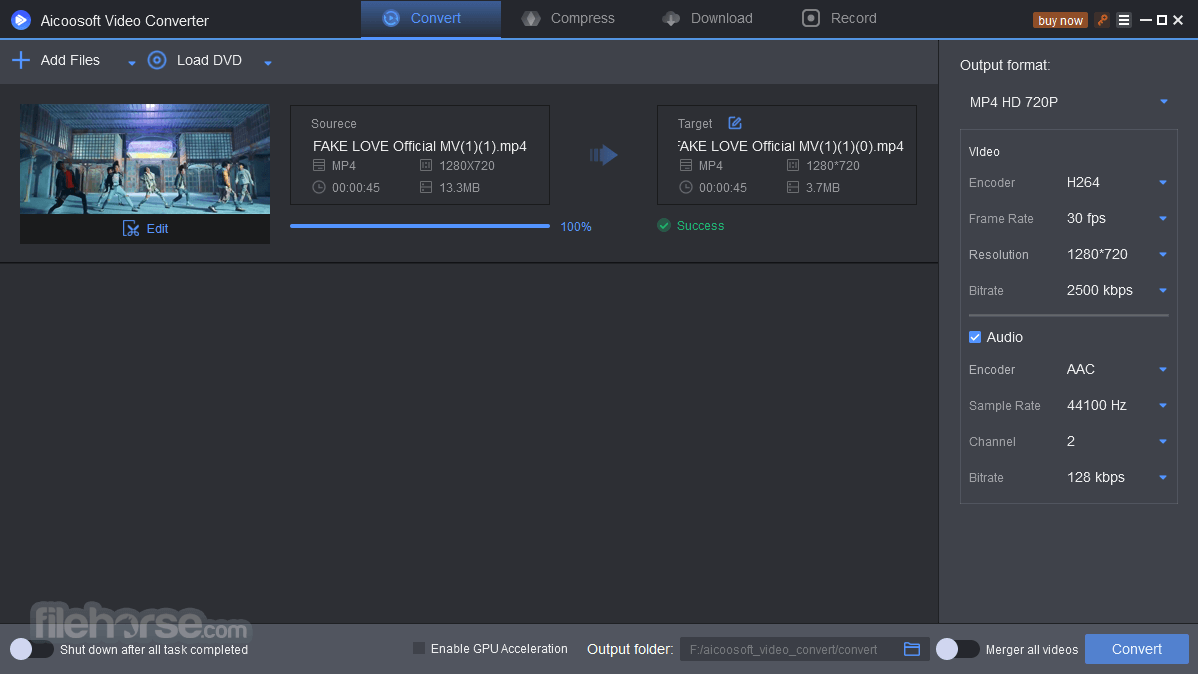
The program features an intuitive and user-friendly interface. The software's layout is well-organized, making it accessible to both beginners and experienced users.
The main window presents clear options for adding files, choosing output formats, and initiating conversions or editing tasks. The design is clean and uncluttered, ensuring a smooth and hassle-free user experience.
Installation and Setup
Installing Aicoosoft Video Converter is a straightforward process. Upon downloading the software from the official website or FileHorse, users can follow the installation wizard's prompts, which guide them through the setup process.
The software is compatible with both Windows and macOS, ensuring broad accessibility. Once installed, users can start using the app immediately, with no complex configurations required.
How to Use
Is Aicoosoft Video Converter available for Mac and Windows?
Yes, the tool is compatible with both macOS and Windows operating systems.
What video formats does Aicoosoft Video Converter support?
It supports over 1000 video and audio formats, including popular ones like MP4, AVI, MKV, and lesser-known formats for comprehensive compatibility.
Does Aicoosoft Video Converter offer GPU acceleration for faster conversion?
Yes, the software supports GPU acceleration to significantly speed up the conversion process.
Can I edit videos within Aicoosoft Video Converter, or do I need a separate video editing software?
It includes a built-in video editor that allows you to perform basic editing tasks such as trimming, merging, adding subtitles, and more.
Is there a free trial available for Aicoosoft Video Converter?
Yes, Aicoosoft offers a free trial version of the software with limited functionality, allowing users to explore its features before making a purchase.

Alternatives
Any Video Converter - All-in-One free video converting software with millions of happy users!
Movavi Video Converter - Convert to any format and save for any device!
WinX HD Video Converter Deluxe - World`s No.1 Fast Ultra HD Video Converter for PC.
AnyMP4 Video Converter Ultimate - Rip DVD and convert 4K/1080p HD video - Support 200+ Formats!
Pricing
It offers flexible pricing options to suit different user needs.
Pricing may vary based on the version and license type, but it typically includes a free trial, a one-year license, and a lifetime license.
Users can visit the official website for the most up-to-date pricing details.
One Year License - $19.99
Pay a yearly subscription / Free update for 1 year
System Requirements
Aicoosoft Video Converter proves to be a powerful and versatile multimedia tool that caters to a wide range of users, from novices to professionals. With its extensive format support, high-speed conversion, user-friendly interface, and built-in editing capabilities, it simplifies the process of handling multimedia files. While it may not replace dedicated video editing software for professionals, it excels at its primary function: converting and managing multimedia content.
Whether you're looking to convert videos for playback on various devices or perform basic edits, Aicoosoft Video Converter is a valuable addition to your multimedia toolkit. Its flexible pricing options and free trial make it accessible to users of all backgrounds, allowing you to explore its features and determine if it's the right fit for your needs.
Note: The trial version is restricted to convert only 1/3 of the video, edit only 1/3 of the length of the video, compress only 1/3 of the length of the video, download 1 video file from online sites, and record a limited video.
Aicoosoft Video Converter for PC has unique advantages in video conversion and video compression, and it has a powerful video downloading feature.
It makes specific improvements in technology for the following users:
Video Editing Users
Better support for HD video conversion, compression, and popular video editing software.
Home Video Users
Supports more formats, the operation is very simple, and the conversion speed is very fast, making the conversion of various home video is very cost-effective.
DVD Users
For users who retain many DVDs and want to watch videos anywhere, the speed of converting DVDs to digital files is very fast.
Entertainment Users
For users who want to obtain videos and audio online, this video converter has powerful and convenient video downloading features.
Aicoosoft HD Video Converter app can convert 4K & HD videos like H264(AVC) and H265(HEVC), 1080P, 720P videos to any format for playback. Or you can convert videos to any device or share with others. 1:1 conversion quality with 4K videos with no quality loss by AI technology.
Compress HD videos from GoPro, HD cameras, Camcorders, and more with selective parameters thanks to AI technology. Flexible trim videos into clips, easy to delete unwanted segments, or merge multiple segments you want into one from a movie or TV episode. Using the video merging function, you can creatively stitch any video you want.
Key Features
Lossless Conversion Technology
It uses advanced converting technology to maintain the quality of your video during the conversion process.
GPU Acceleration
With advanced GPU acceleration technology, Aicoosoft Converter Software empowers video conversion with lightning-fast speed.
Multi-core Processor Optimization
The app uses AI technology that improves the conversion speed by optimizing the multi-core processor. This will dramatically improve the conversion speed.
Convert video/audio files to more than 1000 formats
Convert video or audio files to more than 1000 video and audio formats without losing quality. This superfast video converter allows you to accomplish the audio or video converting process in seconds.
Compress HD Video
Compress HD video without losing quality. You can change video resolution, bit rate, video format, and customize file size flexibility.
Video Compression Setting
Make up the settings for your video compression. You can handle the compression settings in seconds, and you'll find multiple setting options for your video compression.
Compression at One Click
Aicoosoft Video Compressor is efficient at multiple video compressions, allowing you to compress unlimited videos with one click.
Support 1000+ sites
The powerful built-in video downloader allows you to download videos from more than 1000 video and audio sharing sites.
Download HD Video
This video downloader allows you to download HD videos, such as 1080P and 4K, from streaming sites quickly and easily.
Video to MP3
This video downloader allows you to download videos to MP3 with one click, automatic conversion to high-quality MP3.
Useful DVD Converter
An easy-to-use DVD converter allows you to convert your DVDs to a digital file with just 3 clicks. Support to convert DVD to all popular formats such as MP4, MOV, AVI, MKV, MPEG, M4V, etc.
User Interface
The program features an intuitive and user-friendly interface. The software's layout is well-organized, making it accessible to both beginners and experienced users.
The main window presents clear options for adding files, choosing output formats, and initiating conversions or editing tasks. The design is clean and uncluttered, ensuring a smooth and hassle-free user experience.
Installation and Setup
Installing Aicoosoft Video Converter is a straightforward process. Upon downloading the software from the official website or FileHorse, users can follow the installation wizard's prompts, which guide them through the setup process.
The software is compatible with both Windows and macOS, ensuring broad accessibility. Once installed, users can start using the app immediately, with no complex configurations required.
How to Use
- Import Your Videos: Launch the software and click on the "Add Files" button to import the video(s) you want to convert or edit.
- Choose Output Format: Select your desired output format from the extensive list provided.
- Edit (Optional): If needed, use the built-in video editor to make modifications to your videos, such as cutting, merging, adding subtitles, or applying effects.
- Customize Settings (Optional): Fine-tune video and audio settings, including resolution, bitrate, and more, to meet your specific requirements.
- Start Conversion: Click the "Convert" button to begin the conversion process. Aicoosoft's high-speed conversion technology ensures a swift outcome.
- Save Your Files: Once the conversion is complete, your files will be ready in the output folder you specified.
Is Aicoosoft Video Converter available for Mac and Windows?
Yes, the tool is compatible with both macOS and Windows operating systems.
What video formats does Aicoosoft Video Converter support?
It supports over 1000 video and audio formats, including popular ones like MP4, AVI, MKV, and lesser-known formats for comprehensive compatibility.
Does Aicoosoft Video Converter offer GPU acceleration for faster conversion?
Yes, the software supports GPU acceleration to significantly speed up the conversion process.
Can I edit videos within Aicoosoft Video Converter, or do I need a separate video editing software?
It includes a built-in video editor that allows you to perform basic editing tasks such as trimming, merging, adding subtitles, and more.
Is there a free trial available for Aicoosoft Video Converter?
Yes, Aicoosoft offers a free trial version of the software with limited functionality, allowing users to explore its features before making a purchase.
Alternatives
Any Video Converter - All-in-One free video converting software with millions of happy users!
Movavi Video Converter - Convert to any format and save for any device!
WinX HD Video Converter Deluxe - World`s No.1 Fast Ultra HD Video Converter for PC.
AnyMP4 Video Converter Ultimate - Rip DVD and convert 4K/1080p HD video - Support 200+ Formats!
Pricing
It offers flexible pricing options to suit different user needs.
Pricing may vary based on the version and license type, but it typically includes a free trial, a one-year license, and a lifetime license.
Users can visit the official website for the most up-to-date pricing details.
One Year License - $19.99
Pay a yearly subscription / Free update for 1 year
System Requirements
- OS: Windows 7 or later
- CPU: 1GHz Intel or AMD CPU
- Memory: 1GB RAM
- Disk Space: 100MB of free disk space.
- Vast format support for video and audio.
- High-speed conversion with GPU acceleration.
- User-friendly interface.
- Built-in video editor.
- Batch processing for efficiency.
- Comprehensive customization options.
- It's been a long time since there was an update on the official website.
- Limited advanced video editing features compared to dedicated software.
- May be considered expensive by some users, depending on the chosen license.
Aicoosoft Video Converter proves to be a powerful and versatile multimedia tool that caters to a wide range of users, from novices to professionals. With its extensive format support, high-speed conversion, user-friendly interface, and built-in editing capabilities, it simplifies the process of handling multimedia files. While it may not replace dedicated video editing software for professionals, it excels at its primary function: converting and managing multimedia content.
Whether you're looking to convert videos for playback on various devices or perform basic edits, Aicoosoft Video Converter is a valuable addition to your multimedia toolkit. Its flexible pricing options and free trial make it accessible to users of all backgrounds, allowing you to explore its features and determine if it's the right fit for your needs.
Note: The trial version is restricted to convert only 1/3 of the video, edit only 1/3 of the length of the video, compress only 1/3 of the length of the video, download 1 video file from online sites, and record a limited video.
Why is this app published on FileHorse? (More info)
-
Aicoosoft Video Converter 7.0.1 Screenshots
The images below have been resized. Click on them to view the screenshots in full size.
-
-
-

 OperaOpera 133.0 Build 5932.24 (64-bit)
 LDPlayerLDPlayer - Android Emulator
 PhotoshopAdobe Photoshop CC 2026 27.7 (64-bit)
 BlueStacks AIBlueStacks AI
 GTA 6GTA 6 for PS5
 CapCutCapCut Desktop 8.7.0
 PC RepairPC Repair Tool 2026
 Hero WarsHero Wars - Online Action Game
 TradingViewTradingView - Trusted by 100 Million Traders
 Forza HorizonForza Horizon 6
Comments and User Reviews