




 InDesign
 CorelDRAW Go
 Photoshop
 Luminar Neo
 Lightroom
 Pixelcut
 Affinity
 Illustrator
-
Latest Version
Blender Portable 5.2.0 LATEST
-
Review by
-
Operating System
Windows 8 (64-bit) / Windows 10 (64-bit) / Windows 11
-
User Rating
Click to vote -
Author / Product
-
Filename
blender-5.2.0-windows-x64.zip
-
MD5 Checksum
8ab7bee33c74d2d95e41bbd344d13f1a
Blender Portable is the mobile portable version of the renowned open-source 3D creation suite, Blender. Packaged by PortableApps, it allows users to run Blender from a USB drive or any external storage device without installing it on a host computer.
It includes all core functionalities of the standard Blender application, such as modeling, animation, rendering, video editing, and more, in a self-contained, portable format ideal for creatives on the go.
Features
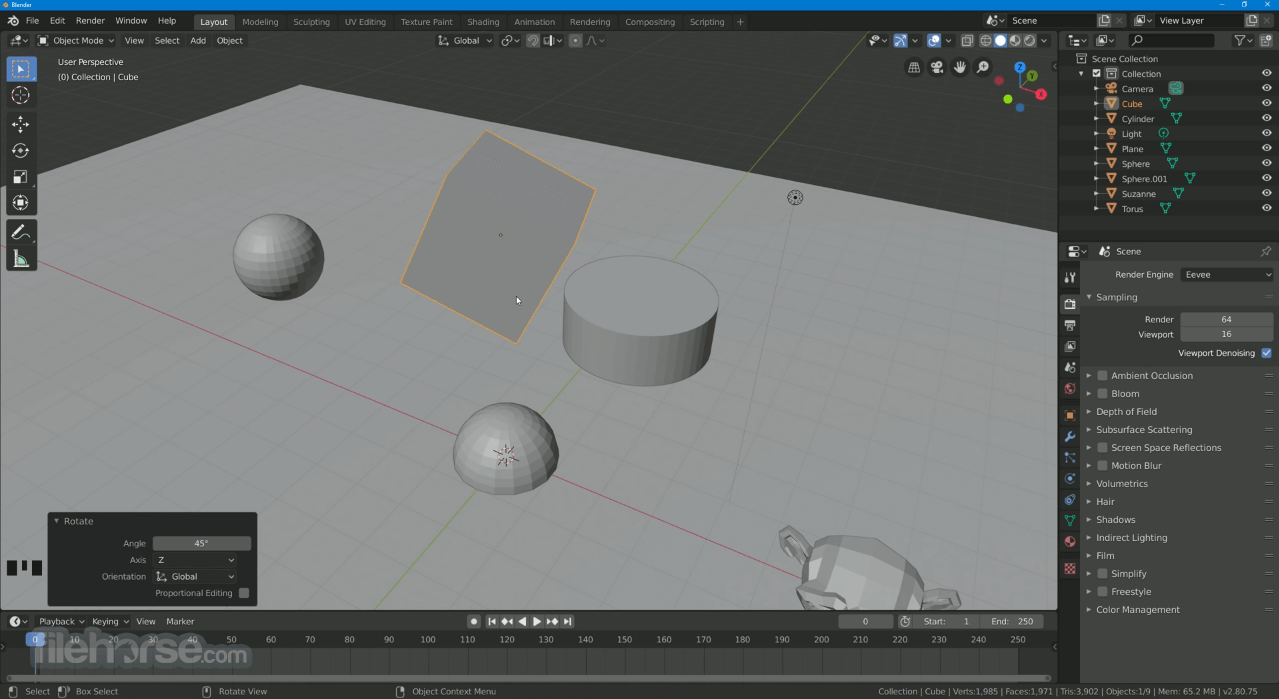
Blender Portable retains the same professional, customizable user interface as the full version of Blender.
It uses a windowed environment with tabs and panels for different workspaces—Layout, Modeling, Sculpting, UV Editing, etc.
Toolbars are highly configurable, and support for multi-monitor setups ensures that professionals can still enjoy a fluid workflow on the go.
Installation and Setup
It can be downloaded from the PortableApps website or other verified sources.
Installation involves simply extracting the files to a USB drive or folder of choice.
No admin rights or system modifications are necessary, making it ideal for use on shared or restricted machines.
How to Use
To use Blender Portable, launch the executable from your USB drive. Projects can be saved directly to the external drive or synced to the cloud.
All preferences and settings are stored within the same folder, ensuring consistency across different machines.
As with the regular version, beginners may find a learning curve, but tutorials and templates are readily available.
FAQs
Does Blender Portable have the same features as standard Blender?
Yes, it includes all features of the full desktop version.
Can I install add-ons and custom scripts?
Yes, add-ons and scripts are supported and saved within the portable directory.
Is Blender Portable slower than the installed version?
Performance is generally the same, though USB read/write speeds may affect load times.
Does it require internet access?
No, it can run offline once downloaded.
Can I use it on macOS or Linux?
Blender Portable (via PortableApps) is designed for Windows only.
Alternatives
Standard Blender (installed version)
SketchUp Make (limited features, browser-based)
Cinema 4D (paid, with strong motion graphics tools)
System Requirements
Windows 8.1/10/11 (64-bit)
4 GB RAM minimum (8 GB or more recommended)
OpenGL-compatible graphics card
USB 3.0 drive recommended for faster performance
PROS
Blender Portable is a powerful, flexible solution for 3D artists, animators, and video editors who need a reliable toolkit on the move. With all the core Blender features intact and the ability to run from a USB drive, it’s an excellent option for students, freelancers, or professionals working in dynamic environments.
Also Available: Download Blender for Mac
It includes all core functionalities of the standard Blender application, such as modeling, animation, rendering, video editing, and more, in a self-contained, portable format ideal for creatives on the go.
Features
- Full-featured 3D modeling, sculpting, and rendering capabilities
- Support for animation, rigging, and simulation (particles, cloth, smoke)
- Video sequence editor for non-linear video editing
- Grease Pencil for 2D animation within a 3D environment
- Cycles and Eevee rendering engines
- Python scripting support for custom tools and plugins
- Runs without installation or leaving traces on the host system
Blender Portable retains the same professional, customizable user interface as the full version of Blender.
It uses a windowed environment with tabs and panels for different workspaces—Layout, Modeling, Sculpting, UV Editing, etc.
Toolbars are highly configurable, and support for multi-monitor setups ensures that professionals can still enjoy a fluid workflow on the go.
Installation and Setup
It can be downloaded from the PortableApps website or other verified sources.
Installation involves simply extracting the files to a USB drive or folder of choice.
No admin rights or system modifications are necessary, making it ideal for use on shared or restricted machines.
How to Use
To use Blender Portable, launch the executable from your USB drive. Projects can be saved directly to the external drive or synced to the cloud.
All preferences and settings are stored within the same folder, ensuring consistency across different machines.
As with the regular version, beginners may find a learning curve, but tutorials and templates are readily available.
FAQs
Does Blender Portable have the same features as standard Blender?
Yes, it includes all features of the full desktop version.
Can I install add-ons and custom scripts?
Yes, add-ons and scripts are supported and saved within the portable directory.
Is Blender Portable slower than the installed version?
Performance is generally the same, though USB read/write speeds may affect load times.
Does it require internet access?
No, it can run offline once downloaded.
Can I use it on macOS or Linux?
Blender Portable (via PortableApps) is designed for Windows only.
Alternatives
Standard Blender (installed version)
SketchUp Make (limited features, browser-based)
Cinema 4D (paid, with strong motion graphics tools)
System Requirements
Windows 8.1/10/11 (64-bit)
4 GB RAM minimum (8 GB or more recommended)
OpenGL-compatible graphics card
USB 3.0 drive recommended for faster performance
PROS
- Fully portable, no installation needed
- Same features as desktop Blender
- Free and open-source
- Saves preferences and add-ons on the drive
- Great for working across multiple machines
- Slightly slower on older USB drives
- Learning curve for new users
- Not officially supported by Blender Foundation
- Limited to Windows systems only
Blender Portable is a powerful, flexible solution for 3D artists, animators, and video editors who need a reliable toolkit on the move. With all the core Blender features intact and the ability to run from a USB drive, it’s an excellent option for students, freelancers, or professionals working in dynamic environments.
Also Available: Download Blender for Mac
Why is this app published on FileHorse? (More info)
-
Blender Portable 5.2.0 Screenshots
The images below have been resized. Click on them to view the screenshots in full size.
-

-

-

-

 OperaOpera 135.0 Build 5973.133 (64-bit)
 LDPlayerLDPlayer - Android Emulator
 Adobe AcrobatAdobe Acrobat Pro 2026.002.21901
 MalwarebytesMalwarebytes Premium 5.7.0
 Premiere ProAdobe Premiere Pro CC 2026 26.5
 CapCutCapCut Desktop 9.3.0
 PC RepairPC Repair Tool 2026
 Hero WarsHero Wars - Online Action Game
 TradingViewTradingView - Trusted by 100 Million Traders
 WARDOGSWARDOGS - All Out Warfare FPS
Comments and User Reviews