




 SystemCare
 4WinKey
 GearUP Booster
 Drive Monitor
 AOMEI Cloner
 Windhawk
 CCleaner
-
Latest Version
Mouse Jiggler 3.0.0 LATEST
-
Review by
-
Operating System
Windows 7 64 / Windows 8 64 / Windows 10 64 / Windows 11
-
User Rating
Click to vote -
Author / Product
-
Filename
MouseJiggler-standalone-x64.zip
Useful for avoiding desktop screensavers or other things triggered by idle detection that, for whatever reason, you can't turn off any other way; or as a quick way to stop a screensaver activating during an installation or when monitoring a long operation without actually having to muck about with the screensaver settings.
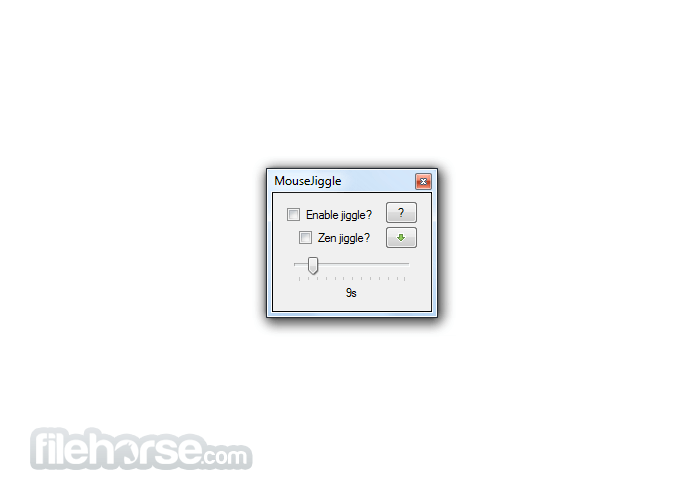
Simply run the MouseJiggle.exe included in the release .zip file. Check the "Enable jiggle?" checkbox to start jiggling the mouse pointer; uncheck it to stop. The jiggle is slight enough that you should be able to use the computer normally, even with jiggling enabled.
Portable Version
A portable version of Mouse Jiggler (i.e., one which does not require the .NET runtime, and so can be installed on locked-down corporate machines that don't have it installed) is available on the releases page, as MouseJiggler-portable.zip. Just unzip and go.
Operation
- The 'Zen jiggle?' checkbox enables a mode in which the pointer is jiggled 'virtually' - the system believes it to be moving and thus screen saver activation, etc., is prevented, but the pointer does not actually move.
- To minimize this program to the system tray, click the button marked with a green, down-pointing arrow.
- If you want to start the MouseJiggler with jiggling already enabled, run the MouseJiggle.exe with either the -j or --jiggle command-line switch.
- The "-z" / "--zen" command-line switch forces zen jiggling to be enabled for the current (and future) invocations of MouseJiggler.
- (Added in 1.5+): The "-m" / "--minimized" command-like switch tells MouseJiggler to start already minimized.
What is Mouse Jiggler used for?
Mouse Jiggler is a small Windows utility designed to prevent your computer from going idle. It simulates mouse movement, which helps keep your system awake and prevents screen savers, sleep mode, or automatic lock from activating.
Does Mouse Jiggler physically move the cursor on the screen?
It can, but it doesn’t have to. Mouse Jiggler offers two modes:
- Normal mode, which visibly moves the cursor slightly.
- “Zen jiggle” mode, which simulates mouse input without actually moving the visible cursor on the screen.
Is Mouse Jiggler safe and legitimate to use?
Yes. Mouse Jiggler is an open-source utility available on GitHub, which means its source code can be reviewed publicly. It does not contain hidden background services or bundled software. As with any tool, users should download it only from the official repository and use it in accordance with workplace policies if installed on a company device.
PROS
- Simple to Use: This program is straightforward to operate, requiring no advanced setup.
- Portable: The tool is lightweight and doesn’t need installation, making it convenient to carry on a USB stick.
- Prevents Sleep Mode: It effectively prevents your computer from entering sleep mode by simulating mouse movements.
- Open-Source: Being open-source, it's free to use and can be modified to suit specific needs.
- No Installation Required: It runs as a standalone executable, avoiding system modifications.
- Limited Functionality: The tool's primary function is basic, with no additional features for more complex tasks.
- No Customization: The app doesn’t offer advanced settings for mouse movements, limiting its versatility.
-
Mouse Jiggler 3.0.0 Screenshots
The images below have been resized. Click on them to view the screenshots in full size.
What's new in this version:
Changed:
- So much has changed. It's been a long time
- Mouse Jiggler is now based on .NET 10. Concurrently, support for Windows versions older than 10 has been dropped.
- Added tray menu and the option to randomize the jiggle interval
- The settings drop-down can now be opened from the command line using the -g / --settings option
- The jiggle interval is now set using a spinner, rather than a poorly-scaled slider
- Multiple jiggle modes are now supported, including normal, zen, circle, and linear (inspired by tobster-de/mousejiggler)
- The jiggle size can now be scaled by factors up to 120
- Command-line help output now slightly less janky
- The system now should not go to sleep while jiggling is active (using SetThreadExecutionState)
- Jiggling is temporarily suspended when the mouse is moved manually
- Various UI and internal improvements
- Now with extra vibe coding! ✨
 OperaOpera 128.0 Build 5807.25 (64-bit)
 Kling AIKling AI - Text or Image to Video
 PhotoshopAdobe Photoshop CC 2026 27.4 (64-bit)
 BlueStacksBlueStacks 10.42.166.1001
 OKXOKX - Buy Bitcoin or Ethereum
 CapCutCapCut 7.9.0
 PC RepairPC Repair Tool 2026
 Hero WarsHero Wars - Online Action Game
 TradingViewTradingView - Trusted by 100 Million Traders
 AdGuard VPNAdGuard VPN 2.9.0
Comments and User Reviews