




 Premiere Pro
 Filmora
 Kling AI
 Restream
 OpusClip
 Camo Studio
 LitMedia AI
-
Latest Version
MPC-BE 1.9.0 (64-bit) LATEST
-
Review by
-
Operating System
Windows 7 64 / Windows 8 64 / Windows 10 64 / Windows 11
-
User Rating
Click to vote -
Author / Product
-
Filename
MPC-BE.1.9.0.x64.exe
-
MD5 Checksum
093a2d7648108573455a6a60e5f4105c
It is a fork of the original Media Player Classic (MPC) and MPC-HC (Home Cinema), redesigned with a modern aesthetic and additional functionality.
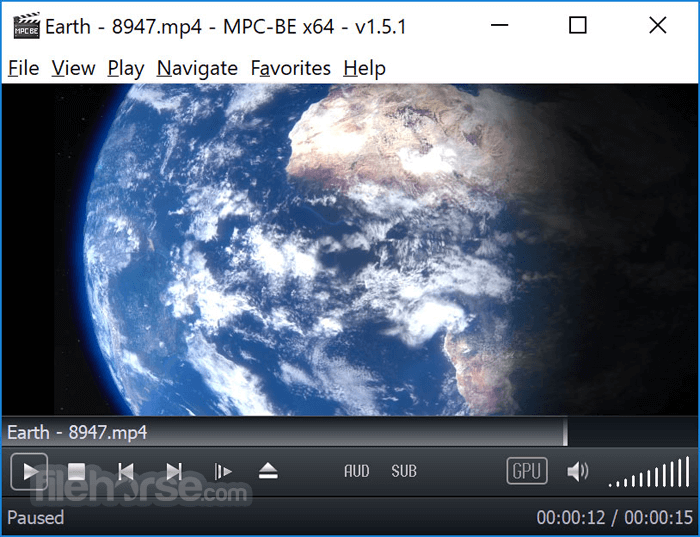
MPC-BE aims to offer users an efficient, customizable, and powerful media playback experience without unnecessary bloat or ads.
Developed by an independent team of volunteers, MPC-BE focuses on improving performance, compatibility, and usability for all types of users, from casual viewers to power users.
Its core strength lies in its ability to play virtually any media format out of the box using built-in decoders.
Key Features
- Support for a wide range of video and audio formats (MKV, AVI, MP4, FLAC, MP3, etc.)
- Enhanced subtitle support (SRT, ASS, embedded subs)
- Integrated audio and video filters for post-processing
- Customizable keyboard shortcuts and mouse controls
- Support for hardware acceleration (DXVA, Intel QuickSync, NVIDIA CUVID)
- Playlist management and bookmarks
- Frame-by-frame playback
- Seek preview and thumbnail navigation
- Dark mode and modern UI themes
- Extensive settings and codec tweaking options
The program retains the classic MPC layout while introducing a sleeker, dark-themed interface. The controls are intuitively arranged, with responsive playback buttons, clean menus, and minimal clutter.

Advanced configuration options are nested in well-organized tabs, catering to both novices and experts. While the UI may appear basic at first glance, its simplicity contributes to smooth performance and low resource usage.
Installation and Setup
It offers a straightforward installation process. The official installer is small and fast.
During setup, users can choose between standard or custom installs, with options to associate file types and configure shortcuts. No bundled software or ads are included.
After installation, MPC-BE is ready to use immediately. No additional codecs are needed, as the software includes its own internal filters and decoders.
How to Use
- Launch MPC-BE from the Start menu or desktop shortcut.
- Drag and drop a video/audio file into the window or use File > Open File.
- Playback begins instantly with default settings.
- Use keyboard shortcuts (e.g., spacebar for pause/play, arrows for seeking) or right-click for playback options.
- Access settings under Options to adjust video renderer, audio filters, subtitles, or customize controls.

FAQ
Does MPC-BE require external codecs?
No, it has built-in codecs for most media formats.
Can it play 4K or HDR content?
Yes, with proper hardware and settings, MPC-BE supports 4K and HDR playback.
Is MPC-BE regularly updated?
Yes, updates are released periodically by the developer team to enhance performance and fix bugs.
Can I customize the interface?
Yes, you can adjust themes, icons, controls, and many playback settings.
Does it support streaming?
It can open online streams via URL, though it's not optimized for streaming platforms.
Alternatives
VLC Media Player – Popular open-source media player with broad format support.
PotPlayer – Feature-rich player with advanced video options and skinning.
KMPlayer – Multimedia player with 3D playback and subtitle tools.
MPV Player – Lightweight player with scriptable configuration and high performance.
System Requirements
- OS: Windows 7, 8, 10, or 11 (32-bit and 64-bit versions available)
- CPU: Dual-core processor recommended
- RAM: 1 GB minimum
- GPU: DirectX 9-compatible for hardware acceleration
- Storage:
- Lightweight and fast
- No ads or bloatware
- Built-in codec support
- Highly customizable
- Excellent subtitle support
UI may feel outdated to some
Limited streaming capabilities
Occasional compatibility issues with rare formats
Conclusion
MPC-BE stands as one of the best lightweight media players available for Windows. It combines stability, broad format support, and powerful customization into a simple, ad-free package.
Ideal for users who want full control over their playback experience without the distractions or bloat of more commercial alternatives, MPC-BE is a top choice for local media playback.
-
MPC-BE 1.9.0 (64-bit) Screenshots
The images below have been resized. Click on them to view the screenshots in full size.
-
-
What's new in this version:
Splitters:
- Fixed crashes in some situations
AudioSplitter:
- Added support for the RF64 format
- Fixed reading of channel layout for some WavPack files
- Added support for ID3 tags for Wave64 files. Unknown Wave64 chunks are now ignored.
AviSplitter:
- Added support for 'y408' video
- Improved support for 'HEVC' video
FLVSplitter:
- Added support for VVC video
MP4Splitter:
- Improved handling of corrupted files
MatroskaSplitter:
- Expanded support for V_UNCOMPRESSED video codecs
- Fixed support for frame rotation (ProjectionPoseRoll)
- Improved support for "V_MS/VFW/FOURCC / HEVC"
MpcDvdVideoDecoder:
- Fixed conversion to YUY2
- Fixed display of menus for some DVD-Videos
RoQVideoDecoder:
- Output in NV12 and YV12 formats is allowed. Full range is used
MPC Video Decoder:
- RGB32 format will be output as a top-down bitmap by default
- Added support for the "IID_MediaSideDataDOVIMetadataV2" interface
- Removed support for the deprecated "IID_MediaSideDataDOVIMetadata" interface
- Fixed retrieving the name of the video adapter when using NVDEC
- Fixed crashes in some situations
MPC Video Converter:
- Added support for AYUV video format
MpcAudioRenderer:
- Improved input format validation
- Optimized retrieval of supported formats for exclusive mode
- Added the "Keep audio device active when paused" setting
- Fixed crashes and freezes in various situations
Subtitles:
- Added the ability to open the properties of an external subtitle renderer in the "Subtitles" settings panel
- Fixed external subtitle connections for VSFilter
- Fixed a crash when rendering PGS/SUP subtitles when using AVX2
YouTube:
- Improved support for yt-dlp
- The built-in YouTube parser is no longer used
Player:
- The HTTP read strategy has been changed
- If the playlist contains one entry, more key combinations can be used to control the player (jump through chapters, adjust volume)
- Improved support for reading ASX playlists
- The translation of the MediaInfo report for Chinese, Korean and Japanese has been removed
- Added blocking of 32-bit filter "PICVideo Lossless JPEG Decompressor" (pvljpg20.dll), because it crashes
- Added blocking of the system filter "AVI Decompressor", which will eliminate the crash of VFW codecs
- Fixed a rare crash when using the "/slave" key
- Fixed a crash when getting a list of fonts for OSD
- Added the ability to load an external audio file using hotkeys
- Fixed opening a network path starting with \?UNC
- The "Determine duration when adding" playlist setting now works for YouTube video URLs
- The "Online media services" settings panel has been redesigned
- Added a "Merge files using FFmpeg" option to the file saving dialog. This option is activated when playing multiple streams obtained using yt-dlp.
- Added loading of local .dpl playlists ("DAUMPLAYLIST")
- Fixed a hang when the user closes the player during the URL opening process
- Various interface fixes
Installer:
- Updated MPC Video Renderer 0.10.5
- Updated MPC Script Source 0.2.17
- Added MPC Image Source 0.3.6
- Updated Japanese translation
- Updated Chinese (Traditional) and Dutch translation
- Updated Romanian translation
- Updated Hungarian translation
- Updated Turkish translation
- Updated German translation
- Updated Chinese (Simplified) translation
- Updated Italian translation
- Updated Korean translation
- Updated Chinese (Traditional)
Updated libraries:
- dav1d 1.5.3-6-g04b69f9
- ffmpeg n8.2-dev-1857-g4653e68aab
- libpng git-v1.6.55-9-g7d52a8087
- Little-CMS git-lcms2.18-26-gf739cda
- MediaInfo git-v26.05-38-g702c9b7fd
- ZenLib git-v0.4.41-91-g073f297
- zlib 1.3.2
 OperaOpera 133.0 Build 5932.24 (64-bit)
 LDPlayerLDPlayer - Android Emulator
 PhotoshopAdobe Photoshop CC 2026 27.7 (64-bit)
 BlueStacks AIBlueStacks AI
 GTA 6GTA 6 for PS5
 CapCutCapCut Desktop 8.7.0
 PC RepairPC Repair Tool 2026
 Hero WarsHero Wars - Online Action Game
 TradingViewTradingView - Trusted by 100 Million Traders
 Forza HorizonForza Horizon 6
Comments and User Reviews