




 Media Encoder
 Camo Studio
 Restream
 Kling AI
 OpusClip
 After Effects
-
Latest Version
MPC-BE 1.9.1 (64-bit) LATEST
-
Review by
-
Operating System
Windows 7 64 / Windows 8 64 / Windows 10 64 / Windows 11
-
User Rating
Click to vote -
Author / Product
-
Filename
MPC-BE.1.9.1.x64.exe
-
MD5 Checksum
97f4955cf9357f356a1189158e8d4b9b
It is a fork of the original Media Player Classic (MPC) and MPC-HC (Home Cinema), redesigned with a modern aesthetic and additional functionality.
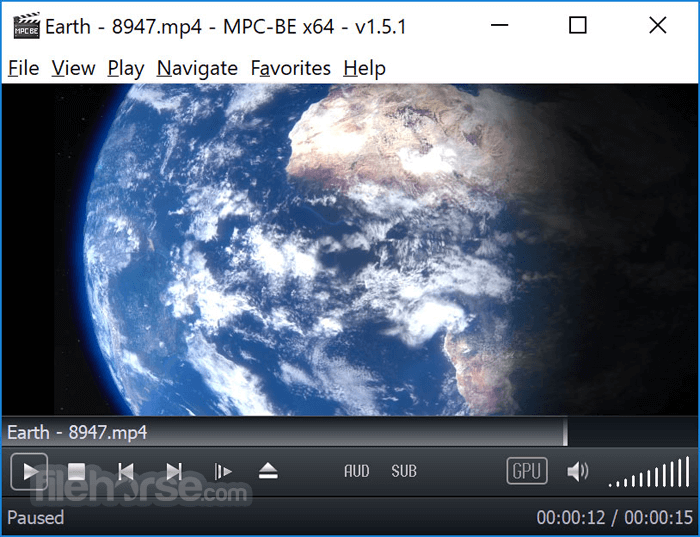
MPC-BE aims to offer users an efficient, customizable, and powerful media playback experience without unnecessary bloat or ads.
Developed by an independent team of volunteers, MPC-BE focuses on improving performance, compatibility, and usability for all types of users, from casual viewers to power users.
Its core strength lies in its ability to play virtually any media format out of the box using built-in decoders.
Key Features
- Support for a wide range of video and audio formats (MKV, AVI, MP4, FLAC, MP3, etc.)
- Enhanced subtitle support (SRT, ASS, embedded subs)
- Integrated audio and video filters for post-processing
- Customizable keyboard shortcuts and mouse controls
- Support for hardware acceleration (DXVA, Intel QuickSync, NVIDIA CUVID)
- Playlist management and bookmarks
- Frame-by-frame playback
- Seek preview and thumbnail navigation
- Dark mode and modern UI themes
- Extensive settings and codec tweaking options
The program retains the classic MPC layout while introducing a sleeker, dark-themed interface. The controls are intuitively arranged, with responsive playback buttons, clean menus, and minimal clutter.

Advanced configuration options are nested in well-organized tabs, catering to both novices and experts. While the UI may appear basic at first glance, its simplicity contributes to smooth performance and low resource usage.
Installation and Setup
It offers a straightforward installation process. The official installer is small and fast.
During setup, users can choose between standard or custom installs, with options to associate file types and configure shortcuts. No bundled software or ads are included.
After installation, MPC-BE is ready to use immediately. No additional codecs are needed, as the software includes its own internal filters and decoders.
How to Use
- Launch MPC-BE from the Start menu or desktop shortcut.
- Drag and drop a video/audio file into the window or use File > Open File.
- Playback begins instantly with default settings.
- Use keyboard shortcuts (e.g., spacebar for pause/play, arrows for seeking) or right-click for playback options.
- Access settings under Options to adjust video renderer, audio filters, subtitles, or customize controls.

FAQ
Does MPC-BE require external codecs?
No, it has built-in codecs for most media formats.
Can it play 4K or HDR content?
Yes, with proper hardware and settings, MPC-BE supports 4K and HDR playback.
Is MPC-BE regularly updated?
Yes, updates are released periodically by the developer team to enhance performance and fix bugs.
Can I customize the interface?
Yes, you can adjust themes, icons, controls, and many playback settings.
Does it support streaming?
It can open online streams via URL, though it's not optimized for streaming platforms.
Alternatives
VLC Media Player – Popular open-source media player with broad format support.
PotPlayer – Feature-rich player with advanced video options and skinning.
KMPlayer – Multimedia player with 3D playback and subtitle tools.
MPV Player – Lightweight player with scriptable configuration and high performance.
System Requirements
- OS: Windows 7, 8, 10, or 11 (32-bit and 64-bit versions available)
- CPU: Dual-core processor recommended
- RAM: 1 GB minimum
- GPU: DirectX 9-compatible for hardware acceleration
- Storage:
- Lightweight and fast
- No ads or bloatware
- Built-in codec support
- Highly customizable
- Excellent subtitle support
UI may feel outdated to some
Limited streaming capabilities
Occasional compatibility issues with rare formats
Conclusion
MPC-BE stands as one of the best lightweight media players available for Windows. It combines stability, broad format support, and powerful customization into a simple, ad-free package.
Ideal for users who want full control over their playback experience without the distractions or bloat of more commercial alternatives, MPC-BE is a top choice for local media playback.
-
MPC-BE 1.9.1 (64-bit) Screenshots
The images below have been resized. Click on them to view the screenshots in full size.
-
-
What's new in this version:
Source filters:
- Added support for network streams whose "Content-Type" field contains an additional "codecs" parameter
MP4Splitter:
- Added support for Dolby Vision in AV1 ('dav1')
- MpaDecFilter
- Added support for MS ADPCM and IMA ADPCM
MPCVideoDec:
- Fixed hardware decoding for older Intel graphics.
- Expanded support for Dolby Vision in AV1 ('dav1')
yt-dlp:
- Fixed detection of the VP9 video codec for some video hosting services
- Protocol "http_dash_segments" is not supported
-
Player:
- Fixed remembering the title of the entry in the playlist for URLs processed by yt-dlp
- Fixed getting icon for file properties window when path length is 260 or more characters
- The "Use Blur Behind effect" setting has been removed because it does not work correctly
- Added the ability to speed up video by long-pressing the left mouse button
- Fixed text in the file name field in saved thumbnails
- Added the ability to use the Ctrl+BackSpace keyboard shortcut to delete the last word in the command, history, and playlist filter fields
- Various interface fixes
Installer:
- Updated MPC Video Renderer 0.10.7
- Added Vietnamese translation
- Updated German translation
- Updated Romanian translation
- Updated Japanese translation
- Updated Korean translation
- Updated Turkish translation
- Updated Hungarian translation
- Updated Bulgarian translation
Updated libraries:
- dav1d 1.5.4
- Detours v4.0.1-131-gd644ce9
- ffmpeg n8.2-dev-2721-gf944afd040
- nanosvg git-239e102
- vvdec v3.2.0
 OperaOpera 135.0 Build 5973.133 (64-bit)
 LDPlayerLDPlayer - Android Emulator
 BlueStacksBlueStacks 10.42.262.1002
 MalwarebytesMalwarebytes Premium 5.7.0
 Premiere ProAdobe Premiere Pro CC 2026 26.5
 CapCutCapCut Desktop 9.3.0
 PC RepairPC Repair Tool 2026
 Adobe AcrobatAdobe Acrobat Pro 2026.002.21901
 TradingViewTradingView - Trusted by 100 Million Traders
 WARDOGSWARDOGS - All Out Warfare FPS
Comments and User Reviews