




 OpusClip
 Artlist
 Restream
 LitMedia AI
 Kling AI
 Camo Studio
 Premiere Pro
-
Latest Version
Plex Media Server 1.43.3.10861 LATEST
-
Review by
-
Operating System
Windows 10 (64-bit) / Windows 11
-
User Rating
Click to vote -
Author / Product
-
Filename
PlexMediaServer-1.43.3.10861-07dfddaeb-x86_64.exe
Designed for media enthusiasts, Plex Media Server lets you organize, stream, and access your movies, TV shows, music, photos, and more across a wide range of devices—from smart TVs to smartphones.
It brings Netflix-like functionality to your personal media library, complete with rich metadata, artwork, and automatic categorization.
Main Features
Media Organization: Automatically organizes movies, TV shows, music, and photos with artwork, descriptions, and ratings.
Streaming Anywhere: Access your media library from any device, anywhere with an internet connection.
Plex Pass Features: DVR functionality, offline sync, mobile uploads, and more with a Plex Pass subscription.
User Management: Create managed accounts and share libraries securely with family or friends.
Live TV & DVR: Watch and record live TV when paired with a compatible tuner and antenna.
Metadata Fetching: Pulls data from trusted sources to enrich your library with posters, trailers, and subtitles.
User Interface
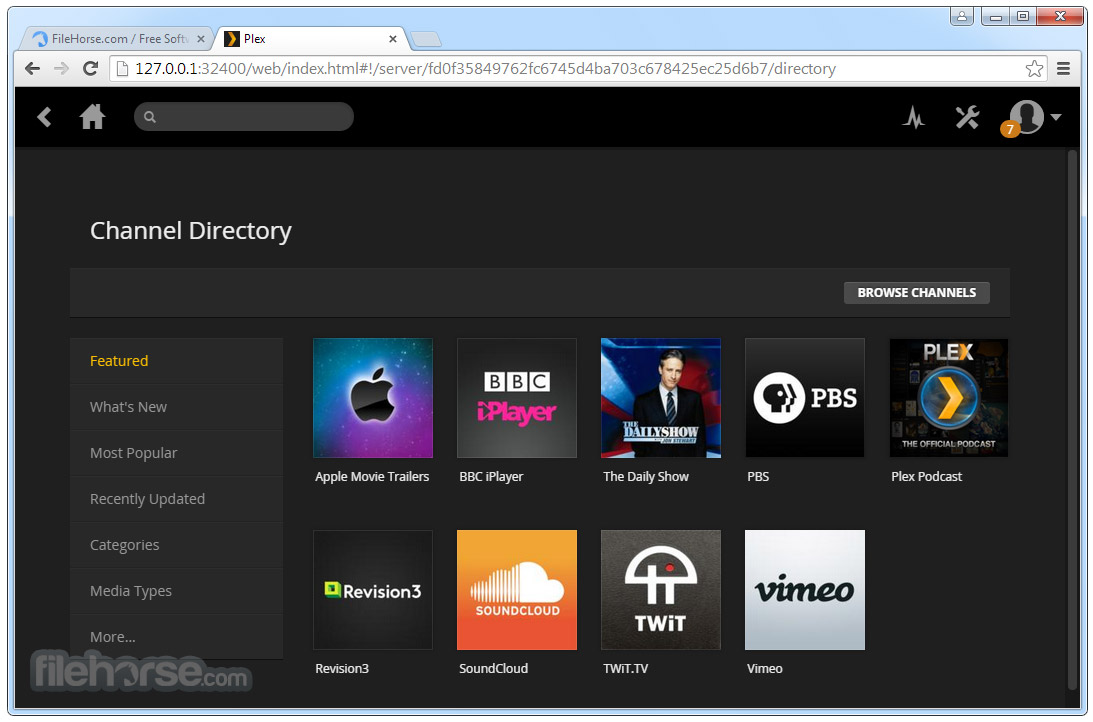
Plex Media Server boasts a clean, intuitive interface modeled after streaming services like Netflix. The dashboard categorizes media by type and displays cover art prominently.
Browsing is seamless, with filters for genres, years, or watched status. Playback controls are responsive, and the media player supports subtitles, resume playback, and transcoding options.
Installation and Setup
- Download the installer from the official website or FileHorse.
- Run the setup file and follow on-screen instructions.
- Create a Plex account or log in.
- Designate folders containing your media files.
- Allow Plex to scan and organize your library.
- Setup typically takes less than 15 minutes. Once configured, the server runs in the background and updates libraries automatically.
- Access Plex via a browser or supported app.
- Navigate through your library by type (movies, shows, etc.).
- Select a title to view details, stream, or download (Plex Pass required).
- Use filters and search to quickly locate content.
- Enable remote access to stream your media outside your local network.
Do I need an internet connection to use Plex?
You need internet for setup and remote streaming, but local playback works offline.
Can I share my Plex library with others?
Yes, Plex lets you share libraries with other Plex users through managed accounts.
Is Plex Media Server legal?
Yes, Plex is legal. However, you must own the rights to the media you upload.
Does Plex support 4K content?
Yes, it can stream 4K content, but performance depends on your hardware.
What’s the difference between Plex free and Plex Pass?
Plex Pass adds features like offline sync, DVR, hardware transcoding, and early access to updates.
Alternatives
Emby – Offers similar functionality with customizable features and live TV.
Kodi – Highly customizable media center for local playback.
MediaPortal – TV-focused media server for advanced tuner use.
Pricing
Free Plan: Basic media server and streaming features.
Plex Pass:
$4.99/month
$39.99/year
$119.99 for a lifetime license
System Requirements
- OS: Windows 11 or Windows 10 (64-bit)
- CPU: Intel Core i3 or equivalent (faster for transcoding)
- RAM: Minimum 2GB (4GB+ recommended)
- Storage: Sufficient space for media and metadata
- Network: Ethernet or strong Wi-Fi for streaming
- Intuitive and attractive interface
- Cross-platform streaming
- Rich metadata and organization
- Remote access support
- Active community and plugin support
- Some features locked behind Plex Pass
- Initial setup can be daunting for beginners
- Transcoding requires a strong CPU
Plex Media Server is a top-tier solution for managing and streaming personal media libraries on Windows PCs. Whether you're looking to centralize your content or stream on the go, Plex offers an elegant, feature-rich experience.
Note: Plex Pass required to use sync, add users to your home, view trailers and other extras, upload content from your mobile devices, use Gracenote Music Magic.
Also Available: Download Plex Media Server for Mac
-
Plex Media Server 1.43.3.10861 Screenshots
The images below have been resized. Click on them to view the screenshots in full size.
-

-

-

-

What's new in this version:
New:
- (Library) Audio codec filter is now available on music libraries when browsing tracks
- (Network) IPv6 support has TEMPORARILY been made a plex pass feature
- (Network) Support for ipv6 only networks
- (Subtitles) Added support for dvb_teletext
- (Transcoder) The “HEVC Sources Only” encoding setting now also applies to AV1 sources and is named “HEVC/AV1 Sources Only”
- Updated Web to 4.160.0
Fixed:
- (Downloads) Stream display titles in download decisions now match streaming decisions
- (Library) Expose HDR, DOVI, and Atmos filters for episodes in show libraries
- (Library) Manual API requests could allow invalid URIs for smart collections and playlists
- (Live-TV) OTA channels would often fail to hardware transcode on MacOS
- (MacOS) The server could crash under certain network conditions
- (Metadata) Don’t abort metadata refresh on failed match if remaining providers are all local
- (Metadata) Local album images can fail to load if item matching is incomplete
- (Metadata) Prefer certification tag when reading NFO content ratings and match to library country preference
- (Metadata) Read writers credits in NFO parser
- (Metadata) Using multiple providers with ratings can result in primary rating being set inconsistently
- (Metadata) When remote providers are missing local metadata would fail to load
- (Performance) Speed up related collection queries in some scenarios
- (PlexMatch) Using show guid hints in .plexmatch files can result in unmatched episodes on initial scan
- (Scanner) Filename text in curly braces should get cleaned up on unmatched content
- (Security) Address potential vulnerability in the CompanionProxy
- (Security) The TranscoderH264Options and TranscoderH264OptionsOverride preferences can no longer be modified over the network
- (Transcoder) Correct the Content-Type of DASH manifest files
 OperaOpera 134.0 Build 5954.46 (64-bit)
 BlueStacksBlueStacks 10.42.252.1003
 PhotoshopAdobe Photoshop CC 2026 27.9.1 (64-bit)
 LDPlayerLDPlayer - Android Emulator
 GTA 6GTA 6 for PS5
 CapCutCapCut Desktop 9.1.0
 PC RepairPC Repair Tool 2026
 Hero WarsHero Wars - Online Action Game
 TradingViewTradingView - Trusted by 100 Million Traders
 Halo: CampaignHalo: Campaign Evolved
Comments and User Reviews