




 SQL Server
 Access
 dbForge Studio
 Portfolio
 Instapage
 Antigravity
 10Web
10Web Dreamweaver
-
Latest Version
Qt 6.11.0 LATEST
-
Review by
-
Operating System
Windows 7 / Windows 8 / Windows 10 / Windows 11
-
User Rating
Click to vote -
Author / Product
-
Filename
qt-everywhere-src-6.11.0.zip
Developed by The Qt Company, it provides a comprehensive set of tools and libraries that allow developers to design, develop, and deploy applications efficiently.
Qt for Windows supports C++ and integrates seamlessly with Python through PyQt or PySide bindings, making it a flexible choice for developers in various industries.
Key Features
Cross-Platform Development: Write code once and deploy it on Windows, macOS, Linux, Android, and iOS.
Rich GUI Widgets: A vast collection of pre-built UI components for rapid application development.
Qt Quick & QML: A declarative scripting language for designing fluid and modern UIs.
3D and OpenGL Support: Ideal for graphics-intensive applications, including simulations and games.
Networking and Database Connectivity: Built-in support for TCP/IP networking, SQL databases, and other connectivity features.
Embedded Systems Compatibility: Used in IoT and automotive industries for embedded applications.
Extensive Documentation & Community Support: Detailed documentation and an active developer community provide support and guidance.
User Interface
Qt offers a flexible UI development approach through Qt Widgets and Qt Quick. Qt Widgets provide a traditional desktop-style interface, whereas Qt Quick enables fluid, animated UIs using QML.
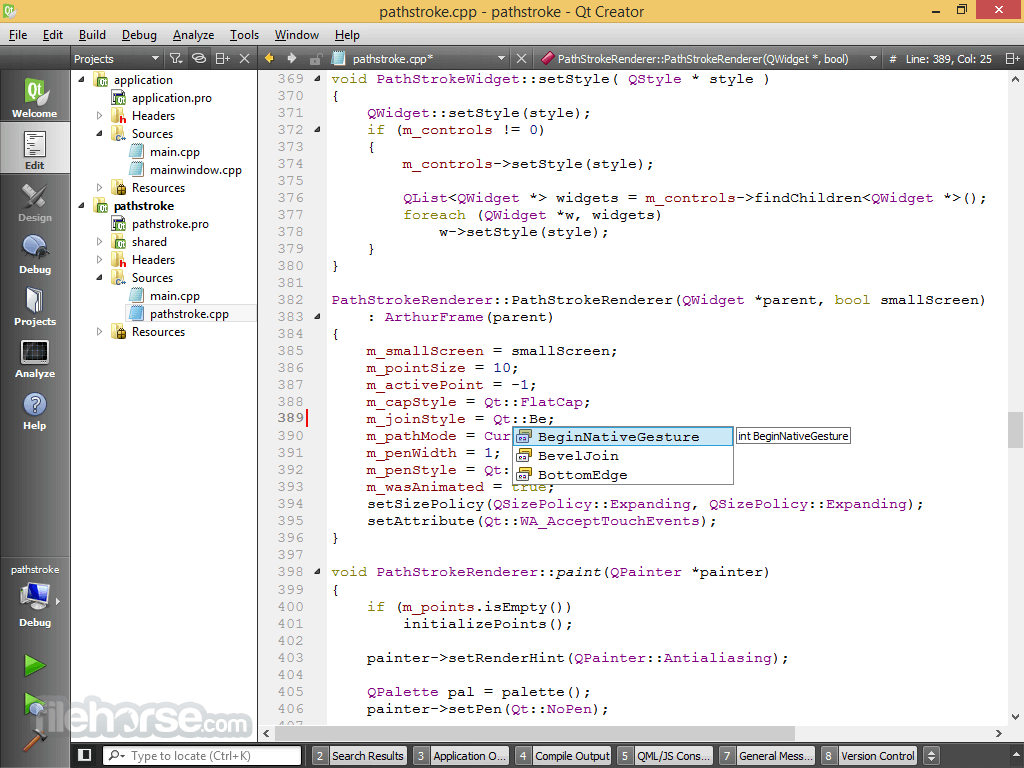
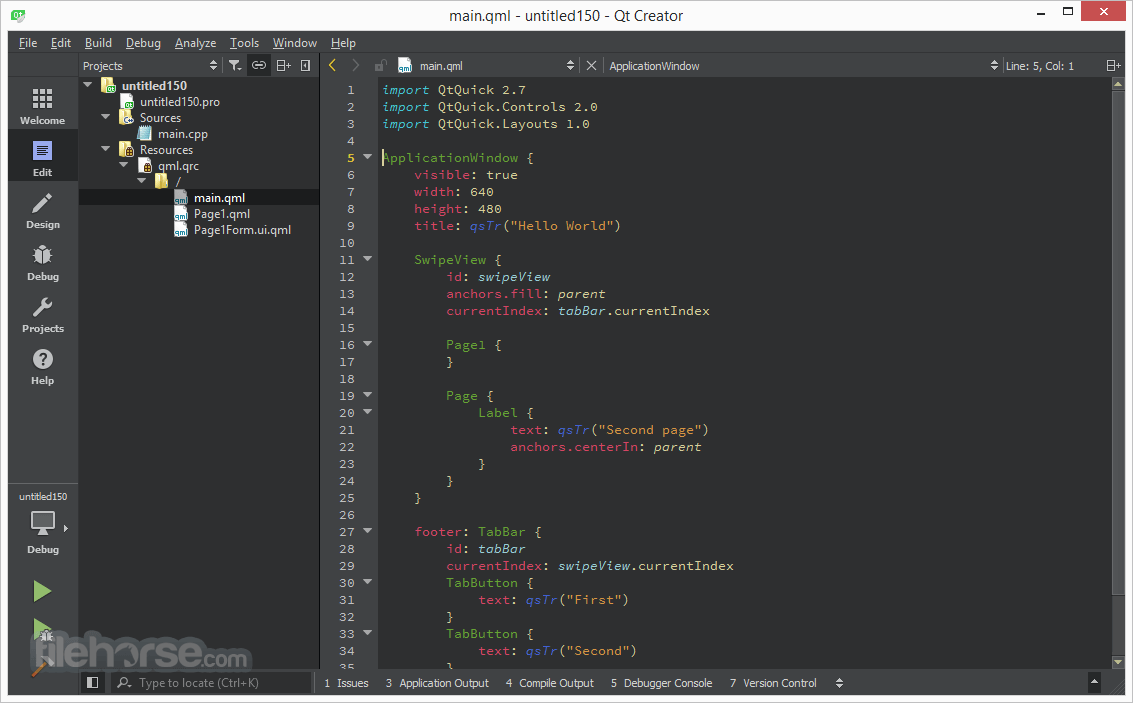
The Qt Creator IDE is designed to streamline development, featuring an intuitive UI with syntax highlighting, a debugger, and real-time design previews.
Installation and Setup
- Download the Qt installer from the official website.
- Run the installer and select the components required, such as Qt libraries, Qt Creator, and desired compilers.
- Follow the setup instructions to install Qt on your Windows PC.
- Configure the development environment and compiler settings.
- Start creating applications using Qt Creator or an external IDE like Visual Studio.
Qt Core: Provides core non-graphical classes.
Qt GUI: Base classes for UI components, includes OpenGL.
Qt Network: Enables network programming.
Qt Quick: Framework for dynamic applications with custom UIs.
Qt Multimedia: Handles audio, video, and camera functionality.
Qt SQL: Supports database integration using SQL.
Qt Add-Ons - Specialized modules for specific tasks:
Qt OpenGL: OpenGL support classes (deprecated in favor of QOpenGL in Qt GUI).
Qt Wayland Compositor: Framework for developing Wayland compositors.
Qt Sensors: Access to sensor hardware and motion gesture recognition.
Qt WebView: Displays web content using native APIs.
Qt Safe Renderer: UI rendering for safety-critical applications.
Qt SCXML: Tools for creating state machines from SCXML files.
What`s New
- Qt AI Assistant: Focus on Coding, Not Chores – Automates test cases, documentation, and boilerplate QML to free up developers for coding.
- Best-in-Class QML – Fine-tuned Llama models trained on 4,000+ QML apps ensure top-quality QML assistance.
- Automated Test Cases & Documentation – Generates unit tests and clear documentation tailored for Qt Test syntax.
- Next-Gen Expertise – Assists with QML, C++, and Python by explaining, refactoring, and optimizing code.
- AI-Powered Productivity, Human-Powered Creativity – Provides optional code auto-completion with flexible activation.
- Open Access to Your Favorite LLMs – Supports Meta’s Llama, Claude 3.5 Sonnet, GPT-4o, and any cloud or self-hosted LLM.
- Unit Testing Made Easy – Quickly generate multiple test cases by selecting QML components, methods, or classes.
- Seamless Code Documentation – Enhances maintainability and collaboration with AI-generated documentation.
- Open Qt Creator and create a new project.
- Choose an application type, such as Qt Widgets Application or Qt Quick Application.
- Design the UI using Qt Designer or write QML code.
- Implement functionality using C++ or Python.
- Build and compile the application using the built-in tools.
- Test the application using Qt’s debugging and profiling tools.
- Deploy the application to the desired platform.
Is Qt free to use?
It offers an open-source version under the GPL and LGPL licenses, but commercial licenses are available for proprietary development.
What programming languages does Qt support?
Qt primarily supports C++, but bindings are available for Python (PyQt, PySide), JavaScript (QML), and other languages.
Can I use Qt for mobile app development?
Yes, it supports Android and iOS development with Qt Quick and QML.
Is Qt suitable for game development?
While Qt supports OpenGL and 3D graphics, it is more suited for applications than high-performance game engines like Unity or Unreal Engine.
Does Qt integrate with Visual Studio?
Yes, it has a Visual Studio Add-in for seamless integration with Microsoft’s IDE.
Alternatives
Electron (JavaScript-based, great for web technologies but consumes more resources)
Microsoft .NET (WPF, WinForms, MAUI) (Tightly integrated with Windows, best for C# developers)
Pricing
Qt is available under different licensing models:
Open-Source License (GPL/LGPL) – Free for non-commercial use.
Commercial License – Paid license for proprietary applications, pricing varies based on requirements.
System Requirements
- Operating System: Windows 10/11 (64-bit)
- Processor: Intel Core i3 or higher
- RAM: Minimum 4GB (Recommended: 8GB or more)
- Storage: At least 5GB free space
- Graphics: OpenGL-compatible GPU for Qt Quick applications
- Cross-platform support with a single codebase
- Rich UI toolkit for modern and traditional applications
- Strong community and extensive documentation
- High performance due to C++ foundation
- Flexible licensing for open-source and commercial projects
- Commercial license can be expensive
- Learning curve for QML and Qt’s framework
- Larger application size compared to native Windows UI frameworks
- Limited game development capabilities compared to dedicated engines
- Windows installation can be complex for beginners
Qt is a powerful and versatile framework for Windows PC developers who need a cross-platform solution for application development. With a vast set of features, an intuitive development environment, and a supportive community, Qt is an excellent choice for both desktop and embedded applications.
While it has a steep learning curve and can be costly for proprietary projects, its efficiency and flexibility make it a strong contender for developers looking to build robust, scalable applications.
-
Qt 6.11.0 Screenshots
The images below have been resized. Click on them to view the screenshots in full size.
-
What's new in this version:
Qt 6.11 adds the following modules:
- Qt Canvas Painter - An accelerated 2D painting solution for Qt Quick and QRhi-based render targets
- Qt OpenAPI - An extension of the upstream Open API generator that generates Qt HTTP clients, typically used for RESTful APIs
- Qt TaskTree - Provides a declarative way to compose and execute asynchronous task workflows
- Qt Labs StyleKit - A dedicated styling API that streamlines styling Qt Quick Controls through a set of shared design attributes
- The new modules are in Technology Preview, excluding their API from Qt's compatibility promises. But we very much welcome feedback to further improve them! Be it via the Qt Support Center the Qt Bug Tracker, the Qt Forum, or the comments of the linked blog posts.
Qt Canvas Painter Module:
- Qt Canvas Painter is an accelerated 2D painting solution for Qt Quick and QRhi-based render targets. See the also the Qt Canvas Painter blog series for an overview.
Qt OpenAPI Module:
- Qt OpenAPI extends an Open API generator to generate Qt HTTP clients, typically used for RESTful APIs
Qt TaskTree Module:
- Qt TaskTree provides a declarative way to compose and execute asynchronous task workflows in C++. See the Introduction blog post series for an overview.
Qt Labs StyleKit Module:
- Qt Labs StyleKit is a dedicated styling API that streamlines styling Qt Quick Controls through a set of shared design attributes
New Features in Qt 6.11:
Qt CoAP Module:
- QCoapClient::bindInterface allows to bind the communication to a specific network interface
Qt Core Module:
- QDate is now weakly incrementable, i.e. implements pre- and post-fix increment (and decrement) operators, and can be used in a C++20 std::views::iota
- QJniObject APIs can now be called with std::expected (or an equivalent type) as the return type, in which case Java exceptions are not consumed by the framework and instead passed back to the caller as the unexpected result.
- QRangeModel::ItemAccess provides a customization point for accessing role data of a multi-role item type
- QRangeModel can now be used with C++ ranges that don't provide a constant std::begin/end implementation, such as C++20 std::views::filter
- With ranges that use the same QObject subclass for multi-role items, the new QRangeModel::autoConnectPolicy can be set to Full or OnRead to connect the changed-signals of all exposed properties of QObject items to the corresponding dataChanged() signal emission.
- QRangeModelAdapter provides a typical C++ container API to the range a QRangeModel operates on, ensuring that relevant QAbstractItemModel signals are emitted on changes, without user code having to work with QModelIndex. This new class is under technology preview.
- On Windows, Qt now automatically generates an application manifest for executables built with CMake. The manifest derives the application version from PROJECT_VERSION, supports customization of the project identifier and execution level via CMake variables, declares compatibility with Windows 10 and Windows 11, and enables longPathAware.
Qt Graphs Module:
- Added new QCustomSeries class to allow users to create their own 2D graph types, such as candlestick or box-plot graphs
- Added multi-axis support to 3D graphs in the form of rowAxis, valueAxis, and columnAxis properties in QBar3DSeries, and axisX, axisY, and axisZ properties in QScatter3DSeries and QSurface3DSeries
- Added subSlicesCount, subSlicesSum, subSlicesRatio, and sliceChildren properties in QPieSlice to allow creating sub slices in pie and donut graphs
- Added visualMin and visualMax properties in QDateTimeAxis and QValueAxis to hold the visible axis ranges
- Added gradient and selectedGradient properties in QAreaSeries to allow using gradients in area graphs
- Added labelPosition property in QBarCategoryAxis to allow adjusting the label placement in bar graphs
- Added timeZone property in QDateTimeAxis to allow setting your own time zone for the axis
- Added pan and zoom properties in QDateTimeAxis to allow panning and zooming the same way as in QValueAxis
- Added color and subColor properties in QAbstractAxis to allow overriding theme colors for the axes
- Added joinStyle, lineStyle, strokeStyle, dashOffset, and dashPattern properties in QLineSeries to allow further styling in line graphs
- Added optimized property in QSplineSeries to allow using Catmull-Rom interpolation instead of the more performance-heavy and accurate default method
- Added customRowLabels and customColumnLabels properties in QBar3DSeries to allow overriding row and column labels
- Added rotationAbsolute property in QCustom3DItem to fix problems in custom item rotations
- Added rowsSanitized property in QSurface3DSeries to automatically remove rows with invalid data
- Added cutoffMargin in GraphsItem3D and Q3DGraphsWidgetItem to adjust the sensitivity of culling items near graph margins
- Added support for multiple QBarSeries in one GraphsView
- Added support for negative values in QBarSeries
- Added support for invalid values in LineSeries which results in visual gaps
Qt GRPC Module:
- Added the new Client Interception mechanism to QtGrpc to enable interception and modification of outgoing requests and incoming responses
- Qt 6.11 adds comparison operators (operator== and operator!=) for QGrpcCallOptions and QGrpcChannelOptions, enabling direct equality checks between option objects
- QGrpcOperation class introduces a serverInitialMetadataReceived() signal that notifies RPC handlers as soon as the server initial metadata is received
- QGrpcChannelOptions class now provides filterServerMetadata() and setFilterServerMetadata() methods to control whether protocol-related metadata is included in server responses
- The QtGrpc namespace introduces the RpcType enum and RpcDescriptor struct to describe gRPC methods with their service name, method name, and communication pattern
Qt GUI Module:
- Accessibility events of the new QAccessible::RoleChange type get emitted by the docking window framework when dock widgets change between docked and floating
- The new accessibility role Switch is used by the Switch type in Qt Quick Controls
- The new accessible attribute Orientation is used by sliders and similar controls to report their orientation to accessibility clients
- QRawFont got an API to get the glyphCount() and to look up the glyphName() for a glyph index of the font
- QTextCharFormat got new APIs to set font features and variable axes
Qt HttpServer Module:
- Added support for HTTP/1.0 clients
- Qt 6.11 introduces configurable request size limits to QHttpServerConfiguration, allowing applications to protect against oversized requests. New methods include setMaximumUrlSize(), setMaximumTotalHeaderSize(), setMaximumHeaderFieldSize(), setMaximumHeaderFieldCount(), and setMaximumBodySize(). When limits are exceeded, the server responds with appropriate HTTP error codes (414, 431, or 413).
- Route handlers can now return QFuture<void> and respond using a QHttpServerResponder&& argument in another thread, enabling CPU-intensive request processing to be offloaded from the main server thread. For HTTP/2 connections, multiple requests can be processed concurrently, while HTTP/1.x connections process requests sequentially but still benefit from background processing. Socket I/O always remains in the QHttpServer thread.
- isResponseCanceled() was added to QHttpServerResponder, allowing handlers to detect when a client has disconnected and exit early to avoid unnecessary processing
Qt Image Formats Module:
- Some bundled third-party modules were updated, see License Changes
Qt Lottie Animation:
- Added support for path fill rules
- Added CMAKE command qt_target_qml_from_lottie for converting from Lottie to QML at build time
- lottietoqml and VectorImage backend are no longer tech preview
- VectorImage: Added support for animating shapes along paths
- VectorImage: Added support for morphing animations (interpolating between two shapes.)
- VectorImage: Added support for matte layers
Qt Multimedia Module:
- Added callback-based overloads for the start methods of QAudioSource and QAudioSink to allow real-time audio processing
Qt Network Module:
- QNetworkRequest can now specify the TCP Keep Alive parameters for the current request. Also, the default TCP Keep Alive parameters have been changed in QNetworkAccessManager and now the inactive connections are terminated after two minutes of inactivity.
 OperaOpera 129.0 Build 5823.28 (64-bit)
 Kling AIKling AI - Text or Image to Video
 PhotoshopAdobe Photoshop CC 2026 27.4 (64-bit)
 BlueStacksBlueStacks 10.42.167.1001
 OKXOKX - Buy Bitcoin or Ethereum
 CapCutCapCut 7.9.0
 PC RepairPC Repair Tool 2026
 Hero WarsHero Wars - Online Action Game
 TradingViewTradingView - Trusted by 100 Million Traders
 AdGuard VPNAdGuard VPN 2.9.0
Comments and User Reviews