




 Windsurf
 Lovable
 SQL Server
 Antigravity
 10Web
10Web Replit
 Cursor
 OnSpace AI
-
Latest Version
Spyder Python 6.1.7 LATEST
-
Review by
-
Operating System
Windows 10 (64-bit) / Windows 11
-
User Rating
Click to vote -
Author / Product
-
Filename
Spyder-Windows-x86_64.exe
-
MD5 Checksum
b901430b20be4db887cf95bd2a4db418
It offers a unique combination of the advanced editing, analysis, debugging, and profiling functionality of a comprehensive development tool with the data exploration, interactive execution, deep inspection, and beautiful visualization capabilities of a scientific package.
Spyder Python IDE, short for "Scientific PYthon Development Environment," is an open-source IDE primarily focused on data analysis and scientific computing using Python. It is built on top of well-known libraries like NumPy, SciPy, Matplotlib, and IPython, making it an ideal choice for scientists, engineers, and researchers.
Beyond its many built-in features, its abilities can be extended even further via its plugin system and API. Furthermore, it can also be used as a PyQt5 extension library, allowing developers to build upon its functionality and embed its components, such as the interactive console, in their own PyQt software. Core building blocks of a powerful IDE!
The easy way to get up and running with Spyder Python IDE 64-bit on any of the supported platforms is to download it as part of the Anaconda distribution and use the conda package and environment manager to keep it and your other packages installed and up to date.
Features
- Interactive Console: A built-in IPython console that allows you to execute Python code interactively and view the results immediately.
- Code Editor: A powerful code editor with features like syntax highlighting, code completion, and linting for efficient code writing.
- Variable Explorer: An interactive tool that displays variables, their values, and data frames, helping you manage and visualize data.
- Debugger: A debugger with breakpoints, variable inspection, and step-by-step execution to assist in troubleshooting code.
- Integrated Documentation: Access to Python documentation and function tooltips within the IDE for quick reference.
- Conda Integration: Seamless integration with Conda environments for managing Python packages and dependencies.
- Plugins: Extensible through plugins, allowing you to customize the ide to your specific needs.
- Version Control: Integration with version control systems like Git for efficient collaboration.
It offers a clean and intuitive user interface that's well-organized to enhance productivity.
The primary workspace includes the code editor, interactive console, and variable explorer. The layout can be customized to suit your preferences, and you can switch between light and dark themes.
Installation and Setup
Installing the program is relatively straightforward, especially if you use the Anaconda distribution, where it comes pre-installed. For other platforms, you can install the IDE using pip:
pip install spyder
Once installed, you can launch Spyder from the command line or your preferred Python distribution. Spyder's initial setup typically involves configuring your Python interpreter and environment, which is done through the "Preferences" menu.
How to Use
- Code Editing: Open or create Python scripts in the code editor. Utilize code completion (Ctrl+Space), linting, and auto-indentation to write clean code.
- Interactive Console: Execute code snippets directly in the console for testing and experimentation.
- Variable Explorer: Explore and manage variables, arrays, and data frames. You can plot data directly from the variable explorer.
- Debugger: Set breakpoints, run code in debugging mode, and inspect variables during debugging sessions.
- Conda Integration: Create and manage Conda environments to isolate project dependencies.
- Plugins: Install and configure plugins to extend Spyder's functionality for specific tasks.
Can I use Spyder for web development or other non-scientific Python projects?
While Spyder is optimized for scientific computing, you can use it for general Python development. However, other IDEs like PyCharm or Visual Studio Code might be better suited for non-scientific projects.
Does Spyder support Jupyter notebooks?
Yes, it provides Jupyter Notebook support, allowing you to create and run Jupyter notebooks within the IDE.
What are the system requirements for Spyder?
Spyder is cross-platform and can run on Windows, macOS, and Linux. It requires Python to be installed, and the system requirements depend on your specific Python packages and project needs.
Is Spyder suitable for beginners in Python programming?
It can be used by beginners, but it may have a steeper learning curve compared to simpler IDEs. However, its powerful features can be advantageous as your Python skills grow.
Is Spyder FREE to use?
Yes, the IDE is an open-source project released under the MIT license, making it FREE for personal and commercial use.
Alternatives
Anaconda: The World`s Most Popular Python/R Data Science Platform for Windows PC!
Visual Studio Code: A versatile and highly customizable code editor with Python support through extensions.
Octave: Powerful mathematics-oriented syntax with built-in plotting and visualization tools.
System Requirements
The system requirements for Spyder are relatively modest, as it primarily relies on Python and its associated packages.
To run the app effectively, ensure you have a compatible Python distribution installed.
The requirements to run Spyder are:
- Python 2.7 or >=3.3
- PyQt5 >=5.5
- Qtconsole >=4.2.0 – for an enhanced Python interpreter.
- Rope >=0.9.4 and Jedi >=0.9.0 – for code completion, go-to-definition and calltips in the Editor.
- Pyflakes – for real-time code analysis.
- Sphinx – for the Help pane rich text mode and to get the documentation.
- Pygments >=2.0 – for syntax highlighting and code completion in the Editor of all file types it supports.
- Pylint – for static code analysis.
- Pycodestyle – for style analysis.
- Psutil – for memory/CPU usage in the status bar.
- Nbconvert – to manipulate Jupyter notebooks on the Editor.
- Qtawesome >=0.4.1 – for an icon theme based on FontAwesome.
- Pickleshare – To show import completions in the Editor and Consoles.
- PyZMQ – To run introspection services in the Editor asynchronously.
- QtPy >=1.2.0 – To run the app with different Qt bindings seamlessly.
- Chardet >=2.0.0– Character encoding auto-detection in the Editor.
- Numpydoc is Used by Jedi to get return types for functions with Numpydoc docstrings.
- Cloudpickle Serialize variables in the IPython kernel to send them to the app.
- Specialized for scientific computing and data analysis.
- Feature-rich, including an interactive console and variable explorer.
- Extensible with plugins.
- Integration with Conda environments.
- Free and open source.
- May have a steeper learning curve for beginners.
- Focused primarily on scientific computing, which might not suit all Python development needs.
In conclusion, Spyder Python IDE is a robust and feature-packed development environment tailored for scientific computing and data analysis using Python. Its integrated console, variable explorer, and debugging tools make it a valuable choice for researchers, scientists, and data professionals.
While it may not be the ideal choice for all Python development scenarios, Spyder's specialization and extensibility make it a valuable addition to any Python developer's toolkit, especially if you're working extensively with data and scientific libraries. Plus, its open-source nature and zero cost make it accessible to all. Whether you're a seasoned Python developer or just starting, Spyder is worth considering for your next Python project.
Also Available: Download Spyder Python for Mac
-
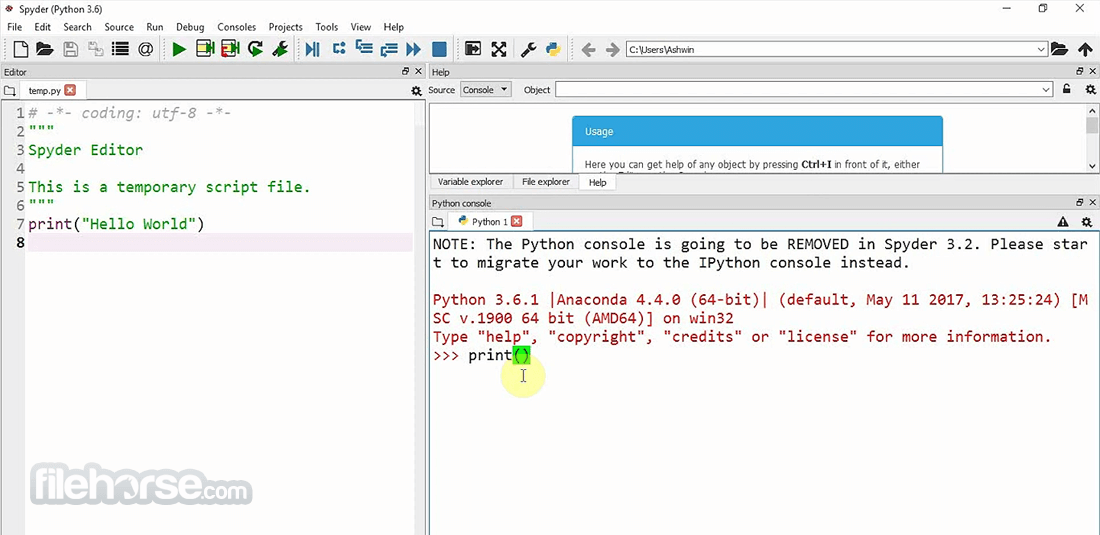
Spyder Python 6.1.7 Screenshots
The images below have been resized. Click on them to view the screenshots in full size.

-
-

-

What's new in this version:
New features:
- Increase threshold to warn users when an array or dataframe is too big to be viewed in the Variable Explorer. The new limit is 50 million elements.
Important fixes:
- Fix formatting and linting with Ruff
- Fix warning to tell users that an array or dataframe is too big to be handled by the Variable Explorer
- Fix syntax highlighting of non-Python files in the Editor
- Fix crash at startup when the in-app appeal page can't be read from disk
- Make right-clicking on Files and Projects select the file where it's done
Fixed:
- UnicodeDecodeError when reading appeal page from disk
- install_dev_repos script is failing with packaging 26.3
- AttributeError on resizing window
- Spyder 6.1.6 fails to start when installed with uv tool install spyder (traitlets _merge error)
- Files pane not selecting item when right-clicking
- Ruff linting does not seem to work at all
- "Opening this variable can be slow" is overly cautious
- Missing indent for parameter descriptions in tooltips
 OperaOpera 135.0 Build 5973.76 (64-bit)
 MalwarebytesMalwarebytes Premium 5.6.5
 PhotoshopAdobe Photoshop CC 2026 27.9.1 (64-bit)
 LDPlayerLDPlayer - Android Emulator
 GTA 6GTA 6 for PS5
 CapCutCapCut Desktop 9.3.0
 PC RepairPC Repair Tool 2026
 Hero WarsHero Wars - Online Action Game
 TradingViewTradingView - Trusted by 100 Million Traders
 How to FishHow to Fish
Comments and User Reviews