




 RecCloud
 Premiere Pro
 Filmora
 Restream
 LitMedia AI
 FocuSee
-
Latest Version
MKVToolNix 98.0.0 (64-bit) LATEST
-
Review by
-
Operating System
Windows 7 64 / Windows 8 64 / Windows 10 64 / Windows 11
-
User Rating
Click to vote -
Author / Product
-
Filename
mkvtoolnix-64-bit-98.0-setup.exe
-
MD5 Checksum
80c392e275cf48cde7f07b0db0678796
Tailored primarily for advanced users and video enthusiasts, MKVToolNix provides a powerful command-line interface along with a user-friendly GUI, making it a go-to solution for working with MKV containers.
The 64-bit version is optimized for modern Windows systems, offering improved performance and compatibility for high-resolution files.
Features
MKV Muxing and Demuxing: Combine video, audio, subtitle, and metadata tracks into a single MKV file or extract individual components.
Track Editing: Modify track names, language settings, default/forced track flags, and compression methods.
Batch Processing: Queue and process multiple jobs in one go using the job queue feature.
Command-Line Integration: Full CLI support for automation and scripting.
Metadata Management: Add or edit chapter information and attachments like fonts or cover images.
Subtitle Support: Compatible with multiple subtitle formats, including SRT, ASS, and PGS.
Preview and Analysis Tools: Examine file properties before and after processing.
User Interface
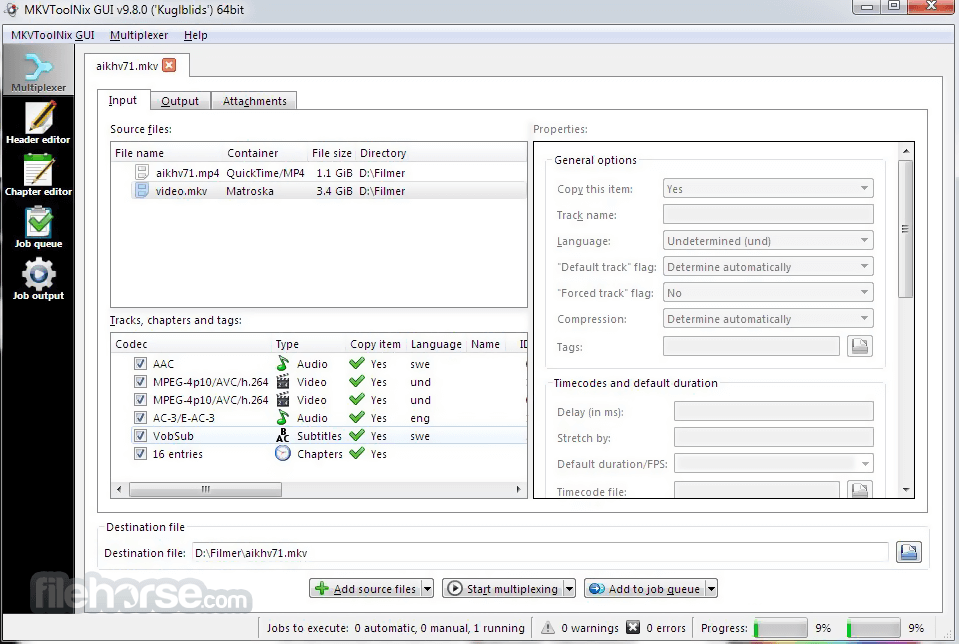
MKVToolNix GUI provides a well-organized, tab-based layout. The interface is split into multiple sections: "Input", "Output", "Attachments", "Chapters", and "Job Queue".
Each section is intuitively laid out, allowing users to drag and drop files, adjust track parameters, and queue up jobs with minimal clicks. Despite its powerful backend, the GUI remains responsive and easy to navigate.
Installation and Setup
Installing MKVToolNix on Windows is straightforward. The 64-bit installer is available on the official website. Once downloaded, setup takes only a few minutes. No bloatware or third-party software is included.
After installation, the application is ready to use without additional configuration, though users can tweak settings for personal preferences.
How to Use
- Drag and drop the MKV or media files into the Input tab.
- Select or deselect video, audio, or subtitle tracks as needed.
- Modify track metadata, language, and flags.
- Set output file destination.
- Click “Start Multiplexing” to begin the muxing process.
- For repetitive tasks, users can save job settings or use the CLI for scripting.
Can MKVToolNix convert videos to MKV?
Yes, it can wrap video/audio files (like MP4, AVI, or MP3) into MKV format, but it does not re-encode the streams.
Does it support subtitles?
Yes, it supports multiple subtitle formats and allows embedding, removal, or editing of subtitle tracks.
Is it safe to use?
Absolutely. MKVToolNix is open-source and regularly updated. It contains no ads or spyware.
Can I extract audio or video from MKV files?
Yes, you can demux (extract) any track using the GUI or command-line tools.
Is there a portable version?
Yes, a portable version is available for users who prefer not to install the software.
Alternatives
HandBrake – Better for video conversion and compression.
FFmpeg – Command-line powerhouse with broader format support.
Avidemux – Lightweight editor for basic cutting and encoding.
System Requirements
- OS: Windows 7/8/10/11 (64-bit)
- RAM: 2GB minimum (4GB+ recommended)
- CPU: Dual-core processor or higher
- Disk Space: ~100MB for installation
- Completely free and open-source
- Powerful muxing/demuxing capabilities
- Regular updates and active development
- User-friendly GUI with advanced features
- Batch processing and CLI support
- Limited video editing features
- No built-in media player for preview
MKVToolNix (64-bit) is a robust, essential tool for users working with Matroska files. Its combination of a powerful engine, versatile features, and clean interface make it a favorite among video editors, archivists, and power users.
Also Available: MKVToolNix (32-bit)
-
MKVToolNix 98.0.0 (64-bit) Screenshots
The images below have been resized. Click on them to view the screenshots in full size.
-

-

What's new in this version:
New features and enhancements:
- all: huge update to the Japanese translations which had been not worked on for several years. The program translation is now complete again, the man page translation has been extended as well. Both were reworked in most places. Translations by coolvitto.
- GUI: chapter editor: added an option in the “additional modifications” dialog that toggles applying the selected modifications to all currently open chapter editor tabs
- GUI: macOS: added dock icon progress bar for job queue
Fixed:
- GUI: chapter editor: when renumbering chapters limiting the number of chapters to renumber did not work
- GUI: macOS: fixed refreshing widgets after system switches between dark & light modes
Build system changes:
- The bundled fmt library was updated to v12.1.0, fixing a build issue on FreeBSD
 OperaOpera 131.0 Build 5877.24 (64-bit)
 Kling AIKling AI - Text or Image to Video
 PhotoshopAdobe Photoshop CC 2026 27.5 (64-bit)
 BlueStacks AIBlueStacks AI
 OKXOKX - Buy Bitcoin or Ethereum
 CapCutCapCut 8.5.0
 PC RepairPC Repair Tool 2026
 Hero WarsHero Wars - Online Action Game
 TradingViewTradingView - Trusted by 100 Million Traders
 AdGuard VPNAdGuard VPN 2.9.0
Comments and User Reviews