




 OpusClip
 Kling AI
 Artlist
 Premiere Pro
 Camo Studio
 LitMedia AI
 Restream
-
Latest Version
MKVToolNix 100.0.0 (32-bit) LATEST
-
Review by
-
Operating System
Windows 7 / Windows 8 / Windows 10
-
User Rating
Click to vote -
Author / Product
-
Filename
mkvtoolnix-32-bit-100.0-setup.exe
-
MD5 Checksum
bcdc18d5250384812b3db5fab7b6dc0b
It features support for treating several input files as if they had been concatenated binarily into a single big input file.
MKVToolNix is a set of software tools that include mkvmerge, mkvinfo, mkvextract, mkvpropedit, mmg, and others.
How to Use
Install the software using the setup wizard
Launch MKVToolNix 32bit GUI from the start menu
Drag and drop MKV or other input files into the GUI
Select or deselect tracks, subtitles, and audio streams
Choose the output folder and file name
Click "Start multiplexing" to begin processing
Wait for the task to complete and check the output file
Alternatives
HandBrake – Better for video conversion and compression.
FFmpeg – Command-line powerhouse with broader format support.
Avidemux – Lightweight editor for basic cutting and encoding.
System Requirements
- Operating System: Windows 7, 8, 10, or 11 (32-bit)
- Processor: Intel or AMD 1 GHz or faster
- RAM: Minimum 2 GB (4 GB recommended)
- Hard Disk: At least 100 MB free space
- Display: 1024x768 resolution or higher
- Free and open-source software
- Supports a wide range of formats
- Fast and efficient file processing
- User-friendly graphical interface
- Regular updates and bug fixes
- May overwhelm new users at first
- Limited editing features included
- No real-time preview for changes
- No built-in video player tool
- Can be resource-heavy during tasks
-
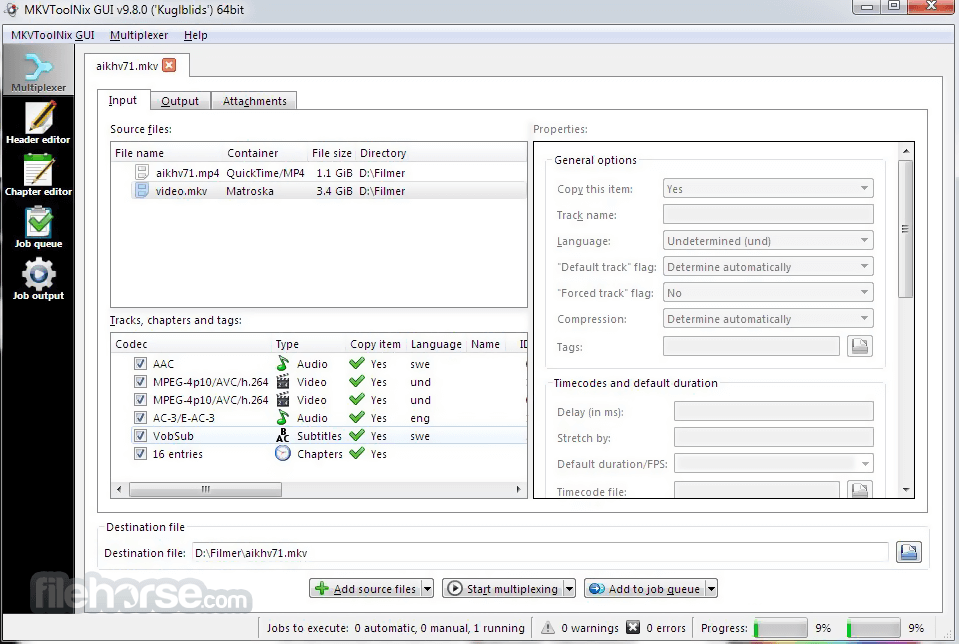
MKVToolNix 100.0.0 (32-bit) Screenshots
The images below have been resized. Click on them to view the screenshots in full size.
-

-

What's new in this version:
New features and enhancements:
- all: added new scalable (SVG) application icons for all applications, replacing the existing pixmap (PNG, ICO) icons. Icons from Sarreq Teryx.
- mkvmerge: MP4 reader: track names are now read from the track’s user-data atoms (trak ? udta ? name) if present.
- MKVToolNix GUI: executing actions configuration, type “play audio file”: added a slider to make configuration more intuitive.
- MKVToolNix GUI: executing actions: macOS only: the GUI will now use bundled audio files for “play audio file” actions that Qt can play instead of using macOS’s system sounds.
- MKVToolNix GUI: executing actions: Windows only: added a new type: executing a PowerShell script. Either an existing script file can be selected or custom PowerShell script code entered in a small editor. The executed script has access to all MTX_… variables through the environment, e.g. $env:MTX_DESTINATION_FILE_BASE_NAME. Workaround for the problems talked about in #6254.
- MKVToolNix GUI: job queue: added a context menu for opening copies of the selected queue jobs in the multiplexer as new settings there without removing the queue jobs.
- MKVToolNix GUI: job queue: added a search functionality for jobs that searches in job descriptions, outputs, warnings & errors.
Fixed:
- command-line tools: Windows: switched to Boost’s UTF-8 code-conversion facet (boost::locale::utf8_codecvt) from std::utf8_codecvt included in MingW. This seems to fix an issue with converting certain high code point from wchar_t to char (from UTF-32/16 to UTF-8), preventing interesting exceptions from being thrown.
- mkvmerge: AAC: fixed mis-detection of ADTS streams not starting on a frame boundary. Fixes regression starting with v87 when fixing AAC LATM config not being parsed if it wasn’t present in the first AAC frame. Patch by Corticalcode.
- mkvmerge: MPEG TS reader: under certain rare conditions mkvmerge was skipping a certain amount of content at the start of the main M2TS file when reading MPLS playlists. The amount of content skipped proportional to the probe range percentage. This only happened when the source Blu-ray contains HDMV TextST subtitles.
- MKVToolNix GUI: executing actions configuration, type “play audio file”: fixed audio volume not working since switching to Qt 6 due to its interface taking a float in range 0.0–1.0 instead of the old interface taking an int in range 0–100.
- MKVToolNix GUI: executing actions: fix backslash handling when parsing a Unix-shell escaped string into separate arguments. The user-visible fix is that the command-line in the “executing actions” dialog will not have the quoting changed in wrong ways by the GUI when the GUI adds another variable upon user request, a regression introduced in v99.
Build system changes:
- all: when building for Windows the programs ImageMagick (executable magick) & Inkscape (executable inkscape) are required in order to build ICOs from SVGs
- macOS: include the app’s supported platform(s) in Info.plist to correctly resolve the app’s Kind as Apple Silicon in System Information
- macOS: updated Qt to 6.11.1. The patch that made building Qt from source possible on macOS 26.4 (by Touchstone64) has been removed as Qt 6.11.1 includes the fix upstream
 OperaOpera 134.0 Build 5954.46 (64-bit)
 BlueStacksBlueStacks 10.42.251.1003
 PhotoshopAdobe Photoshop CC 2026 27.9.1 (64-bit)
 LDPlayerLDPlayer - Android Emulator
 GTA 6GTA 6 for PS5
 CapCutCapCut Desktop 9.1.0
 PC RepairPC Repair Tool 2026
 Hero WarsHero Wars - Online Action Game
 TradingViewTradingView - Trusted by 100 Million Traders
 Halo: CampaignHalo: Campaign Evolved
Comments and User Reviews