




 10Web
10Web dbForge Studio
 Antigravity
 Access
 Instapage
 Dreamweaver
 Portfolio
 SQL Server
-
Latest Version
Xojo 2026 Release 1.2 LATEST
-
Review by
-
Operating System
Windows 10 (32-bit) / Windows 10 (64-bit) / Windows 11
-
User Rating
Click to vote -
Author / Product
Designed for both beginners and seasoned developers, Xojo offers an object-oriented programming language reminiscent of Visual Basic, facilitating a smoother transition for those familiar with that environment.
The platform emphasizes rapid application development (RAD), allowing users to design, develop, and deploy applications efficiently.
Key Features
Cross-Platform Development: Write code once and deploy it across multiple platforms, including desktop, mobile, and web.
Rich Standard Library: Access a comprehensive set of classes and modules covering graphics, database servers, internet protocols, and more.
Drag-and-Drop User Interface: Design interfaces intuitively with a built-in library of over 40 user interface controls, ensuring native look and feel on each platform.
Advanced Language Features: Supports inheritance, interfaces, polymorphism, and other object-oriented programming paradigms.
Database Integration: Seamlessly connect to various databases, including SQLite, MySQL, PostgreSQL, and others.
User Interface
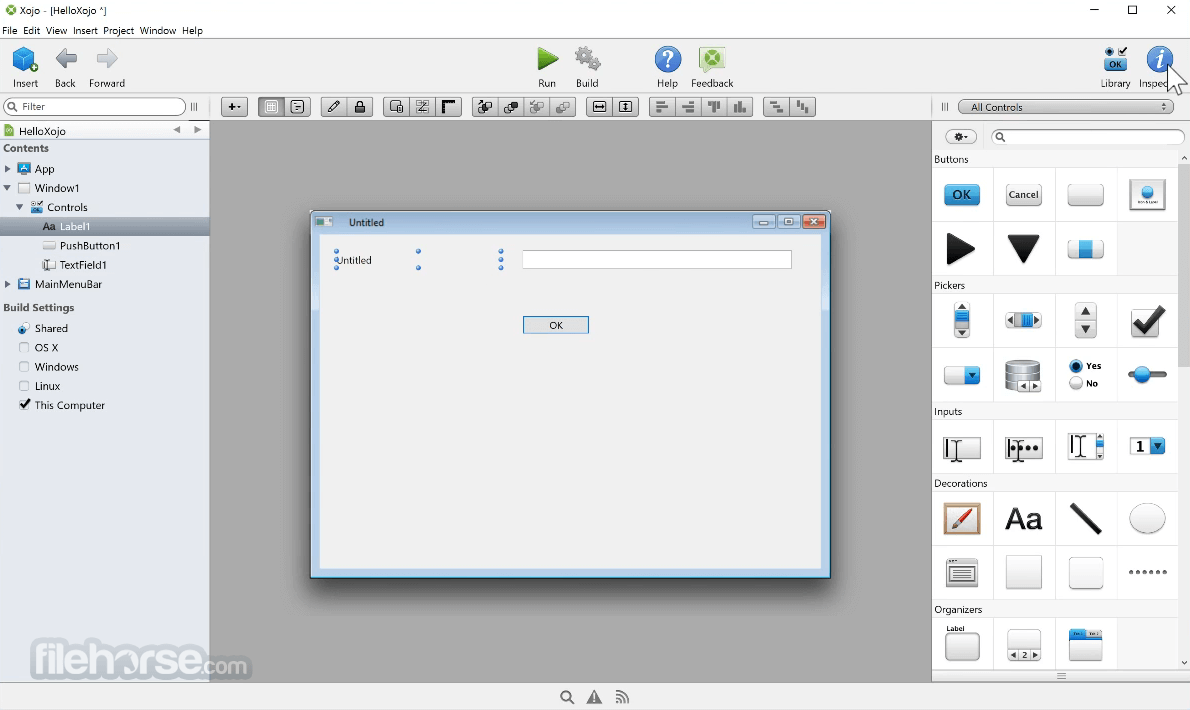
Xojo's Integrated Development Environment (IDE) is designed for simplicity and efficiency. The central workspace provides a project navigator, code editor, and layout editor.
The drag-and-drop interface allows developers to place controls onto windows or web pages effortlessly. Property inspectors and event handlers are easily accessible, streamlining the development process.
Installation and Setup
Download: Visit the official website and download the installer compatible with your operating system.
Installation: Run the installer and follow on-screen prompts to complete the setup.
Activation: Launch Xojo and sign in with your app account to activate the product.
How to Use
Create a New Project: Open Xojo and select the type of application you wish to develop (e.g., Desktop, Web, Mobile).
Design the Interface: Use the drag-and-drop editor to place controls (buttons, text fields, etc.) onto your application's windows or pages.
Write Code: Assign functionality to controls by adding code to event handlers.
Test and Debug: Utilize the built-in debugger to run and test your application.
Build and Deploy: Once satisfied, build your application for the desired platforms and deploy accordingly.
FAQ
Is Xojo suitable for beginners?
Yes, Xojo is designed to be user-friendly, making it accessible for beginners while offering advanced features for experienced developers.
Can I develop mobile applications with Xojo?
Yes, it supports native development for iOS and Android platforms.
What databases can Xojo connect to?
It can connect to SQLite, MySQL, PostgreSQL, and other databases.
Does Xojo support web application development?
Yes, it allows for the development of web applications using the same programming language and IDE.
What platforms can I develop on with Xojo?
You can develop on macOS, Windows, or Linux using Xojo.
Alternatives
Microsoft Visual Studio: A comprehensive IDE supporting multiple programming languages and platforms.
Lazarus with Free Pascal: An open-source cross-platform IDE similar to Delphi, suitable for Pascal programming.
Pricing
Free/Demo: Allows development and testing without the ability to build standalone applications.
Desktop ($399) – Supports macOS, Windows, and Linux. Includes database access, multicore support, version control, and technical support.
Pro ($799) – Includes everything in Desktop plus Web, Mobile, service apps, consulting leads, and technical support.
Pro Plus ($1,999) – Includes everything in Pro plus top priority support, fast fixes, rapid report verification, and activation on 6 devices.
Lite ($99 each) – Build single-platform desktop apps (macOS, Windows, or Linux). Includes SQLite database support and version control.
Web ($399) – Build web apps with database access, deployment support, and technical support.
Mobile ($399) – Build iOS and Android apps with SQLite database support, native controls, and technical support.
System Requirements
Windows 11 or Windows 10, 4 GB RAM minimum (8 GB recommended).
PROS
- Cross-platform development with a single codebase.
- User-friendly IDE with drag-and-drop interface design.
- Comprehensive standard library and database support.
- Some advanced features may be limited compared to other IDEs.
- Licensing can be costly for individual developers.
Xojo stands out as a versatile tool for cross-platform application development, catering to both novices and seasoned developers. Its intuitive IDE, combined with a powerful programming language, facilitates rapid development and deployment across various platforms.
Note: Limited functionality in the demo version.
Also Available: Download Xojo for Mac
-
Xojo 2026 Release 1.2 Screenshots
The images below have been resized. Click on them to view the screenshots in full size.
-

-

-

What's new in this version:
Xojo 2026 Release 1.2
Fixed:
- Web: DecodeURLComponent no longer crashes when given an invalid component, such as a standalone “%”
Xojo 2026 Release 1.1
Highlights:
- Debugger now supports watchpoints
- Greatly improved macOS app code signing process
- New Web controls: WebColorPicker, WebSwitch, WebBarcode
- Android now supports MobileChart, MobileColorPicker, MobilePDFViewer, FolderItem.Zip/Unzip
- Windows: WinUI now supports DesktopTabPanel, DesktopGroupBox
- Jade has improved output and lower token costs
IDE:
New Features:
- The Print command is now supported in the DrawControlInLayoutEditor event, allowing messages to appear in the Messages pane
Fixed:
- Debugger: editing the watch expression of a Variant no longer throws an IllegalCastException
- Improved error reporting in DrawControlInLayoutEditor event scripts by displaying a more accurate line number when errors occur
- In the DrawControlInLayoutEditor event, requesting a property that doesn't exist now displays an error message in the Messages pane instead of failing silently
- Single line comments in Structures no longer raise compile errors
- macOS: Fixed a macOS app signing-related bug when trying to run it from the IDE (Debug), there is a post-build script and the selected Build For option is other than None
- Windows: Color.AccentThemeColor no longer throws an exception if the accent theme color could not be retrieved, instead the highlight color will be returned as a fallback
Framework:
Fixed:
- Disabled the obfuscation of private properties and methods in Libraries, which was causing linking issues with some complex Libraries
- Android: Fixed incorrect position of MobileSlider
- Linux: XojoScript now correctly parses Unicode identifiers. This also fixes the DrawControlInLayoutEditor event so it now works using the Linux ARM64 IDE
- Web: Added WebDatePicker support for detecting date changes when entering a new date from the input control using the keyboard
- Web: Fixed a WebListBox regression causing the control to render vertical grid lines even when GridLineStyle was set to None or Horizontal
- Web: Fixed a WebToolbar regression causing the toggle menu to not be shown on mobile devices
- Web: Fixed a WebLabel regression causing this control to prevent handling the Pressed event on other controls, even if WebLabel wasn't implementing this event
- Windows: WinUI PopupMenu/ComboBox: Setting the SelectedRowIndex to -1 now correctly clears the selection
Xojo 2026 Release 1
Highlights:
- Debugger now supports watchpoints
- Greatly improved macOS app code signing process
- New Web controls: WebColorPicker, WebSwitch, WebBarcode
- Android now supports MobileChart, MobileColorPicker, MobilePDFViewer, FolderItem.Zip/Unzip
- Windows: WinUI now supports DesktopTabPanel, DesktopGroupBox
- Jade has improved output and lower token costs
Statistics:
- Bugs fixed: 124
- Features added: 56
IDE:
New Features:
- The Choose A Project window applies the user selected Accent Color to the icons on macOS
- You can now set watchpoints in the debugger, see documentation for usage
- Added support for additional watchpoint expression matching options: (≥) greater than or equal to and (≤) less than or equal to
- The Watchpoints debugger list now displays the previous value alongside the current value
- When Jade displays a response, it is now shown at the start of the response instead of scrolling to the end of the response
- Jade now compacts long conversations to reduce token usage and API costs
- Update Jade to default to using Claude 4.6 (from 4.0)
- Added DrawControlInLayoutEditor event to DesktopUIControl and MobileUIControl so custom controls can be drawn in the layout editor, similar to WebSDKUIControls
- Obfuscate private property, computed property and private shared method names in the generated Library API output so that their details are not needlessly exposed
- Added option to enable/disable live custom control previews in the layout editor
- iOS: Raised minimum iOS Deployment version to iOS 15.0
- macOS: Improved handling of Entitlements and Provisioning Profiles for macOS apps, so these are properly processed and applied to builds other than those meant to direct distribution and/or publishing to the Mac App Store. In addition, now it does a better job when Run/Debug macOS apps from the IDE, specially if these have Sandbox enabled. In this regard, entitlements and provisioning profiles are also applied to apps debugged from the IDE
- macOS: Now App Store Connect publishing confirmation dialog is presented first when the Publish button (or equivalent menu option) is selected; avoiding processing the checklist when such button has clicked unintentionally. In addition, now the confirmation dialog can be overpassed doing Option-Click on the Publish button or if the Option key is pressed when the equivalent option is selected from the Project menu
- macOS: Improved Developer ID field on Build > macOS > Sign Inspector panel, so it detects the available Teams and build options for signing macOS apps
- macOS: Added the com.apple.security.get-task-allow entitlement by default to macOS apps run/debug from the IDE, so apps like Instruments can attach to them to inspect leaks and other potential issues
- Web: SendEventsInBatches and LazyLoadDependencies WebSession properties will be True now by default on new projects
Fixed:
- The database schema viewer now displays the correct precision for Decimal columns
- Fixed an issue where older Window frame types might not be loaded correctly
- Image Sets from a Library no longer cause compiler errors and can be used outside the Library
- The minimum iOS deployment target in plugin Info.plist files is now setup correctly for release builds in addition to debug builds
- Libraries are now properly saved into XML projects
- Allow the keyboard shortcut to be used to delete a Library project item
- Avoid a possible NilObjectException that might occur when Jade inserts code into a Xojo editor
- Fixed CamelCase definition on some DesktopChart properties
- Fixed an issue with Jade improperly truncating some of its answers
- If the internet connection is offline when asking Jade a question, it now displays a message instead of crashing the IDE with a NetworkException
- The Auto Adjust Tab Order dialog now closes correctly, preventing multiple instances from being opened
- The first time the user fills the App Specific Password settings a Global password entry is created in the Keychain, so it can be used for Notarization of macOS apps when there is not a specific password attached to the project
- Loading a project that has an editor open no longer randomly fails to save changes made to Description fields, Attributes, and Compatibility flags
- Improved readability of Debugger current code line highlight when in dark mode
- Fixed reading a binary format project containing a property with a malformed default value assigned to it; so instead of crashing the IDE it informs the user about it and keeps opening the project as expected
- Fixed an issue when it is about parsing nested array entries in a plist file using the included Plist Editor
- Fixed importing a file whose name conflicts with an existing object name; so now it assigns a unique name to the imported item
- Fixed an issue where the Scope indicator badge was missing from the Autocomplete list for certain items, including Constants and Properties
- When the plist file is created for a compiled macOS app, the Icon File Name entry is only added for a registered Document Type if there is, in fact, some icon image in the associated Icon Family for such entry
- The Database Table Viewer now correctly shows the appropriate column types for the database it's connected to
- Fixed a bug related with Xojo Web projects when these share the Build Automation item with a Desktop project (both of them saved in text format)
- Android: MobileTabPanel now properly shows Unicode tab titles in Layout Editor and at runtime
- iOS: Prevent MobileScreen and MobileContainer from being added to a module
- Linux: Navigator background and source code hint area now respect the system theme colors
- Linux: Linux IDE: The method parameter and return type fields no longer change font size when they gain focus
- Linux: When editing methods in dark mode, the Parameters and Return Type fields no longer intermittently switch from black to white text
- macOS: Debugger popup menu text no longer appears fuzzy or difficult to read
- macOS: The debugger value column text now uses an appropriate text color when selected
- macOS: When a project item is imported from a text-based project into another text-based text project (for example dragging the source text file and dropping it into the target project Browser), and the target project is saved, it generates now the expected files for the imported items and adds the right paths to the target project manifest file
- Web: Fixed an IDe issue causing Web text controls to preview the Hint using the same color as when the control is filled with text
- Web: WebThread.Type will appear as Cooperative now by default on new instances
- Web: The IDE will show the WebDatePicker preview differently when using SQLDate as Display Format
- Web: Fixed an IDE issue causing some properties to be forced to appear under the Behavior group, on Web projects
- Web: DrawControlInLayoutEditor now respects the layout editor's dark mode preview toggle
- Windows: Debugging WinUI apps now properly deletes the debug folder when the debug app terminates
- Windows: Closing the IDE no longer crashes with an Unknown Hard Error
- Windows: It is now possible to add new group headers in the Inspector Behavior dialog in the Windows and Linux IDEs, matching the long-standing behavior of the macOS IDE
Framework:
New Features:
- Added MetaData property to Database class as an additional way to store custom string data that doesn't go into the existing properties
- Android: Added MobileChart control and related classes
- Android: Added MobilePDFViewer
- Android: Added Locale support to String.Titlecase()
- Android: MobileTabPanel captions now display in any case instead of always being in uppercase
- Android: Added MobileTextArea.BorderStyles enum and BorderStyle property
- Android: Added Locale support to String.Uppercase()
- Android: Added Locale support to String.Lowercase()
- Android: Added MobileTextArea and MobileTextField KeyDown event
- Android: Added MobileColorPicker
- Android: Added FolderItem.Zip/Unzip
- Android: MobileSlider now uses modern Material Slider. Value, MinimumValue & MaximumValue are now of type Double to match iOS
- Android: Added Iterator to MobileSegmentedButton
- Android: Added MobileScrollableArea.Scrolled event
- Android: Added Barcode.FromImage and Image methods
- Desktop: Deprecated DesktopGrid.Reload method in favor of ReloadFromDataSource, for consistency
- Desktop: Added CellFocusReceived and CellFocusLost events to DesktopGrid
- Desktop: DesktopGrid applies now the locks set to the received ContainerControl instance for the cell
- iOS: Added MobileMapViewer.HasScaleIndicator property for iOS projects, allowing to show or hide a visual element with the scale representation
- iOS: Added the Scrolled event to MobileScrollableArea and iOSMobileTable for iOS projects
- Mobile: For consistency, deprecated iOSMobileTable.ReloadDataSource in favor of ReloadFromDataSource; deprecated iOSMobileTable.ReloadDataInSection in favor of ReloadSectionFromDataSource and deprecated iOSMobileTable.ReloadRow in favor of ReloadRowFromDataSource
- Web: Added WebSwitch control for Xojo Web apps
- Web: Added Barcode reading support for Web projects
- Web: Added a new non-visual control for Web projects, WebColorPicker, similar to DesktopColorPicker
- Web: Added WebUserAuthentication.IsAvailable As Boolean to check wether the browser supports the feature or not
- Web: Updated Bootstrap to the latest version available, v5.3.8
- Web: Deprecated WebListBox.ReloadData method in favor of ReloadFromDataSource, for consistency
- Web: WebListBox editable fields will have a unique ID now and will inherit Bootstrap styles, to make it consistent with other text field controls, and to make it easier to style them with CSS
- Web: Updated TypeScript compiler from v5.7.2 to v5.9.3
- Web: Updated the TypeScript target that Xojo Web uses to compile the frontend code, from ES6 to ES2020
- Web: Cleaned up the unused code in the Web Framework, to reduce the compiled bundle size
- Web: Added WebMapViewer.HasScaleIndicator property allowing to show or hide a visual element with the distance representation
- Web: Added WebLabel support for changing the element type it uses, for helping with accessibility, SEO and also to make it easier to design pages with titles
- Web: Added WebTextArea.AddText method to make the control more consistent with the other project types
- Web: Removed Xojo Web dependency on Modernizr third party library. Deprecated WebSDKControl.BrowserCompatibility so the library can be removed in the future
- Web: Added support for WebButton.Icon, compatible with arbitrary WebPicture and WebPicture.BootstrapIcon
- Windows: DesktopXAMLContainer: can now Begin/Pause/Resume/Stop Storyboards
- Windows: WinUI: added support for the DesktopTabPanel control
- Windows: DesktopXAMLContainer now supports the ContextRequested event, which will be raised in EventTriggered. Also, WinUI controls now fire the ConstructContextualMenu event
- Windows: WinUI: added support for the DesktopGroupBox control
Fixed:
- ColorGroup now works with a Library
- Fixed a NilObjectException that happened under certain circumstances when drawing a Picture on PDFDocument Graphics context
- Fixed an issue where DesktopGrid was drawing a vertical line for the last column even when the Grid Line Style property is set to None
- MySQLCommunityServer: binding currency values to a ExecuteSQL/SelectSQL statements no longer fails with a data truncation error
- Assigning a double to a DatabaseRow.Column now matches the same precision as assigning a double to a DatabaseColumn.Value (80510)
- Fixed setting properly the Parent property of DesktopGrid instances at runtime, mostly when these are added as childs to DesktopTabPanel or DesktopPagePanel
- Picture.FromScaleFactor now rounds to the nearest pixel
- Fixed a low-res output for PDFGraphics.DrawPicture when all parameters are provided
- Fixed HTMLViewer.PrintToPDF behaviour on macOS, so it generates now paginated PDF files. The output is equivalent to the one got using Print > PDF from a macOS browser, for example
- Getting the number of dimensions of an array (by passing -1 to UBound) no longer causes an OutOfBoundsException
- Subclassing Rect and calling the Constructor(x, y, width, height) no longer raises a StackoverflowException
- Undeprecated REALGetControlEnabled as it remains the only reliable way to determine a control's true enabled state, particularly when the control is parented to another control that may have a different enabled state
- DesktopToolbar.ButtonAt and DesktopToolbar.RemoveButtonAt now raises an OutOfBounds exception instead of silently returning Nil when the received index is less than 0 or greater than the number of items in the bar itself
- DatabaseColumn: Assigning values to a column in a non-editable row now correctly raises a DatabaseException. This behavior previously applied only to the generic Value setter and has now been extended to all type-specific setters (e.g. IntegerValue, StringValue, etc.) (79631)
- Fixed extra spaces added to the text of annotations on PDFDocument
- XojoScript can now access all the Color constants like Color.Red, Color.White, etc
- Android: Type-specific Integer methods (e.g. Int32.FromHex) no longer cause compilation errors
- Android: To match other platform behavior, DateTime values in a Dictionary are now converted to Strings when the Dictionary is converted to JSON
- Android: Fixed an issue where Introspection.ParameterInfo incorrectly returned the name of array parameters
- Android: Fixed a compiler error that occurred when using ReDim/ResizeTo with multidimensional arrays.Issue #76680 (76680)
- Desktop: Fixed DesktopChart.PaintBefore and DesktopChart.PaintAfter receiving a Graphics context with its width set to 0 when the chart type is set to Scatter
- Desktop: Closing a modal window before its event loop begins no longer causes a crash
- Desktop: Contextual clicking on a DesktopContainer, that's hosted on a deprecated Window, no longer crashes
- iOS: Fixed Desktop/MobileChart (iOS) not displaying prefix-suffix when the dataset that has the Prefix-suffix assigned is set as hidden at runtime
- iOS: Now MobileSegmentedButton on iOS properly sets at runtime the selected segment from the Inspector Panel
- iOS: Fixed a NilObjectException when labels are not provided to draw a ChartCircularDataset (Pie chart) on DesktopChart / MobileChart (iOS). In addition, now the user gets feedback about dataset(s) enabled/disabled also in these cases
- iOS: Fixed a bug on DesktopChart/MobileChart (iOS) where pressing the legends were not reacting when more than one dataset was involved in a Pie type chart
- iOS: Fixed MobileSegmentedButton.Iterator skipping the first segment at first run
- Linux: Fixed an issue where resizing a window programmatically could ignore the new width or height and raise the Resize event before the window had resized to its final bounds
- Linux: Updating values on a ScrollBar or Slider while its window is being destroyed no longer triggers a failed assertion
- Linux: Fixed an issue where ListBox content could be incorrectly offset when placed inside a GroupBox within a non-transparent Container
- Linux: FolderItem.MoveTo no longer raises an exception when moving a file to a different volume
- Linux: DesktopTextField/TextArea: setting a BackgroundColor no longer affects the text selection color
- Linux: Setting Graphics.LineDash to Nil now correctly resets the dash pattern, so lines are drawn solid rather than dashed
- Linux: Obtaining the Resources folder when the app name contains periods now works correctly
- Linux: We now enforce an initial minimum control height on Linux for controls that require it. This helps to prevent controls from being clipped
- Linux: App.ExecutableFile now returns a more reliable path/name, especially if the app was launched via a symlink
- macOS: Fixed a regression where DesktopListbox stopped raising MouseDown when the click happened on scrollbars. That also applies to DesktopScrollbar itself
- macOS: Graphics.Outline now works on macOS Tahoe, however, brushes will not be applied when drawing the Outline on Tahoe
- macOS: Fixed a DateTimePicker control bug under macOS, where it was using a different control height in the Layout Editor and at runtime, making it difficult to align it correctly with other controls
- macOS: A DesktopTextArea hosted on a disabled parent control within a DesktopContainer is now correctly disabled when the DesktopContainer is added to the layout
- Web: Fixed a WebChart issue causing using a prefix or suffix on some charts to throw errors at runtime
- Web: Fixed a bug where the image-cache system for PDFDocument was returning the wrong PDF XObject for a given image on web projects
- Web: Fixed a WebToolbar issue causing the Height property to not be fully represented at runtime
- Web: Fixed a WebToolbar issue causing menus in toolbars to be shown behind other toolbars
- Web: Fixed a WebListBox issue causing the header borders to be a pixel or two off
- Web: Fixed a WebChart issue causing the ScatterChartDataset.Fill property to be ignored
- Web: Fixed a WebListBox issue causing the EditCellAt method call to be ignored sometimes, when the cell text was empty
- Web: Fixed a WebPicture issue causing the constructor to throw an UnsupportedFormatException with some kind of JPEG files
- Web: Fixed a WebListBox issue causing styles to not be completely replaced after using style cell renderers multiple times
- Web: Fixed a few issues when setting a WebStyle value to Nil. It will reset the value to its default value now
- Web: Fixed a potential issue in Web projects causing a NilObjectException to be raised while trying to create a temporary file
- Web: Fixed an issue causing Web controls added at runtime to not fire events registered at design time
- Web: Deprecated WebApplication.AutoQuit in favor of AllowAutoQuit, for consistency with the other targets
- Web: Deprecated WebRadioGroup.RemoveAllRows method in favor of RemoveAll and RemoveRowAt in favor of RemoveAt, for consistency
- Web: Fixed a WebListBox issue causing editing fields to edit its HTML, instead of the text value
- Web: Fixed a WebListBox issue causing to show ellipsis on empty checkbox cells, when the column was too narrow
- Web: Fixed a WebListBox issue causing touch devices to not be able to select rows, when AllowRowReordering was set to True
- Web: Fixed an issue causing web controls to not be able to show a Tooltip, after removing it
- Web: WebLabel won't be using the label HTML element anymore, as it's meant to be used to label form controls, not generic captions
- Web: Fixed a WebPopupMenu issue causing the dropdown menu to continue being shown after clicking outside, when having a Tooltip
- Web: Fixed a WebChart issue causing some ChartDataset properties, like AllowInteraction, IsLegendVisible and AllowPopover to be incompatible with the deprecated web chart datasets (e.g. WebChartLinearDataset)
- Web: Fixed an issue causing some browsers to display a Permissions policy violation complain on the developer tools
- Web: Fixed a WebButton issue causing the control to ignore multiple Pressed events, when pressing on it quickly enough
- Web: WebComboBox dividers won't be shown anymore when filtering results, as it causes accessibility issues when trying to navigate using the keyboard
- Web: Fixed a WebButton issue when using Safari with a mix of input devices. We will ensure this browser shows the focus ring when navigating through the controls without a pointer device
- Web: Fixed a WebPopupMenu causing the control to hijack the focus after closing its menu
- Windows: We now override the default system settings and instead honor the user dark mode settings (whether through our custom XOJO_WIN32_DARKMODE_DISABLED environment variable or build settings) to theme WinUI controls
- Windows: SearchField control no longer leaks GDI objects
- Windows: WinUI controls are now correctly themed when switching between light and dark mode
- Windows: WinUI: PopupMenu/ComboBox dropdown list is now dismissed when clicking outside them
- Windows: Controls on a window no longer move completely offscreen, leaving the window seemingly blank, when the PC wakes from sleep, or when turning off/on the monitors in a multiple monitor setup
- Windows: The WinUI Label control no longer incorrectly triggers the MouseDown event twice
- Windows: ProgressBar in dark mode now looks more like its equivalent in light mode. This works around a recent version of Windows 11 that updated the appearance of the Win32 ProgressBar in dark mode. Unfortunately the result looks unpolished and does not match the themed drawing we use for DrawInto, leading to visual inconsistencies. So to avoid this we now prefer the light mode version, which is also the behavior Windows used prior to this change
- Windows: Enabling a WinUI control no longer causes focus to shift to that control, unless it already has focus
- Windows: The Edit->Undo menu item is now correctly enabled when changes are made in TextArea and TextField controls
- Windows: Pressing Ctrl+H, while the DesktopWindow has keyboard focus, now triggers the KeyDown event
- Windows: Display the classic Win32 printer dialog because the newer WinUI version has issues when connecting to printers
Compiler:
Fixed:
- iOS plugin Info.plist files now correctly use the minimum OS version specified in the build settings
- Android: Fixed an issue where the type of some Color methods were not being detected properly when used within the Array() method, which caused an Android compilation error
- Android: Fixed an exception that would occur when casting a variant containing an interface to the interface
- Android: Fixed a compile error that could occur in the Return of the Get section of a hidden computed ColorGroup property
- Android: Fixed a compile error that would occur with a string property whose value starts with #
- Android: Using Me or Self as the In variable (because it is an iterator) in a For Each is now properly cast to the correct type, fixing a compile error
- Android: Fixed a compile error that could occur when using a For Each with a function call as the In variable
- Android: Fixed a compile error that would occur when using a control subclass from a module on a screen
- Android: Fixed a compile error that would occur when comparing an enum with a class property of the same name
Xojo 2025 Release 3.1
- Support for macOS Tahoe 26 and iOS 26
- IDE now supports Libraries for Desktop, Web, Console and iOS projects
- IDE now has an AI assistant, called Jade
- Added DesktopGrid control
- Multiple WebListBox improvements
- Web now uses Bootstrap v5.3.7 and Bootstrap Icons v1.13.1
- Added Passkeys/WebAuth support for web apps
- Windows DesktopXAMLContainer improvements
- Expanded WinUI-backed controls
- Several Crypto enhancements
- Improved color settings for layouts and controls on iOS and Android
- Android Support for PDFDocument
Xojo 2025 Release 3
- Support for macOS Tahoe 26 and iOS 26
- IDE now supports Libraries for Desktop, Web, Console and iOS projects
- IDE now has an AI assistant, called Jade
- Added DesktopGrid control
- Multiple WebListBox improvements
- Web now uses Bootstrap v5.3.7 and Bootstrap Icons v1.13.1
- Added Passkeys/WebAuth support for web apps
- Windows DesktopXAMLContainer improvements
- Expanded WinUI-backed controls
- Several Crypto enhancements
- Improved color settings for layouts and controls on iOS and Android
- Android Support for PDFDocument
Xojo 2025 Release 2.1
Highlights:
- Optimized (faster, larger) frameworks are used when compiling with Aggressive Optimization
- Updated to SQLite 3.49.1 for all platforms except Android which is at 3.49.2
- Added Random.UUID shared method
- Enhanced XAML integration for Windows applications
- Added support to change the Shell.Backend on Windows to use PowerShell in addition to cmd
- DesktopHTMLViewer now supports printing directly to a PDF file using PrintToPDF
- Improved WebStyle supports hover, pressed and visited states
- Added ToPicture method to Web and Mobile MapViewer control to get a map as a picture
- Select and use multiple photos at once on iOS with MobileImagePicker
- New Android UserAuthentication class adds facial recognition, fingerprint and passcodes
- MobileSharingPanel allows sharing of multiple images and files more easily
- Preemptive threads are now supported on Android
Statistics:
- Bugs fixed: 7
- Documentation changes: 1
IDE:
- macOS: Fixed IDE's Window menu displaying too many separator entries on macOS when the menu bar is refreshed
- Windows: Windows IDE: the XAML control chooser window is now initialized with the selected DesktopXAMLContainer content
Framework:
- Web: Fixed a WebListBox issue causing columns to not be resized properly in some cases, when using Firefox or Chrome
- Web: Fixed a WebMessageDialog issue causing the control failing to work properly when there were multiple instances in the layout
- Web: Fixed an issue causing controls to not clean up their styles from the HTML DOM after removing them
Compiler:
- Android: Fixed a regression that causes a silent failure when code signing release apk files
- Android: Fixed a release build error that could occur in projects without MobileImagePicker and MobileLocation
Documentation:
- Added missing NoSelection constant to the DesktopComboBox & DesktopPopupMenu docs
Xojo 2025 Release 2
- Optimized (faster, larger) frameworks are used when compiling with Aggressive Optimization
- Updated to SQLite 3.49.2 for all platforms
- Added Random.UUID shared method
- Enhanced XAML integration for Windows applications
- Added support to change the Shell.Backend on Windows to use PowerShell in addition to cmd
- DesktopHTMLViewer now supports printing directly to a PDF file using PrintToPDF
- Improved WebStyle supports hover, pressed and visited states
- Added ToPicture method to Web and Mobile MapViewer control to get a map as a picture
- Select and use multiple photos at once on iOS with MobileImagePicker
- New Android UserAuthentication class adds facial recognition, fingerprint and passcodes
- MobileSharingPanel allows sharing of multiple images and files more easily
- Preemptive threads are now supported on Android
Xojo 2025 Release 1.1
- Linux ARM IDE Support: Now available, including Raspberry Pi
- App Store Publishing: Directly publish macOS Desktop and iOS projects to App Store Connect from the IDE
- Web Drag and Drop Support: Any visual control can now be dragged or accept drops
- WebListBox: Now supports editable cells and checkboxes, and row reordering via dragging
- Windows built-in ICU Libraries: Eliminates manual ICU updates and reduces app file sizes
- Android Support: Initial ColorGroup and Dark Mode support
- TLS 1.3 Support: Now available with SSLSocket and URLConnection
- IDE Toolbars: Option to hide captions. Windows now features a smaller toolbar, and both Windows and Linux use modern Bootstrap icons. The Documentation window toolbar is now more compact.
- IDE Code Editor: Cmd/Ctrl + Double-clicking on a local variable name now jumps to its declaration, similar to the "Go To var" command
- IDE Layout Editor: Improved performance for complex container layouts
 OperaOpera 131.0 Build 5877.24 (64-bit)
 AdsPowerAdsPower - Antidetect Browser
 PhotoshopAdobe Photoshop CC 2026 27.5 (64-bit)
 BlueStacks AIBlueStacks AI
 OKXOKX - Buy Bitcoin or Ethereum
 CapCutCapCut 8.5.0
 PC RepairPC Repair Tool 2026
 Hero WarsHero Wars - Online Action Game
 TradingViewTradingView - Trusted by 100 Million Traders
 AdGuard VPNAdGuard VPN 2.9.0
Comments and User Reviews