




 Premiere Pro
 RecCloud
 LitMedia AI
 FocuSee
 Filmora
 Restream
-
Latest Version
Zoom Player MAX 22.2 LATEST
-
Review by
-
Operating System
Windows 7 / Windows 8 / Windows 10 / Windows 11
-
User Rating
Click to vote -
Author / Product
-
Filename
zp2220max.exe
-
MD5 Checksum
cc280369abcbee06a4f86d7a3c1726ed
Unlike standard media players, Zoom Player MAX is designed with a modular structure and extensive support for third-party codecs and filters.
It’s built for users who need both high-quality playback and total control over their viewing experience.
Key Features
Smart Play Technology: Ensures stable and smooth playback by automatically selecting the most appropriate codecs and filters.
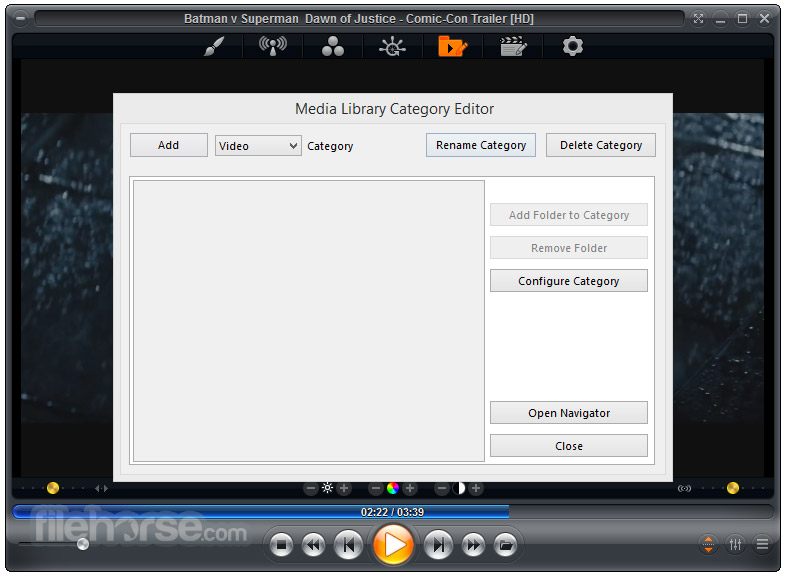
Media Library System: Organizes media content into easily navigable categories with metadata scraping support.
Advanced Audio/Video Controls: Adjust playback speed, zoom, aspect ratio, color settings, equalizer, and subtitle synchronization.
Streaming and IPTV Support: Supports streaming video, audio, and IPTV services via direct URL input or playlist files.
Customization and Skins: Full skinning support, keyboard/mouse customization, and scripting options for automation.
Playback History and Resume: Remembers playback position for multiple files.
Kiosk Mode & Remote Control Support: Ideal for digital signage and HTPC setups.
Installation and Setup
Installation is straightforward, with a setup wizard guiding users through codec installation and initial configuration. The software can also auto-detect missing components and offer to download them.
A codec pack is included, but it allows the use of third-party codecs for advanced scenarios.
How to Use
- Launch the app and load media via drag-and-drop, file browser, or network streaming.
- Use the Media Library to organize your files or watch network content.
- Customize playback settings from the right-click menu or the advanced options dialog.
- Enable Smart Play for optimal codec usage.
- Use keyboard shortcuts or a remote to control playback.
Zoom Player latest version introduces a Modern UI with a semi-transparent Control Overlay appearing over the video area, replacing the traditional skinned interface.
This overlay is highly customizable, allowing adjustments to button layouts, sizes, text fonts, colors, and transparency.
New settings enable automatic display of the Control Overlay during specific actions like pausing or seeking. Additional features include snap zones for quick window positioning, a redesigned color control overlay, enhanced media library search, and improved IPTV Group Manager.
Numerous optimizations and bug fixes have also been implemented to enhance performance and user experience.
Full Features
- Highly customizable interface with windowed and fullscreen modes, great for all screen sizes and accessibility needs.
- Supports DirectShow, libVLC, and Chromium engines; optimized Smart Play tech ensures smooth playback.
- Full 4K HDR hardware decoding; dynamic skins with scalable UI modes (F4–F7).
- Rich Media Library with metadata scraping, filtering, sorting, and parental controls.
- Output to any audio device with 10-band equalizer, S/PDIF, and bitstreaming.
- Auto-resume subtitles/audio tracks, aspect ratio controls, zoom/pan, and magnetic docking.
- Hover previews, timeline chapters, and action sound FX system.
- Extensive playlist, image slideshow, and multi-monitor video wall support.
- GuardDog auto-restart, Wake-on-LAN, screen-burn protection, and network drive keep-alive.
- DVD/Blu-ray playback, IPTV, YouTube, RSS, Emby/Plex/Jellyfin support.
- Subtitle downloads, playlist switching, ring tone creator, and virtual editing.
- Visualizations, contact sheet creation, GoPro sequence auto-play, and screenshot tools.
- Full HTPC control with keyboard, mouse, remotes, gamepads, and Android app.
- Customizable keyboard/mouse, gestures, screen corners, and smart audio device switching.
- Extensive automation/API control, detachable control bar, and web remote.
- Resume playback across PCs, change resolution, blank monitors, and parental locks.
Does Zoom Player MAX support 4K and HDR content?
Yes, it supports 4K UHD and HDR playback, provided the system has compatible hardware and codecs.
Can it play Blu-ray discs?
Zoom Player MAX can play Blu-ray folder structures, but it doesn’t support encrypted Blu-ray discs out of the box due to licensing restrictions.
Is it suitable for HTPC setups?
Absolutely. It supports remote control, fullscreen kiosk mode, and highly customizable navigation interfaces.
Does it require external codec packs?
It comes with its own install center for essential codecs, but also allows use of external packs like LAV Filters for advanced playback.
Can it stream from YouTube or network shares?
Yes, it supports streaming from direct video URLs and network locations (SMB/UPnP), though YouTube streaming requires configuration.
Alternatives
VLC Media Player – Simpler, free, and highly portable with strong codec support.
PotPlayer – Feature-rich and lightweight with a modern interface.
KMPlayer – Advanced controls and 3D playback support.
MPC-HC with codec packs – Highly customizable but no longer in active development.
Pricing
Zoom Player MAX is a paid software, typically priced at $29.95 for a single-user license, with discounted upgrades and lifetime license options.
A free version, Zoom Player FREE, is available with fewer features.
Supported
Video formats supported: Plays DVD, BluRay (decrypted), MKV, AV1, H.264, H.265, WebM, AVI, FLV, WMV, MOV, MP4, VOB, TS, MTS, 3GP, Real Media, QuickTime, DV, MXF, SWF, and more.
Audio formats supported: Compatible with MP3, FLAC, AAC, WMA, OGG, OPUS, AC3, DTS, WAV, ALAC, RA, APE, CDA, TTA, MIDI, SHOUTcast, and others.
Interactive formats supported: Handles DVD menus, HTML-based content, and Flash (SWF) interactivity.
Image formats supported: Opens JPG, PNG, GIF, BMP, TIFF, PSD, ICO, TGA, PCD, PSP, and many additional image formats.
System Requirements
- OS: Windows 7, 8, 10, 11 (32-bit or 64-bit)
- CPU: Dual-core or better recommended
- RAM: Minimum 2 GB
- GPU: DirectX-compatible graphics card for hardware acceleration
- Disk: ~100 MB for installation
- Extremely customizable and powerful
- Excellent format and codec support
- Stable playback with Smart Play
- Remote control and HTPC-ready features
- Active development and support
- Interface may be too complex for beginners
- Some features locked behind the paid version
- Streaming configuration can be tricky
Zoom Player MAX is a top-tier choice for users seeking a highly configurable and performance-oriented media player for Windows. While it may not be the best option for casual viewers, power users, HTPC enthusiasts, and digital signage setups will find it exceptionally capable.
With features like Smart Play, streaming support, and deep customization, it stands out as a premium alternative in a crowded media player market.
Note: 30 days trial version.
-
Zoom Player MAX 22.2 Screenshots
The images below have been resized. Click on them to view the screenshots in full size.

-

-

-
-

What's new in this version:
New:
- Introducing Home Theater Video Streaming search
- I implemented a new "Search" section to the Video Streaming Home Theater interface that allows you to search for Live Streams, Live Programs, VOD Movies and VOD TV Shows
- ZP Remote Neo is now live on the google play store
Feature:
- Control and easily switch between multiple PCs running Zoom Player
- Fully customizable button layout (position, size, background shape, background color, horizontal/vertical spacing)
- Navigate and play items from the playlist directly on your phone
- Access to 100's of Zoom Player Standard, Extended and Navigation functions
- Control the remote PC's mouse with a virtual track-pad
- Multiple button styles & tap effects
- 100% Private & Open-Source! no Ads! no Tracking
- I am releasing ZP Remote Neo as a free, open-source add-on to enhance the Zoom Player experience. Please support my work by purchasing or gifting licenses.
I've added support for YouTube DirectShow/libVLC streaming based on the yt-dlp open source project:
- Beyond YouTube, yt-dlp supports finding streams on many other website such as Instagram, TikTok, SoundCloud, Twitter/X and many many more
- In the "Advanced Options / Playback" section, you can now specify website URLs Zoom Player should pass through yt-dlp before trying to play the stream.
- Take into account that playback from such sources may not be perfect.
- I've added a "Currently playing" icon next to the stream name in the Video Streaming Home Theater interface.
- The Video Streaming Group Manager has been enhanced with support for selecting multiple groups to hide by matching a name. For example, if your provider includes many groups in french and you don't speak
- the language and each french group contains "FR |", you can just type this text to select every matching group.
- New "/UseLibVLC" command line parameter that instructs Zoom Player to try using libVLC as the media engine for the next media played.
- New "Mouse Hover" color effect for the control overlay's timeline. You can fully customize the colors in the advanced options dialog under "Interface / Control Overlay".
- New "Use fuzzy logic when indexing the Episode Guide" Video Streaming setting (Adv. Options / Playback / Video Streaming). Disabled by default.
- In previous versions Zoom Player always used a fuzzy name matching logic when trying to match the stream index of a Stream Playlist with the Electronic Program Guide (EPG).
- However, using fuzzy matching logic is a lot slower than a direct match, causing the global program search feature to become impractically slow when dealing with a massive amount of streams which is the reason I disabled fuzzy matching by default and created a new setting which you manually enabled.
- For comparison, on the same playlist and program guide, using fuzzy matching logic took over 2 minutes while a direct match took 4 seconds. The results were identical since the provider's Playlist and EPG databases were not too messy.
- For greater context, regardless of using either a fuzzy or direct match, the results are cached so fuzzy-matching's long processing time is only triggered once per provider and repeated global program searches should usually take 1-2 seconds on even large databases.
- I wrote new code to load the Playlist -> EPG indexing code to run in a background thread as soon as you open either the Windowed or Home Theater versions of the Video Streaming interface.
- This means that performing a global program search should return results a lot faster in most usage cases.
- Made the rotate video function accessible as a control overlay button which you can assign to any of the 4 control overlay button zones.
- Added support for the APV format. Advanced Professional Video is a high-efficiency, intra-frame only and visually lossless video codec developed by Samsung for professional smartphone recording and editing. It offers 20% better storage efficiency than traditional codecs (according to Samsung), supports 10-16 bit depths, 4K/8K resolution.
- Please note that APV playback requires LAV Filters v0.81 or newer. This version of LAV Filters may not be included in this release due to bug reports I've seen on the LAV release post over at the doom9 forums.
- New "2800" TCP/IP API command to force the next media to load with libVLC instead of DirectShow. May not apply if DirectShow isn't used to load the media.
Changed:
- Filtering streams (searching) in the Video Streaming Windowed interface should be significantly faster, to the point you may want to disable the "Filter streams when pressing enter (otherwise filter on each key stroke)" setting.
- The "Filter streams/programs when pressing enter" Video Streaming setting has been changed to "Filter streams when pressing enter" and now only applied to streams and no longer to program searches which now always require pressing enter to search.
- Scrolling through the Video Streaming Home Theater interface should be a bit smoother.
- Optimized EPG indexing by removing EPG channel entries that did not contain any program entries.
- When creating Windows Shortcuts to streams from the Video Streaming windowed dialog's right click menu, if libVLC is set as the playback engine for Video Streaming, the new "/UseLibVLC" command line parameter will be included in the new shortcut to ensure Zoom Player uses the correct media engine when the shortcut is launched.
Fixed:
- Fixed multiple bugs in the Video Streaming Episode Guide to Playlist indexing cache which could inflate the cache file with duplicate entries, slowing down future indexing and global program searches.
- Some Video Streaming VOD movies showed a wrong duration due to bad database input by some service providers (entered minutes instead of seconds). I fixed this by using a validation against an alternative JSON text field.
- Fixed a crash when trying to browse a VOD TV Show's episode listing with some TV Shows that had a different way of encoding episode meta-data information.
- Enabling the "Pre-load navigation gfx" setting (Adv. Options / Interface / Home Theater / Settings) could have triggered a crash under some conditions, causing the home theater fullscreen interfaces to glitch.
- Fixed a crash when trying to use an external audio track with Zoom Player's DSP filter disabled.
- Fixed a crash when trying to open the Video Streaming window and then closing Zoom Player before the Video Streaming window had a chance to appear.
- Performing a Video Streaming global program search now waits for the EPG to finish loading first. Previously a search before the EPG finished parsing would return partial results.
- Opening and then closing the Video Streaming Group Manager interface would cause visual artifacts when the Video Streaming Home Theater was in focus on the Stream or EPG lists.
- Fixed a media library bug that triggered after resetting filters, causing clicks on the scrollbar to register as thumbnail clicks.
 OperaOpera 127.0 Build 5778.76 (64-bit)
 Kling AIKling AI - Text or Image to Video
 PhotoshopAdobe Photoshop CC 2026 27.4 (64-bit)
 BlueStacksBlueStacks 10.42.166.1001
 OKXOKX - Buy Bitcoin or Ethereum
 CapCutCapCut 7.9.0
 PC RepairPC Repair Tool 2026
 Hero WarsHero Wars - Online Action Game
 TradingViewTradingView - Trusted by 100 Million Traders
 AdGuard VPNAdGuard VPN 2.9.0
Comments and User Reviews