




 Restream
 OpusClip
 Premiere Pro
 Artlist
 LitMedia AI
 Kling AI
 Camo Studio
-
Latest Version
-
Operating System
Windows 7 / Windows 8 / Windows 10
-
User Rating
Click to vote -
Author / Product
-
Filename
mkvtoolnix-32-bit-99.0-setup.exe
-
MD5 Checksum
b2bab8f563079486b1a794a4de9423ba
Sometimes latest versions of the software can cause issues when installed on older devices or devices running an older version of the operating system.
Software makers usually fix these issues but it can take them some time. What you can do in the meantime is to download and install an older version of MKVToolNix 99.0.0 (32-bit).
For those interested in downloading the most recent release of MKVToolNix (32-bit) or reading our review, simply click here.
All old versions distributed on our website are completely virus-free and available for download at no cost.
We would love to hear from you
If you have any questions or ideas that you want to share with us - head over to our Contact page and let us know. We value your feedback!
-
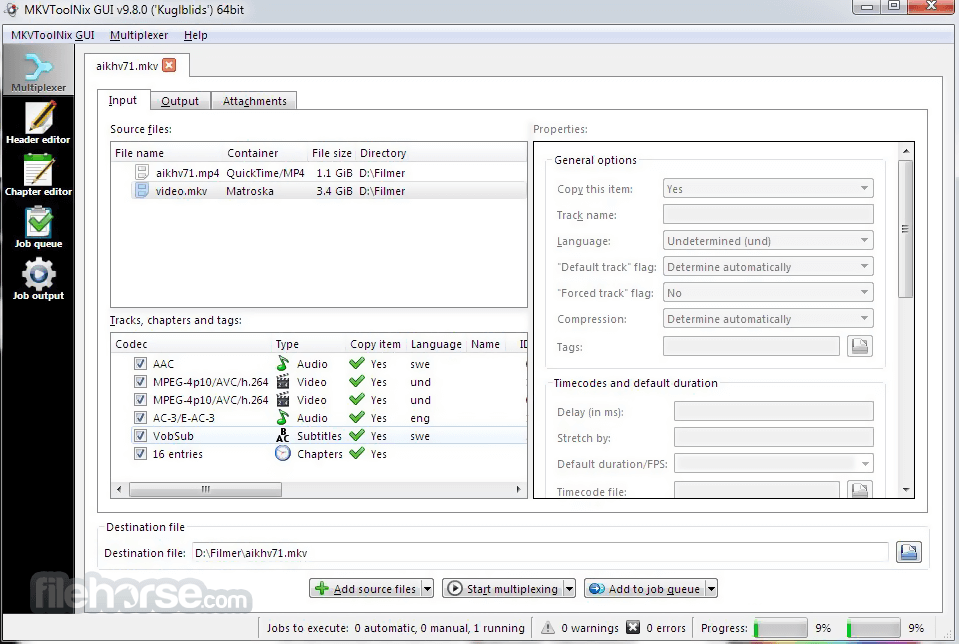
MKVToolNix 99.0.0 (32-bit) Screenshots
The images below have been resized. Click on them to view the screenshots in full size.
-

-

What's new in this version:
New features and enhancements:
- MKVToolNix GUI: the GUI will now remember the last used directory for selecting audio files for playback in “play audio file” program runners separately from any other “open file”-type situations. This directory will also default to /System/Library/Sounds on macOS now.
MKVToolNix GUI: executing actions → running programs: added new variables: MTX_DESTINATION_FILE_BASE_NAME (the name without the drive letter, path or the suffix; e.b. /movies/A.new.hope.mkv → A.new.hope) and MTX_DESTINATION_FILE_SUFFIX (only the letters after the last ., e.g. /movies/A.new.hope.mkv → mkv). Added examples to all the destination file variables in the popup menu when adding variables in the preferences
- MKVToolNix GUI: executing actions → running programs: the command-line input widget will now receive focus again after using the popup menu for adding a variable
- MKVToolNix GUI: executing actions → running programs: the variables will now also be set as environment variables when running a program after a job completes.
- MKVToolNix GUI: executing actions → running programs: when using the “Execute now” button for testing the MTX_… variables will be set to the current multiplexer tab’s values for easier testing
Fixed:
- mkvmerge: if using legacy font MIME types is off mkvmerge will now remap legacy font MIME types present in source files into the current ones
- mkvmerge, mkvpropedit, MKVToolNix GUI’s multiplexer & header editor: on Windows & macOS the MIME type detection will now use the FreeDesktop.org MIME database instead of falling back to file extension-based guesses. This matches how it works on other operating systems. This fixes e.g. OpenType fonts being detected as the legacy type application/vnd.ms-opentype instead of the current IETF RFC, font/otf, no matter what the “use legacy font MIME types” settings in the preferences was set to.
- MKVToolNix GUI: update checker: fixed a potential attempt to read from an invalid memory address if an error occurred when parsing the XML file retrieved from the official MKVToolNix server
- macOS: GUI: the default audio file for program runners of type “play audio file” has been changed to an AIFF file as Qt’s Multimedia backend routes through Core Audio which doesn’t support WebM/VP8/Vorbis/Opus. Existing configurations will be updated if they point to the prior default WebM audio file.
 OperaOpera 134.0 Build 5954.46 (64-bit)
 BlueStacksBlueStacks 10.42.251.1003
 PhotoshopAdobe Photoshop CC 2026 27.9.1 (64-bit)
 LDPlayerLDPlayer - Android Emulator
 GTA 6GTA 6 for PS5
 CapCutCapCut Desktop 9.1.0
 PC RepairPC Repair Tool 2026
 Hero WarsHero Wars - Online Action Game
 TradingViewTradingView - Trusted by 100 Million Traders
 Halo: CampaignHalo: Campaign Evolved
Comments and User Reviews