




 10Web
10Web OnSpace AI
 Replit
 Windsurf
 Cursor
 Antigravity
 SQL Server
 Lovable
-
Latest Version
Qt Creator 20.0.0 LATEST
-
Review by
-
Operating System
Windows 7 64 / Windows 8 64 / Windows 10 64 / Windows 11
-
User Rating
Click to vote -
Author / Product
-
Filename
qt-creator-opensource-windows-x86_64-20.0.0.exe
For developers working with C++ and Qt, having a robust and feature-rich integrated development environment (IDE) is essential.
Qt Creator is a powerful and versatile IDE for Windows specifically designed for building Qt applications.
It is widely used for desktop, embedded, and mobile application development, offering an intuitive interface and a strong set of features.
Qt Creator is an open-source IDE designed to streamline Qt application development across multiple platforms, including Windows, macOS, and Linux.
It provides code editing, debugging, version control, and UI design tools, making it a comprehensive solution for Qt-based software development.
With its CMake, QMake, and Meson support, it caters to developers working on both simple and complex projects.
Main Features
Cross-Platform Support – Develop and deploy applications on Windows, Linux, macOS, and embedded systems.
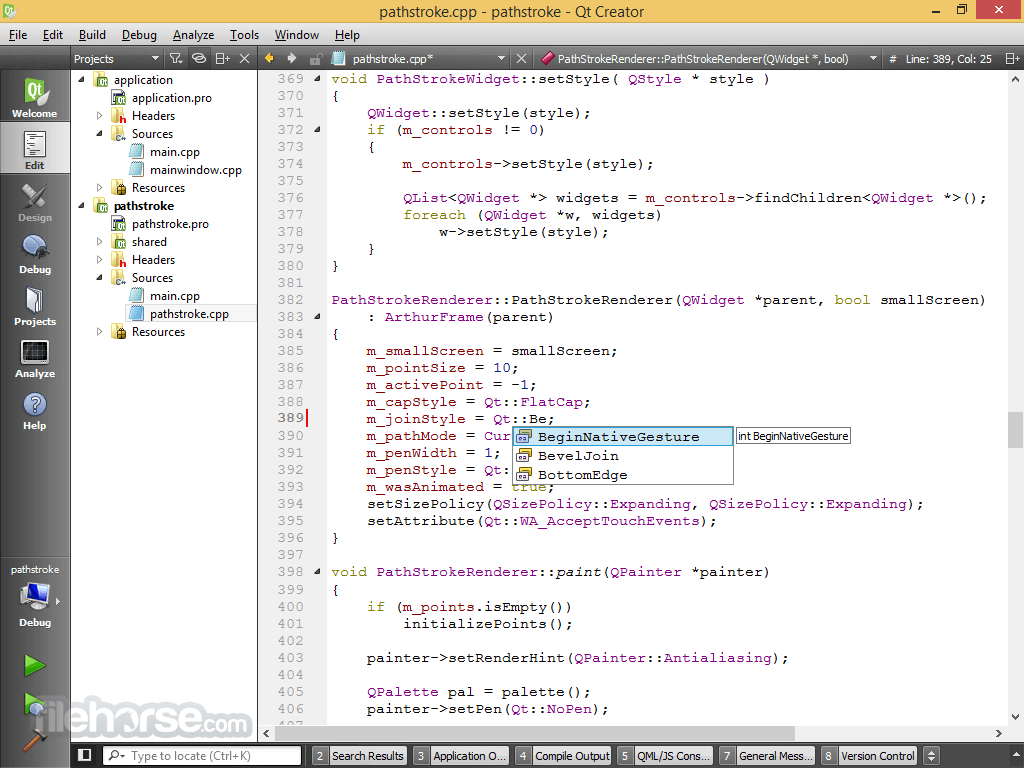
Advanced Code Editor – Syntax highlighting, auto-completion, refactoring tools, and smart indentation for C++, QML, JavaScript, and Python.
Integrated Debugger – Supports GDB, LLDB, and Microsoft Debugger for seamless debugging of C++ applications.
Graphical UI Designer – Drag-and-drop UI design with Qt Quick Designer and Qt Widgets.
Built-in Version Control – Integration with Git, Subversion, and Perforce.
Project Management – Supports multiple build systems like CMake, QMake, and Meson.
Embedded Development – Debug and deploy applications for embedded platforms like Raspberry Pi and MCUs.
User Interface
Qt Creator features a clean and modern interface designed for efficiency. The IDE includes a split-pane view for working on multiple files simultaneously and provides customizable layouts.
It also features a powerful search and navigation system, making it easy to locate files, classes, and functions.
Installation and Setup
Create a New Project – Use the project wizard to start a new Qt Widgets or Qt Quick application.
Write Code – Utilize the advanced editor with syntax highlighting and code completion.
Design UI – Use the drag-and-drop UI designer for easy interface building.
Compile & Build – Choose a build configuration and compile your project.
Debug & Test – Use the integrated debugger to troubleshoot issues.
Deploy – Package and deploy your application to the target platform.
FAQ
Is Qt Creator free?
Yes, this program is open-source, but the Qt framework has both free and commercial licensing options.
Can I use Qt Creator for Python development?
Yes, it supports Python with PyQt and PySide, but C++ is its primary language.
Does Qt Creator support CMake?
Yes, it fully supports CMake, making it compatible with modern C++ projects.
Can I use Qt Creator for non-Qt projects?
Yes, you can use Qt Creator as a general C++ IDE even for non-Qt applications.
Is Qt Creator good for beginners?
While Qt Creator is feature-rich, beginners may find it complex compared to simpler IDEs like Eclipse or Visual Studio Code.
Alternatives
Microsoft Visual Studio – A popular C++ IDE with powerful debugging tools.
Eclipse IDE – A versatile, extensible C++ IDE.
Pricing
Open-Source Version – Free for personal and non-commercial use.
Commercial License – Pricing varies depending on Qt Company’s licensing model for professional developers.
System Requirements
Qt Creator is a powerful, cross-platform IDE that excels in Qt and C++ development. With an intuitive code editor, robust debugging tools, and excellent UI design capabilities, it is the preferred choice for developers working on Qt applications. While it may have a steeper learning curve for beginners, it provides all the necessary tools to build, test, and deploy high-quality software.
Qt Creator is a powerful and versatile IDE for Windows specifically designed for building Qt applications.
It is widely used for desktop, embedded, and mobile application development, offering an intuitive interface and a strong set of features.
Qt Creator is an open-source IDE designed to streamline Qt application development across multiple platforms, including Windows, macOS, and Linux.
It provides code editing, debugging, version control, and UI design tools, making it a comprehensive solution for Qt-based software development.
With its CMake, QMake, and Meson support, it caters to developers working on both simple and complex projects.
Main Features
Cross-Platform Support – Develop and deploy applications on Windows, Linux, macOS, and embedded systems.
Advanced Code Editor – Syntax highlighting, auto-completion, refactoring tools, and smart indentation for C++, QML, JavaScript, and Python.
Integrated Debugger – Supports GDB, LLDB, and Microsoft Debugger for seamless debugging of C++ applications.
Graphical UI Designer – Drag-and-drop UI design with Qt Quick Designer and Qt Widgets.
Built-in Version Control – Integration with Git, Subversion, and Perforce.
Project Management – Supports multiple build systems like CMake, QMake, and Meson.
Embedded Development – Debug and deploy applications for embedded platforms like Raspberry Pi and MCUs.
User Interface
Qt Creator features a clean and modern interface designed for efficiency. The IDE includes a split-pane view for working on multiple files simultaneously and provides customizable layouts.
It also features a powerful search and navigation system, making it easy to locate files, classes, and functions.
Installation and Setup
- Download Qt Creator from the official Qt website.
- Run the installer and select the required Qt components and dependencies.
- Configure the build environment (choose CMake, QMake, or another build system).
- Set up compilers and debuggers (MinGW, MSVC, Clang, etc.).
- Start coding your Qt-based applications.
Create a New Project – Use the project wizard to start a new Qt Widgets or Qt Quick application.
Write Code – Utilize the advanced editor with syntax highlighting and code completion.
Design UI – Use the drag-and-drop UI designer for easy interface building.
Compile & Build – Choose a build configuration and compile your project.
Debug & Test – Use the integrated debugger to troubleshoot issues.
Deploy – Package and deploy your application to the target platform.
FAQ
Is Qt Creator free?
Yes, this program is open-source, but the Qt framework has both free and commercial licensing options.
Can I use Qt Creator for Python development?
Yes, it supports Python with PyQt and PySide, but C++ is its primary language.
Does Qt Creator support CMake?
Yes, it fully supports CMake, making it compatible with modern C++ projects.
Can I use Qt Creator for non-Qt projects?
Yes, you can use Qt Creator as a general C++ IDE even for non-Qt applications.
Is Qt Creator good for beginners?
While Qt Creator is feature-rich, beginners may find it complex compared to simpler IDEs like Eclipse or Visual Studio Code.
Alternatives
Microsoft Visual Studio – A popular C++ IDE with powerful debugging tools.
Eclipse IDE – A versatile, extensible C++ IDE.
Pricing
Open-Source Version – Free for personal and non-commercial use.
Commercial License – Pricing varies depending on Qt Company’s licensing model for professional developers.
System Requirements
- OS: Windows 10/11 (64-bit)
- Processor: Intel or AMD (x86_64 architecture)
- RAM: 4GB (8GB recommended)
- Disk Space: 2GB minimum
- Graphics: OpenGL 2.0 support required for Qt Quick applications
- Excellent Qt integration for rapid development
- Cross-platform support for Windows, Linux, and macOS
- Powerful code editor with auto-completion and debugging tools
- Great UI design tools for Qt Widgets and Qt Quick
- Good support for embedded and mobile development
- The free version lacks some commercial features
- Limited third-party plugin ecosystem compared to Visual Studio
- Can be resource-intensive for large projects
- Commercial licensing can be expensive for professional use
Qt Creator is a powerful, cross-platform IDE that excels in Qt and C++ development. With an intuitive code editor, robust debugging tools, and excellent UI design capabilities, it is the preferred choice for developers working on Qt applications. While it may have a steeper learning curve for beginners, it provides all the necessary tools to build, test, and deploy high-quality software.
Why is this app published on FileHorse? (More info)
-
Qt Creator 20.0.0 Screenshots
The images below have been resized. Click on them to view the screenshots in full size.
-

 OperaOpera 133.0 Build 5932.34 (64-bit)
 LDPlayerLDPlayer - Android Emulator
 PhotoshopAdobe Photoshop CC 2026 27.7 (64-bit)
 BlueStacks AIBlueStacks AI
 GTA 6GTA 6 for PS5
 CapCutCapCut Desktop 8.7.0
 PC RepairPC Repair Tool 2026
 Hero WarsHero Wars - Online Action Game
 TradingViewTradingView - Trusted by 100 Million Traders
 Forza HorizonForza Horizon 6
Comments and User Reviews