




 YTD Download
 Blip Transfer
 PRTG
PRTG TrueNAS
 4K Download
 WTFast
 Keeprix
 CleverGet
-
Latest Version
AOMEI Image Deploy 1.2 LATEST
-
Review by
-
Operating System
Windows XP / Vista / Windows 7 / Windows 8 / Windows 10 / Windows 11
-
User Rating
Click to vote -
Author / Product
-
Filename
DeployFree.exe
AOMEI Image Deploy is a FREE image deployment and network cloning software that supports deploying/restoring an image to multiple computers over a network.
It will not only offer a free solution to deploy your system image to multiple computers within a LAN, but also help you to save time and resources by provisioning hundreds of PCs and Servers simultaneously.
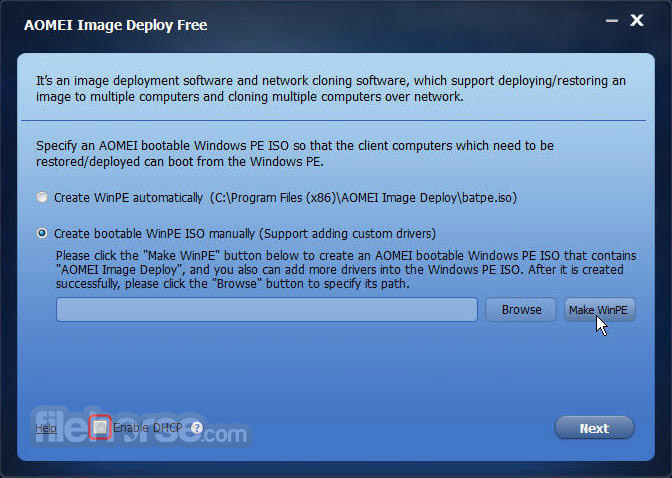
Ever wondered the easiest way to deploy a system image to multiple computers at the same time, rather than restoring the system image to a single computer one by one? For instance, 30 computers need to be installed with the system, including software, patches, drivers, and so forth.
It will take you a lot of time and resources. Now, AOMEI Image Deploy for PC offers you a simple solution that deploys system images to dozens of computers simultaneously.
Features and Highlights
Real-time process monitor
The server will display clients' IP addresses and restore status in the list. The process of restoration is displayed in percentage. The server will receive a prompt whether the restore is successful or not, and it can manage all clients remotely.
Free image deployment software
Freely offers an image deployment solution that other paid software will not offer, and it enables you to deploy an image to multiple bare metals freely. Some alternatives of AOMEI Image Deploy are expensive; usually, you will spend over $1,000 to deploy 50 computers.
Easy-to-use image deployment and network cloning software
AOMEI ImageDeploy is a very convenient and easy-to-use tool with and built-in wizard method. Those features enable you to follow the prompt step by step to finish the deployment process to batch client computers within the same LAN.
Batch preset the client computers' names and IP addresses
Automatically distributes different computer names and IP addresses for Client computers that finish deployment, and makes sure they can be connected to the network normally after entering the OS. Actually, you can preinstall remote control software in the system image. When client computers are online, you can take the subsequent operation to the client computers remotely.
Dissimilar hardware support
AOMEI Universal Restore technique supports deploying system images to multiple client computers, even with different hardware (For instance, CPU and motherboard). It ensures normal system start-up in client computers after deployment.

How to Use
It allows you to restore a system image to multiple client computers simultaneously over a network. To do this, you need a server computer where AOMEI Image Deploy is installed and client computers that will receive the image. Client computers typically don’t have an operating system installed.
Steps for Deploying an Image:
Server and Client Preparation:
Pricing
AOMEI Image Deploy Free - $0.00
Everything AOMEI Image Deploy Free, plus:
It will not only offer a free solution to deploy your system image to multiple computers within a LAN, but also help you to save time and resources by provisioning hundreds of PCs and Servers simultaneously.
- Build hundreds of systems with minimal manual intervention to save time and money.
- Restore the system quickly from pre-configured images to minimize downtime.
- Minimize the occurrence of configuration errors and get consistent environments.
Ever wondered the easiest way to deploy a system image to multiple computers at the same time, rather than restoring the system image to a single computer one by one? For instance, 30 computers need to be installed with the system, including software, patches, drivers, and so forth.
It will take you a lot of time and resources. Now, AOMEI Image Deploy for PC offers you a simple solution that deploys system images to dozens of computers simultaneously.
Features and Highlights
Real-time process monitor
The server will display clients' IP addresses and restore status in the list. The process of restoration is displayed in percentage. The server will receive a prompt whether the restore is successful or not, and it can manage all clients remotely.
Free image deployment software
Freely offers an image deployment solution that other paid software will not offer, and it enables you to deploy an image to multiple bare metals freely. Some alternatives of AOMEI Image Deploy are expensive; usually, you will spend over $1,000 to deploy 50 computers.
Easy-to-use image deployment and network cloning software
AOMEI ImageDeploy is a very convenient and easy-to-use tool with and built-in wizard method. Those features enable you to follow the prompt step by step to finish the deployment process to batch client computers within the same LAN.
Batch preset the client computers' names and IP addresses
Automatically distributes different computer names and IP addresses for Client computers that finish deployment, and makes sure they can be connected to the network normally after entering the OS. Actually, you can preinstall remote control software in the system image. When client computers are online, you can take the subsequent operation to the client computers remotely.
Dissimilar hardware support
AOMEI Universal Restore technique supports deploying system images to multiple client computers, even with different hardware (For instance, CPU and motherboard). It ensures normal system start-up in client computers after deployment.
How to Use
It allows you to restore a system image to multiple client computers simultaneously over a network. To do this, you need a server computer where AOMEI Image Deploy is installed and client computers that will receive the image. Client computers typically don’t have an operating system installed.
Steps for Deploying an Image:
Server and Client Preparation:
- Install AOMEI Image Deploy on the server computer (Windows 7 or higher is recommended).
- Ensure all computers are connected to the same LAN network.
- Confirm client computers support PXE (network boot) and configure BIOS settings to prioritize network boot.
- Create a system backup image or disk backup in advance.
- Ensure that the disk number for system installation on clients matches the server's disk number (commonly "disk 0" if only one disk exists).
- Remove additional disks on client computers to avoid data loss.
Pricing
AOMEI Image Deploy Free - $0.00
- Deploy the image to unlimited computers simultaneously
- Only deploy the image to a maximum of 20 computers simultaneously
- Preset the client computer's name
- Deploy the image to all computers within your company
- Low-priority technical support
Everything AOMEI Image Deploy Free, plus:
- Deploy the image to unlimited computers simultaneously
- Preset the client computer's IP address
- Deploy the image to different hardware
- Business usage
- High-priority technical support
- The image file should be a system image or a disk image created by AOMEI Backupper.
- The server-side computer needs to install AOMEI Image Deploy. If a PC has installed this tool, it can be set as a server-side computer.
- Set the network boot as the first boot device in BIOS for all client computers before image deployment.
- Microsoft Windows 7 (all editions, 32-bit and 64-bit)
- Microsoft Windows 8/8.1 (all editions, 32-bit and 64-bit)
- Microsoft Windows 10 (all editions, 32-bit and 64-bit)
- Microsoft Windows 11 (all editions, 32-bit and 64-bit)
- Microsoft Windows Server 2003 and 2003 R2 (all editions, 32-bit and 64-bit)
- Microsoft Windows Server 2008 and 2008 R2 (all editions, 32-bit and 64-bit)
- Microsoft Windows Home Server (WHS) 2011 and Windows Small Business Server (SBS) 2011
- Microsoft Windows Server 2012 and 2012 R2(all editions)
- Microsoft Windows Server 2016 (all editions)
- Microsoft Windows Server 2019 (all editions)
- Microsoft Windows Server 2022 (all editions)
- Easy Image Deployment
- Supports Multiple Systems
- High Deployment Speed
- User-Friendly Interface
- Centralized Management
- Limited Free Features
- Requires Network Setup
- No Real-Time Monitoring
- Basic Customization Options
- Limited Mac OS Support
Why is this app published on FileHorse? (More info)
-
AOMEI Image Deploy 1.2 Screenshots
The images below have been resized. Click on them to view the screenshots in full size.
-
-

-

-

 OperaOpera 135.0 Build 5973.41 (64-bit)
 BlueStacksBlueStacks 10.42.260.1002
 PhotoshopAdobe Photoshop CC 2026 27.9.1 (64-bit)
 LDPlayerLDPlayer - Android Emulator
 GTA 6GTA 6 for PS5
 CapCutCapCut Desktop 9.1.0
 PC RepairPC Repair Tool 2026
 Hero WarsHero Wars - Online Action Game
 TradingViewTradingView - Trusted by 100 Million Traders
 Halo: CampaignHalo: Campaign Evolved
Comments and User Reviews