




 Groupy
 Wallpaper
 Logi Options+
 HomeDock OS
 Lookeen
 DeskScapes
 WindowBlinds
 Folder Color
-
Latest Version
-
Operating System
Windows 10 / Windows 11
-
User Rating
Click to vote -
Author / Product
-
Filename
DisplayFusionSetup-12.0c.exe
Sometimes latest versions of the software can cause issues when installed on older devices or devices running an older version of the operating system.
Software makers usually fix these issues but it can take them some time. What you can do in the meantime is to download and install an older version of DisplayFusion 12.0.
For those interested in downloading the most recent release of DisplayFusion or reading our review, simply click here.
All old versions distributed on our website are completely virus-free and available for download at no cost.
We would love to hear from you
If you have any questions or ideas that you want to share with us - head over to our Contact page and let us know. We value your feedback!
-
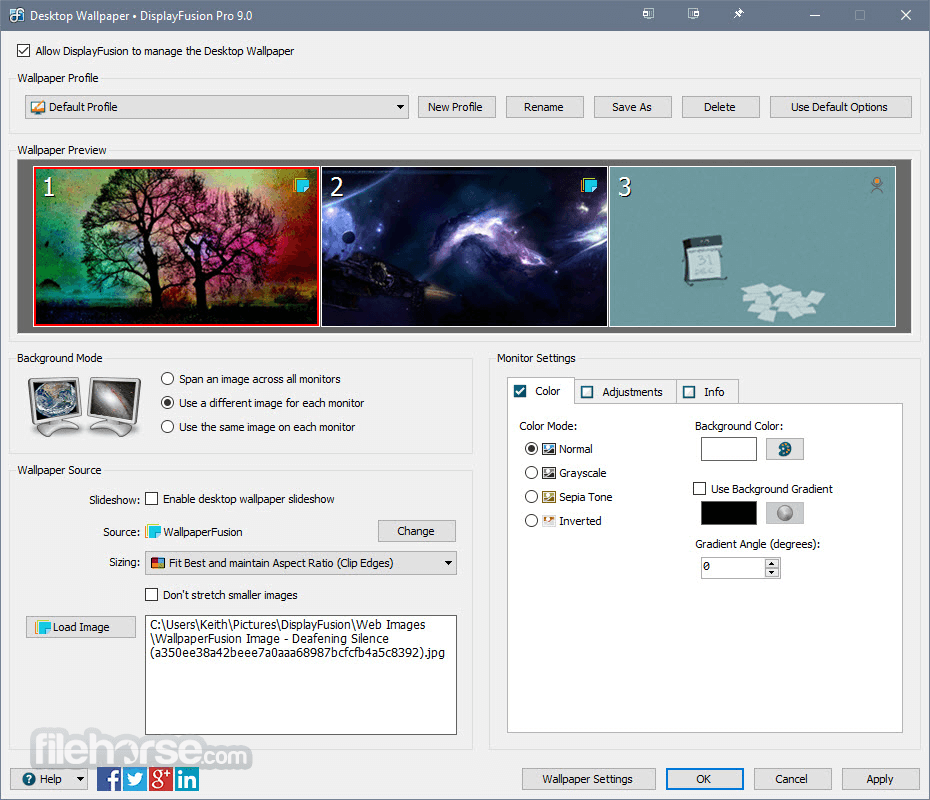
DisplayFusion 12.0 Screenshots
The images below have been resized. Click on them to view the screenshots in full size.
-

-

-

-

What's new in this version:
- Note: Current version of Start11 causes the DisplayFusion taskbar to not show up, they plan to fix it in the next release, meantime you can resolve it by disabling "Let Start11 enhance the taskbar" in the Start11 settings
Changed:
- "Ignore wrapping, sticking, and snagging on for full screen windows" is now enabled by default for new installs
- Added the ability for Window Position Profiles to launch entries that it didn't find a match for at the time of loading
- Removed the Bing Images wallpaper source as Microsoft has retired the API
- Google Photos API no longer allows downloading multiple photos, removed slideshow option for Google Photos wallpaper source
- Wallpaper now applies using Windows per-monitor wallpaper API
- Updated the text for the "centre child windows" options on the Window Management tab
- Added an Advanced Setting to have DisplayFusion restart explorer.exe without a prompt when necessary
- Renamed and added Advanced Settings for vertical taskbar button sizes for more flexibility
- Max value for "Wait" action in Trigger rules has been increased to 9999 seconds
- Added a new option to Window Position Profiles to provide more control over ignore minimized windows
- Updated the way monitors are numbered in multi-monitor remote desktop sessions (this may require you to update Triggers, Functions, etc, feel free to reach out to our support team for assistance with that)
- DisplayFusion Photos Screen Saver uses a new rendering library
- Enter and arrow keys now deactivate the screen saver
- Renamed the Options tab to "General"
- Updated the APOD wallpaper source to use their API
- Alt+Tab entries now have a close button (appears on mouse hover)
- Added support for pinning Firefox PWA apps
- Increased the limit on the advanced setting for TitleBar Button minimum window width
- Modifier keys in translations now keep their names instead of being translated
- New advanced setting for disabling the "auto arrange enabled" warning when loading a Desktop Icon Profile
- Removed the keybind failure error message when saving settings
Fixed:
- Reliability fixes for monitor configuration and monitor profile loading
- Resolved an issue where windows sometimes incorrectly skipped getting hooked
- Resolved some webview2 errors
- Resolved an issue with the tray overflow on Russian Windows versions
- Resolved an issue where the wallpaper is sometimes blank
- DF now only scans known game storage folders for anti-cheat apps to prevent hooking and triggering the anti-cheat, instead of folders for all launched processes
- Resolved a CPU usage issue
- DF was incorrectly trying to constrain borderless full screen games to splits
- Resolved a Microsoft Teams crash when launching from the DisplayFusion taskbar
- Samsung Dex app now gets TitleBar Buttons
- Resolved a handle/memory leak with My Videos wallpaper source
- Load Profile tooltip no longer shows behind the menu in the Monitor Configuration window
- Notepad taskbar shortcuts now work correctly when pinning by path
- Vertical taskbars now immediately redraw after doing a show desktop instead of disappearing
- Fixed up Slack and Skype UWP app icons on the DisplayFusion taskbar
- Resolved an issue with monitor IDs for monitors connected via DisplayLink docks
- Resolved an issue with BFS.Application.StartHidden showing a cmd window when using it to run a batch file
- Updated the hook blocklisting to prevent the hooks from causing performance issues with web browsers when ESET Antivirus and DisplayFusion are both running
- Taskbar button jump list items now have icons
- Arc browser now launches correctly from the DisplayFusion taskbar
- Firefox now correctly gets input focus when launching from the DisplayFusion taskbar
- Text in wallpaper source selector is now the correct size
- Resolved a scaling issue with the Load Image button in the wallpaper window
- DisplayFusion Photos Screen Saver now loads next image correctly if the current image failed to load
- Resolved a delay when exiting screen saver
- "Move newly opened windows" option no longer causes Notepad++ updater dialog to move to the right side of the screen
- Resolved an issue with Window Restored Trigger rules causing some issues with Firefox and Plexamp
- Previewing screen saver no longer prompts to save settings
- DisplayFusion taskbar no longer stays above RDP windows that span only some monitors
- Resolved an issue where cmd windows sometimes didn't get hooked
- Resolved an issue with pinned Edge PWA apps
- Resolved an issue where DisplayFusionService files were left behind until a reboot when doing a silent uninstall
- Resolved an issue where DisplayFusionService was uninstalled before answering "No" to the uninstall confirmation prompt
- Resolved an issue where left-mouse click holding over a taskbar button triggered it even when a full screen window was covering it
- Resolved an issue where Calculator launched from pinned taskbar shortcut didn't get input focus
- Resolved an issue where taskbars on different monitors were getting forced to bottom due to full screen app on one monitor
- Tasbkar button grouping improvement for apps that have version numbers in their folder paths
- Cheat Engine now shows up in Alt+Tab and on the taskbar
- Resolved some hooking issues with DisplayFusion running on ARM versions of Windows
- Resolved an issue with the taskbar button for wsjt-x_improved app
- FCPUpDeluxe now gets a taskbar button
- Resolved an issue with pinned browser shortcuts
- Clicking the Windows Security tray icon now works correctly
- Wallpaper is now auto-fixed if DisplayFusion detects that the Windows TranscodedWallpaper file is missing
- Alt+Tab now gets read by Windows Narrator
- Website wallpaper now works correctly even when slideshow mode is enabled
- Resolved an issue with the SmugMug wallpaper source timing out
- Functions now ignore xwidget and Sidebar windows
- Overflow button now opens when clicked on secondary taskbars
- Close button no longer drops behind preview in AltTab
- Resolved an issue where DF scripting sometimes couldn't find the .NET Framework directory
- Mailbird now maximizes to splits again
- TitleBar Buttons now show on Bambu Studio
- Resolved an issue with the taskbar hover previews
- Universal Apps now gets focused correctly when launched from DF taskbar
- Resolved an intermittent delay with Trigger rules that use the Window Created event
- Resolved an issue where some DisplayFusion taskbar/tray icon sub-menus wouldn't open on hover
- Resolved an issue where window sometimes would be slightly below taskbar when using "Move to next monitor and maximize"
- Resolved an issue where Alt+Tab handler would sometimes only show the current window and the Desktop entry
- Resolved an issue with wallpaper slideshows on some machines
- Resolved an issue where pinned Edge "apps" sometimes had the wrong icon
- FxSound now shows up on the DisplayFusion taskbar
- Website wallpaper no longer changes scaling levels when toggling keyboard/mouse input
- Monitor Fading improvements when a window spans more than one monitor
- Resolved an issue where hooks would cause game framerates to drop in certain game menus (e.g. The Finals) when moving the mouse around quickly
- Fortnite no longer has FPS drops in menus when moving the mouse (this is a generic fix that will help with other games as well)
- Process Explorer now shows all tray icons in the DisplayFusion taskbar system tray
- Resolved a monitor padding issue when switching display orientation
- Monitor Fading no longer unfades everything when desktop is focused
- Resolved an issue with the Wallpaper preview being blank when spanning an image
- No longer shows duplicate taskbar entries for Free Manga Downloader (FMD) app
 OperaOpera 129.0 Build 5823.28 (64-bit)
 Kling AIKling AI - Text or Image to Video
 PhotoshopAdobe Photoshop CC 2026 27.4 (64-bit)
 BlueStacksBlueStacks 10.42.167.1001
 OKXOKX - Buy Bitcoin or Ethereum
 CapCutCapCut 7.9.0
 PC RepairPC Repair Tool 2026
 Hero WarsHero Wars - Online Action Game
 TradingViewTradingView - Trusted by 100 Million Traders
 AdGuard VPNAdGuard VPN 2.9.0
Comments and User Reviews