




 Cursor
 Antigravity
 SQL Server
 Lovable
 10Web
10Web Replit
 OnSpace AI
 Windsurf
-
Latest Version
Godot Engine 4.7.1 (64-bit) LATEST
-
Review by
-
Operating System
Windows 7 64 / Windows 8 64 / Windows 10 64 / Windows 11
-
User Rating
Click to vote -
Author / Product
-
Filename
Godot_v4.7.1-stable_win64.exe.zip
Godot Engine 64bit is completely free and open-source under the very permissive MIT license. No strings attached, no royalties, nothing. Your game is yours, down to the last line of engine code.
Features and Highlights
An extremely efficient paradigm for designing games
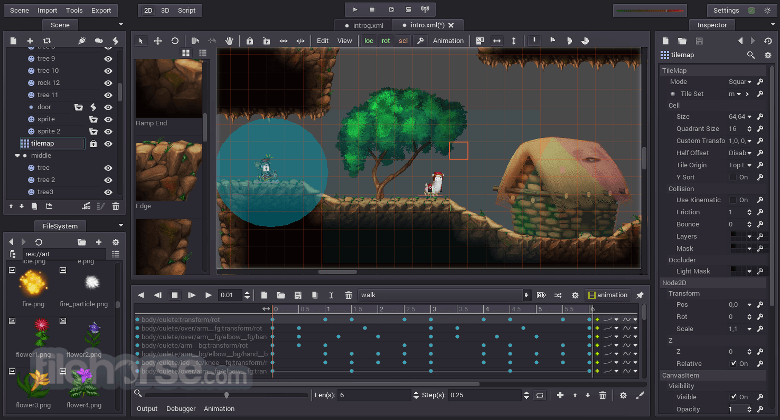
- Visual editor, full of mature tools.
- Uncluttered UI, with context-sensitive editors.
- Amazing scene system, supporting instancing and inheritance.
- Friendly content creation interfaces for artists, level designers, animators, …
- Visual shader editing for 2D and 3D.
- Persistent live editing (changes are not lost after stopping the game). Live editing on mobile devices!
- Fully dedicated 2D engine, no hacks.
- Work in pixels as your units, but scale to any screen size and ratio.
- Custom 2D physics engine that works in pixel coordinates.
- Flexible kinematic controller for collision without physics.
- Blit 3D models as sprites into 2D.
- Import 3D models from 3DS Max, Maya, Blender, and more with full animation.
- Skeleton deforms and blend shapes.
- Several light types, with shadow mapping.
- Render with HDR, anti-aliasing, and linear color modes.
- Post-process fog, glow, bloom, color adjustment, …
- Support for Physically-Based Rendering planned for the end of 2016.
- Animate 2D or 3D. Visual animation editor with the timeline.
- Frame-based or cut-out animation for sprites and rigs.
- Any property of any object can be animated, even function calls.
- Use custom transition curves and tweens.
- Helpers to animate 2D rigs, with skeletons and IK.
- Efficient optimizer to pack imported 3D animations.
- Animation Tree support for fluid character animation.
- A python-like scripting language, designed to make games with zero hassle.
- Built-in editor with syntax highlighting, real-time parser, and code completion.
- Powerful integrated debugger and profilers. It can debug a game running on mobile devices.
- Integrated class documentation browser.
- Friendly C++ API to optimize parts of the game or extend any part of the engine.
- Mobile platforms: iOS, Android, BlackBerry OS
- Desktop platforms: Windows, macOS, Linux, BSD, Haiku
- Web Platforms: HTML5 (via Emscripten)
- One-click deploy & export to most platforms. Easy to create custom builds too.
- Recommended: Vulkan 1.0 compatible hardware
- Minimal: OpenGL 3.3 / OpenGL ES 3.0 compatible hardware
Alternatives
Unreal Engine - High-fidelity graphics, real-time 3D creation.
Unity - Powerful 3D and 2D gaming development software for Windows.
CryEngine - Advanced graphics and real-time rendering tools.
GameMaker Studio - Simple 2D development with drag-and-drop system.
Cocos Creator - Open-source framework focused on mobile games.
Construct 3 - Beginner-friendly drag-and-drop 2D game engine.
RPG Maker: Tailored for creating role-playing games, this software provides specialized tools and a simple interface for RPG development.
PROS
- Open-Source and Free
- Node-Based Architecture
- Cross-Platform Export
- Lightweight and Fast
- Active Community Support
- Limited 3D Features
- Smaller Asset Marketplace
- GDScript Learning Curve
- Less Industry Adoption
- Lacks Native Support for VR
-
Godot Engine 4.7.1 (64-bit) Screenshots
The images below have been resized. Click on them to view the screenshots in full size.
-

-

What's new in this version:
2D:
- Improve 2D editor dropping code
3D:
- Fix GridMap editor cursor starting at the wrong position
- Fix MeshLibrary editor not properly handling read-only libs
- Fix closed Curve3D first/last point missing in/out control point
Animation:
- Make animation folding access cfg only at save/load project time
- Fix Abort on Reset functionality in AnimationNodeOneShot
Assetlib:
- Fix asset store zoom mode crash in project manager
- Set the Asset Store's default sorting to highest scored
Audio:
- Add missing mutex unlock in AudioDriverPulseAudio in error state
Buildsystem:
- Fix some classes being incorrectly marked as 100% documented in doc_status.py
- Vulkan: Fix build with use_volk=no
- Add missing components to the pkg-config for system HarfBuzz
- Update macOS/iOS min. versions in plist and exporter
Core:
- Do not inline new operators
- Cherry-picks for the 4.7 branch (future 4.7.1) - 1st batch
- Cherry-picks for the 4.7 branch (future 4.7.1) - 3rd batch
- Fix MSVC compilation with Tracy
Documentation:
- Update doc for OptionButton.fit_to_longest_item
Editor:
- Fix debugger call stack not selecting nodes in remote scene tree
- Guard against non-main-thread emission of EditorFileSystem changed signal
- Make Instant Preview work for first selection after being enabled
- Fix new resource locked when created via editable children in inspector
- Wrap Long Project Title
- Fix possible freeze when running project with floating script editor
- Fix ownership issues when pasting as replacement
- Clean Up x position calcuation of the AudioStream filename in the Inspector
- Don't edit current object after changing scene
- Fix broken icons when moving the FileSystem dock to the bottom
- Fix .godot file icon saturation in editor file dialogs
- Fix context menu not opening favorite sections in Editor Inspector
- Fix scene tab titles not updating on language change
- Fix "Remove" button in MeshLibrary editor being enabled when it shouldn't
- Fix scene not requesting save for Load as Placeholder
- Fix crash in Project Settings when an autoload has been freed
- Fix incorrect non-unique resource indicator
- Fix EditorContextMenuPluginManager crash in Project Manager
Export:
- Fix incorrect per-instance shader parameters when exporting in headless mode
GDExtension:
- Avoid transient null virtual method store during lazy init
GUI:
- Fix SpinBox not calling base Range:_value_changed
- Range: Don't use min for snap offset when it's too big
- Make the OptionButton match the width of the pop-up menu
- Fix Tree item edit canceled instantly on scroll
- TextServer: Fix some emoji sequences with skin tone modifier not rendered correctly
- RTL: Improve img= and font= tags parsing
- Fix BoxContainer not using get_bound_minimum_size when calculating layout
- Fix growth directions not being respected when resizing Control nodes
- Add empty icons for file dialog menu to the default theme
- Fix scene tree drag-n-drop regression on touchscreens
- Fix visual glitch with connections lines in GraphEdit
- Fix issues in some Container types related to maximum size
Fix crash in Tree:_get_item_focus_rect
- Set SpinBox's internal node's use_parent_material to true
- Don't automatically open virtual keyboard when popup menu shows
Import:
- GLTF: Use p_state parameter directly
- GLTF: Fix compressed image names being empty during export
- Fix extracting materials without a per-material override
- Fix crash in GLTFNode.get_scene_node_path
Input:
- Fix backspace being unable to delete pre-existing text in any input field when using a soft keyboard on Android
- Android: Fix EditorSettings not instantiated error when running game
- Fix Tree node mouse dragging regression on touchscreens
Navigation:
- Fix navigation agents unconditionally getting added to avoidance simulation after pause resume
Network:
- Set inited=false on CookieContextMbedTLS:clear to avoid accidental double destruction
- mbedtls: Update to 3.6.7
Physics:
- Fix crash when clicking via the Game view API created collisions
- Fix crash when assigning more than 2047 MiB to Jolt temp buffer
Platforms:
- Fix crash in org.godotengine.godot.GodotActivity.updatePiPParams
Rendering:
- Fix flickering lighting on mesh-instances with non-uniform scale
- Seek past skipped shader variant payloads to avoid reading incorrect data
- Fix previous transform getting remembered for 2 frames after the instance stops moving
- Zero out the memory of disabled directional lights
- Vulkan: Silence loader warning about incompatible drivers
- Fix hint_default_transparent used with sampler2DArray
- Metal: Fix buffer overrun
- Fix orthographic camera directional shadow culling
Shaders:
- Suppress warning about missing mesh tangents if TANGENT is assigned in the shader
Tests:
- Crypto: Add tests for AESContext
- Crypto: Add sign/verify and encrypt/decrypt tests
Thirdparty:
- meshoptimizer: Update to 1.1.1
 OperaOpera 133.0 Build 5932.34 (64-bit)
 LDPlayerLDPlayer - Android Emulator
 PhotoshopAdobe Photoshop CC 2026 27.7 (64-bit)
 BlueStacks AIBlueStacks AI
 GTA 6GTA 6 for PS5
 CapCutCapCut Desktop 8.7.0
 PC RepairPC Repair Tool 2026
 Hero WarsHero Wars - Online Action Game
 TradingViewTradingView - Trusted by 100 Million Traders
 Forza HorizonForza Horizon 6
Comments and User Reviews