




 Genspark AI
 Edraw AI
 Adobe Acrobat
 WPS Office
 BookFab
 PDFelement
-
Latest Version
iSpring Free 11.3.6009 LATEST
-
Review by
-
Operating System
Windows 7 64 / Windows 8 64 / Windows 10 64 / Windows 11
-
User Rating
Click to vote -
Author / Product
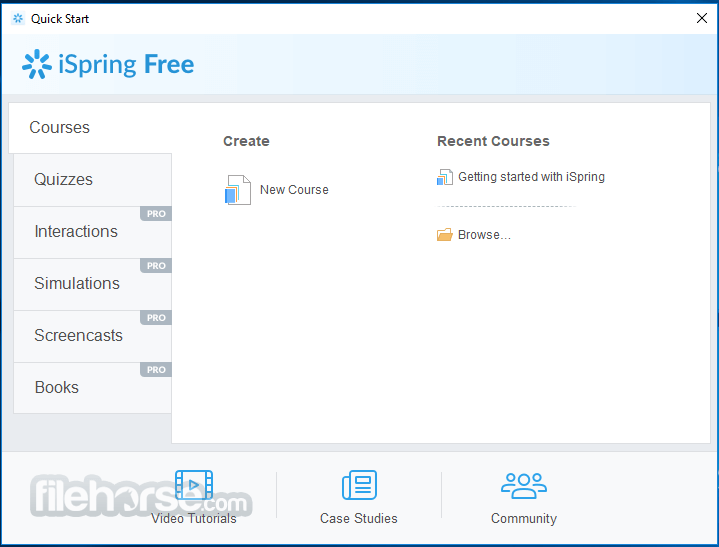
iSpring Free is a free eLearning authoring tool that allows you to create responsive courses and quizzes right in PowerPoint and convert them to HTML5 or SCORM. Three kinds of questions are available to assess knowledge retention in iSpring Free: Multiple-Choice, Multiple Response, and Short Answer. You can also set feedback, several attempts, and time limits.
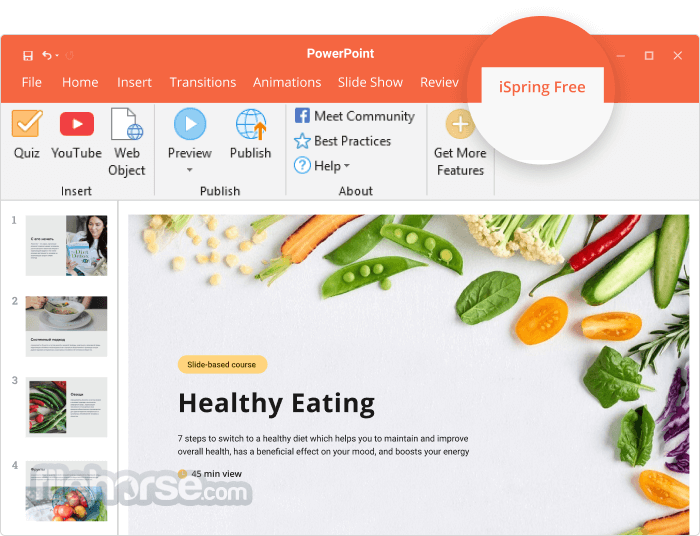
You can enhance your slides with YouTube videos and web objects. Find a relevant video on YouTube and add it to your course easily to better illustrate the topic. Insert live, navigable web objects on the slides, e.g., a page from Wikipedia or your corporate website.
Explore iSpring Suite
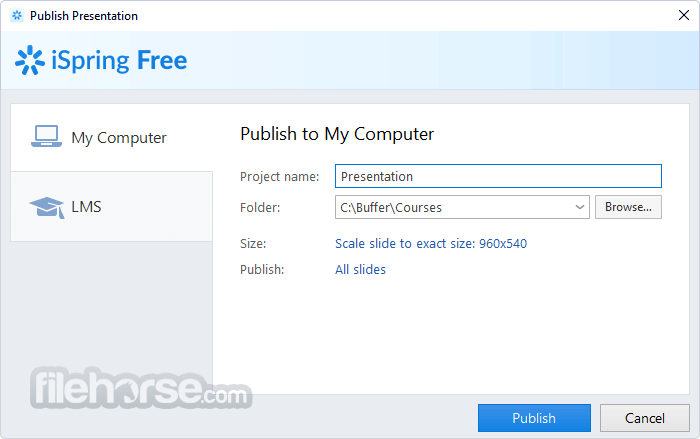
With iSpring Free, you can convert PowerPoint presentations to HTML5 and share them online easily. If you opt to publish your presentations as a SCORM course, you can upload the .zip file to an LMS and track how your learners progress. After conversion, all the transitions, animations, and triggers are kept intact.
iSpring Free makes courses automatically adapt to all devices and look great on any screen, including PCs, Macs, tablets, and smartphones (with Windows, iOS, and Android OS). The app doesn’t limit the number of conversions, doesn’t expire, and doesn’t add huge promo banners to your content.
Features and Highlights
Transform your PowerPoint presentations into captivating online courses effortlessly. With iSpring Free, there's no need to navigate complex eLearning software - simply craft courses within the familiar PowerPoint environment while retaining all animations, triggers, transitions, and effects.
Enhance your courses seamlessly with interactive quizzes. Whether it's pre-assessments, self-assessments, or final tests, iSpring Free allows you to incorporate quizzes effortlessly. Elevate your tests with multimedia elements and tailor testing rules for cheat-proof assessments, including randomizing questions, shuffling answer options, and imposing time limits for each question.
Ensure your courses shine on any device without the hassle of reformatting. iSpring Free automatically optimizes your content for various screens, be it smartphones, tablets, or laptops.
Seamlessly integrate your courses with any SCORM-based Learning Management System (LMS). iSpring Free is fully SCORM compliant, guaranteeing smooth compatibility with platforms such as Moodle, Blackboard, Litmos, and beyond.
FAQs
What is iSpring Free, and what can you use it for?
iSpring Free is a PowerPoint-based eLearning authoring tool that lets you turn your slides into interactive online learning content. It supports quizzes, media embeds (images, video, audio), and converts your presentation into SCORM or HTML5 format for web or LMS use.
Does iSpring Free work with existing PowerPoint presentations?
Yes, iSpring Free installs as an add-in for Microsoft PowerPoint so you can enhance or convert your existing presentations right inside the program. It preserves your animations, triggers, and transitions when converting to eLearning formats.
What types of quizzes can I create with iSpring Free?
iSpring Free includes built-in quiz tools that let you add basic interactive elements like multiple choice, multiple response, and short answer questions. These quizzes help keep learners engaged and assess their understanding as part of your course.
How can I share or publish content created with iSpring Free?
After designing your course or quiz, you can publish it as a SCORM package and upload it to any SCORM-compatible LMS to track learner progress. Alternatively, you can export it as HTML5 and share it via a website, link, or email without needing an LMS.
Is iSpring Free suitable for all devices and screens?
Yes, courses created with iSpring Free are fully responsive, so they adapt to different screen sizes, including desktop, tablet, and mobile devices. That means learners can conveniently access your content on the device that works best for them.
PROS
You can enhance your slides with YouTube videos and web objects. Find a relevant video on YouTube and add it to your course easily to better illustrate the topic. Insert live, navigable web objects on the slides, e.g., a page from Wikipedia or your corporate website.
Explore iSpring Suite
- Screen recordings and video lectures
- Interactive role-play simulations
- Even more interactive assessments
- Hundreds of ready-made templates and characters
- AI-based voiceovers
With iSpring Free, you can convert PowerPoint presentations to HTML5 and share them online easily. If you opt to publish your presentations as a SCORM course, you can upload the .zip file to an LMS and track how your learners progress. After conversion, all the transitions, animations, and triggers are kept intact.
iSpring Free makes courses automatically adapt to all devices and look great on any screen, including PCs, Macs, tablets, and smartphones (with Windows, iOS, and Android OS). The app doesn’t limit the number of conversions, doesn’t expire, and doesn’t add huge promo banners to your content.
Features and Highlights
Transform your PowerPoint presentations into captivating online courses effortlessly. With iSpring Free, there's no need to navigate complex eLearning software - simply craft courses within the familiar PowerPoint environment while retaining all animations, triggers, transitions, and effects.
Enhance your courses seamlessly with interactive quizzes. Whether it's pre-assessments, self-assessments, or final tests, iSpring Free allows you to incorporate quizzes effortlessly. Elevate your tests with multimedia elements and tailor testing rules for cheat-proof assessments, including randomizing questions, shuffling answer options, and imposing time limits for each question.
Ensure your courses shine on any device without the hassle of reformatting. iSpring Free automatically optimizes your content for various screens, be it smartphones, tablets, or laptops.
Seamlessly integrate your courses with any SCORM-based Learning Management System (LMS). iSpring Free is fully SCORM compliant, guaranteeing smooth compatibility with platforms such as Moodle, Blackboard, Litmos, and beyond.
FAQs
What is iSpring Free, and what can you use it for?
iSpring Free is a PowerPoint-based eLearning authoring tool that lets you turn your slides into interactive online learning content. It supports quizzes, media embeds (images, video, audio), and converts your presentation into SCORM or HTML5 format for web or LMS use.
Does iSpring Free work with existing PowerPoint presentations?
Yes, iSpring Free installs as an add-in for Microsoft PowerPoint so you can enhance or convert your existing presentations right inside the program. It preserves your animations, triggers, and transitions when converting to eLearning formats.
What types of quizzes can I create with iSpring Free?
iSpring Free includes built-in quiz tools that let you add basic interactive elements like multiple choice, multiple response, and short answer questions. These quizzes help keep learners engaged and assess their understanding as part of your course.
How can I share or publish content created with iSpring Free?
After designing your course or quiz, you can publish it as a SCORM package and upload it to any SCORM-compatible LMS to track learner progress. Alternatively, you can export it as HTML5 and share it via a website, link, or email without needing an LMS.
Is iSpring Free suitable for all devices and screens?
Yes, courses created with iSpring Free are fully responsive, so they adapt to different screen sizes, including desktop, tablet, and mobile devices. That means learners can conveniently access your content on the device that works best for them.
PROS
- Convert PowerPoint to HTML5/SCORM.
- Retain animations & transitions.
- Easily incorporate YouTube videos.
- Accessible on all devices.
- SCORM compliance for LMS integration.
- Limited interactive features.
- Basic assessment options.
- In the free/demo version, not all features are available.
- No advanced editing capabilities.
- Dependency on PowerPoint.
- Possible lack of customization.
Why is this app published on FileHorse? (More info)
-
iSpring Free 11.3.6009 Screenshots
The images below have been resized. Click on them to view the screenshots in full size.
-
-

-

-
 OperaOpera 132.0 Build 5905.11 (64-bit)
 AdsPowerAdsPower - Antidetect Browser
 PhotoshopAdobe Photoshop CC 2026 27.7 (64-bit)
 BlueStacks AIBlueStacks AI
 OKXOKX - Buy Bitcoin or Ethereum
 CapCutCapCut Desktop 8.5.0
 PC RepairPC Repair Tool 2026
 Hero WarsHero Wars - Online Action Game
 TradingViewTradingView - Trusted by 100 Million Traders
 Forza HorizonForza Horizon 6
Comments and User Reviews