



 War Robots
 Polytoria
 eFootball 2026
 FM 26
FM 26 FC 26
FC 26 Warships
 World of Tanks
-
Latest Version
Minecraft RTX 1.21 LATEST
-
Review by
-
Operating System
Windows 10 / Windows 11
-
User Rating
Click to vote -
Author / Product
-
Filename
MinecraftUWP_1.21.5101.Appx
-
MD5 Checksum
7e47d37a4b9f257557412605f6396ec0
Minecraft RTX for Windows is a next-generation version of the sandbox crafting megahit game Minecraft, enhanced for the newest PC graphics cards that are capable of rendering games with a wide array of taxing RayTracing effects.
While the vast majority of games are created using the traditional techniques where lightning, reflections, and other light-propagation effects such as shadows, caustics, and ambient occlusion are pre-calculated and are simply “played back” during gameplay, this latest version of Minecraft tosses all those systems away and embraces fully real-time calculation of how light travels across the game world.
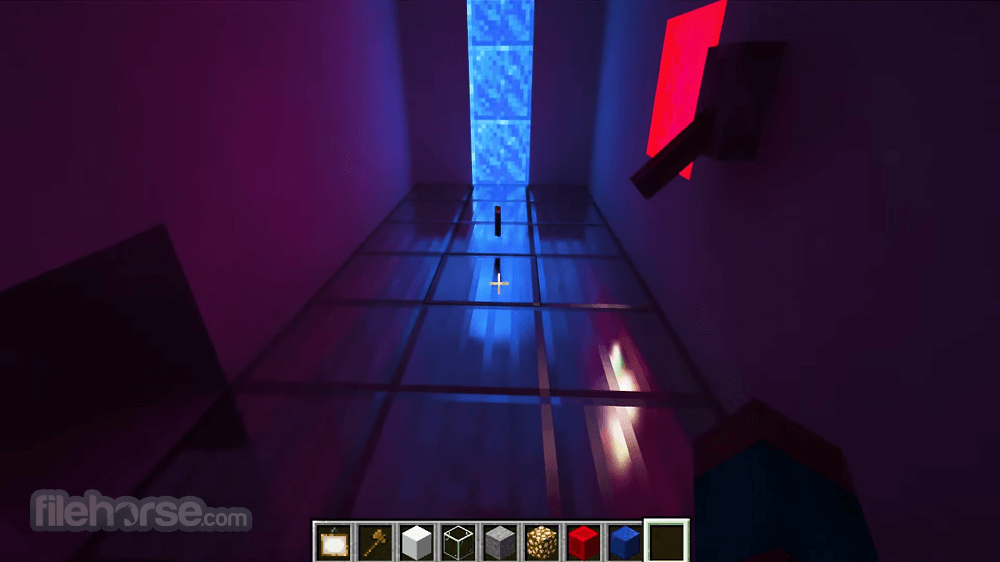
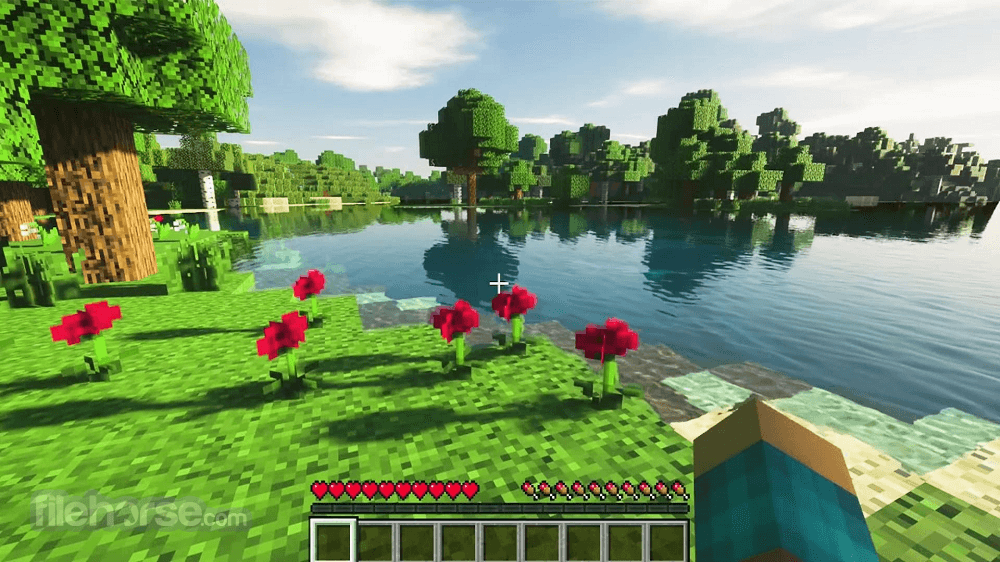
Powered by the latest generation of Nvidia RTX graphics cards, Minecraft with RTX can take full advantage of real-time global illumination with several bounces of light, emissive pixels, a realistically illuminated world, correct shadows, and rich, advanced materials to create the most impressive-looking version of Minecraft that was ever crafted.
In addition to RTX effects, the rendering capability of this version of the game is also greatly boosted with the presence of DLSS (Deep Learning Super Sampling), an innovative upsampling technique that can take a lower resolution version of the game and accurately calculate a higher resolution version of the image.
Since the Raytracing calculations are especially taxing on the GPU, and the number of light rays that have to be calculated in each frame is directly proportional to the active resolution, having the game run at a lower resolution and then upsampled by DLSS is a must for all gamers.
Minecraft RTX for Windows 10/Windows 11 is distributed online only via its official page on Microsoft Store, where all PC gamers with a compatible GPU card can download it and experience it with ease. In addition to fully path-traced raytracing support, this version of the game also comes with the special Physically Based Rendering texture pack that will transform and add additional detail to many materials found inside the game.
The basic version of this game also includes a wide variety of specially crafted worlds, enabling users to explore them in stunning raytracing visuals with incredible amounts of realistic detail. One of those maps is the Ancient Roman Colosseum, where players can not only explore this historic monument but also engage in wave-based combat against enemies with up to 3 friends.
Minecraft RTX for PC is a premium game that can be either bought for a single price or unlocked as part of Xbox Game Pass, a gaming subscription that unlocks hundreds of games on both PC and Xbox console platforms.
Main Features
Real-time Ray Tracing
It boasts the impressive capability of real-time ray tracing, transforming the game's visuals by simulating the behavior of light, reflections, shadows, and global illumination. The result is breathtakingly realistic environments.
High-Resolution Textures
This game software includes high-resolution texture packs that take advantage of the latest NVIDIA hardware, ensuring that every block, item, and structure looks incredibly detailed.
DLSS Support
For gamers using NVIDIA RTX graphics cards, it offers support for Deep Learning Super Sampling (DLSS), improving performance while maintaining exceptional image quality.
Physically-Based Rendering (PBR)
The addition of PBR materials adds a new level of realism to Minecraft, making surfaces react to light in a more natural and dynamic way.
Immersive Soundscapes
Enhanced audio effects further immerse players in the Minecraft world, with realistic echoes and spatial sound.

User Interface
It maintains the same user-friendly and intuitive interface as the original Minecraft game, ensuring that both new and experienced players can navigate the menus and options with ease.
The graphical settings menu has been expanded to include ray tracing options, allowing players to customize their visual experience to suit their hardware and preferences.
Installation and Setup
Installing Minecraft RTX is a straightforward process. Users need to have a compatible RTX series graphics card from NVIDIA, up-to-date GPU drivers, and the latest version of the base Minecraft Java Edition.
Once these requirements are met, simply download the game executable file from the official website and follow the installation wizard's instructions.
How to Use
FAQs
What is Minecraft RTX?
Minecraft RTX is a special version of Minecraft that features real-time ray tracing technology. It enhances lighting, shadows, reflections, and global illumination to create more realistic and visually immersive environments compared to the standard version.
Do you need a special graphics card for Minecraft RTX?
Yes. Minecraft RTX requires an NVIDIA GeForce RTX graphics card that supports hardware ray tracing. Without compatible RTX hardware, the ray tracing features cannot be enabled.
Is Minecraft RTX a separate game?
No. Minecraft RTX is a ray-traced version of Minecraft running on the Bedrock Edition. It uses special RTX-enabled worlds and texture packs to activate advanced lighting effects.
Does Minecraft RTX affect performance?
Yes. Ray tracing is demanding on hardware and can significantly reduce frame rates compared to standard Minecraft. However, technologies like NVIDIA DLSS help improve performance while maintaining high visual quality.
Is Minecraft RTX worth using in 2026?
Yes, if you have compatible RTX hardware and want a visually upgraded experience. In 2026, ray tracing is more common and optimized, making Minecraft RTX a great way to experience the game with modern graphics enhancements.
Pricing
Minecraft RTX is available for FREE to existing Minecraft Java Edition owners who meet the hardware requirements for ray tracing.
However, players should note that the necessary hardware, such as an NVIDIA RTX graphics card, comes at an additional cost.

System Requirements
All in all, Minecraft RTX is a remarkable piece of game software that elevates the iconic Minecraft experience to a new level of visual excellence. Its real-time ray tracing technology, high-resolution textures, and DLSS support make it a must-try for gamers seeking the most immersive and realistic Minecraft experience.
While hardware limitations may pose a barrier for some players, those with compatible systems will undoubtedly be captivated by the breathtakingly beautiful Minecraft worlds brought to life by Minecraft RTX. Whether you're a longtime Minecraft fan or a newcomer to the game, Minecraft RTX is a worthy addition to your gaming library, setting a new standard for visual fidelity in the Minecraft universe.
While the vast majority of games are created using the traditional techniques where lightning, reflections, and other light-propagation effects such as shadows, caustics, and ambient occlusion are pre-calculated and are simply “played back” during gameplay, this latest version of Minecraft tosses all those systems away and embraces fully real-time calculation of how light travels across the game world.
Powered by the latest generation of Nvidia RTX graphics cards, Minecraft with RTX can take full advantage of real-time global illumination with several bounces of light, emissive pixels, a realistically illuminated world, correct shadows, and rich, advanced materials to create the most impressive-looking version of Minecraft that was ever crafted.
In addition to RTX effects, the rendering capability of this version of the game is also greatly boosted with the presence of DLSS (Deep Learning Super Sampling), an innovative upsampling technique that can take a lower resolution version of the game and accurately calculate a higher resolution version of the image.
Since the Raytracing calculations are especially taxing on the GPU, and the number of light rays that have to be calculated in each frame is directly proportional to the active resolution, having the game run at a lower resolution and then upsampled by DLSS is a must for all gamers.
Minecraft RTX for Windows 10/Windows 11 is distributed online only via its official page on Microsoft Store, where all PC gamers with a compatible GPU card can download it and experience it with ease. In addition to fully path-traced raytracing support, this version of the game also comes with the special Physically Based Rendering texture pack that will transform and add additional detail to many materials found inside the game.
The basic version of this game also includes a wide variety of specially crafted worlds, enabling users to explore them in stunning raytracing visuals with incredible amounts of realistic detail. One of those maps is the Ancient Roman Colosseum, where players can not only explore this historic monument but also engage in wave-based combat against enemies with up to 3 friends.
Minecraft RTX for PC is a premium game that can be either bought for a single price or unlocked as part of Xbox Game Pass, a gaming subscription that unlocks hundreds of games on both PC and Xbox console platforms.
Main Features
Real-time Ray Tracing
It boasts the impressive capability of real-time ray tracing, transforming the game's visuals by simulating the behavior of light, reflections, shadows, and global illumination. The result is breathtakingly realistic environments.
High-Resolution Textures
This game software includes high-resolution texture packs that take advantage of the latest NVIDIA hardware, ensuring that every block, item, and structure looks incredibly detailed.
DLSS Support
For gamers using NVIDIA RTX graphics cards, it offers support for Deep Learning Super Sampling (DLSS), improving performance while maintaining exceptional image quality.
Physically-Based Rendering (PBR)
The addition of PBR materials adds a new level of realism to Minecraft, making surfaces react to light in a more natural and dynamic way.
Immersive Soundscapes
Enhanced audio effects further immerse players in the Minecraft world, with realistic echoes and spatial sound.
User Interface
It maintains the same user-friendly and intuitive interface as the original Minecraft game, ensuring that both new and experienced players can navigate the menus and options with ease.
The graphical settings menu has been expanded to include ray tracing options, allowing players to customize their visual experience to suit their hardware and preferences.
Installation and Setup
Installing Minecraft RTX is a straightforward process. Users need to have a compatible RTX series graphics card from NVIDIA, up-to-date GPU drivers, and the latest version of the base Minecraft Java Edition.
Once these requirements are met, simply download the game executable file from the official website and follow the installation wizard's instructions.
How to Use
- Launch the game after installation.
- Create or load a world.
- Access the in-game settings menu to customize your ray tracing experience. Adjust settings such as ray tracing quality, shadows, reflections, and DLSS options to optimize performance.
- Explore the Minecraft world and enjoy the stunning visuals created by real-time ray tracing.
FAQs
What is Minecraft RTX?
Minecraft RTX is a special version of Minecraft that features real-time ray tracing technology. It enhances lighting, shadows, reflections, and global illumination to create more realistic and visually immersive environments compared to the standard version.
Do you need a special graphics card for Minecraft RTX?
Yes. Minecraft RTX requires an NVIDIA GeForce RTX graphics card that supports hardware ray tracing. Without compatible RTX hardware, the ray tracing features cannot be enabled.
Is Minecraft RTX a separate game?
No. Minecraft RTX is a ray-traced version of Minecraft running on the Bedrock Edition. It uses special RTX-enabled worlds and texture packs to activate advanced lighting effects.
Does Minecraft RTX affect performance?
Yes. Ray tracing is demanding on hardware and can significantly reduce frame rates compared to standard Minecraft. However, technologies like NVIDIA DLSS help improve performance while maintaining high visual quality.
Is Minecraft RTX worth using in 2026?
Yes, if you have compatible RTX hardware and want a visually upgraded experience. In 2026, ray tracing is more common and optimized, making Minecraft RTX a great way to experience the game with modern graphics enhancements.
Pricing
Minecraft RTX is available for FREE to existing Minecraft Java Edition owners who meet the hardware requirements for ray tracing.
However, players should note that the necessary hardware, such as an NVIDIA RTX graphics card, comes at an additional cost.
System Requirements
- Windows 10/11 64-bit
- An NVIDIA RTX series graphics card
- The latest GPU drivers
- Minecraft Java Edition (latest version)
- A system with sufficient RAM and CPU power for ray tracing
- Stunningly realistic visuals with real-time ray tracing.
- High-resolution textures and PBR materials.
- DLSS support for improved performance.
- Easy installation and user-friendly interface.
- Compatibility with most user-generated worlds.
- Limited to NVIDIA RTX graphics card users.
- Demanding hardware requires a powerful PC for optimal performance.
- Currently only available on Windows.
All in all, Minecraft RTX is a remarkable piece of game software that elevates the iconic Minecraft experience to a new level of visual excellence. Its real-time ray tracing technology, high-resolution textures, and DLSS support make it a must-try for gamers seeking the most immersive and realistic Minecraft experience.
While hardware limitations may pose a barrier for some players, those with compatible systems will undoubtedly be captivated by the breathtakingly beautiful Minecraft worlds brought to life by Minecraft RTX. Whether you're a longtime Minecraft fan or a newcomer to the game, Minecraft RTX is a worthy addition to your gaming library, setting a new standard for visual fidelity in the Minecraft universe.
Why is this app published on FileHorse? (More info)
-
Minecraft RTX 1.21 Screenshots
The images below have been resized. Click on them to view the screenshots in full size.
-
-
-
-

 OperaOpera 129.0 Build 5823.15 (64-bit)
 Kling AIKling AI - Text or Image to Video
 PhotoshopAdobe Photoshop CC 2026 27.4 (64-bit)
 BlueStacksBlueStacks 10.42.167.1001
 OKXOKX - Buy Bitcoin or Ethereum
 CapCutCapCut 7.9.0
 PC RepairPC Repair Tool 2026
 Hero WarsHero Wars - Online Action Game
 TradingViewTradingView - Trusted by 100 Million Traders
 AdGuard VPNAdGuard VPN 2.9.0
Comments and User Reviews