




 Big Walk
 World of Tanks
 WoT: HEAT
 IRON NEST
 Go-Go Town!
 Halo: Campaign
-
Latest Version
MultiMC 5 0.7.0 LATEST
-
Review by
-
Operating System
Windows 7 / Windows 8 / Windows 10 / Windows 11
-
User Rating
Click to vote -
Author / Product
-
Filename
mmc-develop-win32.zip
MultiMC is a game utility for the popular sandbox creative game Minecraft. It serves the role of the advanced launcher for Minecraft that gives every player the ability to create multiple and separate instances of Minecraft, with built-in tools for managing and troubleshooting all of the active game sessions.

In addition to handling stock versions of game servers, the app also has support for managing individual extensions for each active instance - including their custom mods, saves, texture packs, player numbers, and more.
To achieve all this, MultiMC comes as a standalone dashboard that is full of easy-to-reach tools and a clear listing of currently active instances. On top of the app, you can access the row of the primary buttons for the general management of the servers (Add Instance, Folders, Settings, and Update).
The majority of the app’s UI is taken up by the listing screen, which includes the names of the instances and all installed and active mods they have. On the far right, you get an in-depth option for each selected instance, with easy-to-reach access to server launch controls, and Instance tools for editing, managing screenshots, exporting instances, and more.

During the years of development under an open-source license, MultiMC has grown considerably.
Today, it enables users to start Minecraft with a custom resolution, change numerous Java runtime options, show color-coded console output, custom groups and icons for all instances, automatic installation and mod management, exporting, and importing of Minecraft instances, mod management, and support for every version of Minecraft.
If you are a serious Minecraft player who feels that the default game launcher is not giving you the options that you require to satisfy your gaming needs, Multi MC will be a perfect utility for you.
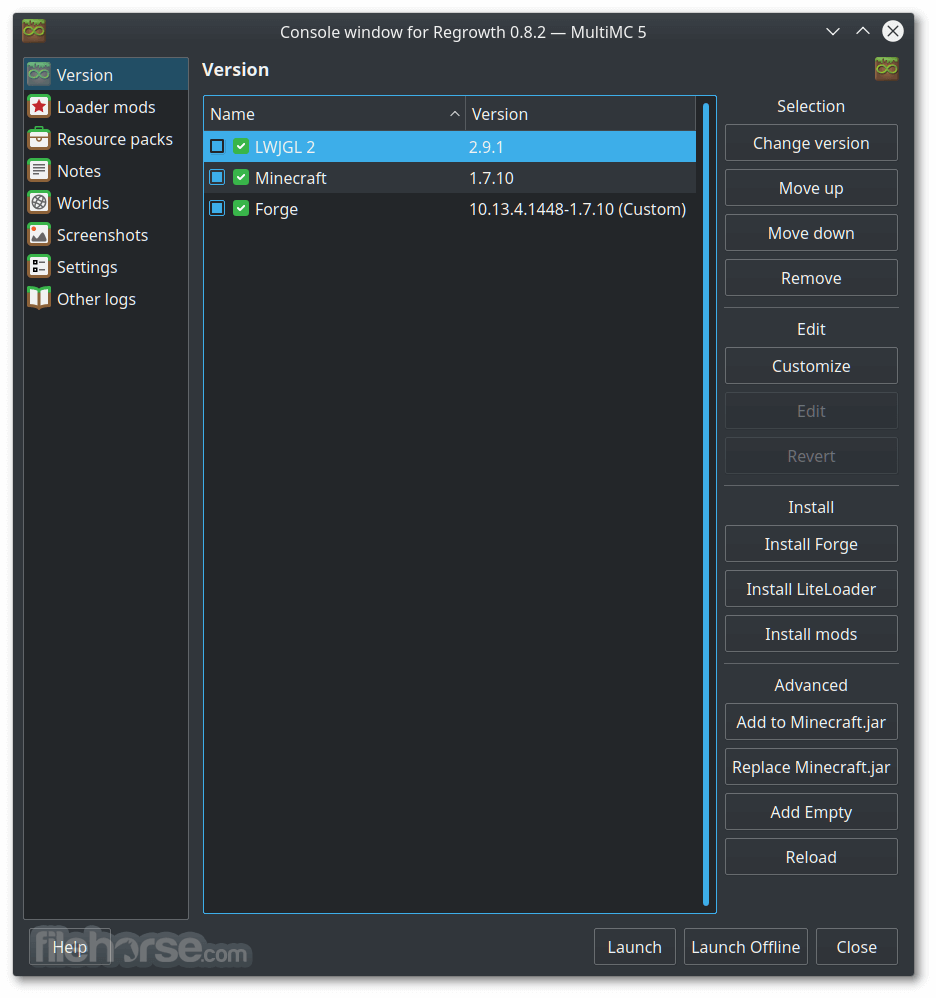
MultiMC is 100% FREE and is very resource-light. It can be easily used on any desktop or laptop Windows PC that can run Minecraft.
How to Use
What is MultiMC?
MultiMC is an open-source launcher for Minecraft that lets you manage multiple installations of the game with ease. It allows users to create separate instances for different modpacks or versions, ensuring better organization and stability when switching between configurations.
How do I install mods using MultiMC?
You can install mods by opening an instance, selecting “Edit Instance,” and then adding mods under the “Loader Mods” section. MultiMC supports popular mod loaders like Forge, Fabric, and Quilt, making it flexible for all kinds of modded Minecraft setups.
Is MultiMC available on all operating systems?
Yes, MultiMC works on Windows, macOS, and Linux. The installation process differs slightly for each OS, but all versions maintain the same interface and feature set for consistent usability across platforms.
Can I import modpacks from other launchers?
Yes, MultiMC allows you to import modpacks from other launchers such as CurseForge or Technic. You can drag and drop ZIP files or use import features, which makes it convenient for players migrating from other platforms.
Is MultiMC free to use?
Absolutely. MultiMC is completely free and open-source software, developed and maintained by a community of contributors. You can download, use, and modify it without any cost or subscription requirements.
The top alternatives to MultiMC:
ATLauncher - User-friendly launcher with mod pack support.
Technic Launcher - Popular launcher for modded Minecraft packs.
TLauncher - Versatile Minecraft launcher with mod options.
CurseForge App - Official launcher for CurseForge mod packs.
Badlion Client - Enhanced client with mods and optimizations.
Minecraft Launcher - Official launcher by Mojang Studios.
FTB Launcher - The official launcher for Feed The Beast modpacks.
PROS
In addition to handling stock versions of game servers, the app also has support for managing individual extensions for each active instance - including their custom mods, saves, texture packs, player numbers, and more.
To achieve all this, MultiMC comes as a standalone dashboard that is full of easy-to-reach tools and a clear listing of currently active instances. On top of the app, you can access the row of the primary buttons for the general management of the servers (Add Instance, Folders, Settings, and Update).
The majority of the app’s UI is taken up by the listing screen, which includes the names of the instances and all installed and active mods they have. On the far right, you get an in-depth option for each selected instance, with easy-to-reach access to server launch controls, and Instance tools for editing, managing screenshots, exporting instances, and more.
During the years of development under an open-source license, MultiMC has grown considerably.
Today, it enables users to start Minecraft with a custom resolution, change numerous Java runtime options, show color-coded console output, custom groups and icons for all instances, automatic installation and mod management, exporting, and importing of Minecraft instances, mod management, and support for every version of Minecraft.
If you are a serious Minecraft player who feels that the default game launcher is not giving you the options that you require to satisfy your gaming needs, Multi MC will be a perfect utility for you.
MultiMC is 100% FREE and is very resource-light. It can be easily used on any desktop or laptop Windows PC that can run Minecraft.
How to Use
- Launch MultiMC and configure settings such as memory allocation.
- Add a New Instance by clicking "Add Instance" and selecting a Minecraft version.
- Install Mods by clicking "Edit Instance" and adding Forge, Fabric, or individual mods.
- Manage Accounts under "Settings" → "Accounts" to log in with your Minecraft credentials.
- Customize Settings like Java version, RAM allocation, and resolution in "Settings."
- Launch Minecraft by selecting an instance and clicking "Launch."
- Create and Manage Instances to keep different modpacks and versions separate.
- Import Modpacks from ZIP files or CurseForge for quick setup.
- Backup and Export instances to save progress and transfer setups easily.
What is MultiMC?
MultiMC is an open-source launcher for Minecraft that lets you manage multiple installations of the game with ease. It allows users to create separate instances for different modpacks or versions, ensuring better organization and stability when switching between configurations.
How do I install mods using MultiMC?
You can install mods by opening an instance, selecting “Edit Instance,” and then adding mods under the “Loader Mods” section. MultiMC supports popular mod loaders like Forge, Fabric, and Quilt, making it flexible for all kinds of modded Minecraft setups.
Is MultiMC available on all operating systems?
Yes, MultiMC works on Windows, macOS, and Linux. The installation process differs slightly for each OS, but all versions maintain the same interface and feature set for consistent usability across platforms.
Can I import modpacks from other launchers?
Yes, MultiMC allows you to import modpacks from other launchers such as CurseForge or Technic. You can drag and drop ZIP files or use import features, which makes it convenient for players migrating from other platforms.
Is MultiMC free to use?
Absolutely. MultiMC is completely free and open-source software, developed and maintained by a community of contributors. You can download, use, and modify it without any cost or subscription requirements.
The top alternatives to MultiMC:
ATLauncher - User-friendly launcher with mod pack support.
Technic Launcher - Popular launcher for modded Minecraft packs.
TLauncher - Versatile Minecraft launcher with mod options.
CurseForge App - Official launcher for CurseForge mod packs.
Badlion Client - Enhanced client with mods and optimizations.
Minecraft Launcher - Official launcher by Mojang Studios.
FTB Launcher - The official launcher for Feed The Beast modpacks.
PROS
- Easy Mod Management and Version Control
- Lightweight Launcher with Minimal Resource Usage
- Multiple Account and Instance Support
- Customizable Settings and Advanced Features
- Portable with No Installation Required
- Lacks Built-in Marketplace for Mods and Add-ons
- No Automatic Updates for Installed Mods
- Requires Manual Setup for Certain Features
- Limited Integration with Official Minecraft Launcher
- Advanced Settings Can Be Overwhelming for Beginners
Why is this app published on FileHorse? (More info)
-
MultiMC 5 0.7.0 Screenshots
The images below have been resized. Click on them to view the screenshots in full size.
-
-
-

-

 OperaOpera 135.0 Build 5973.92 (64-bit)
 LDPlayerLDPlayer - Android Emulator
 PhotoshopAdobe Photoshop CC 2026 27.9.1 (64-bit)
 MalwarebytesMalwarebytes Premium 5.6.5
 GTA 6GTA 6 for PS5
 CapCutCapCut Desktop 9.3.0
 PC RepairPC Repair Tool 2026
 Hero WarsHero Wars - Online Action Game
 TradingViewTradingView - Trusted by 100 Million Traders
 How to FishHow to Fish
Comments and User Reviews