




 Folder Color
 DeskScapes
 Raycast
 Fluent Search
 Logi Options+
 Wallpaper
 WindowBlinds
 Flow Launcher
-
Latest Version
Prey 1.13.39 (64-bit) LATEST
-
Review by
-
Operating System
Windows 7 64 / Windows 8 64 / Windows 10 64 / Windows 11
-
User Rating
Click to vote -
Author / Product
-
Filename
prey-windows-1.13.39-x64.exe
Originally developed in 2009, Prey has evolved into a robust tool trusted by millions worldwide to safeguard their devices and data.
Main Features
Real-Time Tracking: Utilizes GPS, Wi-Fi triangulation, and GeoIP to provide accurate device location.
Remote Security Actions: Enables remote locking, data wiping, alarm activation, and message display to deter unauthorized access.
Control Zones: Allows users to set geofenced areas, receiving alerts when devices enter or exit specified zones.
Data Protection: Offers remote data retrieval and deletion to secure sensitive information.
Fleet Management: Provides tools for tagging, organizing, and monitoring multiple devices, ideal for businesses and educational institutions.
Products
Prey Full Suite
A comprehensive device security solution designed for businesses. It tracks, responds, and helps manage devices efficiently.
Prey Protection
Around-the-clock tracking and advanced security tools to safeguard your data and prevent device loss.
Prey Tracking
A straightforward service that helps you locate and monitor fleets while providing essential tools to secure your devices.
User Interface
Prey's interface is designed for simplicity and efficiency. The centralized dashboard offers a global view of all registered devices, displaying their statuses and locations.
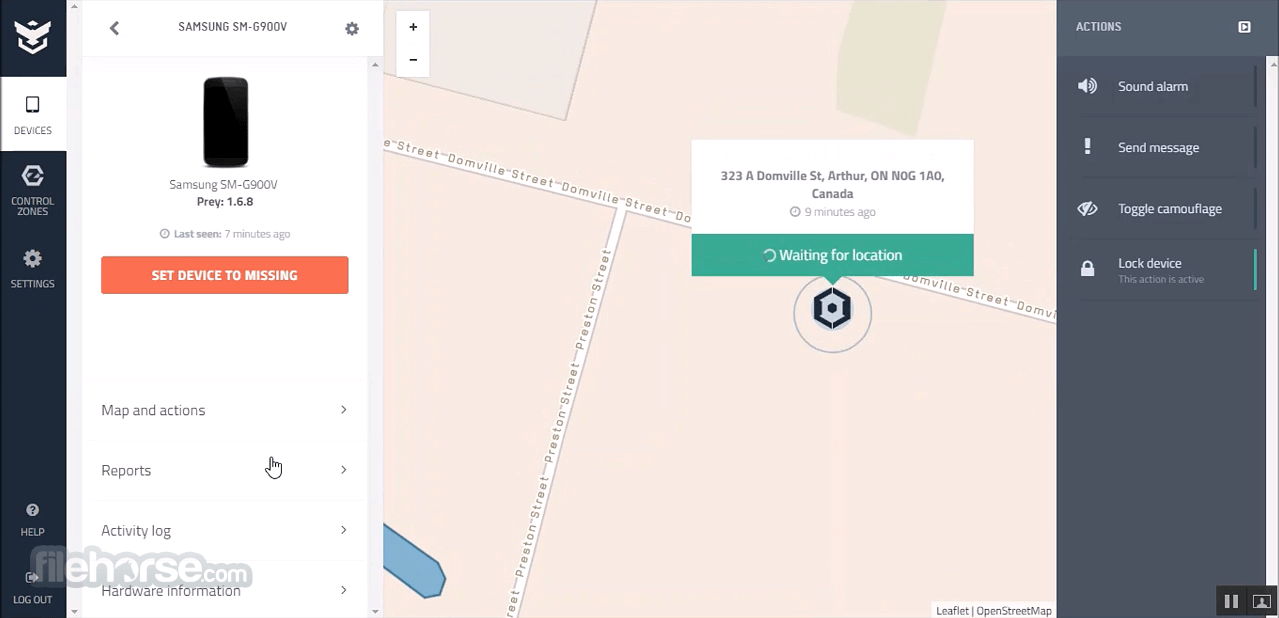
Navigating through features is intuitive, with clear menus and actionable buttons, ensuring users can quickly access and manage device settings.
Installation and Setup
Download: Visit the official website or FileHorse.com and download the Windows installer.
Installation: Run the installer and follow the on-screen prompts to complete the setup.
Account Creation: Launch the application and sign up for a free account or log in if you already have one.
Device Registration: Once logged in, the device will automatically register to your account and appear on your dashboard.
How to Use
Mark as Missing: If a device is lost or stolen, log into your Prey account, select the device, and click "Mark as Missing." It will then start monitoring and send periodic reports.
Remote Actions: From the dashboard, choose the desired action—lock device, sound alarm, display message, or wipe data—to execute it on the selected device.

Set Control Zones: Define specific areas on the map and assign devices to these zones. Receive notifications if devices move outside the designated boundaries.
FAQ
Is Prey free to use?
It offers a free plan that includes basic tracking and security features for up to three devices. Paid plans provide advanced functionalities and support for more devices.
Can Prey track a device that's already lost?
It can only track devices that have the software installed and registered prior to being lost. It's essential to set up Prey on your devices beforehand.
How does Prey locate devices?
It uses a combination of GPS, Wi-Fi triangulation, and GeoIP to determine a device's location accurately.
Is my personal data secure with Prey?
Yes, it prioritizes user privacy and employs robust security measures to protect your data.
Can I manage multiple devices with Prey?
Absolutely. Prey is designed to handle multiple devices, making it suitable for both personal and organizational use.
Pricing
It offers a free plan supporting up to three devices with basic features.
Paid plans start at $5 per month, providing advanced functionalities and support for additional devices. For detailed pricing, visit their official website.
System Requirements
- Operating System: Windows 11, 10, 8 or 7
- Processor: 1 GHz or faster
- Memory: 1 GB RAM
- Storage: 50 MB of available disk space
- User-friendly interface
- Cross-platform compatibility
- Robust free plan
- Comprehensive security features
- Responsive customer support
- Advanced features require a paid subscription
- Initial setup requires internet connectivity
- Some users may find the interface simplistic
It stands out as a reliable and efficient solution for device tracking and security. Its user-friendly interface, coupled with a robust set of features, makes it an excellent choice for individuals and organizations aiming to protect their devices and data.
Whether you're managing a personal laptop or a fleet of corporate devices, Prey offers the tools necessary to ensure security and peace of mind.
Note: Limited functionality in the demo version.
Also Available: Download Prey for Mac
-
Prey 1.13.39 (64-bit) Screenshots
The images below have been resized. Click on them to view the screenshots in full size.
-

-

-
What's new in this version:
Prey 1.13.39 (64-bit)
- Feat: Added tracking_schedule support to control which days and time windows forced location can run; unified boot-time and runtime settings processing into a single shared path
- Fix: Hardened all Windows exec calls in system detection functions against synchronous EROFS and EPERM errors; removed -NoProfile to avoid unnecessary PowerShell profile loading
- Fix: WebSocket action responses now retry indefinitely every 30 s until the server ACKs delivery, replacing the previous 10-attempt cap that could silently drop responses
- Fix: Errors with an err.level property are now skipped from exception reporting, providing a lightweight opt-out for non-fatal errors that should not reach telemetry
- Fix: Fixed a null-emitter crash in the hostname trigger when a pending async SQLite callback fires after stop() has already cleared the emitter reference
- Fix: handleError now preserves all properties of the original Error object when wrapping exceptions; a bare throw in the command handler is replaced with a callback error to prevent unhandled crashes
- Chore: Updated dependencies to resolve npm audit security vulnerabilities
Prey 1.13.38 (64-bit)
Fixed:
- Fix: Fixed a crash on macOS where permissionFile.getData() could return a raw boolean (written by the mac native location helper without string coercion) instead of the expected string, causing an uncaught .localeCompare is not a function TypeError. permissionfile.js now normalizes on read and write so already-corrupted SQLite data self-heals; listeners.js comparisons and the mac branch's error handling are also hardened as defense in depth.
- Fix: Fixed two startup crashes on Windows: countLinesLoggerRestarts now wraps its file read in a try-catch to prevent an uncaught EPERM when prey_restarts.log is locked or has missing permissions; the storage_fns.set check-then-insert pattern is replaced with a single INSERT OR REPLACE to eliminate the TOCTOU race that produced "Already registered" errors for preyconf and shouldPreyCFile during concurrent agent initialization.
- Fix: Fixed a TypeError crash when daemon.set_watcher is invoked through the CLI run helper: run always calls commands as command(values, cb), but set_watcher only accepts (cb), so the parsed CLI values object landed in the callback slot. Because the object is truthy, the !cb guard was bypassed and the object propagated through the full call chain, crashing as "done/cb is not a function" at the upgrade and fresh-install paths in prey_owl.js. The CLI registration now wraps the call to forward only the real callback. Callback guards in prey_owl.js are also standardised from cb && cb(...) to typeof cb === 'function' && cb(...) for consistency.
- Fix: Fixed a double-callback crash in the macOS geo location socket layer: tryToSendNew could fire cbAttached on already-completed messages, causing a second callback invocation after the socket response was processed. The optional time parameter is now forwarded through writeMessage to addAndWait so callers can override the default 7 s timeout (the darwin provider passes 65 s). A null guard on inFlightCallbacks in callSocket is added as defense in depth.
Prey 1.13.36 (64-bit)
Fixed:
- Fixed an issue where the X-Prey-Status HTTP header could contain invalid characters (such as newlines) that violated RFC 7230, causing request failures when device status data included special characters
- Fixed the hostname trigger incorrectly firing a device_renamed event when location data (a JSON object) was stored as the hostname value in the local database, causing spurious rename notifications to the control panel
- Fixed edge cases in the Windows lock action where Task Manager windows opened during the lock session were not properly closed on unlock
- Removed an empty registry key created during installation that caused errors with the unattended (silent) installer on Windows
- Upgraded node-forge to 1.4.0 to address CVE-2026-33896 (BasicConstraints bypass vulnerability)
- Upgraded underscore to 1.13.8 to address a Denial of Service vulnerability in the flatten function
- Upgraded minimatch to address a ReDoS (Regular Expression Denial of Service) vulnerability (GHSA-3ppc-4f35-3m26)
- Upgraded plist to 3.1.1 to address a CVE in the bundled @xmldom/xmldom dependency
- New Windows Prey Lock guarding edge cases and solving focus on textbox issues
- Chore: Updated bundled Windows executables: Fenix 1.0.8, WpxSvc 2.0.34, and Updater 1.0.8
- Ensured the SQLite database connection is properly closed after every storage operation (set, del, update, all, query) and that initialization errors are propagated to callers, preventing connection leaks
- Replaced the firewall npm dependency with direct Windows API calls via the new winsvc module for managing firewall rules, with multi-level fallback (winsvc HTTP → CLI → PowerShell). Registry set/del operations also now prefer the Windows API with reg.exe fallback
- Registry keys are now cleaned up during full uninstallation (pre_uninstall), not only during dedicated cleanup tasks
- Fixed the Windows anchor location storage to perform an upsert (update if already exists) instead of silently failing on duplicate entries. Invalid cached locations are now cleared on load
- Fixed two connection leak edge cases in the storage layer: storage_fns.all and storage_fns.query were closing the SQLite connection on the success path but not on error paths. Also fixed a null dereference crash when the underlying dbComm.all callback returned (null, null), causing a TypeError reading err.code on a null value
- Fixed a double-callback and uncaught exception risk in the Wi-Fi geo location strategy: when the server returned HTTP 429 (rate limit), execution fell through to a second checkResponse call after the cache-query block completed, and a catch block was using throw inside an async callback instead of calling back with the error
- Fixed a double-callback during post_install on Windows where both setUpVersion and prey_user.create were invoked with the same ready callback, causing it to fire twice
- Fixed the Windows service version cache permanently storing null on a failed first attempt, preventing retries when the service binary was not yet present on disk
- Fixed command injection in the registry.js reg.exe fallback: path, key, and value parameters were unquoted in the shell exec string, allowing values with spaces or metacharacters to break the command or inject additional shell instructions
- Added NaN guards before process.kill() calls in utilinformation.js, tasks/os/windows.js, and panel/index.js: a corrupt or empty pidfile returning NaN from parseInt was passed directly to process.kill, causing unpredictable behavior
- Fixed force_new_config on Unix silently issuing kill -9 undefined when client_pid returned an error: a missing return caused execution to continue past the error log and schedule the kill command with an undefined PID
- Converted edr_log.js to a no-op module, removing synchronous fs.appendFileSync disk writes from production code paths
- Improved the hostname JSON guard to apply .trim() before checking the first character, preventing bypass when a stored hostname value has leading whitespace
Prey 1.13.35 (64-bit)
Fixed:
- Fixed a crash in the Wi-Fi location strategy where a server-side body error response was incorrectly propagated as a null callback argument, causing callers to receive an undefined result and crash on property access (lat, accuracy)
- Fixed coordinate validation in the location trigger to accept lat/lng values returned as strings by the geo provider, parsing and validating them against valid geographic ranges instead of rejecting them outright
Prey 1.13.34 (64-bit)
Fixed:
- Fix: Fixed a crash in hardware data collection where os.cpus() returning an empty array or undefined values in virtualized environments caused an unhandled TypeError. The agent now returns safe defaults instead.
- Fix: Fixed a crash on Windows where the Wi-Fi location strategy could return coordinates in a raw API format instead of the expected processed format, causing coords.lng.toString() to fail. Also fixed a related issue where lng=0 (prime meridian) was incorrectly treated as a missing value due to use of || instead of ??.
Prey 1.13.33 (64-bit)
- Feat: Location methods (native, Wi-Fi, and IP-based) can now be individually disabled from the control panel. When a method is disabled, the agent automatically falls back to the next available source.
Prey 1.13.32 (64-bit)
- Feat: New Windows location orchestration system that coordinates native and Wi-Fi location sources, with periodic validation and persistent recovery across restarts
- Feat: Disk encryption data is now only collected and reported when the control panel explicitly requests it via backend configuration
Fixed:
- Fixed a bug where a missing Wi-Fi location would cause the location strategy to fail entirely instead of falling back gracefully
- New MacSVC 1.0.9 with a fix for screenshot capture on macOS
- New WinSVC 2.0.33
- On Windows, the native location source is now restricted to WinRT only, improving reliability by avoiding incompatible sources
- Windows location orchestrator now uses a finer-grained change verification strategy instead of a broad jump-detection threshold, reducing false location updates
- Increased the native location accuracy threshold from 100 to 200 meters for better location acceptance on Windows
- The lock action on Windows now correctly restores the taskbar and re-applies the lock when a Fast User Switch occurs
- The unlock password is now masked in WebSocket communication logs to avoid exposing it
- WebSocket reconnection backoff maximum wait time was reduced to 2 minutes to recover faster after connectivity issues
- Added timeouts to system calls (PowerShell/exec) to prevent the agent from blocking indefinitely when a command hangs
- Prevents report gathering from stacking up when the agent is under degraded conditions (slow storage or hanging commands)
- Fixed a border case where multiple simultaneous timers could open more than one WebSocket connection for the same device
- Fixed an error that caused the alarm action to fail silently when the device session was inactive
Prey 1.13.31 (64-bit)
- Merge branch 'fix/out-of-time-auto-update-macos' into 'develop'
- Fix/out of time auto update macos
- See merge request prey/js/prey-node-client!1391
 OperaOpera 135.0 Build 5973.41 (64-bit)
 BlueStacksBlueStacks 10.42.255.1003
 PhotoshopAdobe Photoshop CC 2026 27.9.1 (64-bit)
 LDPlayerLDPlayer - Android Emulator
 GTA 6GTA 6 for PS5
 CapCutCapCut Desktop 9.1.0
 PC RepairPC Repair Tool 2026
 Hero WarsHero Wars - Online Action Game
 TradingViewTradingView - Trusted by 100 Million Traders
 Halo: CampaignHalo: Campaign Evolved
Comments and User Reviews