




 WindowBlinds
 Folder Color
 Groupy
 HomeDock OS
 Wallpaper
 DeskScapes
 Logi Options+
 Lookeen
-
Latest Version
Prey 1.13.32 (64-bit) LATEST
-
Review by
-
Operating System
Windows 7 64 / Windows 8 64 / Windows 10 64 / Windows 11
-
User Rating
Click to vote -
Author / Product
-
Filename
prey-windows-1.13.32-x64.exe
Originally developed in 2009, Prey has evolved into a robust tool trusted by millions worldwide to safeguard their devices and data.
Main Features
Real-Time Tracking: Utilizes GPS, Wi-Fi triangulation, and GeoIP to provide accurate device location.
Remote Security Actions: Enables remote locking, data wiping, alarm activation, and message display to deter unauthorized access.
Control Zones: Allows users to set geofenced areas, receiving alerts when devices enter or exit specified zones.
Data Protection: Offers remote data retrieval and deletion to secure sensitive information.
Fleet Management: Provides tools for tagging, organizing, and monitoring multiple devices, ideal for businesses and educational institutions.
Products
Prey Full Suite
A comprehensive device security solution designed for businesses. It tracks, responds, and helps manage devices efficiently.
Prey Protection
Around-the-clock tracking and advanced security tools to safeguard your data and prevent device loss.
Prey Tracking
A straightforward service that helps you locate and monitor fleets while providing essential tools to secure your devices.
User Interface
Prey's interface is designed for simplicity and efficiency. The centralized dashboard offers a global view of all registered devices, displaying their statuses and locations.
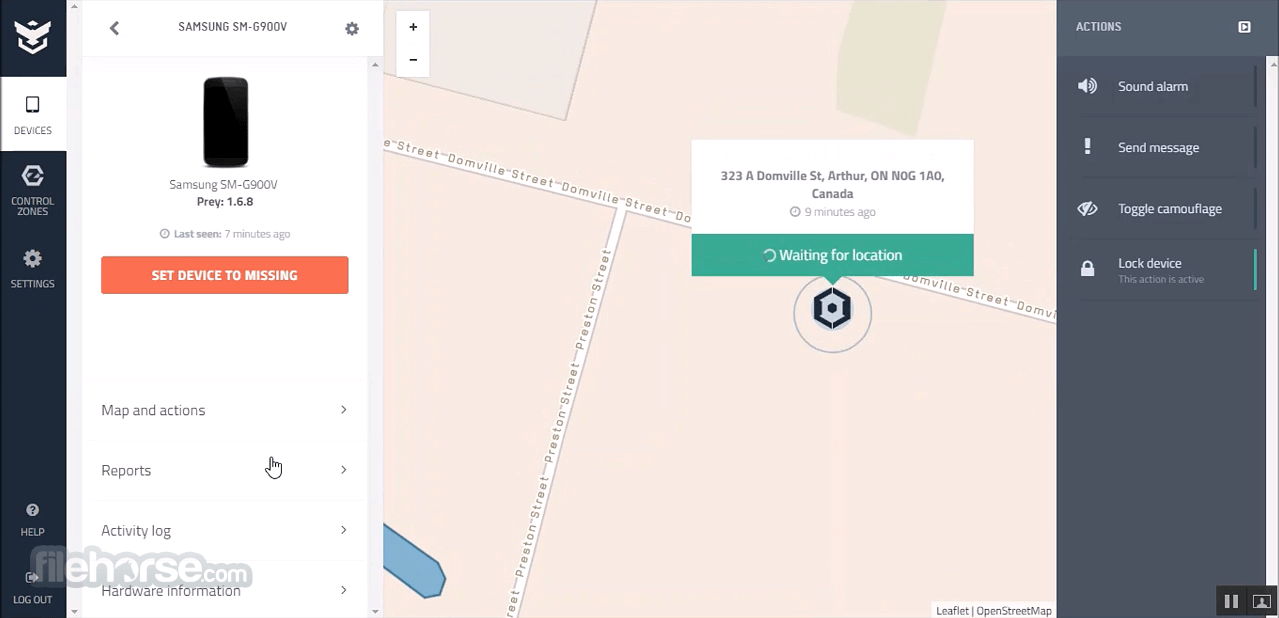
Navigating through features is intuitive, with clear menus and actionable buttons, ensuring users can quickly access and manage device settings.
Installation and Setup
Download: Visit the official website or FileHorse.com and download the Windows installer.
Installation: Run the installer and follow the on-screen prompts to complete the setup.
Account Creation: Launch the application and sign up for a free account or log in if you already have one.
Device Registration: Once logged in, the device will automatically register to your account and appear on your dashboard.
How to Use
Mark as Missing: If a device is lost or stolen, log into your Prey account, select the device, and click "Mark as Missing." It will then start monitoring and send periodic reports.
Remote Actions: From the dashboard, choose the desired action—lock device, sound alarm, display message, or wipe data—to execute it on the selected device.

Set Control Zones: Define specific areas on the map and assign devices to these zones. Receive notifications if devices move outside the designated boundaries.
FAQ
Is Prey free to use?
It offers a free plan that includes basic tracking and security features for up to three devices. Paid plans provide advanced functionalities and support for more devices.
Can Prey track a device that's already lost?
It can only track devices that have the software installed and registered prior to being lost. It's essential to set up Prey on your devices beforehand.
How does Prey locate devices?
It uses a combination of GPS, Wi-Fi triangulation, and GeoIP to determine a device's location accurately.
Is my personal data secure with Prey?
Yes, it prioritizes user privacy and employs robust security measures to protect your data.
Can I manage multiple devices with Prey?
Absolutely. Prey is designed to handle multiple devices, making it suitable for both personal and organizational use.
Pricing
It offers a free plan supporting up to three devices with basic features.
Paid plans start at $5 per month, providing advanced functionalities and support for additional devices. For detailed pricing, visit their official website.
System Requirements
- Operating System: Windows 11, 10, 8 or 7
- Processor: 1 GHz or faster
- Memory: 1 GB RAM
- Storage: 50 MB of available disk space
- User-friendly interface
- Cross-platform compatibility
- Robust free plan
- Comprehensive security features
- Responsive customer support
- Advanced features require a paid subscription
- Initial setup requires internet connectivity
- Some users may find the interface simplistic
It stands out as a reliable and efficient solution for device tracking and security. Its user-friendly interface, coupled with a robust set of features, makes it an excellent choice for individuals and organizations aiming to protect their devices and data.
Whether you're managing a personal laptop or a fleet of corporate devices, Prey offers the tools necessary to ensure security and peace of mind.
Note: Limited functionality in the demo version.
Also Available: Download Prey for Mac
-
Prey 1.13.32 (64-bit) Screenshots
The images below have been resized. Click on them to view the screenshots in full size.
-

-

-
What's new in this version:
- Feat: New Windows location orchestration system that coordinates native and Wi-Fi location sources, with periodic validation and persistent recovery across restarts
- Feat: Disk encryption data is now only collected and reported when the control panel explicitly requests it via backend configuration
Fixed:
- Fixed a bug where a missing Wi-Fi location would cause the location strategy to fail entirely instead of falling back gracefully
- New MacSVC 1.0.9 with a fix for screenshot capture on macOS
- New WinSVC 2.0.33
- On Windows, the native location source is now restricted to WinRT only, improving reliability by avoiding incompatible sources
- Windows location orchestrator now uses a finer-grained change verification strategy instead of a broad jump-detection threshold, reducing false location updates
- Increased the native location accuracy threshold from 100 to 200 meters for better location acceptance on Windows
- The lock action on Windows now correctly restores the taskbar and re-applies the lock when a Fast User Switch occurs
- The unlock password is now masked in WebSocket communication logs to avoid exposing it
- WebSocket reconnection backoff maximum wait time was reduced to 2 minutes to recover faster after connectivity issues
- Added timeouts to system calls (PowerShell/exec) to prevent the agent from blocking indefinitely when a command hangs
- Prevents report gathering from stacking up when the agent is under degraded conditions (slow storage or hanging commands)
- Fixed a border case where multiple simultaneous timers could open more than one WebSocket connection for the same device
- Fixed an error that caused the alarm action to fail silently when the device session was inactive
 OperaOpera 131.0 Build 5877.24 (64-bit)
 Kling AIKling AI - Text or Image to Video
 PhotoshopAdobe Photoshop CC 2026 27.5 (64-bit)
 BlueStacks AIBlueStacks AI
 OKXOKX - Buy Bitcoin or Ethereum
 CapCutCapCut 8.5.0
 PC RepairPC Repair Tool 2026
 Hero WarsHero Wars - Online Action Game
 TradingViewTradingView - Trusted by 100 Million Traders
 AdGuard VPNAdGuard VPN 2.9.0
Comments and User Reviews