




 DeskScapes
 Groupy
 Logi Options+
 Folder Color
 Lookeen
 WindowBlinds
 Typing Master
 Wallpaper
-
Latest Version
Stellarium 25.4 (64-bit) LATEST
-
Review by
-
Operating System
Windows 10 (64-bit) / Windows 11
-
User Rating
Click to vote -
Author / Product
-
Filename
stellarium-25.4-qt6-arm64.exe
-
MD5 Checksum
b497ac8eca0cc53298bba877eeb0b9ac

It provides a highly detailed and realistic simulation of stars, planets, nebulae, and other celestial objects, allowing users to view the sky as it would appear from any location on Earth.
With a vast catalog of over 600,000 stars and deep-space objects, Stellarium for PC is widely used in educational settings and by amateur astronomers for planning observations.
Key Features
Realistic Night Sky Simulation – Displays stars, planets, moons, constellations, and deep-sky objects with high accuracy.
Extensive Object Database – Over 600,000 cataloged stars and nebulae, with additional databases for more celestial objects.
Telescope Control – Connects to telescopes via third-party plugins for automated tracking.
Time Travel Feature – Simulates sky conditions at any past or future date.
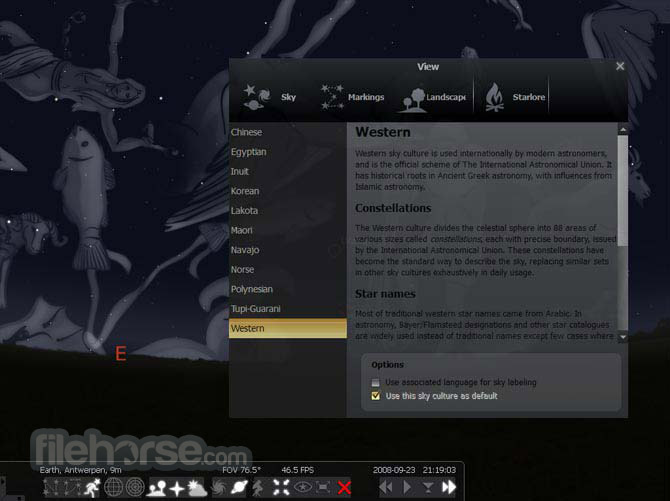
Constellations and Mythology – Displays constellation lines, names, and mythological figures from different cultures.
Customizable Views – Allows users to adjust sky elements, landscapes, and atmospheric conditions.
Educational Tools – Includes labels, grids, and overlays for learning and teaching astronomy.
Scripting Support – Enables automation and custom simulations using scripts.

Installation and Setup
- Download this program from the official website or FileHorse.
- Run the installer and follow the on-screen instructions.
- Choose installation options, including the default directory and additional plugins if needed.
- Launch the application and configure your viewing location using GPS coordinates or selecting a city.
- Adjust settings such as sky brightness, labels, and object visibility according to preference.
Set Location – Use the location window to specify your observing position.
Explore the Sky – Click and drag to move around the sky, zoom in with the mouse wheel.
Search for Objects – Use the search tool to find stars, planets, or constellations.

Time Control – Adjust the date and time slider to simulate past or future celestial events.
Enable Telescope Mode – If using a telescope, configure and connect it for guided tracking.
Use Shortcuts – Learn keyboard shortcuts to toggle grids, labels, and other features quickly.
FAQs
Is Stellarium free to use?
Yes, this program is completely FREE and open-source. However, premium versions with additional features are available for mobile devices.
Can Stellarium control my telescope?
Yes, with the appropriate plugin, it can connect to and control various telescope models.
Does Stellarium work offline?
Yes, it works entirely offline once installed, but online features like database updates require an internet connection.
Can I use Stellarium for astrophotography planning?
Yes, this app is widely used for planning astrophotography sessions by simulating star positions and visibility.
Is Stellarium available for macOS and Linux?
Yes, the software is cross-platform and available for Windows, macOS, and Linux.
System Requirements
- OS: Windows 7, 8, 10, 11 (64-bit)
- Processor: 2 GHz dual-core or higher
- RAM: 2 GB (4 GB recommended)
- Graphics: OpenGL 3.3 compatible GPU
- Storage: 1 GB of available space
- Free and open-source
- Realistic sky simulation with a vast celestial database
- Telescope control capability
- Educational and customizable
- Works offline after installation
- Requires a decent GPU for smooth rendering
- Some advanced features need plugins
Stellarium is an outstanding planetarium software for anyone interested in astronomy, from casual stargazers to serious amateur astronomers. Its detailed sky simulation, telescope control support, and educational features make it a valuable tool for planning observations and learning about celestial objects.
Also Available: Stellarium for Mac
-
Stellarium 25.4 (64-bit) Screenshots
The images below have been resized. Click on them to view the screenshots in full size.
-
-
-
What's new in this version:
Added:
- new sky culture: Balinese
- new sky culture: Indian
- new sky culture: Norse
- new sky culture: Chinese
- initial support of narration
- discovery circumstances for newly discovered comets
- missing timezone
- Latin zodiac in Greek
- Latin zodiac in Greek
- Greek zodiac in Greek
- Greek zodiac in Greek
- report failures to load textures obtained from network too
- constellation descriptions to Modern sky culture
- VS2026 multi-config section and fix VS2022 statement in BUILDING.md
- more logging categories
- missing context in Modern sky culture constellation names
- ability to inhibit screensaver in fullscreen via CLI
- object type support for custom object
- obj type in search result, indicating SIMBAD result with fetched object types
- all native names to name search
- the star “Celestial Pig’s Eye” in Chinese sky culture
- Visual Studio 2022 build instructions
- ability to see colored labels for satellites in both modes
- polar distance info into InfoMap data
- extinction effect into drawing of satellites
- new set of navigational stars
- ability to use polar distance instead of declination in equatorial coordinates
- Nova Centauri 2025
- support for translating separated Constellations section
Fixed:
- crash when ENABLE_SPEECH is not defined
- typos
- structure of many sky cultures
- observe magnitude limit
- discovery circumstances for minor planets
- some debug messages with paths
- hardware detection in linux/aarch64
- hardware detection in OpenBSD
- typo in Babylonian
- checking updates
- build with Qt6.10
- IPA for Russian Siberian sky culture
- GUI issue in Solar System Editor plugin
- altitude representation in decimal degrees in AstroCalc/Phenomena tool
- deleted lines during creation of a constellation end up in the output in Sky Culture Maker plugin
- Observability Analysis plugin crash
- start with empty observing list
- documentation
- getting screenshot HiDPI scaling on Wayland
- bookmarks for minor planets orbital elements
- indication satellite in penumbra
- helplabel font in bottom bar
- a use after free
- loading localization in some specific cases
- translations issue
- loading star catalogs
- setting SkyculturePartition colors
- reading the setting for enabling abbreviations of constellations
- missing config option
- tooltip
- the positioning of the star “Auxiliary Road “ in Chinese Chenzhuo sky culture
- description of few scripts
- classification issue in Sky Culture Maker plugin
- issue in Sky Culture Maker plugin: Drawn constellations are not reset after “Export and Exit”
- issue in Sky Culture Maker plugin: Stop drawing line key
- issue in Sky Culture Maker plugin: Not all sky culture description input fields that are marked required are actually checked
- issue in Sky Culture Maker plugin: No formal checks for ‘Constellations’ input field in sky culture description
- some issues in the Chinese Chenzhuo sky culture
- Sardinian sky culture: Allow elongation-dependent name for Venus
- abbreviations in Indian sky culture
Changed:
- Changed core: Allow negative hour angles
- Changed core: Compute correct longitude position even if skyculture partition is not shown
- Changed core: Recreate viewport effect on screen scaling change
- Changed core: Take changes in magnitude due to proper motion when getting vmag with extinction
- Changed core: Retrieve all cultural names on search
- Changed core: Extend global zone in lv0-2 catalogs to 200,000 years due to GH #4501
- Changed core: Need to normalize binary stars’ cartesian position to fix wrong parallax effect for binary stars
- Changed core: Minor dynamic resolution changes
- Changed core: Don’t forget to run markdownToHTML on an SC description section
- Changed core: Scale Custom Object pointer with the screen
- Changed core: Scale nomenclature pointer with the screen
- Changed core: Scale star pointer with the screen
- Changed core: Properly scale SolarSystem pointer with the screen
- Changed core: Properly scale meteor shower icon on the screen
- Changed core: Scale meteor shower, satellite, DSO pointers with the screen
- Changed visual type of monthly graph in AstroCalc tool
- Changed GUI: Don’t force button sizes in ScriptConsole
- Changed GUI: Make combobox dropdown actually drop down
- Changed NLS: Simplify ‘pronounce’ .po entries of Chinese sky cultures
- Changed Calendars plugin: Allow exporting displayed list
- Changed Sky Culture Maker plugin: Remove “test only” warning and enable translation signal
- Changed Sky Culture Maker plugin: Tell what fields are incomplete on export error
- Changed Sky Culture Maker plugin: Use artIntensity from ConstellationMgr
- Changed Sky Culture Maker plugin: Tweak the Close dialog text
- Changed Sky Culture Maker plugin: Use better button labels in the Close dialog
- Changed Sky Culture Maker plugin: Fix UX issues with aborting and hiding dialogs + missing translations
- Changed Sky Culture Maker plugin: Fix Thickness of constellation lines in SCM is not tied to Stellarium’s settings
- Changed Sky Culture Maker plugin: Move constellation descriptions to the Constellations dialog
- Changed Sky Culture Maker plugin: Option to merge constellation lines into polylines
- Changed Sky Culture Maker plugin: Don’t exit on “Export and Exit” when export failed
- Changed Oculars plugin: Try a drop shadow to increase GUI panel clarity
Updated:
- DSO catalog
- CalcMySky to v0.4.0
- Babylonian sky cultures
- Chinese
- BAS_Messier_Tour.ssc script
- Maori sky culture
- Modern
- Arabic
- description of Arabic
- Chinese sky cultures: complete the entries on planets
- IAU-star names in Modern
- the list of contributors
- photometry data of satellites
- default list of satellites
- the default list of locations
- the default catalog of exoplanets
- default catalog of pulsars
- names of DSO
- orbital elements for minor bodies of Solar system
- discovery circumstances for comets and minor planets
- translations
- Stellarium User Guide
- template for Stellarium User Guide
- planetary nomenclature data
- Restored mistakenly altered Sun texture
- Removed copies of images from root directory
- Removed extraneous brackets in IPA of Balinese sky culture
- Removed outdated core: Unuse StelSkyDrawer::getBortleScaleIndex in ZL
- Removed the kludge in Constellation
 OperaOpera 125.0 Build 5729.49 (64-bit)
 MalwarebytesMalwarebytes Premium 5.4.5
 PhotoshopAdobe Photoshop CC 2026 27.2 (64-bit)
 BlueStacksBlueStacks 10.42.153.1003
 OKXOKX - Buy Bitcoin or Ethereum
 Premiere ProAdobe Premiere Pro CC 2025 25.6.3
 PC RepairPC Repair Tool 2025
 Hero WarsHero Wars - Online Action Game
 TradingViewTradingView - Trusted by 60 Million Traders
 WPS OfficeWPS Office Free 12.2.0.23155
Comments and User Reviews