




 VoxBox
 Sound Forge
 Broadcaster
 LOVO AI
 Pro Tools
 iTop Voicy
 Adobe Audition
 ElevenLabs AI
-
Latest Version
Virtual Audio Cable 4.7.1 LATEST
-
Review by
-
Operating System
Windows 7 / Windows 8 / Windows 10 / Windows 11
-
User Rating
Click to vote -
Author / Product
-
Filename
vac471.zip
You definitely know that traditional hardware audio devices (CD/LP player, FM receiver, equalizer tool, amplifier, etc.) may be connected by electrical (analog or digital) cables.
It provides a set of virtual audio devices named Virtual Cables. The "Virtual Cable" term is used only in the VAC description; actual device/endpoint names are different.
You could create the same path, connecting the analog output of any audio adapter (sound card) to its own analog input by a plain electric cable. Then, you can select playback and recording endpoints in source and destination applications, so they become connected.
This software performs such signal transfer completely inside the computer, with no audio hardware, and with no quality loss (if no format conversion and/or volume control are involved).
Download Virtual Audio Cable for Windows PC now!
However, the digital audio signal produced by the source application will come through a digital-to-analog converter, then through the electric cable, then through an analog-to-digital converter, and finally be recorded by the destination application.
Therefore, double digital-to-analog and analog-to-digital conversions are performed in case of such a connection, and audio quality is degraded.
VAC behavior is similar to the "Stereo Mix" ("What You Hear" or "What U Hear") feature of some hardware audio adapters (cards). But it is only similar, not equivalent.
If you simply need a function like "Stereo Mix" under Win7/Win8/Win10/Win11, it could be better to try to enable it in your audio adapter.
How to Use Virtual Audio Cable (VAC)
- Install this tool and restart your computer if required.
- Open VAC Control Panel and create at least one virtual cable (Line 1).
- Set the first application’s audio output device to “Line 1 (Virtual Audio Cable)”.
- Set the second application’s audio input device to “Line 1 (Virtual Audio Cable)”.
- Play audio in the source application and verify it appears in the destination application.
- Adjust buffer size and latency settings in VAC Control Panel if needed.
- Use additional virtual lines if you need to route multiple audio streams simultaneously.
You need no audio hardware (sound adapter/card), either built-in or external, to use VAC for digital audio transfer. Audio hardware is required only to hear the results or to record signals from external sources. On a computer with no audio adapter (card), you still can use VAC to record audio signals produced by applications (for example, testing audio broadcast on a virtual server).
Control panel application
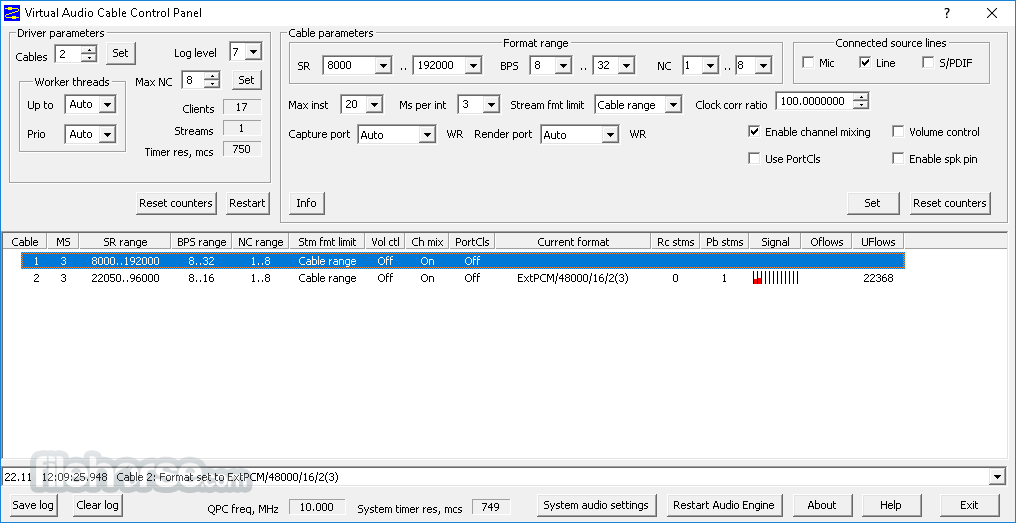
VAC Control Panel application allows you to change the number of Virtual Cables, view/modify VAC driver and cable settings, and watch for cable/stream activity.
Device-to-device audio transfer
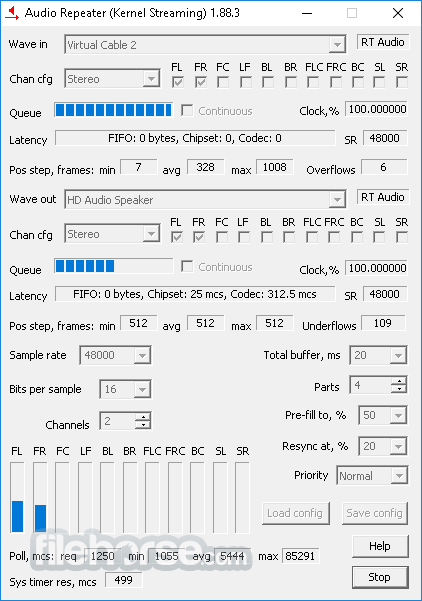
Virtual Cable devices (endpoints) allow you to organize application-to-application audio transfer only. To perform the endpoint-to-endpoint transfer, use the Audio Repeater application included in the product package.
Driver-based solution
The app contains a Windows WDM/KS virtual device driver that creates virtual audio devices. This driver is a kernel-mode module and needs to be installed with administrator rights. Being a WDM/KS filter, it represents the lowest-level audio layer in Windows. It can be effectively used by any upper-level layer (KS-aware applications, WASAPI, MME or DirectSound subsystems, ASIO wrappers, and so on).
Comprehensive user manual
It user manual is included in the free trial package available on the download page. It contains many details useful for a better understanding of the product and for using it correctly. You don't have to install the trial version to open and read the user manual. Just download the ZIP archive, open it to see the contents, and double-click on the file named "vac" marked by the question mark icon (the "chm" extension).
Features and Highlights
- Windows 11, 10, 8.1, 8, 7 (32-bit and 64-bit).
- Up to 256 Virtual Cables, allowing to transfer of up to 256 independent audio signals at the same time.
- Latency can be reduced to 0.5 milliseconds.
- Almost any of the fixed-point PCM audio formats (1000..384000 samples per second, 8..32 bits per sample, 1..32 channels).
- PCM format conversion (sampling rate, bits per sample, number of channels).
- RT Audio (WaveRT) protocol support with notification events, packet mode, clock, and position registers. Clock registers are bound to Virtual Cables, so all streams in each cable are coherent.
- An unlimited number of Kernel Streaming clients. You can share each Virtual Cable between any number of KS-aware audio applications or ASIO wrappers.
- Signal mixing from all streams of each Virtual Cable, allowing to mix signals from several applications in real-time.
- Volume control features (both attenuation and boost).
- Channel scattering/gathering mode. Using KS-aware applications, you can map particular channels in a stream.
VAC can be used with a wide range of audio software and application categories, including:
Internet Telephony / VoIP / SIP / Voice Messaging
Compatible with communication platforms such as Viber, Zoom, Discord, Ventrilo, and MicroSIP for routing call audio between applications.
Live Mixing and DJ Software
Works with tools like vMix, Mixxx, VirtualDJ, and VoiceMeeter Banana/Potato to manage and redirect live audio streams.
Live Broadcasting
Integrates with streaming and broadcasting software including OBS Studio, Wirecast, VidBlasterX, and SAM Broadcaster.
Speech Synthesis and Recognition
Supports text-to-speech and speech-to-text engines such as Google TTS/STT and Dragon NaturallySpeaking for audio input/output routing.
Software Synthesizers and Digital Audio Workstations (DAWs)
Compatible with professional music production tools like Ableton Live, ACID, AudioMulch, Band-in-a-Box, Bidule, Cakewalk/Sonar, Cubase, FL Studio, GarageBand, Logic, MiniMoog, n-Track, Nuendo, Reaktor, REAPER, Reason, Samplitude, Traktor, and Vegas.
Audio Editors and Recorders
Functions seamlessly with editing software such as Audacity, Adobe Audition, GoldWave, WaveLab, and Sound Forge.
Virtual Machines
Enables audio routing inside environments like VMware Player/Workstation, VirtualBox, and Hyper-V.
Amateur and Software-Defined Radio (SDR)
Useful for radio communication software including Flex Radio, PowerSDR, HAM Radio Deluxe, HamSphere, HDSDR, Fldigi, SDR-Radio, WSJT-X, and JTDX.
Audio Application Development
Ideal for developers who need to monitor audio operations, analyze playback data, or inject specific audio streams for testing and recording purposes.
Alternatives
VoiceMeeter – A virtual audio mixer and routing tool that offers advanced control over multiple audio inputs and outputs.
VB-Cable for PC – A simpler virtual audio cable solution for basic routing without extensive mixing features.
ASIO4ALL – A universal ASIO driver that improves audio performance and routing for low-latency applications.
PROS
- High Audio Quality Routing
- Minimal Latency Performance
- Customizable Audio Channels
- Compatible with Most Audio Apps
- Easy Installation Process
- Complex Setup for Beginners
- Limited Free Version Options
- Occasional Audio Lag Issues
- No Built-In Audio Effects
- Resource-Intensive on Low-End PCs
-
Virtual Audio Cable 4.7.1 Screenshots
The images below have been resized. Click on them to view the screenshots in full size.
-

-
What's new in this version:
Added:
- Added minimum RT Audio (WaveRT) buffer duration factors to VAC driver to force audio clients to use larger buffers
- Added filter interface query to Driver API
- Added endpoint names to Cable Information Window of Control Panel and their context menus
- Added indication of default endpoint assignments
- Added support of pin index (#n) in the command line of Audio Repeater KS
- Added support of sample container size in Audio Repeater KS
- Added support of selecting KS filters by their device interface paths in Audio Repeater KS
- Added context help (question mark) buttons to Control Panel dialogs to restore minimize buttons in title bars
- Added context help (question mark) buttons to Audio Repeater applications
- Added some modern multi-channel formats to Audio Repeater applications
- Added Rescan button to Audio Repeater applications to refresh the lists of input/output endpoints
- Added "handless" mode to Audio Repeater MME
Fixed:
- Fixed some errors in help topic links that prevented the topics from being displayed
- Fixed a bug with missing signal level indicators in Control Panel under XP
- Fixed a bug in the uninstaller where it would fail to retry uninstalling a device if it was busy but after the error all streams were terminated
- Fixed some minor bugs
- Removed "PortCls" column from the cable list in Control Panel
- Eliminated noticeable delay in closing cable information windows
- Queue indicators in Audio Repeater are now displayed in gradient colors to reduce flickering
- The uninstaller now removes child devices from "Audio inputs and outputs"
 OperaOpera 134.0 Build 5954.56 (64-bit)
 BlueStacksBlueStacks 10.42.255.1002
 PhotoshopAdobe Photoshop CC 2026 27.9.1 (64-bit)
 LDPlayerLDPlayer - Android Emulator
 GTA 6GTA 6 for PS5
 CapCutCapCut Desktop 9.1.0
 PC RepairPC Repair Tool 2026
 Hero WarsHero Wars - Online Action Game
 TradingViewTradingView - Trusted by 100 Million Traders
 Halo: CampaignHalo: Campaign Evolved
Comments and User Reviews