




 Adobe Acrobat
 Day One
 Genspark AI
 WPS Office
 Wispr Flow
 OKX
OKX Edraw AI
 PDFelement
-
Latest Version
Zotero 9.0.5 LATEST
-
Review by
-
Operating System
Windows 7 64 / Windows 8 64 / Windows 10 64 / Windows 11
-
User Rating
Click to vote -
Author / Product
-
Filename
Zotero-9.0.5_x64_setup.exe
Zotero is a powerful, open-source reference management Windows tool designed for researchers, students, and academics.
Developed by the Corporation for Digital Scholarship, it helps users collect, organize, cite, and share research materials effortlessly.
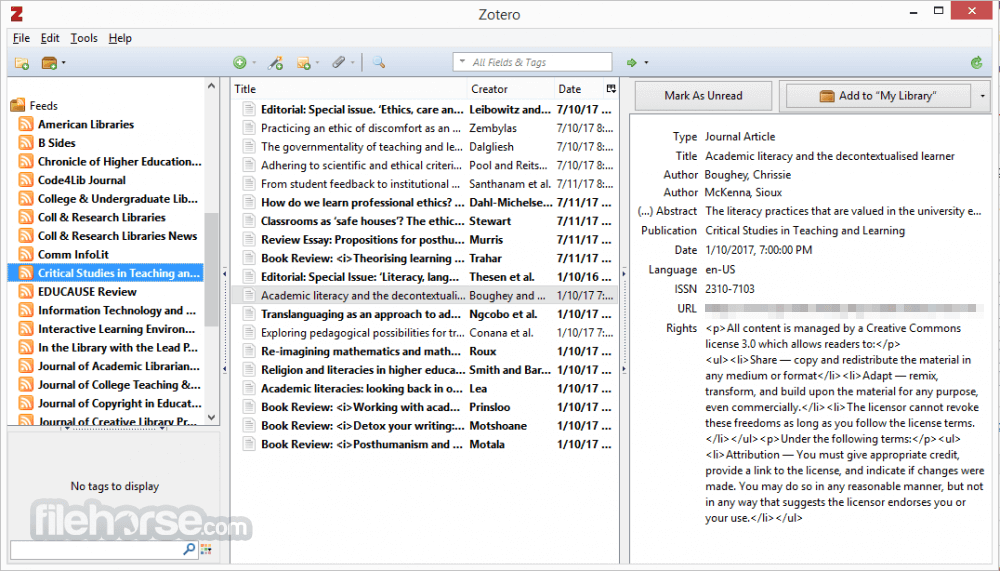
Zotero streamlines the research process by allowing users to manage citations, bibliographies, and PDFs in a centralized digital library.
With its seamless browser integration and compatibility with word processors, Zotero is an essential tool for anyone dealing with extensive research.
Key Features
Reference Management – It allows users to store and organize references from websites, journals, and books in one place.
Automatic Citation Capture – With a single click, users can save references from databases, library catalogs, and academic websites.
Integration with Word Processors – It works with Microsoft Word, Google Docs, and LibreOffice to insert citations and generate bibliographies.
Cloud Syncing – The app synchronizes data across multiple devices, ensuring access to research materials anywhere.
Tagging and Searching – Users can tag and search references efficiently, making large libraries easy to navigate.
Collaboration Features – Zotero Groups allows researchers to share libraries and collaborate on projects.
PDF Annotation – Users can highlight and add notes to PDFs directly within this program.
Plugins and Customization – It supports third-party plugins for added functionalities, such as enhanced citation styles and additional integrations.
User Interface
It has a clean and straightforward interface, divided into three main panels:
Adding References – Click the browser extension or manually add references by inputting details.
Organizing Library – Use collections, tags, and search filters to keep research organized.
Citing in Documents – In Word or Google Docs, use the toolbar to insert citations and generate bibliographies.
Annotating PDFs – Open PDFs within Zotero to highlight and take notes.
Collaborating – Share references with colleagues using Groups.
FAQ
Is Zotero free?
Yes, this program is free to use, but it offers additional cloud storage plans for users requiring more than 300 MB of storage.
Does Zotero work offline?
Yes, it works offline, and any changes made will sync when an internet connection is available.
Can I import references from other citation managers?
Yes, it supports imports from EndNote, Mendeley, and RefWorks using standard formats like RIS and BibTeX.
Does Zotero support different citation styles?
Yes, it supports thousands of citation styles, including APA, MLA, Chicago, and more.
How do I recover lost references?
If you accidentally delete references, check the Zotero Trash or restore data from the online backup if syncing is enabled.
Alternatives
EndNote – A premium reference manager with advanced citation tools but costly.
Mendeley – Offers PDF annotation and social collaboration but has limited free storage.
JabRef – A BibTeX-based reference manager for LaTeX users.
Pricing
Free Plan – Includes 300 MB of cloud storage.
Paid Plans – Starts at $20/year for 2 GB of storage, with higher tiers for additional space.
System Requirements
Zotero is an excellent reference management tool for students, researchers, and academics looking for a free, open-source solution. With its seamless citation management, collaboration tools, and cloud syncing, it simplifies research organization.
While its interface may not be the most modern, its functionality outweighs aesthetic concerns. If you need an effective, budget-friendly citation tool, this software is an outstanding choice.
Also Available: Download Zotero for Mac
Developed by the Corporation for Digital Scholarship, it helps users collect, organize, cite, and share research materials effortlessly.
Zotero streamlines the research process by allowing users to manage citations, bibliographies, and PDFs in a centralized digital library.
With its seamless browser integration and compatibility with word processors, Zotero is an essential tool for anyone dealing with extensive research.
Key Features
Reference Management – It allows users to store and organize references from websites, journals, and books in one place.
Automatic Citation Capture – With a single click, users can save references from databases, library catalogs, and academic websites.
Integration with Word Processors – It works with Microsoft Word, Google Docs, and LibreOffice to insert citations and generate bibliographies.
Cloud Syncing – The app synchronizes data across multiple devices, ensuring access to research materials anywhere.
Tagging and Searching – Users can tag and search references efficiently, making large libraries easy to navigate.
Collaboration Features – Zotero Groups allows researchers to share libraries and collaborate on projects.
PDF Annotation – Users can highlight and add notes to PDFs directly within this program.
Plugins and Customization – It supports third-party plugins for added functionalities, such as enhanced citation styles and additional integrations.
User Interface
It has a clean and straightforward interface, divided into three main panels:
- The left panel displays collections and tags for organization.
- The middle panel lists references with metadata, including title, author, and publication year.
- The right panel provides detailed metadata fields, notes, and attachment options.
- The interface is intuitive, making it easy for users to navigate through their reference library without a steep learning curve.
- Download and Install – It can be downloaded from the official website or FileHorse. The installer is straightforward and takes a few minutes.
- Install Browser Connector – To capture references from the web, install the Zotero Connector extension for Chrome, Firefox, or Edge.
- Set Up Syncing – Users can create a free account to sync their library across multiple devices.
- Configure Word Processor Plugins – It integrates with Microsoft Word and Google Docs automatically, but users may need to enable add-ins.
Adding References – Click the browser extension or manually add references by inputting details.
Organizing Library – Use collections, tags, and search filters to keep research organized.
Citing in Documents – In Word or Google Docs, use the toolbar to insert citations and generate bibliographies.
Annotating PDFs – Open PDFs within Zotero to highlight and take notes.
Collaborating – Share references with colleagues using Groups.
FAQ
Is Zotero free?
Yes, this program is free to use, but it offers additional cloud storage plans for users requiring more than 300 MB of storage.
Does Zotero work offline?
Yes, it works offline, and any changes made will sync when an internet connection is available.
Can I import references from other citation managers?
Yes, it supports imports from EndNote, Mendeley, and RefWorks using standard formats like RIS and BibTeX.
Does Zotero support different citation styles?
Yes, it supports thousands of citation styles, including APA, MLA, Chicago, and more.
How do I recover lost references?
If you accidentally delete references, check the Zotero Trash or restore data from the online backup if syncing is enabled.
Alternatives
EndNote – A premium reference manager with advanced citation tools but costly.
Mendeley – Offers PDF annotation and social collaboration but has limited free storage.
JabRef – A BibTeX-based reference manager for LaTeX users.
Pricing
Free Plan – Includes 300 MB of cloud storage.
Paid Plans – Starts at $20/year for 2 GB of storage, with higher tiers for additional space.
System Requirements
- OS – Windows 7, 8, 10, and 11
- Processor – Intel or AMD (64-bit recommended)
- RAM – 2 GB minimum (4 GB or more recommended)
- Disk Space – 250 MB for installation (additional space needed for library storage)
- Free and open-source
- Easy citation management with browser integration
- Works offline with syncing options
- Supports thousands of citation styles
- Collaboration features for team research
- Limited free cloud storage (300 MB)
- Occasional sync conflicts in group libraries
- Interface can feel outdated compared to competitors
Zotero is an excellent reference management tool for students, researchers, and academics looking for a free, open-source solution. With its seamless citation management, collaboration tools, and cloud syncing, it simplifies research organization.
While its interface may not be the most modern, its functionality outweighs aesthetic concerns. If you need an effective, budget-friendly citation tool, this software is an outstanding choice.
Also Available: Download Zotero for Mac
Why is this app published on FileHorse? (More info)
-
Zotero 9.0.5 Screenshots
The images below have been resized. Click on them to view the screenshots in full size.
What's new in this version:
- Fixed broken Word integration after Microsoft’s June 9 Windows security updates
 OperaOpera 132.0 Build 5905.73 (64-bit)
 LDPlayerLDPlayer - Android Emulator
 PhotoshopAdobe Photoshop CC 2026 27.7 (64-bit)
 BlueStacks AIBlueStacks AI
 NitradoNitrado - Rent a Gaming Server
 CapCutCapCut Desktop 8.7.0
 PC RepairPC Repair Tool 2026
 Hero WarsHero Wars - Online Action Game
 TradingViewTradingView - Trusted by 100 Million Traders
 Forza HorizonForza Horizon 6
Comments and User Reviews