




 PDFelement
 Wispr Flow
 Genspark AI
 BookFab
 Adobe Acrobat
 Transkriptor
 Accio Work
 Day One
-
Latest Version
ChemSketch 2024 LATEST
-
Review by
-
Operating System
Windows 10 (64-bit) / Windows 11
-
User Rating
Click to vote -
Author / Product
-
Filename
ACDLabs202413_ChemSketch_FInstall.zip
-
MD5 Checksum
5e58cac3be61e7f41c15aaeae86f4fac
ChemSketch is a chemically intelligent drawing interface that allows you to draw almost any chemical structure, including organics, organometallics, polymers, and Markush structures.
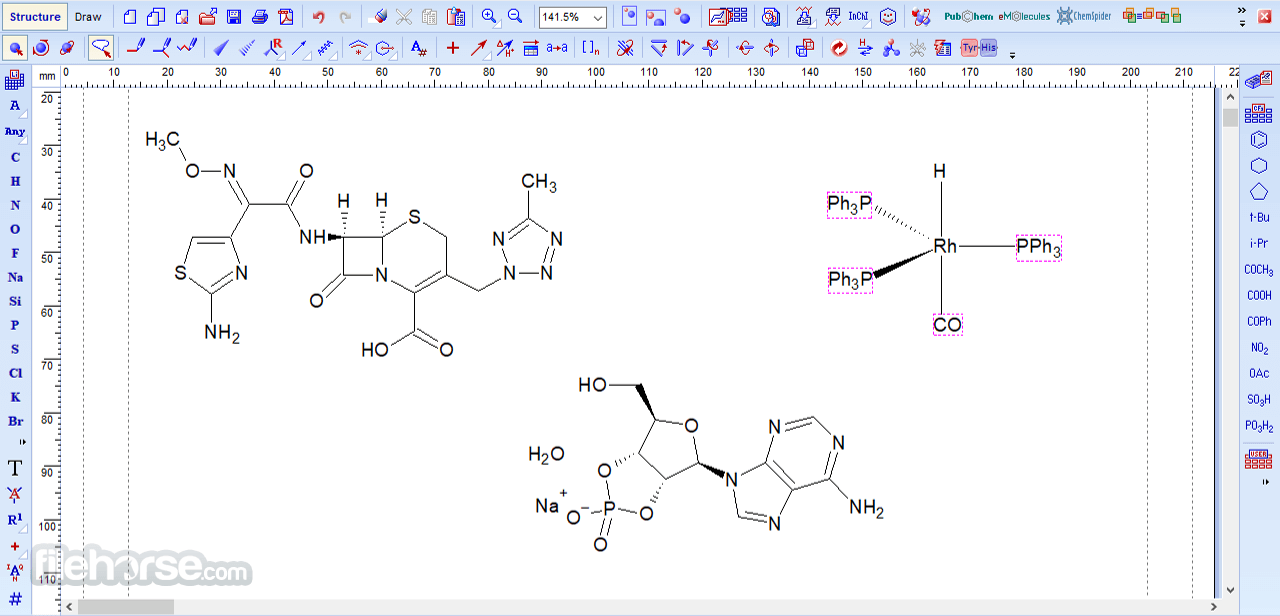
Use it to produce professional-looking structures and diagrams for reports and publications. An awesome chemical drawing software for your desktop or laptop computer!
ChemSketch is a powerful and versatile chemical drawing and molecular modeling software developed by ACD/Labs. It is designed for chemists, educators, and students who need a tool to create and analyze chemical structures, reactions, and properties.
Whether you're a professional chemist working in a laboratory or a student learning the basics of chemistry, it provides a user-friendly platform for visualizing and studying chemical compounds.
ACD/ChemSketch Freeware is a drawing package that allows you to draw chemical structures, including organics, organometallics, polymers, and Markush structures.
It also includes features such as calculation of molecular properties (e.g., molecular weight, density, molar refractivity, etc.), 2D and 3D structure cleaning and viewing, functionality for naming structures (fewer than 50 atoms and 3 rings), and prediction of logP.
See It In Action

Key Features
Chemical Structure Drawing: It allows users to draw chemical structures with ease, including organic, inorganic, and organometallic compounds. The intuitive drawing tools make it accessible for users of all skill levels.
Molecular Modeling: Users can create 3D molecular models, helping to visualize the spatial arrangement of atoms and bonds, which is crucial for understanding molecular interactions and properties.
Chemical Properties Prediction: The software can predict various chemical properties, such as molecular weight, boiling point, melting point, and more, making it a valuable tool for researchers and educators.
Spectral Analysis: It offers tools for analyzing NMR (nuclear magnetic resonance) and IR (infrared) spectra, aiding in the identification and characterization of chemical compounds.
Reaction Mechanism Drawing: It allows users to sketch reaction mechanisms and visualize the step-by-step processes involved in chemical reactions.
Database Integration: It can connect to chemical databases, helping users access extensive libraries of chemical structures and information
User Interface
It boasts an intuitive and user-friendly interface. The main workspace consists of a drawing area, where you can create chemical structures by dragging and dropping elements, bonds, and functional groups.
The toolbar provides quick access to various drawing tools, and the menu bar offers comprehensive options for structuring and analyzing chemical compounds.

The software's interface is well-organized, making it easy to navigate, even for beginners. The layout is clean and free from clutter, ensuring that users can focus on their chemical tasks without distractions.
Installation and Setup
Installing the program is a straightforward process. You can download the software from the official ACD/Labs website or other trusted sources like FileHorse. Once downloaded, follow the installation wizard's instructions, and the software will be ready to use within minutes.
During installation, you may be prompted to choose specific components or features to install. This flexibility allows you to customize the app according to your needs, ensuring that you don't install unnecessary components.
How to Use
Drawing Chemical Structures:
What`s new in version 2025
Improved π-complex search support in Spectrus DB - π-complexes (e.g., ferrocenes and similar organometallics) with different structural representations are now recognized as the same compound and can be searched jointly in the Spectrus database.
ACD/Labs
Expanded ACD/Dictionary - The built-in dictionary has been greatly enlarged with ~1,700 new structures and 13,000 new names, covering more reagents, catalysts, and common compounds.
ACD/Labs
Stereoconfiguration included in SMILES & InChI export - When exporting chemical structures to SMILES or InChI format, stereochemistry (3D configuration) is now preserved and included, improving compatibility with downstream tools and databases.
ACD/Labs
CAS / SciFinderⁿ search integration reinstated - Direct search capability is back: you can now query CAS SciFinderⁿ from within ChemSketch to look up structures and associated data.
ACD/Labs
Better interoperability with other drawing tools - You can copy/paste structures between ChemSketch and web-based drawing apps (e.g., Ketcher, Marvin), enabling easier collaboration or transfer between different cheminformatics platforms.
ACD/Labs
Other notable improvements concern data import/export, naming, and database features, making the software more flexible and powerful for modern chemical drawing, documentation, and database workflows.
FAQs
Is ChemSketch available for free?
Yes, it offers a free version (freeware) with a wide range of features. However, there are also paid versions with additional capabilities.
Can I use ChemSketch on Mac or Linux?
ChemSketch is primarily designed for Windows but can be run on Mac and Linux through compatibility layers like Wine or virtualization software.
Is there a ChemSketch mobile app?
Unfortunately, there is no official mobile app for ChemSketch at the moment.
Can ChemSketch predict the toxicity of chemical compounds?
It can predict certain properties, but it may not provide specific toxicity predictions. Toxicity prediction often requires more specialized software.
How do I access chemical databases within ChemSketch?
You can connect to chemical databases from the "Database" menu within the app. Some databases may require a subscription or access credentials.
Pricing
ChemSketch is a versatile and user-friendly software that caters to the needs of chemists, educators, and students alike. With its intuitive interface and a wide range of features, it simplifies the process of drawing chemical structures, predicting properties, and analyzing spectra.
While it may have some limitations, such as limited support for non-Windows platforms and advanced features locked behind a paywall, its free version still offers a robust set of tools that can significantly enhance your chemistry-related work.
Whether you're a novice or an experienced chemist, ChemSketch is a valuable addition to your toolbox, making the world of chemistry more accessible and engaging.
Note: 7 days trial version.
Use it to produce professional-looking structures and diagrams for reports and publications. An awesome chemical drawing software for your desktop or laptop computer!
ChemSketch is a powerful and versatile chemical drawing and molecular modeling software developed by ACD/Labs. It is designed for chemists, educators, and students who need a tool to create and analyze chemical structures, reactions, and properties.
Whether you're a professional chemist working in a laboratory or a student learning the basics of chemistry, it provides a user-friendly platform for visualizing and studying chemical compounds.
ACD/ChemSketch Freeware is a drawing package that allows you to draw chemical structures, including organics, organometallics, polymers, and Markush structures.
It also includes features such as calculation of molecular properties (e.g., molecular weight, density, molar refractivity, etc.), 2D and 3D structure cleaning and viewing, functionality for naming structures (fewer than 50 atoms and 3 rings), and prediction of logP.
See It In Action
- Draw structures, reactions, and schema (e.g., biotransformation maps)
- Generate IUPAC systematic names for molecules of up to 50 atoms and 3 ring structures
- Predict molecular properties for individual structures (molecular weight, formula weight, density, logP
- Search for structures in the built-in dictionary of over 170,000 systematic, trivial, and trade names
- Create professional reports, working with structures, text, and graphics simultaneously
- Import and export structure files in a variety of standard file formats
- Click and drag between two atoms to quickly create bonds
- Create chemical structures from InChI and SMILES codes
- Draw Markush structures (generic view), structures with delocalization, and polymers
- Create special Markush structures with added or removed mass or fragments, to describe metabolic and mass-spectral transformations
- Depict reactions by drawing, importing, mapping atom-atom transformation, and editing reaction conditions
- Adjust the position of Hydrogens near each atom
- Apply powerful 3D and 2D rotation, and move/resize features
- Create 3D models from 2D structures with the geometry optimization button
- Search for chemical structures in various file formats throughout your computer's file systems. (SK2; MOL; SDF; SKC; CHM; CDX; RXN; Adobe PDF; Microsoft Office DOC, XLS, PPT; and ACD/Labs databases CUD, HUD, CFD, NDB, ND5, INT)
- Search Microsoft Word documents with structures created in ChemDraw or Accelrys ISIS
- Search using full or partial structures
- Choose from a wide range of special bond types, including aromatic, delocalized, undefined single and double stereo, quadruple, and coordination bonds
- Automatically assign hydrogen atoms and charges to fill the valence
- Instantly display chemical formula, molecular weight, percentage composition, and estimated macroscopic properties such as molar refractivity, refractive index, molar volume, density, and parachor
- Look up elements on the Expanded Periodic Table of Elements, which includes physical properties, NMR properties, isotope composition, and images of elements in their natural form
- Draw reactions and complex chemical schemes with manual or automatic mapping
- Calculate quantities for chemical reactions and solutions
- View all the suggested tautomeric forms for your structure
- Create professional chemistry-related reports and presentations
- Export your Chem Sketch files to Adobe Acrobat PDF format
- Cut- and-paste structures and chemical information directly into Windows applications and maintain OLE links
- Convert your work into HTML
- Create templates for generating reports from other ACD/Labs products, defined by rules or company standards
- Customize toolbars
- Customize display properties such as atom numbering, chemical symbols, and valence
- Send SK2 files or PDF documents as an email attachment directly from the ACD/interface
- Work with structures, text, and graphics simultaneously
- Save and load object styles
Key Features
Chemical Structure Drawing: It allows users to draw chemical structures with ease, including organic, inorganic, and organometallic compounds. The intuitive drawing tools make it accessible for users of all skill levels.
Molecular Modeling: Users can create 3D molecular models, helping to visualize the spatial arrangement of atoms and bonds, which is crucial for understanding molecular interactions and properties.
Chemical Properties Prediction: The software can predict various chemical properties, such as molecular weight, boiling point, melting point, and more, making it a valuable tool for researchers and educators.
Spectral Analysis: It offers tools for analyzing NMR (nuclear magnetic resonance) and IR (infrared) spectra, aiding in the identification and characterization of chemical compounds.
Reaction Mechanism Drawing: It allows users to sketch reaction mechanisms and visualize the step-by-step processes involved in chemical reactions.
Database Integration: It can connect to chemical databases, helping users access extensive libraries of chemical structures and information
User Interface
It boasts an intuitive and user-friendly interface. The main workspace consists of a drawing area, where you can create chemical structures by dragging and dropping elements, bonds, and functional groups.
The toolbar provides quick access to various drawing tools, and the menu bar offers comprehensive options for structuring and analyzing chemical compounds.
The software's interface is well-organized, making it easy to navigate, even for beginners. The layout is clean and free from clutter, ensuring that users can focus on their chemical tasks without distractions.
Installation and Setup
Installing the program is a straightforward process. You can download the software from the official ACD/Labs website or other trusted sources like FileHorse. Once downloaded, follow the installation wizard's instructions, and the software will be ready to use within minutes.
During installation, you may be prompted to choose specific components or features to install. This flexibility allows you to customize the app according to your needs, ensuring that you don't install unnecessary components.
How to Use
Drawing Chemical Structures:
- Use the toolbar to select elements, bonds, and functional groups.
- Click and drag elements onto the drawing area to create a molecule.
- Connect atoms by clicking and dragging the cursor to create bonds.
- After drawing a structure, go to the "View" menu and select "3D View."
- Manipulate the 3D model using the mouse to view it from different angles.
- Enter the chemical structure.
- Go to the "Calculate" menu and select the property you want to predict, such as molecular weight or boiling point.
- Import NMR or IR spectra data.
- Use the analysis tools to interpret the spectra and identify compounds.
- Use the reaction arrow tool to sketch reaction mechanisms step by step.
What`s new in version 2025
Improved π-complex search support in Spectrus DB - π-complexes (e.g., ferrocenes and similar organometallics) with different structural representations are now recognized as the same compound and can be searched jointly in the Spectrus database.
ACD/Labs
Expanded ACD/Dictionary - The built-in dictionary has been greatly enlarged with ~1,700 new structures and 13,000 new names, covering more reagents, catalysts, and common compounds.
ACD/Labs
Stereoconfiguration included in SMILES & InChI export - When exporting chemical structures to SMILES or InChI format, stereochemistry (3D configuration) is now preserved and included, improving compatibility with downstream tools and databases.
ACD/Labs
CAS / SciFinderⁿ search integration reinstated - Direct search capability is back: you can now query CAS SciFinderⁿ from within ChemSketch to look up structures and associated data.
ACD/Labs
Better interoperability with other drawing tools - You can copy/paste structures between ChemSketch and web-based drawing apps (e.g., Ketcher, Marvin), enabling easier collaboration or transfer between different cheminformatics platforms.
ACD/Labs
Other notable improvements concern data import/export, naming, and database features, making the software more flexible and powerful for modern chemical drawing, documentation, and database workflows.
FAQs
Is ChemSketch available for free?
Yes, it offers a free version (freeware) with a wide range of features. However, there are also paid versions with additional capabilities.
Can I use ChemSketch on Mac or Linux?
ChemSketch is primarily designed for Windows but can be run on Mac and Linux through compatibility layers like Wine or virtualization software.
Is there a ChemSketch mobile app?
Unfortunately, there is no official mobile app for ChemSketch at the moment.
Can ChemSketch predict the toxicity of chemical compounds?
It can predict certain properties, but it may not provide specific toxicity predictions. Toxicity prediction often requires more specialized software.
How do I access chemical databases within ChemSketch?
You can connect to chemical databases from the "Database" menu within the app. Some databases may require a subscription or access credentials.
Pricing
- Software License (1 year maintenance included) - $819.00
- Software License (2 years maintenance included) - $949.00
- Software License (3 years maintenance included) - $1,089.00
- Subscription License (Maintenance included, billed annually until cancelled) - $320.00
- 7 Day Free Trial - $0.00
- OS: Windows 10 (64-bit) / Windows 11 (64-bit)
- Processor: minimum 2-core CPU
- RAM: 4 GB or more
- Drive Space: 40 GB of free disk space
- Internet Connection: Required for database access and updates
- User-friendly interface suitable for beginners and professionals.
- Comprehensive set of chemical drawing and modeling tools.
- 3D molecular modeling capability.
- Property prediction and spectral analysis features.
- Database integration for easy access to chemical information.
- Free version available.
- Primarily designed for Windows, limited native support for Mac and Linux.
- Some advanced features are only available in paid versions.
- Mobile app not available.
ChemSketch is a versatile and user-friendly software that caters to the needs of chemists, educators, and students alike. With its intuitive interface and a wide range of features, it simplifies the process of drawing chemical structures, predicting properties, and analyzing spectra.
While it may have some limitations, such as limited support for non-Windows platforms and advanced features locked behind a paywall, its free version still offers a robust set of tools that can significantly enhance your chemistry-related work.
Whether you're a novice or an experienced chemist, ChemSketch is a valuable addition to your toolbox, making the world of chemistry more accessible and engaging.
Note: 7 days trial version.
Why is this app published on FileHorse? (More info)
-
ChemSketch 2024 Screenshots
The images below have been resized. Click on them to view the screenshots in full size.
-
-
-
-

 OperaOpera 134.0 Build 5954.56 (64-bit)
 BlueStacksBlueStacks 10.42.255.1002
 PhotoshopAdobe Photoshop CC 2026 27.9.1 (64-bit)
 LDPlayerLDPlayer - Android Emulator
 GTA 6GTA 6 for PS5
 CapCutCapCut Desktop 9.1.0
 PC RepairPC Repair Tool 2026
 Hero WarsHero Wars - Online Action Game
 TradingViewTradingView - Trusted by 100 Million Traders
 Halo: CampaignHalo: Campaign Evolved
Comments and User Reviews