




 10Web
10Web Portfolio
 Access
 SQL Server
 dbForge Studio
 Instapage
 Dreamweaver
 Antigravity
-
Latest Version
Firebird 5.0.4 (64-bit) LATEST
-
Review by
-
Operating System
Windows 7 64 / Windows 8 64 / Windows 10 64 / Windows 11
-
User Rating
Click to vote -
Author / Product
-
Filename
Firebird-5.0.4.1812-0-windows-x64.exe
-
MD5 Checksum
34f00a07c30033d050a25917d04a7df2
Originating from Borland's InterBase in 2000, Firebird for Windows has evolved into a standalone system renowned for its performance, scalability, and support for various platforms, including Windows, Linux, and macOS.
It caters to both small embedded systems and large-scale enterprise solutions, making it a versatile choice for diverse database needs.
Key Features
Multi-Generational Architecture (MGA): Firebird's MGA ensures consistent read operations without locking mechanisms, allowing for high concurrency and performance.
Stored Procedures and Triggers: It supports complex business logic directly within the database through stored procedures and triggers, enhancing data integrity and reducing application logic complexity.
Full ACID Compliance: Firebird guarantees Atomicity, Consistency, Isolation, and Durability, ensuring reliable transaction processing.
SQL Standards Compliance: It adheres to SQL standards, facilitating seamless integration and migration from other database systems.
Cross-Platform Support: It operates on multiple platforms, providing flexibility in deployment environments.
User Interface
Firebird itself does not include a graphical user interface (GUI); it operates as a backend service. However, several third-party tools provide GUIs for managing Firebird databases:
FlameRobin: A lightweight, cross-platform GUI administration tool specifically designed for Firebird.
IBExpert: A comprehensive development and administration IDE for Firebird and InterBase databases, offering advanced features for database management.
Database Workbench: A versatile tool supporting multiple database systems, including Firebird, with a user-friendly interface for database development and administration.
Installation and Setup
Download: Obtain the latest app installer from the official website.
Run Installer: Execute the installer and follow the on-screen instructions. Choose components as per your requirements.
Configure: Set the sysdba password during installation. Post-installation, configure the firebird.conf file to fine-tune server settings.
Start Service: After installation, it runs as a service. Ensure it's active via the Services management console.
How to Use
Create a Database: Utilize a GUI tool like FlameRobin or command-line utilities to create a new database.
Define Schema: Design tables, views, stored procedures, and triggers to establish the database schema.
Manage Data: Perform data manipulation operations such as insert, update, delete, and query using SQL commands.
Backup and Restore: Employ Firebird's gbak utility for regular backups and restores to safeguard data integrity.
FAQ
Is Firebird free to use?
Yes, Firebird is open-source and free for both commercial and non-commercial use.
Can Firebird handle large databases?
Absolutely, Firebird is designed to scale efficiently, managing databases ranging from a few megabytes to many terabytes.
Does Firebird support stored procedures and triggers?
Yes, it fully supports stored procedures and triggers, allowing for complex business logic implementation within the database.
What programming languages can connect to Firebird?
It provides APIs and drivers for numerous programming languages, including C++, Delphi, Java, .NET, Python, and more.
How does Firebird ensure data security?
It offers user authentication, role-based security, and supports SSL/TLS for secure data transmission.
Alternatives
MySQL: A widely-used open-source RDBMS known for its reliability and ease of use.
PostgreSQL: An advanced open-source RDBMS offering extensive features and standards compliance.
SQLite: A self-contained, serverless RDBMS suitable for embedded applications.
Pricing
Firebird is free to download and use under the Initial Developer's Public License (IDPL). There are no licensing fees, making it a cost-effective solution for organizations of all sizes.
System Requirements
Operating Systems: Windows 11, 10, 8 or 7 (32/64bit)
Hardware: Minimum 512MB RAM; recommended 2GB or more for larger databases.
Disk Space: Approximately 20MB for the base installation; additional space required based on database size.
PROS
- High performance with low resource consumption.
- Cross-platform compatibility.
- Strong support for stored procedures and triggers.
- Active open-source community providing regular updates.
- Lacks an official GUI management tool.
- Smaller community compared to some other RDBMSs, potentially leading to fewer third-party resources.
It stands as a powerful and versatile RDBMS suitable for a wide range of applications. Its adherence to SQL standards, combined with features like Multi-Generational Architecture and full ACID compliance, make it a reliable choice for developers and organizations seeking a robust database solution.
While the absence of an official GUI may present a learning curve for some users, the availability of third-party tools bridges this gap effectively. Overall, Firebird's performance, scalability, and zero licensing costs position it as a compelling option in the realm of database management systems.
Also Available: Firebird for Mac
-
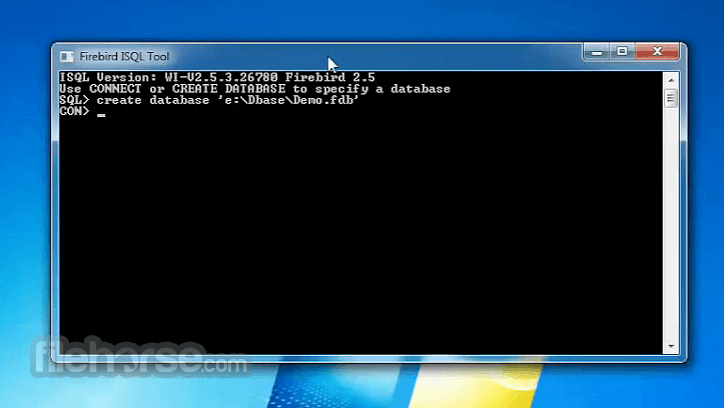
Firebird 5.0.4 (64-bit) Screenshots
The images below have been resized. Click on them to view the screenshots in full size.
-

-

What's new in this version:
New features:
- Add new setting AllowUpdateOverwrite that defines how UPDATE operation should handle the case when a record was updated by trigger
- Add API method Util::convert
Improved:
- Add limit for max value of -PARALLEL switch value when restoring a database
- Update Windows distributions with zlib version 1.3.2
- Context variables clear/re-initialization support
- 'invalid request BLR' puts actual error (and procedure where it happened) at the end where it is truncated by ISC API
- Ensure sequences are replicated even if changed in de-facto read-only transactions
- Early diagnostics for the improperly re-initialized replica
- Allow isc_tpb_read_consistency to imply read committed
- Increase Android page size to 16KB
- Get the modification time of a config file with a higher precision to fix cases when it's not reloaded after modification/replacement
 OperaOpera 130.0 Build 5847.41 (64-bit)
 Kling AIKling AI - Text or Image to Video
 PhotoshopAdobe Photoshop CC 2026 27.5 (64-bit)
 BlueStacks AIBlueStacks AI
 OKXOKX - Buy Bitcoin or Ethereum
 CapCutCapCut 7.9.0
 PC RepairPC Repair Tool 2026
 Hero WarsHero Wars - Online Action Game
 TradingViewTradingView - Trusted by 100 Million Traders
 AdGuard VPNAdGuard VPN 2.9.0
Comments and User Reviews