




 Edraw AI
 BookFab
 PDFelement
 Adobe Acrobat
 WPS Office
 Genspark AI
-
Latest Version
GitMind 1.2.8 LATEST
-
Review by
-
Operating System
Windows 7 / Windows 8 / Windows 10 / Windows 11
-
User Rating
Click to vote -
Author / Product
-
Filename
GitMind.exe
GitMind is a free online AI mind mapping and brainstorming tool designed for concept mapping, project planning, and other creative tasks. 100+ Mind Map Examples for Free. Boost your productivity now!
Create and collaborate on mind maps online in real-time - TRY NOW!
Overview
GitMind for PC is a platform that prioritizes both form and function, continuously enhancing its input and output capabilities. It breaks free from conventional thinking, employing mind maps, flowcharts, organizational charts, UML diagrams, and swimlanes to cultivate a sense of order, fluidity, and elegance.
This innovative collaborative mind mapping software ushers in a new era, fostering brainstorming and collaborative idea generation. It effortlessly facilitates the exchange of ideas, nurturing the organic emergence of wisdom.
It has the unique ability to visualize an abundance of disparate knowledge points, inspirations, and ideas, enabling them to seamlessly interconnect and evolve through collaborative feedback. This free flow of creativity fosters ongoing growth in individual and organizational awareness, elevating the value of ideas.
With the app, you can capture inspiration, kindle creativity, and watch ideas flourish boundlessly. Your thoughts, visions, reflections, and insights can extend indefinitely, vividly manifesting on the canvas. It catalyzes complete idea connectivity, co-creation, and the accumulation and refinement of valuable concepts, empowering all to build their own expansive realm of ideas.
GitMind isn't just a tool; it's a comprehensive solution that embraces planning, management, decision-making, and the cultivation and enhancement of ideas. Its structured approach allows knowledge to flourish vertically, allowing insights and wisdom to naturally emerge, effectively serving as your second brain.

Save and Sync across your devices
It provides secure cloud storage to save and protect your files. Every change can be saved and synchronized across all of your devices automatically.
Free Editable Templates
With GitMind’s template gallery and stylish themes, you can easily create mind maps, logic charts, org charts, fishbone charts, flowcharts, UML diagrams, and more.
Share and collaborate on ideas
The app facilitates you to process files in batches and switch between outliner and mind mapping. You can easily export mind maps to PDF, TXT, SVG, and other useful formats. Real-time collaboration online makes mind mapping in a team easier.
How can GitMind AI help you?
AI Mind Map
Enter a topic and use AI to quickly generate a complete professional mind map.
Chat with AI
Chat with GitMind AI while creating mind maps for efficient access to information and streamlined mapping.
File Analysis
Upload a complex document for swift AI analysis and content extraction, generating a summarized mind map.
Premium Themes
Unlock exclusive premium themes for instant personalization, enhancing your mind maps.
Backgrounds
Various styles of premium backgrounds, one-click switching, making your mind maps simple and attractive.

Pricing
Free
Everything in Basic, plus:
Everything in Pro, plus:
Everything in Ultra, plus:
Can I continue to use the free version after creating 10 files?
After creating 10 files, upgrading your plan will be suggested when saving or creating new files. Nevertheless, opting not to upgrade will still allow access to previously created content.
Will the VIP plan renew automatically when it expires?
Monthly and annual subscription plans will automatically renew when the membership period expires, and you can cancel at any time during the subscription period.
Alternatives
EdrawMind - A feature-rich mind-mapping solution with a wide range of templates, outline modes, and advanced export options. It supports collaboration, offers a clean interface, and includes AI-powered brainstorming features.
XMind - A powerful mind-mapping and brainstorming app featuring elegant templates, logic charts, and diverse diagram styles. It works across all major platforms and is suitable for both personal and professional use.
Miro Mind Map - A versatile online whiteboard that supports mind maps, flowcharts, sticky notes, and team collaboration. It’s ideal for remote work, workshops, and creative sessions with multiple participants.
PROS
Create and collaborate on mind maps online in real-time - TRY NOW!
Overview
GitMind for PC is a platform that prioritizes both form and function, continuously enhancing its input and output capabilities. It breaks free from conventional thinking, employing mind maps, flowcharts, organizational charts, UML diagrams, and swimlanes to cultivate a sense of order, fluidity, and elegance.
This innovative collaborative mind mapping software ushers in a new era, fostering brainstorming and collaborative idea generation. It effortlessly facilitates the exchange of ideas, nurturing the organic emergence of wisdom.
It has the unique ability to visualize an abundance of disparate knowledge points, inspirations, and ideas, enabling them to seamlessly interconnect and evolve through collaborative feedback. This free flow of creativity fosters ongoing growth in individual and organizational awareness, elevating the value of ideas.
With the app, you can capture inspiration, kindle creativity, and watch ideas flourish boundlessly. Your thoughts, visions, reflections, and insights can extend indefinitely, vividly manifesting on the canvas. It catalyzes complete idea connectivity, co-creation, and the accumulation and refinement of valuable concepts, empowering all to build their own expansive realm of ideas.
GitMind isn't just a tool; it's a comprehensive solution that embraces planning, management, decision-making, and the cultivation and enhancement of ideas. Its structured approach allows knowledge to flourish vertically, allowing insights and wisdom to naturally emerge, effectively serving as your second brain.
Save and Sync across your devices
It provides secure cloud storage to save and protect your files. Every change can be saved and synchronized across all of your devices automatically.
Free Editable Templates
With GitMind’s template gallery and stylish themes, you can easily create mind maps, logic charts, org charts, fishbone charts, flowcharts, UML diagrams, and more.
Share and collaborate on ideas
The app facilitates you to process files in batches and switch between outliner and mind mapping. You can easily export mind maps to PDF, TXT, SVG, and other useful formats. Real-time collaboration online makes mind mapping in a team easier.
How can GitMind AI help you?
- Product Plan
- Essay Writing Process
- Frontend Master
- Performance Review
- Marketing Strategy
- Weight-loss Tips
- General Process
- Product Production Process
- Financial Audit Process
- Funding Scheme Process
- Production management
- Order processing system
- Class Diagram
- Swimlane
- SIPOC Analysis
- Business analysis
- Six Thinking Hats
- Timeline
- Enterprise operation
- Five-step analysis
AI Mind Map
Enter a topic and use AI to quickly generate a complete professional mind map.
Chat with AI
Chat with GitMind AI while creating mind maps for efficient access to information and streamlined mapping.
File Analysis
Upload a complex document for swift AI analysis and content extraction, generating a summarized mind map.
Premium Themes
Unlock exclusive premium themes for instant personalization, enhancing your mind maps.
Backgrounds
Various styles of premium backgrounds, one-click switching, making your mind maps simple and attractive.
Pricing
Free
- 20MB AI file summary
- 10 Files
- 30 Images per mind map
- 10 Images inserted in the Whiteboard
- 500MB Cloud storage
- Standard export
- 7 days Trash and Version history
- 5 Planet members
- Cross-platform sync
- Team collaboration
- Focus mode
- Slide show mode
- Unlimited files
- HD export
- Insert 500 images per map
- Cloud storage 10 GB
- Create 5 planets
- 30 members/planet
- Add watermark
- Interlinks between maps
- Premium themes&illustrations
Everything in Basic, plus:
- 2000 credits/month
- File summary 30MB
- Summarize long text
- Summarize audio
- Summarize YouTube
- Summarize webpage
- Summarize image
- Chat with AI
- Generate image
Everything in Pro, plus:
- 5000 credits/month
- File summary 50MB
- Insert 800 images per map
- Image uploads 30MB
- Cloud storage 50 GB
- Create 10 planets
- 100 members/planet
Everything in Ultra, plus:
- Share the plan and credits with the team
- 50000 credits/month
- Track team credit usage
- Add, remove & manage members
- Dedicated technical support
- Flexible team sizing
Can I continue to use the free version after creating 10 files?
After creating 10 files, upgrading your plan will be suggested when saving or creating new files. Nevertheless, opting not to upgrade will still allow access to previously created content.
Will the VIP plan renew automatically when it expires?
Monthly and annual subscription plans will automatically renew when the membership period expires, and you can cancel at any time during the subscription period.
Alternatives
EdrawMind - A feature-rich mind-mapping solution with a wide range of templates, outline modes, and advanced export options. It supports collaboration, offers a clean interface, and includes AI-powered brainstorming features.
XMind - A powerful mind-mapping and brainstorming app featuring elegant templates, logic charts, and diverse diagram styles. It works across all major platforms and is suitable for both personal and professional use.
Miro Mind Map - A versatile online whiteboard that supports mind maps, flowcharts, sticky notes, and team collaboration. It’s ideal for remote work, workshops, and creative sessions with multiple participants.
PROS
- Free online mind mapping and brainstorming tool.
- Supports various diagram types for creativity.
- Promotes collaborative idea generation.
- Facilitates the exchange and evolution of ideas.
- Offers secure cloud storage and synchronization.
- Provides free editable templates and stylish themes.
- Enables real-time collaboration in teams.
- Supports importing XMind and GitMind projects.
- Limited features in the free version.
- The monthly plan has a subscription fee.
- Requires an internet connection for real-time collaboration.
Why is this app published on FileHorse? (More info)
-
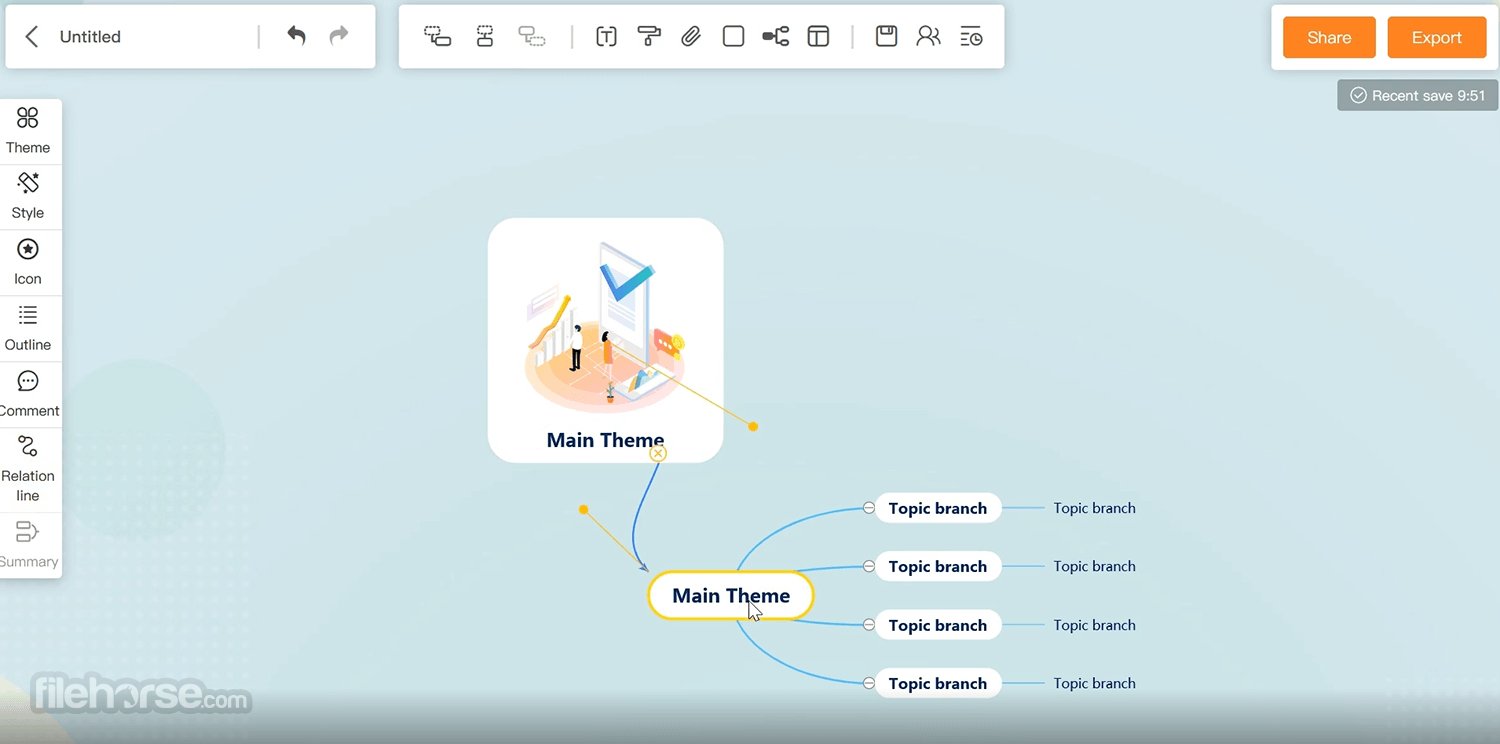
GitMind 1.2.8 Screenshots
The images below have been resized. Click on them to view the screenshots in full size.
-
-
 OperaOpera 129.0 Build 5823.28 (64-bit)
 Kling AIKling AI - Text or Image to Video
 PhotoshopAdobe Photoshop CC 2026 27.4 (64-bit)
 BlueStacksBlueStacks 10.42.167.1001
 OKXOKX - Buy Bitcoin or Ethereum
 CapCutCapCut 7.9.0
 PC RepairPC Repair Tool 2026
 Hero WarsHero Wars - Online Action Game
 TradingViewTradingView - Trusted by 100 Million Traders
 AdGuard VPNAdGuard VPN 2.9.0
Comments and User Reviews