




 10Web
10Web Instapage
 Antigravity
 Dreamweaver
 Portfolio
 SQL Server
 dbForge Studio
 Access
-
Latest Version
Godot Engine 4.6.2 (64-bit) LATEST
-
Review by
-
Operating System
Windows 7 64 / Windows 8 64 / Windows 10 64 / Windows 11
-
User Rating
Click to vote -
Author / Product
-
Filename
Godot_v4.6.2-stable_win64.exe.zip
Godot Engine 64bit is completely free and open-source under the very permissive MIT license. No strings attached, no royalties, nothing. Your game is yours, down to the last line of engine code.
Features and Highlights
An extremely efficient paradigm for designing games
- Visual editor, full of mature tools.
- Uncluttered UI, with context-sensitive editors.
- Amazing scene system, supporting instancing and inheritance.
- Friendly content creation interfaces for artists, level designers, animators, …
- Visual shader editing for 2D and 3D.
- Persistent live editing (changes are not lost after stopping the game). Live editing on mobile devices!
- Fully dedicated 2D engine, no hacks.
- Work in pixels as your units, but scale to any screen size and ratio.
- Custom 2D physics engine that works in pixel coordinates.
- Flexible kinematic controller for collision without physics.
- Blit 3D models as sprites into 2D.
- Import 3D models from 3DS Max, Maya, Blender, and more with full animation.
- Skeleton deforms and blend shapes.
- Several light types, with shadow mapping.
- Render with HDR, anti-aliasing, and linear color modes.
- Post-process fog, glow, bloom, color adjustment, …
- Support for Physically-Based Rendering planned for the end of 2016.
- Animate 2D or 3D. Visual animation editor with the timeline.
- Frame-based or cut-out animation for sprites and rigs.
- Any property of any object can be animated, even function calls.
- Use custom transition curves and tweens.
- Helpers to animate 2D rigs, with skeletons and IK.
- Efficient optimizer to pack imported 3D animations.
- Animation Tree support for fluid character animation.
- A python-like scripting language, designed to make games with zero hassle.
- Built-in editor with syntax highlighting, real-time parser, and code completion.
- Powerful integrated debugger and profilers. It can debug a game running on mobile devices.
- Integrated class documentation browser.
- Friendly C++ API to optimize parts of the game or extend any part of the engine.
- Mobile platforms: iOS, Android, BlackBerry OS
- Desktop platforms: Windows, macOS, Linux, BSD, Haiku
- Web Platforms: HTML5 (via Emscripten)
- One-click deploy & export to most platforms. Easy to create custom builds too.
- Recommended: Vulkan 1.0 compatible hardware
- Minimal: OpenGL 3.3 / OpenGL ES 3.0 compatible hardware
Alternatives
Unreal Engine - High-fidelity graphics, real-time 3D creation.
Unity - Powerful 3D and 2D gaming development software for Windows.
CryEngine - Advanced graphics and real-time rendering tools.
GameMaker Studio - Simple 2D development with drag-and-drop system.
Cocos Creator - Open-source framework focused on mobile games.
Construct 3 - Beginner-friendly drag-and-drop 2D game engine.
RPG Maker: Tailored for creating role-playing games, this software provides specialized tools and a simple interface for RPG development.
PROS
- Open-Source and Free
- Node-Based Architecture
- Cross-Platform Export
- Lightweight and Fast
- Active Community Support
- Limited 3D Features
- Smaller Asset Marketplace
- GDScript Learning Curve
- Less Industry Adoption
- Lacks Native Support for VR
-
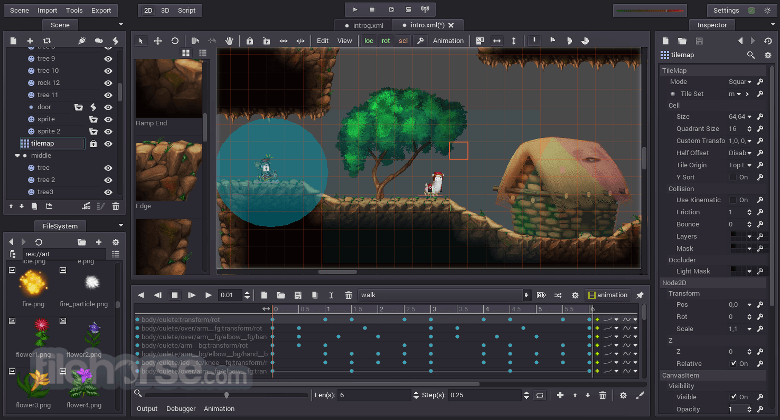
Godot Engine 4.6.2 (64-bit) Screenshots
The images below have been resized. Click on them to view the screenshots in full size.
-

-

What's new in this version:
Changed:
- 3D: Fix 3D focus selection for subgizmos
- 3D: Fix DirectionalLight3D property list
- Animation: Check playback_queue existance after emit animation_finished signal
- Animation: Deselect bezier keyframes when switching animations
- Animation: Fix timeline cursor following mouse during marker selection
- Animation: Fix visual shift of animation editor keys during selection
- Core: Fix String::split_ crash on empty string
- Core: Fix editable children state when duplicating instantiated nodes
- Core: RingBuffer: Fix T read() method reading empty buffer
- Core: RingBuffer: Fix overreading on methods that take an offset as an argument
- Editor: Fix build profile generator creating bogus profiles
- Editor: Fix mute button after pausing and stopping
- Editor: Fix theme item inspector tooltips for Window subclasses
- Editor: Set accessibility name on Tree inline cell editor when editing
- Editor: Stop autocomplete from eating words by default
- Export: Android Editor: Copy keystore to temp file during export
- GDExtension: Add missing GDVIRTUAL_BIND(_get_supported_extensions) on MovieWriter
- GUI: Fix “Custom” anchor preset being ignored if the parent isn’t a Control
- GUI: Fix RichTextLabel drag selection not working after double-click
- GUI: TextEdit: Fix clipping of last character due to right margin rounding
- GUI: TextServer: Ignore language of embedded object replacement spans when updating line breaks
- Import: Blender attempts should be incremented to avoid endless loop
- Physics: Jolt Physics: Make MoveKinematic more accurate when rotating a body by a very small angle
- Physics: Jolt Physics: Rework how gravity is applied to dynamic bodies to prevent energy increase on elastic collisions
- Physics: Jolt Physics: Swapping vertices of triangle if it is scaled inside out
- Platforms: Android: Fix FileAccess crash when using treeUri in Gradle-built apps
- Platforms: Fix macOS Steam time tracking lost when opening a project
- Platforms: iOS: Add UIScene lifecycle events
- Platforms: iOS: Propagate VC UI preferences to SwiftUI hosting controller
- Platforms: macOS: Enable wake for events if Magnet is running
- Platforms: Wayland: Improve mapping robustness and synchronization
- Platforms: Windows: Set current driver when ANGLE init fails
- Rendering: Apply fixed size properly for mono/stereo rendering
- Rendering: Fix accidental write-combined memory reads in canvas renderer
- Rendering: Fix Tangent decoding detection when computing vertex skinning
- Rendering: Fix viewport debanding not working with spatial scalers
- Rendering: macOS: Force ANGLE (GL over Metal) when running in VM
 OperaOpera 129.0 Build 5823.28 (64-bit)
 Kling AIKling AI - Text or Image to Video
 PhotoshopAdobe Photoshop CC 2026 27.4 (64-bit)
 BlueStacksBlueStacks 10.42.167.1001
 OKXOKX - Buy Bitcoin or Ethereum
 CapCutCapCut 7.9.0
 PC RepairPC Repair Tool 2026
 Hero WarsHero Wars - Online Action Game
 TradingViewTradingView - Trusted by 100 Million Traders
 AdGuard VPNAdGuard VPN 2.9.0
Comments and User Reviews