




 OnSpace AI
 SQL Server
 Windsurf
 Cursor
 Antigravity
 Replit
 Lovable
 10Web
10Web
-
Latest Version
Gradle 9.6.1 LATEST
-
Review by
-
Operating System
Windows 7 / Windows 8 / Windows 10 / Windows 11
-
User Rating
Click to vote -
Author / Product
-
Filename
gradle-9.6.1-all.zip
Gradle is an advanced build automation tool designed for multi-language software development.
It is particularly popular in the Java ecosystem and is widely used for building, testing, and deploying applications.
Unlike traditional build tools such as Apache Ant and Maven, Gradle for Windows offers a more flexible and high-performance approach, utilizing a directed acyclic graph (DAG) to optimize build efficiency.
Gradle is written in Groovy and Kotlin, offering developers a powerful scripting language to configure and manage their build processes.
It integrates seamlessly with other tools such as Android Studio, IntelliJ IDEA, and Eclipse, making it a preferred choice for Android and Java developers.
Key Features
Incremental Builds – It optimizes tasks by only executing necessary updates, improving build performance.
Multi-Project Builds – It efficiently handles complex multi-module projects with dependency management.
Kotlin DSL Support – Offers scripting with Kotlin, providing better readability and IDE support.
Dependency Management – Supports Maven, Ivy, and custom repositories for managing project dependencies.
Custom Build Logic – Allows developers to define custom tasks and workflows in Groovy or Kotlin.
Task Parallelization – Runs independent tasks in parallel to speed up the build process.
Continuous Build Feature – Detects changes in source files and automatically triggers a new build.
Extensibility – Highly customizable with plugins and third-party integrations.
Command Line Interface (CLI) – Offers powerful CLI commands for managing builds.
Integration with CI/CD Tools – Works well with Jenkins, GitHub Actions, and other automation tools.
User Interface
Gradle does not have a traditional graphical user interface (GUI); it operates mainly via the command line and integrates with various IDEs. The build scripts are written in text-based formats (Groovy or Kotlin), making it accessible for developers familiar with scripting languages.
For those using Gradle with an IDE such as Android Studio, IntelliJ IDEA, or Eclipse, it provides a more visual way to manage dependencies, tasks, and configurations through built-in UI components in the IDE.
FAQ
Can I use Gradle with Maven dependencies?
Yes, it supports Maven and Ivy repositories, allowing you to import dependencies from pom.xml files.
How does Gradle improve build performance?
It uses incremental builds, caching, and parallel execution to reduce build times.
Is Gradle only for Java projects?
No, it supports various languages, including Kotlin, Groovy, Scala, C++, and JavaScript.
How do I debug a Gradle build issue?
Use the --stacktrace or --debug flag in the CLI to get detailed error logs.
Can Gradle be used in CI/CD pipelines?
Yes, it integrates with Jenkins, GitHub Actions, GitLab CI, and other automation tools.
Alternatives
This program is open-source and FREE to use under the Apache License 2.0. However, Gradle Enterprise, a paid version, offers enhanced build analytics and acceleration for large teams.
System Requirements
Gradle is a powerful and flexible build automation tool, especially suited for Java and Android development. Its performance optimizations, extensive customization, and robust dependency management make it a preferred choice over traditional build tools like Maven and Ant. However, its steep learning curve and complexity may pose challenges for beginners.
For developers working with large-scale projects requiring efficiency, automation, and scalability, Gradle is an excellent option. Whether you're a beginner or an advanced user, investing time in mastering Gradle can significantly improve your build and deployment workflows.
It is particularly popular in the Java ecosystem and is widely used for building, testing, and deploying applications.
Unlike traditional build tools such as Apache Ant and Maven, Gradle for Windows offers a more flexible and high-performance approach, utilizing a directed acyclic graph (DAG) to optimize build efficiency.
Gradle is written in Groovy and Kotlin, offering developers a powerful scripting language to configure and manage their build processes.
It integrates seamlessly with other tools such as Android Studio, IntelliJ IDEA, and Eclipse, making it a preferred choice for Android and Java developers.
Key Features
Incremental Builds – It optimizes tasks by only executing necessary updates, improving build performance.
Multi-Project Builds – It efficiently handles complex multi-module projects with dependency management.
Kotlin DSL Support – Offers scripting with Kotlin, providing better readability and IDE support.
Dependency Management – Supports Maven, Ivy, and custom repositories for managing project dependencies.
Custom Build Logic – Allows developers to define custom tasks and workflows in Groovy or Kotlin.
Task Parallelization – Runs independent tasks in parallel to speed up the build process.
Continuous Build Feature – Detects changes in source files and automatically triggers a new build.
Extensibility – Highly customizable with plugins and third-party integrations.
Command Line Interface (CLI) – Offers powerful CLI commands for managing builds.
Integration with CI/CD Tools – Works well with Jenkins, GitHub Actions, and other automation tools.
User Interface
Gradle does not have a traditional graphical user interface (GUI); it operates mainly via the command line and integrates with various IDEs. The build scripts are written in text-based formats (Groovy or Kotlin), making it accessible for developers familiar with scripting languages.
For those using Gradle with an IDE such as Android Studio, IntelliJ IDEA, or Eclipse, it provides a more visual way to manage dependencies, tasks, and configurations through built-in UI components in the IDE.
FAQ
Can I use Gradle with Maven dependencies?
Yes, it supports Maven and Ivy repositories, allowing you to import dependencies from pom.xml files.
How does Gradle improve build performance?
It uses incremental builds, caching, and parallel execution to reduce build times.
Is Gradle only for Java projects?
No, it supports various languages, including Kotlin, Groovy, Scala, C++, and JavaScript.
How do I debug a Gradle build issue?
Use the --stacktrace or --debug flag in the CLI to get detailed error logs.
Can Gradle be used in CI/CD pipelines?
Yes, it integrates with Jenkins, GitHub Actions, GitLab CI, and other automation tools.
Alternatives
- Maven – XML-based build tool with a convention-over-configuration approach.
- Ant – Flexible but lacks dependency management features.
- Bazel – Google's build tool with high scalability and performance.
- Make – Traditional Unix-based build tool with limited flexibility.
- Buck – Facebook’s open-source build system optimized for large projects.
This program is open-source and FREE to use under the Apache License 2.0. However, Gradle Enterprise, a paid version, offers enhanced build analytics and acceleration for large teams.
System Requirements
- OS: Windows 7, 8, 10, 11 (32/64bit)
- JDK: Java 8 or higher
- Memory: 4GB RAM (8GB recommended)
- Storage: 500MB free disk space
- Additional: IDE support (IntelliJ IDEA, Eclipse, or Android Studio recommended)
- High performance with incremental builds and caching
- Supports multi-language development
- Flexible and highly customizable
- Strong dependency management
- Seamless integration with CI/CD pipelines and IDEs
- Higher learning curve compared to Maven
- No official GUI, mostly command-line-based
- Requires manual setup for Windows installation
- Gradle scripts can become complex for large projects
- Not as widely adopted as Maven in some enterprise environments
Gradle is a powerful and flexible build automation tool, especially suited for Java and Android development. Its performance optimizations, extensive customization, and robust dependency management make it a preferred choice over traditional build tools like Maven and Ant. However, its steep learning curve and complexity may pose challenges for beginners.
For developers working with large-scale projects requiring efficiency, automation, and scalability, Gradle is an excellent option. Whether you're a beginner or an advanced user, investing time in mastering Gradle can significantly improve your build and deployment workflows.
Why is this app published on FileHorse? (More info)
-
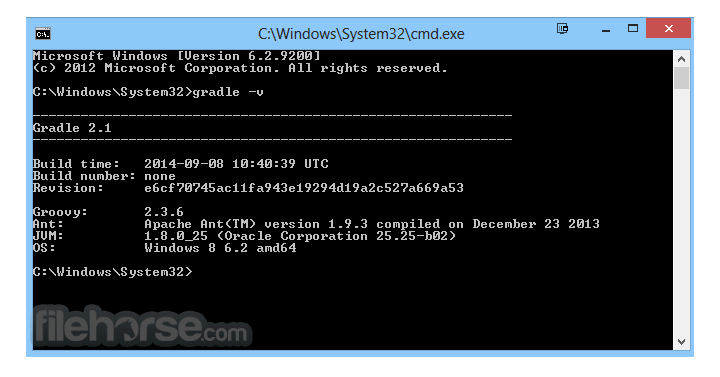
Gradle 9.6.1 Screenshots
The images below have been resized. Click on them to view the screenshots in full size.
What's new in this version:
- Improved Configuration Cache hit rates
- Additional CLI rendering options
- Important project hierarchy lookup deprecations
 OperaOpera 134.0 Build 5954.46 (64-bit)
 BlueStacksBlueStacks 10.42.251.1003
 PhotoshopAdobe Photoshop CC 2026 27.9.1 (64-bit)
 LDPlayerLDPlayer - Android Emulator
 GTA 6GTA 6 for PS5
 CapCutCapCut Desktop 9.1.0
 PC RepairPC Repair Tool 2026
 Hero WarsHero Wars - Online Action Game
 TradingViewTradingView - Trusted by 100 Million Traders
 Halo: CampaignHalo: Campaign Evolved
Comments and User Reviews