



 Go-Go Town!
 WoT: HEAT
 MECCHA
 007 Game
 World of Tanks
-
Latest Version
Minecraft Beta LATEST
-
Review by
-
Operating System
Windows 7 / Windows 7 64 / Windows 8 / Windows 8 64 / Windows 10 / Windows 10 64
-
User Rating
Click to vote -
Author / Product
-
Filename
MinecraftInstaller-beta.msi
Minecraft Beta is a brand-new launcher for starting the original PC version of the legendary video game Minecraft: Java Edition, which has managed to find hundreds of millions of fans from all around the world.
This new version of the game was built to facilitate the future expansion of Minecraft-related content on Desktop, with a new launcher having the capability to streamline player access to the base Minecraft game and future games in the Minecraft universe, such as the celebrated single-player adventures Minecraft: Dungeons and Minecraft: Story Mode.
So, Minecraft Beta does not signify some early or incomplete version of the game, but it instead represents a new front-end for a proven megahit Minecraft: Java Edition, that all of its players know and love.
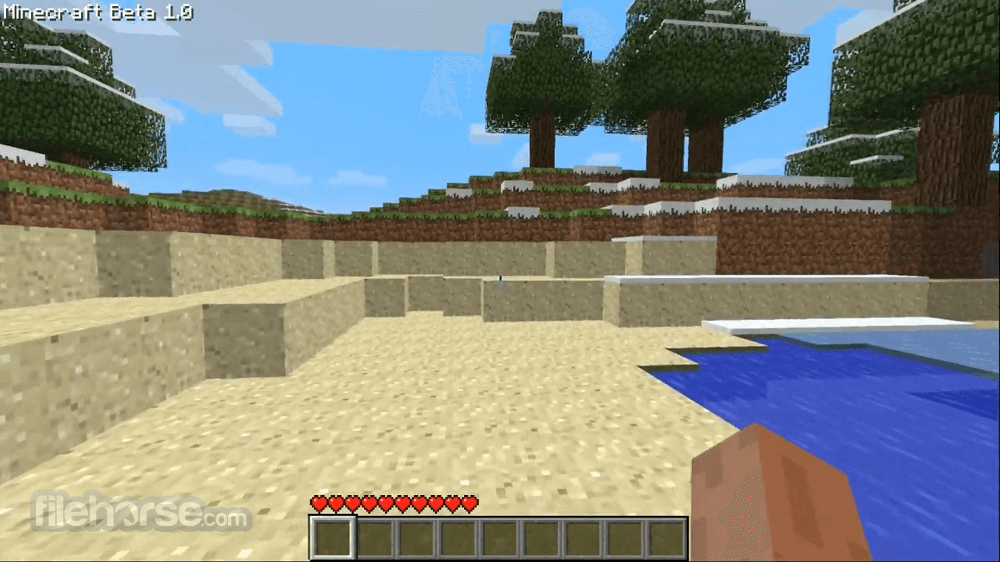
Minecraft is a sandbox video game with a first-person perspective that allows players of all ages to explore a procedurally-generated 3D world, fight opponents, mine materials, craft items, and use their imaginations to build new structures (from small objects to large and intricate cities) both alone and with the help of friends in online servers.
The visual style of the game has adopted a crude but eye-catching theme of large blocks, which are used to make the entire environment, from the highest mountain peaks to the deepest underground caves.
Players are tasked to explore this environment, use their pickaxes to chip away blocks, find resources everywhere around them, and use the gathered materials to craft new items that can help them create a perfect home, farm, city, or anything else they imagine. Since some game modes have global quests, players can also try to “finish” this sandbox game by visiting several realms, finding magical items, and defeating the final dragon boss battle.

The game features multiple game modes that promote different types of gameplay styles, with “survival mode” being one of the most popular. Gamers also have a large set of tools for changing the game, not only with mods that tweak built-in gameplay systems but also introduce brand new items, gameplay mechanics, assets, and rendering procedures.
Since it rarely requires fast-paced gameplay and instead focuses on open-ended gameplay, freeform exploration, and finding fun in cooperative tasks, Minecraft is a game for all ages. And its latest version,n found in Minecraft Beta for Windows PC, introduces a new launcher that allows easier Minecraft Universe content discovery.
Information on Minecraft Preview and Beta

What’s New

FAQs
What is the Minecraft Launcher Beta, and what’s different from the regular launcher?
The Minecraft Launcher Beta is a testing version of the standard launcher that includes new features, improvements, and fixes before they are released publicly. According to the official article, it allows users to try upcoming changes early, but it may be less stable than the regular version since features are still being tested.
Is the Minecraft Launcher Beta safe to use?
Yes, the beta launcher is officially provided by Mojang Studios and Microsoft, so it is safe to install. However, since it is a beta version, users may encounter bugs, crashes, or incomplete features, which are expected during testing phases.
How can I join or switch to the Minecraft Launcher Beta?
You can access the beta by opting into the preview version through official channels (such as the Microsoft Store or launcher settings, depending on your platform). The official guide explains that users can install or switch versions to test new features, and they can also revert to the stable launcher if needed.
PROS
This new version of the game was built to facilitate the future expansion of Minecraft-related content on Desktop, with a new launcher having the capability to streamline player access to the base Minecraft game and future games in the Minecraft universe, such as the celebrated single-player adventures Minecraft: Dungeons and Minecraft: Story Mode.
So, Minecraft Beta does not signify some early or incomplete version of the game, but it instead represents a new front-end for a proven megahit Minecraft: Java Edition, that all of its players know and love.
Minecraft is a sandbox video game with a first-person perspective that allows players of all ages to explore a procedurally-generated 3D world, fight opponents, mine materials, craft items, and use their imaginations to build new structures (from small objects to large and intricate cities) both alone and with the help of friends in online servers.
The visual style of the game has adopted a crude but eye-catching theme of large blocks, which are used to make the entire environment, from the highest mountain peaks to the deepest underground caves.
Players are tasked to explore this environment, use their pickaxes to chip away blocks, find resources everywhere around them, and use the gathered materials to craft new items that can help them create a perfect home, farm, city, or anything else they imagine. Since some game modes have global quests, players can also try to “finish” this sandbox game by visiting several realms, finding magical items, and defeating the final dragon boss battle.
The game features multiple game modes that promote different types of gameplay styles, with “survival mode” being one of the most popular. Gamers also have a large set of tools for changing the game, not only with mods that tweak built-in gameplay systems but also introduce brand new items, gameplay mechanics, assets, and rendering procedures.
Since it rarely requires fast-paced gameplay and instead focuses on open-ended gameplay, freeform exploration, and finding fun in cooperative tasks, Minecraft is a game for all ages. And its latest version,n found in Minecraft Beta for Windows PC, introduces a new launcher that allows easier Minecraft Universe content discovery.
Information on Minecraft Preview and Beta
- These work-in-progress versions can be unstable and may not be representative of the final version quality
- Minecraft Preview is available on Xbox, PlayStation 4, Windows 10/11, and iOS devices. More information can be found at aka.ms/PreviewFAQ
- The beta is available on Android (Google Play). To join or leave the beta, see aka.ms/JoinMCBeta for detailed instructions
What’s New
- New Chaos Cubed Features: Introduced geysers for vertical movement and environmental gameplay, plus expanded sulfur-based mechanics
- Sulfur Cube Upgrade: New interaction allowing Sulfur Cubes to absorb and detonate TNT, adding chaotic combat possibilities
- World Generation Improvements: Enhanced sulfur caves, springs, and canyon generation for more dynamic environments
- Accessibility Update: Added panorama scroll speed control for customizable menu experience
- Gameplay Fixes: Resolved multiple issues with mobs, liquids, bees, and loot behavior
- Graphics & Performance: Improved ray tracing visuals, fixed rendering issues, and reduced unnecessary disk activity
- UI & Controls Improvements: Better crafting previews, text editing controls, and interface responsiveness
- Stability Enhancements: Fixed crashes, infinite loading issues, and improved overall performance
FAQs
What is the Minecraft Launcher Beta, and what’s different from the regular launcher?
The Minecraft Launcher Beta is a testing version of the standard launcher that includes new features, improvements, and fixes before they are released publicly. According to the official article, it allows users to try upcoming changes early, but it may be less stable than the regular version since features are still being tested.
Is the Minecraft Launcher Beta safe to use?
Yes, the beta launcher is officially provided by Mojang Studios and Microsoft, so it is safe to install. However, since it is a beta version, users may encounter bugs, crashes, or incomplete features, which are expected during testing phases.
How can I join or switch to the Minecraft Launcher Beta?
You can access the beta by opting into the preview version through official channels (such as the Microsoft Store or launcher settings, depending on your platform). The official guide explains that users can install or switch versions to test new features, and they can also revert to the stable launcher if needed.
PROS
- Streamlined access to Minecraft Universe.
- Open-ended gameplay for all ages.
- Diverse game modes & mod support.
- New launcher for easier content discovery.
- Experimental features may be unstable.
- Potential performance issues.
- Requires LAN for offline multiplayer.
- Limited compatibility for Preview & Beta versions.
Why is this app published on FileHorse? (More info)
-
Minecraft Beta Screenshots
The images below have been resized. Click on them to view the screenshots in full size.
-
-

-
-
 OperaOpera 134.0 Build 5954.56 (64-bit)
 BlueStacksBlueStacks 10.42.255.1002
 PhotoshopAdobe Photoshop CC 2026 27.9.1 (64-bit)
 LDPlayerLDPlayer - Android Emulator
 GTA 6GTA 6 for PS5
 CapCutCapCut Desktop 9.1.0
 PC RepairPC Repair Tool 2026
 Hero WarsHero Wars - Online Action Game
 TradingViewTradingView - Trusted by 100 Million Traders
 Halo: CampaignHalo: Campaign Evolved
Comments and User Reviews