




 Wispr Flow
 BookFab
 Accio Work
 Transkriptor
 PDFelement
 Day One
 Adobe Acrobat
 Genspark AI
-
Latest Version
PDFsam Basic 6.0.4 LATEST
-
Review by
-
Operating System
Windows 7 64 / Windows 8 64 / Windows 10 64 / Windows 11
-
User Rating
Click to vote -
Author / Product
-
Filename
pdfsam-basic-6.0.4-windows-x64.msi
PDFsam Basic is a free, open-source, multi-platform software designed to split, merge, extract pages, mix and rotate PDF files, PDFsam Basic will cover most of your PDF related needs.
Download and install PDFsam Basic for your Windows system, it's free and open-source! Amazing Split or merge PDF software!
Features and Highlights
Merge PDF
PDF merge probably is the most used PDFsam module and lets you combine PDF files together.
PDF Split
The Split module lets you split PDF files at predefined or specified page numbers.
Mix PDF
The PDF mix module lets you merge two PDF files taking pages alternately in straight or reverse order. The perfect solution if you have two documents containing even and odd pages respectively and you want to rebuild the original document.
Rotate PDF
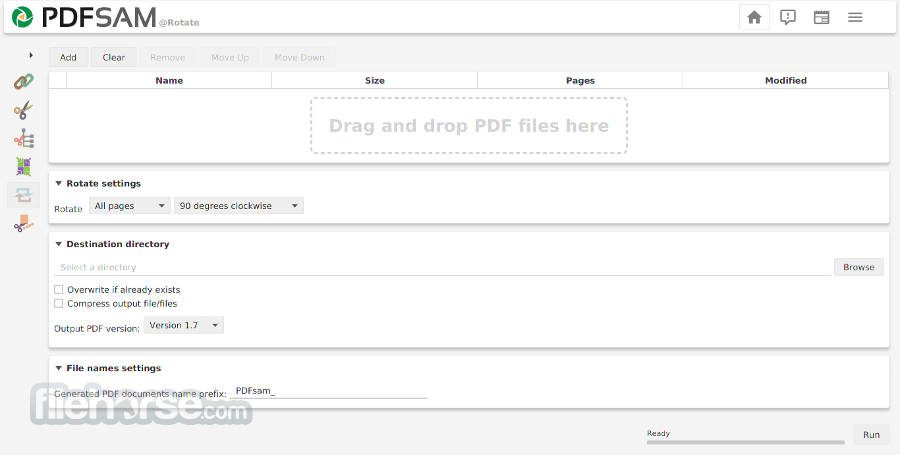
The Rotate module lets you rotate PDF files by simply selecting the PDF documents you want to rotate and apply a rotation of 90, 180, or 270 degrees to their pages.
Extract PDF pages
The Extract module lets you extract pages from a PDF file. Single pages or page ranges can be selected to create a new PDF file containing only the pages you need.
Alternatives
Adobe Acrobat Pro: A widely-used and feature-rich PDF editor that allows you to create, edit, convert, and annotate PDF files.
iTop PDF: Edit PDF with an easy and full-featured PDF editor on Windows PC. Simple, Powerful & Free PDF Editor!
PDF Candy: An online PDF editor that offers various tools for editing, converting, and merging PDF files.
pdfFiller: Change text, highlight or blackout content, add signatures in PDFs and more!
How to Use
OS: Windows 7, 8, 10, or 11
CPU: 1 GHz or faster processor
RAM: Minimum 256 MB (1 GB recommended)
Disk Space: At least 100 MB free space
Java: Java Runtime Environment 8 or higher
PROS
Download and install PDFsam Basic for your Windows system, it's free and open-source! Amazing Split or merge PDF software!
Features and Highlights
Merge PDF
PDF merge probably is the most used PDFsam module and lets you combine PDF files together.
PDF Split
The Split module lets you split PDF files at predefined or specified page numbers.
Mix PDF
The PDF mix module lets you merge two PDF files taking pages alternately in straight or reverse order. The perfect solution if you have two documents containing even and odd pages respectively and you want to rebuild the original document.
Rotate PDF
The Rotate module lets you rotate PDF files by simply selecting the PDF documents you want to rotate and apply a rotation of 90, 180, or 270 degrees to their pages.
Extract PDF pages
The Extract module lets you extract pages from a PDF file. Single pages or page ranges can be selected to create a new PDF file containing only the pages you need.
Alternatives
Adobe Acrobat Pro: A widely-used and feature-rich PDF editor that allows you to create, edit, convert, and annotate PDF files.
iTop PDF: Edit PDF with an easy and full-featured PDF editor on Windows PC. Simple, Powerful & Free PDF Editor!
PDF Candy: An online PDF editor that offers various tools for editing, converting, and merging PDF files.
pdfFiller: Change text, highlight or blackout content, add signatures in PDFs and more!
How to Use
- Install the software by running the setup file
- Launch the program from the desktop or start menu
- Select a PDF task like Merge, Split, or Rotate
- Add PDF files using drag-and-drop or file browser
- Configure settings based on your desired output
- Click "Run" to process the PDF task
- Save the output file to your chosen location
OS: Windows 7, 8, 10, or 11
CPU: 1 GHz or faster processor
RAM: Minimum 256 MB (1 GB recommended)
Disk Space: At least 100 MB free space
Java: Java Runtime Environment 8 or higher
PROS
- Free and open source software
- Simple and user-friendly interface
- Supports batch processing
- No internet required to use
- Regular software updates
- Limited to basic PDF functions
- Requires Java to run
- No OCR or text editing tools
- Slower with large PDF files
- Dated interface design
Why is this app published on FileHorse? (More info)
-
PDFsam Basic 6.0.4 Screenshots
The images below have been resized. Click on them to view the screenshots in full size.

-

-

-
What's new in this version:
- Fixed where the application was trying to load an empty workspace file path at startup
 OperaOpera 133.0 Build 5932.60 (64-bit)
 BlueStacksBlueStacks 10.42.251.1002
 PhotoshopAdobe Photoshop CC 2026 27.7 (64-bit)
 WPS OfficeWPS Office Free 12.2.0.23196
 GTA 6GTA 6 for PS5
 CapCutCapCut Desktop 9.1.0
 PC RepairPC Repair Tool 2026
 Hero WarsHero Wars - Online Action Game
 TradingViewTradingView - Trusted by 100 Million Traders
 Halo: CampaignHalo: Campaign Evolved
Comments and User Reviews