




 BookFab
 Transkriptor
 Day One
 Adobe Acrobat
 Genspark AI
 Wispr Flow
 PDFelement
 Accio Work
-
Latest Version
PVsyst 8.0.18 LATEST
-
Review by
-
Operating System
Windows 7 / Windows 8 / Windows 10 / Windows 11
-
User Rating
Click to vote -
Author / Product
-
Filename
PVsyst-8.0.18.47080-setup.exe
Designed from the ground up to be a valuable tool for engineers, researchers, educators, and architects, it can quickly and reliably model the possible deployment formats for PV systems, create full reports, visual graphs, and detailed data tables that are ready for exporting and use in other software.
PVsyst is an all-in-one software package for the evaluation of PV systems. It provides built-in tools for evaluating the initial system designs (with a large database of pre-built components for easier setting of starting parameters and a full editor for tweaking each component to fit your needs), a system sizing tool for exploring optimal inverter sizing, and other parameters of your PV setup.
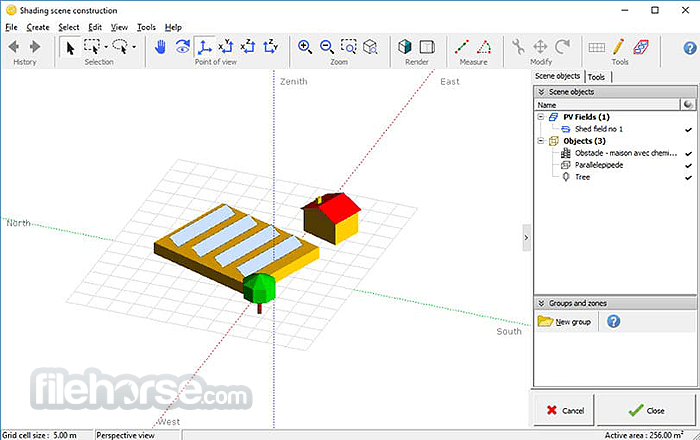
Interactive and highly customizable 3D Shading Scene tool that can simulate the effects of your setup, comprehensive simulation and reporting service, support for calculation of grid storage, direct integration with metronome service for placing and testing of your PC setup on any simulated location on Earth, a database of meteo data, other PV modules and components, multi-year batch simulation of aging effects, and many more tools and services.
Define
Perform rapid simulations by defining a wide range of parameters.
Design
Refine the definition of your system's losses and shading.
Simulate
Conduct an hourly simulation using all your input data.
Analyse
Generate a comprehensive final report including customisable graphs and deliverables.
This highly customized simulation tool is perfect for the simulation of PV systems of all sizes, from small personal projects to large PV platforms intended to provide reliable power delivery to a large number of customers.
It even features a 3D CAO tool for drawing the geometry of the entire PV system, automatic sun position and shading calculation for beam components, and much more.
PVsyst is available for purchase under several types of licenses (Pro30 and Premium, all with one year of official support, with the option to extend it). The entire app can also be tested for FREE in a 30-day trial.

Features and Highlights
- Comprehensive design tool for evaluating photovoltaic systems of all sizes.
- Compile a detailed evaluation of the effectiveness of your PV platform. Detailed computation of PV conversion effectiveness.
- Simulation of sun/shadow for your PV system, including placement on structures and precise location/orientation.
- Built-in support for location searching via Google Maps and Meteonorm interpolation.
- Direct shading simulation calculation takes into consideration the effects of nearby big plants.
- Tools for parameter optimization.
- Optimized for Windows 11/10. It can be used in Windows 8/8.1 via virtual machines.
- Available for FREE via a 30-day trial demo.
New Grid Storage Power-Shifting Strategy
- A new tariff-based power-shifting mode lets users store daytime PV production and discharge it during periods with better electricity prices.
- SolarEdge systems now support heterogeneous string configurations in subarrays.
- Updated optimizer efficiency modeling and improved power clipping handling for more accurate simulation results.
- New AndSolar optimizers added to the component database.
- Corrected grid injection behavior during battery charging/discharging.
- Revised battery operation calculations for more reliable grid-storage simulations.
- Updated NSRDB Physical Solar Model to v4, improving North American weather imports.
- Better validation and handling of Solargis CSV imports.
- API weather import issues resolved for more consistent data acquisition.
- Faster and more stable large-scene shading table calculations.
- Improved accuracy for thin-object shading and bifacial diffuse rear-side modeling.
- More consistent GCR/backtracking computations and better orientation handling.
- Mixed orientation subarrays are now properly constrained to avoid invalid setups.
- Overload losses and inverter sizing warnings now behave more consistently and realistically.
- Clearer and more reliable PV table and layout handling in imported DAE/H2P files.
- Cleaner diagrams: corrected legends, proper unit displays, and stable shading/SLD outputs.
- Power Factor explanations updated with clearer graphical guidance.
- Carbon balance printing and module PAN file display issues have been resolved.
- “Module degradation” terminology clarified and restricted to valid inputs.
- Installation costs now correctly include optimizer pricing.
- Frequent updates across the module, inverter, optimizer, and weather databases for more accurate system modeling.
- Better error handling, fewer crashes in key dialogs (3D scene, layout, batch mode, reporting), and more reliable preference/licensing management.
The installation package of PVsyst weighs in at just under 200 MB, enabling any user to quickly download it and deploy it on their home, work PC, workstation, or virtual machine.

The app officially doesn’t support access via Remote Desktop Client or running on Windows and Application servers. Instead, it is intended to be run natively on Windows 11/10 or under virtual machines on Windows 8/8.1. Mac and Linux users can run this app using virtual machines.
Minimal system requirements are set at any PC that can run Windows 8 or 11, with at least 1 GB of system RAM memory, 1GB of free storage space, a graphics card that supports OpenGL 2.0 or higher, and a minimum screen resolution of 800 x 600 pixels (SVGA).
Pricing
30 days FREE trial version for the Professional version.
Professional Plan - $878 USD.
- Unlimited features
- Unrestricted access to the components database
- Updates included
- Also grants access to PVsyst 7
- 2-4 licences: -5%
- 5-9 licences: -15%
- 10+ licences: -20%
- Full features with an "Education" watermark on reports
- Access granted upon proof of an educational program
- For teacher devices only
- Price: $470 USD/year
- Full features with a "Classroom" watermark on reports
- Access granted upon proof of an educational program
- Manufacturers are listed generically in reports
- Price: $28 USD /year
- Full features with a "Student" watermark on reports
- Access granted upon proof of a valid student card
- Manufacturers are listed generically in reports
- Price: $28 USD /year
- Full features with "Training" or "Research" watermark on reports
- Access granted upon proof of participation in a training or research program
- Price: $626 USD /year
Compatible Operating Systems
- All Windows client versions currently supported by Microsoft: Windows 8, Windows 10, Windows 11 (32-bit or 64-bit)
- Other operating systems may support PVsyst installation and execution, but no guarantee can be provided
Servers and application servers (Citrix, ZenDesktop, ZenApp,…), Remote Desktop, Azure Virtual Desktop machine, Windows Enterprise editions.
Minimum required configuration:
- At least 2 GB of RAM
- At least 2 GB of free space on the hard drive
- Minimum screen resolution of 1280 x 720 pixels
- Graphics card supporting OpenGL 2.0 or higher
- .NET 4.8 framework (for Meteonorm)
- PVsyst workspace does not support shared or remotely synced drives/folders (including OneDrive, Google Drive, Dropbox, etc). Files and workspaces can be synced as a separate task, once PVsyst has been closed
English, French, Italian, Spanish, German, Portuguese, Turkish, Chinese, Korean, Japanese, and Polish.
PROS
- Comprehensive Analysis: Offers detailed simulation and analysis for PV systems, including shading analysis, system loss calculations, and performance ratio.
- User-Friendly Interface: Intuitive interface that simplifies complex simulations.
- Wide Database: Extensive database of PV modules, inverters, and meteorological data.
- Financial Analysis: Provides economic evaluation tools, helping in assessing project feasibility.
- Versatile Applications: Suitable for different types of PV systems, including grid-connected, stand-alone, and hybrid systems.
- Detailed Reporting: Generates comprehensive reports and visualizations, aiding in documentation and presentation.
- Resource-Intensive: Demands significant computational resources, which might slow down older systems.
- Limited Customization: Some users may find the customization options limited for specific needs.
-
PVsyst 8.0.18 Screenshots
The images below have been resized. Click on them to view the screenshots in full size.
-
-
-

-

What's new in this version:
Improvements:
- Databases update
Corrections:
- Optimizers: It is now impossible to define a subarray with Huawei optimizers and a mixed orientation
- Power shifting: the grid injection power is correct when charging and discharging the battery
- Weather data: Fixed the issue preventing the import of API weather data
 OperaOpera 133.0 Build 5932.60 (64-bit)
 BlueStacksBlueStacks 10.42.241.1001
 PhotoshopAdobe Photoshop CC 2026 27.7 (64-bit)
 WPS OfficeWPS Office Free 12.2.0.23196
 GTA 6GTA 6 for PS5
 CapCutCapCut Desktop 8.9.1
 PC RepairPC Repair Tool 2026
 Hero WarsHero Wars - Online Action Game
 TradingViewTradingView - Trusted by 100 Million Traders
 Forza HorizonForza Horizon 6
Comments and User Reviews